
1. Introduction
The Freshmeo LJC18A3-H-Z/BX is a high-performance cylindrical capacitive proximity sensor switch designed for reliable non-contact detection in various industrial automation applications. This sensor is capable of detecting both metallic and non-metallic objects, including liquids, powders, plastics, and glass, within a specified range. This manual provides essential information for the safe and effective installation, operation, and maintenance of your sensor.
2. Safety Information
Please read and understand all safety instructions before installing or operating the device.
- Power Disconnection: Always ensure that the power supply is disconnected before performing any installation, wiring, or maintenance procedures to prevent electric shock.
- Voltage and Current: Do not exceed the specified supply voltage (DC 6-36V) or output current (300mA) ratings to avoid damage to the sensor or connected equipment.
- Environment: Install the sensor in an environment free from excessive vibration, moisture, corrosive gases, or extreme temperatures.
- Qualified Personnel: Installation and wiring should only be performed by qualified personnel familiar with electrical systems and safety standards.
3. Product Overview
The LJC18A3-H-Z/BX sensor features a robust cylindrical design and operates on the principle of capacitance change. It provides an NPN Normally Open (NO) output.
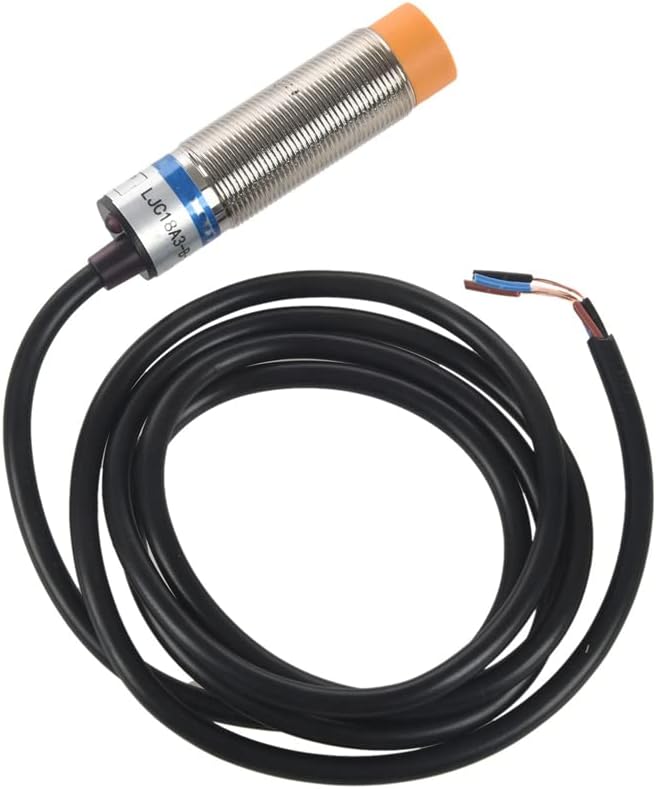
Figure 1: Freshmeo LJC18A3-H-Z/BX Capacitance Proximity Sensor. This image shows the cylindrical sensor body with its threaded housing, the sensing face, and the attached cable with three color-coded wires (brown, blue, black).
4. Setup and Installation
4.1 Mounting
The sensor is designed for easy mounting using its threaded cylindrical body. Secure the sensor firmly in place using the provided nuts and washers. Ensure the sensing face is clear of obstructions and positioned correctly relative to the target object.

Figure 2: Mounting hardware including two hexagonal nuts and two toothed lock washers, used to secure the sensor in position.
4.2 Wiring
The LJC18A3-H-Z/BX sensor uses a three-wire NPN Normally Open (NO) configuration. Follow the wiring diagram below carefully.
- Brown Wire: Connect to the positive (+) terminal of the DC 6-36V power supply.
- Blue Wire: Connect to the negative (-) terminal (Ground) of the DC power supply.
- Black Wire: This is the NPN Normally Open (NO) output. Connect this wire to the input of your control device (e.g., PLC, relay coil). The other side of your load should be connected to the positive (+) power supply. When an object is detected, the black wire will switch to ground (0V), completing the circuit for the load.
Note: For NPN NO output, the output wire (black) provides a ground signal when activated. Ensure your control device is compatible with NPN sinking inputs.
5. Operating Instructions
Once properly installed and wired, the sensor operates automatically.
- Detection Principle: The sensor emits an electromagnetic field. When an object enters this field within the detection range (1-10mm), it causes a change in capacitance, triggering the sensor's output.
- Output State: As an NPN Normally Open (NO) sensor, the output (black wire) is open (high impedance) when no object is detected. When an object enters the detection range, the output switches to a closed state (connects to ground), activating the connected load.
- Object Types: This capacitive sensor can detect a wide range of materials, including metals, plastics, wood, water, oil, glass, and various powders. The effective detection distance may vary slightly depending on the material's dielectric constant and size.
6. Maintenance
The LJC18A3-H-Z/BX sensor is designed for minimal maintenance.
- Cleaning: Periodically clean the sensing face of the sensor to remove dust, dirt, or debris that could interfere with detection. Use a soft, dry cloth. Avoid abrasive cleaners or solvents.
- Inspection: Regularly inspect the sensor's mounting and wiring for any signs of damage, corrosion, or loosening. Ensure all connections are secure.
- Environmental Check: Verify that the operating environment remains within the specified conditions (temperature, humidity, absence of corrosive substances).
7. Troubleshooting
If the sensor is not functioning as expected, refer to the following troubleshooting guide:
| Problem | Possible Cause | Solution |
|---|---|---|
| Sensor does not detect objects. |
|
|
| Sensor output is always ON (activated). |
|
|
| Intermittent detection. |
|
|
8. Specifications
| Model Number | LJC18A3-H-Z/BX |
| Part Number | Fre3-AL87-SW8-2030 |
| Sensor Type | Capacitance Proximity Sensor |
| Output Type | NPN Normally Open (NO) |
| Supply Voltage | DC 6-36V |
| Current Output | 300mA |
| Detection Distance | 1-10mm |
| Head Diameter | 18mm |
| Response Frequency | 100Hz |
| Detecting Object | Metal or Nonmetal Material (e.g., plastic, water, glass, oil, powder) |
| Dimensions (L x Max. Dia) | 7.5 x 4cm (approx. 3" x 1.6") |
| Material | Plastic, Alloy |
| Package Content | 1 x Capacitive Proximity Switch |
9. Warranty and Support
For warranty information, please refer to the terms and conditions provided at the time of purchase or visit the official Freshmeo website.
For technical support or further assistance, please contact your retailer or the manufacturer's customer service department.