
1. Product Overview
The SmartAI H5 is a lightweight, cordless handheld vacuum cleaner designed for efficient cleaning in various environments, including cars, homes, and RVs. It features a powerful 17000Pa suction, an LED display for battery and power status, and a Type-C charging port for convenience.
Package Contents
- SmartAI H5 Handheld Vacuum Cleaner
- 3-in-1 Brush Head (Crevice tool, Brush nozzle, Flat nozzle)
- Charging Base
- USB Type-C Charging Cable
- User Manual

Image 1.1: SmartAI H5 Handheld Vacuum Cleaner with included accessories, including the main unit, various nozzles, charging cable, and charging base.
2. Setup and Charging
Initial Charge
Before first use, fully charge the vacuum cleaner. The device uses a 4x 2500mAh lithium-ion battery. A full charge typically takes approximately 4 hours using a 5V/2A adapter (not included).
- Connect the USB Type-C charging cable to the vacuum cleaner's charging port or the charging base.
- Connect the other end of the cable to a compatible USB power adapter (5V/2A recommended), computer, or car charger.
- The LED display will indicate charging status. Once fully charged, the display will show 100% or a full battery icon.

Image 2.1: The SmartAI H5 vacuum cleaner connected to a Type-C charging cable, illustrating various charging methods such as USB adapter, computer, and car charging.
Assembling Accessories
Attach the desired nozzle directly to the vacuum cleaner's suction port. The 3-in-1 brush head can be configured for different cleaning tasks.
- Crevice Tool: Ideal for narrow gaps and corners.
- Brush Nozzle: Suitable for upholstery, carpets, and removing pet hair.
- Flat Nozzle: For general surface cleaning.

Image 2.2: Demonstrates the three different brush head configurations: a crevice tool for car seats, a flat nozzle with brush for upholstery, and a flat nozzle for general surfaces.
3. Operating Instructions
Power On/Off and Suction Modes
Press the power button to turn the vacuum cleaner on. The LED display will show the current battery level and suction mode.
- Standard Mode: Provides up to 30 minutes of continuous cleaning for everyday dust and debris.
- Max Power Mode: Offers 17000Pa suction for up to 15 minutes, ideal for stubborn dirt, pet hair, and larger particles.
- Toggle between suction modes using the mode selection button.
LED Display
The integrated LED display provides real-time information:
- Battery Level: Indicates the remaining battery charge.
- Suction Mode: Shows the currently active power setting.
- Remaining Usage Time: Estimates the operational time left based on the current suction mode.
Usage Tips
- For optimal performance, ensure the dustbin is not full and the filter is clean.
- Use the appropriate nozzle for the surface and type of debris being cleaned.
- Avoid vacuuming liquids or sharp objects to prevent damage to the motor and filter.
4. Maintenance
Regular maintenance ensures optimal performance and extends the lifespan of your SmartAI H5 vacuum cleaner.
Emptying the Dustbin
The vacuum cleaner features a one-click dustbin emptying mechanism.
- Hold the vacuum cleaner over a waste bin.
- Press the dustbin release button (usually located near the dustbin).
- The dustbin will open, allowing debris to fall out.
- Close the dustbin securely after emptying.
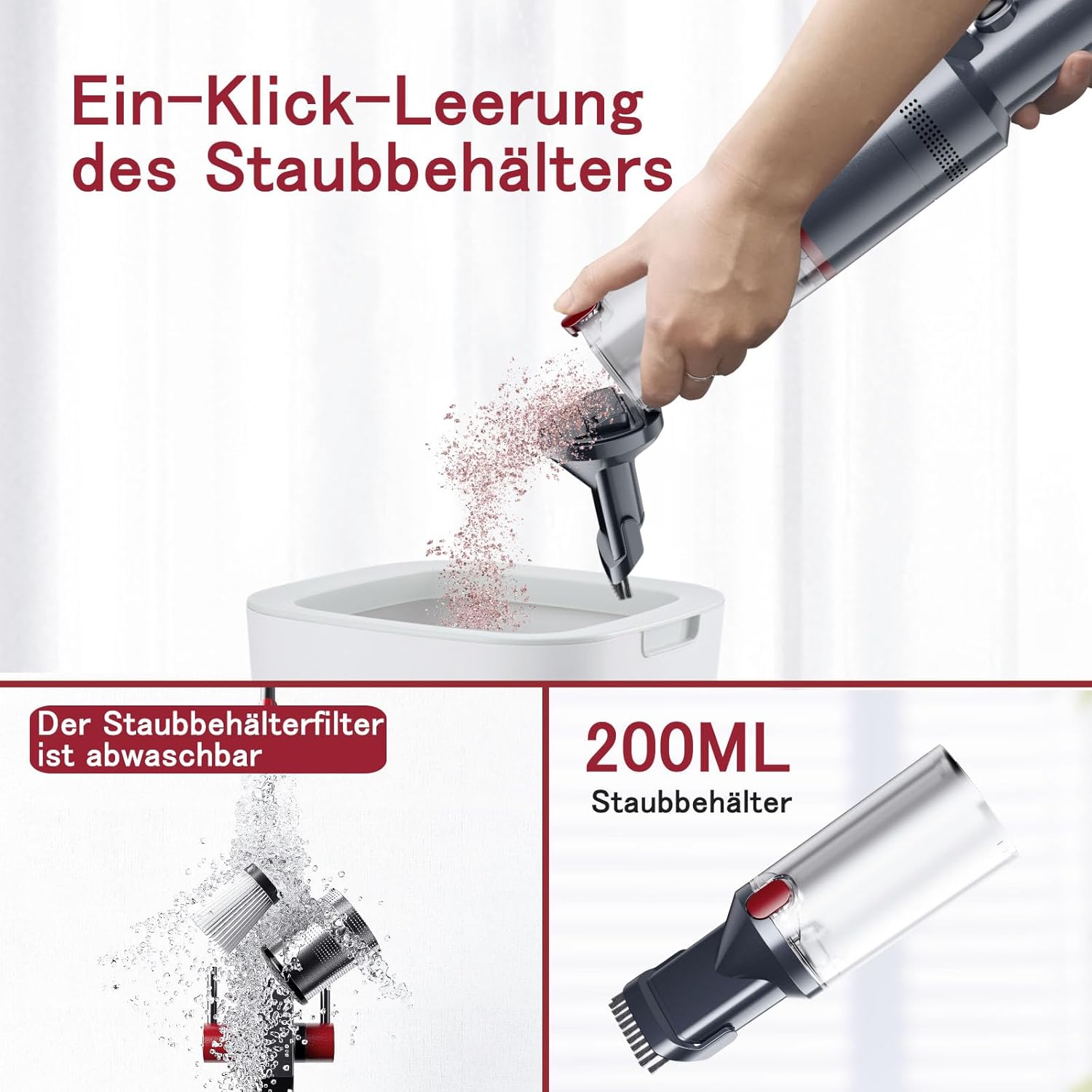
Image 4.1: Illustration of the one-click dustbin emptying process and the washable filter being rinsed under water.
Cleaning the HEPA Filter
The HEPA filter is washable and reusable. Clean it regularly to maintain suction power.
- Twist and pull to remove the dustbin from the main unit.
- Remove the HEPA filter from the dustbin.
- Rinse the filter under running water until clean. Do not use detergents.
- Allow the filter to air dry completely for at least 24 hours before reinserting it. Ensure it is completely dry to prevent mold or damage to the vacuum.
- Reassemble the filter and dustbin, then attach them back to the vacuum cleaner.
Note: The dust container has a capacity of 600 milliliters.
5. Troubleshooting
If you encounter issues with your SmartAI H5, refer to the following common problems and solutions.
| Problem | Possible Cause | Solution |
|---|---|---|
| No power / Does not turn on | Battery is depleted Power button not pressed correctly | Charge the vacuum cleaner fully Ensure the power button is pressed firmly |
| Low suction power | Dustbin is full Filter is clogged Nozzle/hose is blocked | Empty the dustbin Clean or replace the HEPA filter Check and clear any blockages in the nozzle or suction path |
| Vacuum not charging | Charging cable or adapter faulty Charging port dirty Battery issue | Try a different Type-C cable and 5V/2A adapter Clean the charging port Contact customer support if the issue persists |
| Unusual noise during operation | Blockage in the suction path Motor issue | Check for and remove any blockages Contact customer support |
6. Specifications
| Feature | Detail |
|---|---|
| Brand | SmartAI |
| Model Number | H5 |
| Power | 145 W |
| Suction Power | 17000 Pa (Max) |
| Voltage | 12.0 V |
| Battery Type | Lithium-ion (4 x 2500 mAh) |
| Runtime | Up to 30 minutes (Standard Mode) Up to 15 minutes (Max Power Mode) |
| Charging Time | Approx. 4 hours (with 5V/2A adapter) |
| Dustbin Capacity | 600 Milliliters |
| Filter Type | HEPA Filter |
| Noise Level | 65 Decibels |
| Weight | 498 Grams (approx. 1.1 lbs) |
| Dimensions (L x W x H) | 5 x 10 x 10 cm (approx.) |
| Special Features | Lightweight, Cordless, Bagless, LED Display |
7. Warranty and Support
SmartAI offers a 12-month quality assurance service for this product. If you encounter any issues or have questions, please contact our customer support team. Our team is available 7 days a week, 24 hours a day to assist you.
For professional customer service, please refer to the contact information provided with your purchase or visit the official SmartAI website.