
1. Introduction
This manual provides detailed instructions for the installation, operation, and maintenance of the Hanwha Techwin SCD-6085R 2MP IR DWDR TVI/AHD/CVI/CVBS Motion Detection Dome Camera. Please read this manual thoroughly before using the product to ensure proper and safe operation.
The SCD-6085R is a versatile 2-megapixel Full HD (1080p) dome camera designed for indoor security applications. It features a 1/2.8" 2M CMOS sensor, a 3.2-10mm (3.1x) varifocal lens, and infrared (IR) illumination for clear imaging in low-light conditions up to 65.62 feet. It supports multiple video formats including TVI, AHD, CVI, and CVBS, offering broad compatibility with various surveillance systems. Key features include 60dB DWDR (Digital Wide Dynamic Range) and coaxial control for easy setup and management.
2. Safety Information
Always follow these safety precautions to prevent injury or damage to the product:
- Power Supply: Use only the specified power supply (24VAC/12VDC). Incorrect voltage can damage the camera.
- Installation: Ensure the camera is securely mounted to prevent it from falling. Installation should be performed by qualified personnel.
- Environment: This camera is designed for indoor use. Avoid exposing it to extreme temperatures, humidity, or direct water contact.
- Cleaning: Disconnect power before cleaning. Use a soft, dry cloth. Do not use strong detergents or solvents.
- Disassembly: Do not attempt to disassemble or modify the camera. This will void the warranty and may cause damage.
3. Package Contents
Verify that all items are present in the package:
- Hanwha Techwin SCD-6085R Dome Camera
- Mounting Screws and Anchors
- Installation Template
- Quick Start Guide (refer to this manual for full details)
- Power Adapter (may be sold separately depending on region/retailer)
4. Product Overview
Familiarize yourself with the components of your SCD-6085R camera.
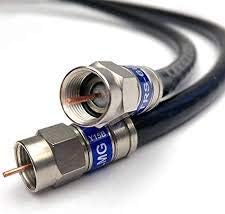
Figure 4.1: Bottom view of the camera. This image shows the base of the dome camera, including screw holes for mounting and a product label with model information and certifications.
The camera features a durable dome casing, a varifocal lens for adjustable field of view, and IR LEDs for night vision. The base includes mounting points and connection ports for power and video output.
5. Setup and Installation
5.1 Mounting the Camera
- Select Location: Choose an indoor location with a clear view of the area to be monitored. Ensure the mounting surface is strong enough to support the camera.
- Use Template: Place the provided installation template on the desired mounting surface (e.g., ceiling) and mark the drill holes.
- Drill Holes: Drill pilot holes according to the template. Insert wall anchors if necessary.
- Secure Camera: Align the camera base with the drilled holes and secure it using the provided screws.
5.2 Wiring and Connections
The SCD-6085R supports TVI/AHD/CVI/CVBS video output via a coaxial cable and requires a 24VAC or 12VDC power supply.

Figure 5.1: Coaxial Cable Connectors. This image displays standard coaxial cable connectors, which are used to transmit video signals from the camera to a DVR or monitor.
- Connect Video: Connect one end of a coaxial cable to the camera's video output port and the other end to the video input of your DVR or monitor.
- Connect Power: Connect the appropriate 24VAC or 12VDC power adapter to the camera's power input.
- Power On: Once all connections are secure, plug in the power adapter to power on the camera.
5.3 Initial Configuration
The camera's video output format (TVI/AHD/CVI/CVBS) can typically be switched using a dip switch on the camera or via coaxial control (UTC) from a compatible DVR. Refer to your DVR's manual for coaxial control instructions.
- Lens Adjustment: Adjust the varifocal lens (3.2-10mm) to achieve the desired field of view and focus. This is usually done manually by rotating the lens rings after removing the dome cover.
- Test View: Verify the camera feed on your monitor or DVR.
6. Operating the Camera
The SCD-6085R is designed for continuous surveillance. Its features are primarily managed through a connected DVR or NVR system.
6.1 Video Monitoring
View live and recorded footage through your connected DVR/NVR system. The camera provides Full HD (1080p) video at 30 frames per second.

Figure 6.1: Multi-Camera Monitoring on a Tablet. This image shows a person viewing live feeds from four different security cameras on a tablet, demonstrating remote monitoring capabilities.

Figure 6.2: Surveillance Monitor Display. This image depicts a security monitor showing a quad-view of camera feeds, typical for a surveillance system.
6.2 Motion Detection
The camera features motion detection capabilities. Configuration of motion detection zones, sensitivity, and recording actions (e.g., start recording, send alerts) is typically done through the connected DVR/NVR system's interface.
6.3 DWDR (Digital Wide Dynamic Range)
DWDR helps to balance exposure in scenes with both very bright and very dark areas, ensuring clearer images in challenging lighting conditions. This feature is automatically managed by the camera or can be configured via coaxial control.
6.4 IR Night Vision
The integrated IR LEDs provide illumination for clear black-and-white video in complete darkness, with an effective range of up to 65.62 feet (20 meters). The camera automatically switches to IR mode in low-light conditions.
7. Maintenance
7.1 Cleaning
- Regularly clean the camera's dome cover with a soft, lint-free cloth to remove dust and smudges.
- For stubborn dirt, slightly dampen the cloth with water. Avoid abrasive cleaners or solvents.
- Ensure the lens is clean for optimal image quality.
7.2 Firmware Updates
Periodically check the Hanwha Techwin website for firmware updates for your camera model. Firmware updates can improve performance, add features, or fix bugs. Follow the instructions provided with the firmware update package carefully.
8. Troubleshooting
| Problem | Possible Cause | Solution |
|---|---|---|
| No video output |
|
|
| Poor image quality |
|
|
| Motion detection not working |
|
|
9. Specifications
| Feature | Detail |
|---|---|
| Model | SCD-6085R |
| Image Sensor | 1/2.8" 2M CMOS |
| Resolution | 2MP (1080p Full HD) |
| Frame Rate | 30fps |
| Lens | 3.2 ~ 10mm (3.1x) Varifocal Lens |
| Video Output | TVI/AHD/CVI/CVBS (Selectable) |
| DWDR | 60dB |
| Day & Night | True Day/Night (ICR) |
| IR Distance | 65.62 feet (20 meters) |
| Motion Detection | Yes |
| Coaxial Control | Yes |
| Power Input | 24VAC / 12VDC |
| Indoor/Outdoor Usage | Indoor |
| Form Factor | Dome |
| UPC | 655255874823 |
10. Warranty and Support
For warranty information and technical support, please refer to the official Hanwha Techwin website or contact your authorized dealer. Keep your purchase receipt as proof of purchase.
- Warranty Period: Typically, Hanwha Techwin products come with a limited warranty. Please check the specific terms and conditions provided at the time of purchase or on the manufacturer's website.
- Technical Support: For assistance with installation, configuration, or troubleshooting beyond this manual, visit the Hanwha Techwin support portal or contact their customer service.

