
1. Product Overview
The Xgody X13 is an unlocked 4G dual SIM smartphone designed for everyday use. It features a 6.1-inch qHD display, runs on Android 9.0, and includes dual 5MP cameras. With a 3000mAh battery and face recognition technology, it offers essential smartphone functionalities.
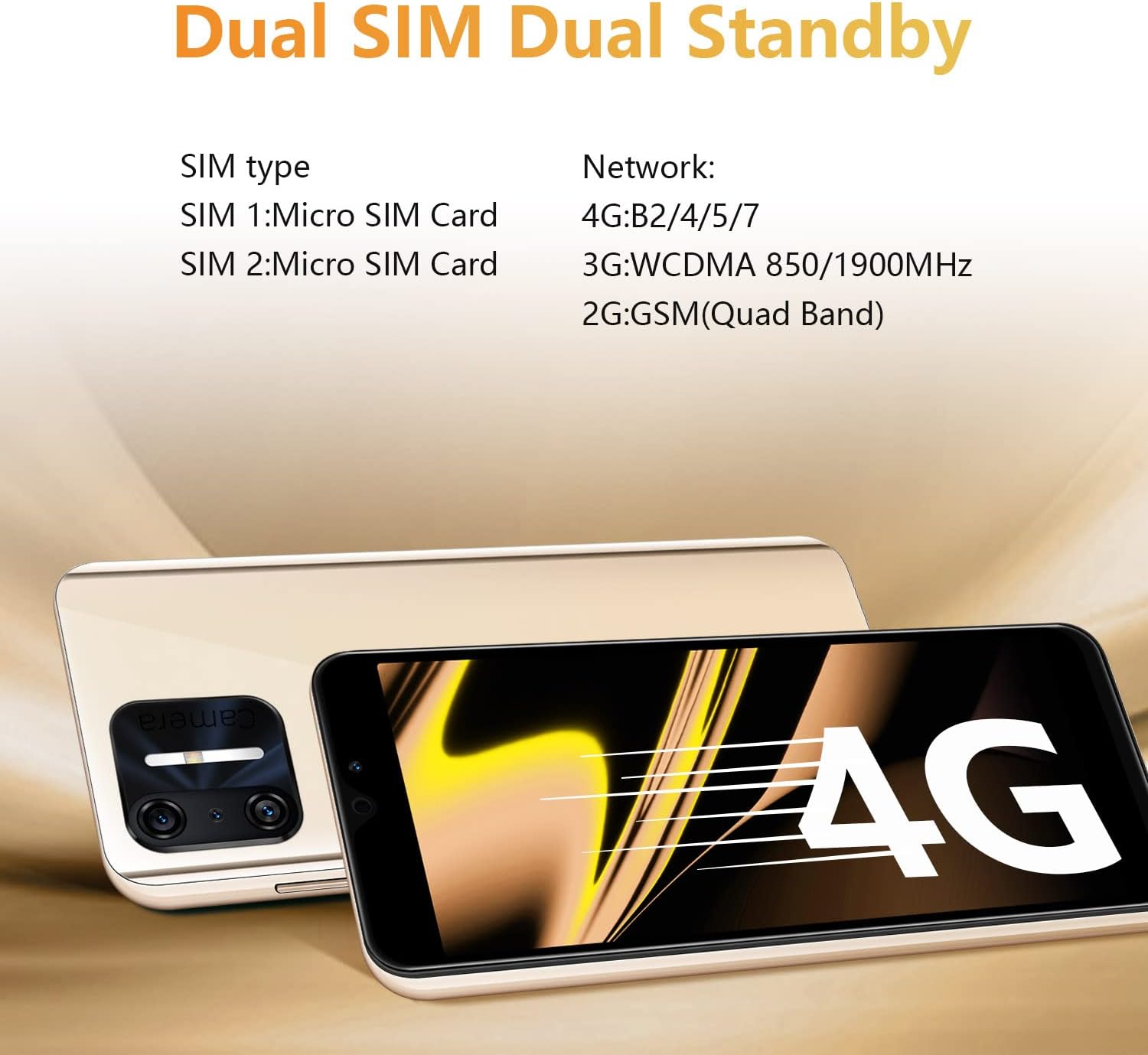
Image: Front and back view of the Xgody X13 Smartphone.
2. What's in the Box
Upon opening the package, verify that all items are present:
- Xgody X13 Smartphone
- USB Cable
- Phone Case
- Screen Protector
- User Manual
- Battery (may be separate)
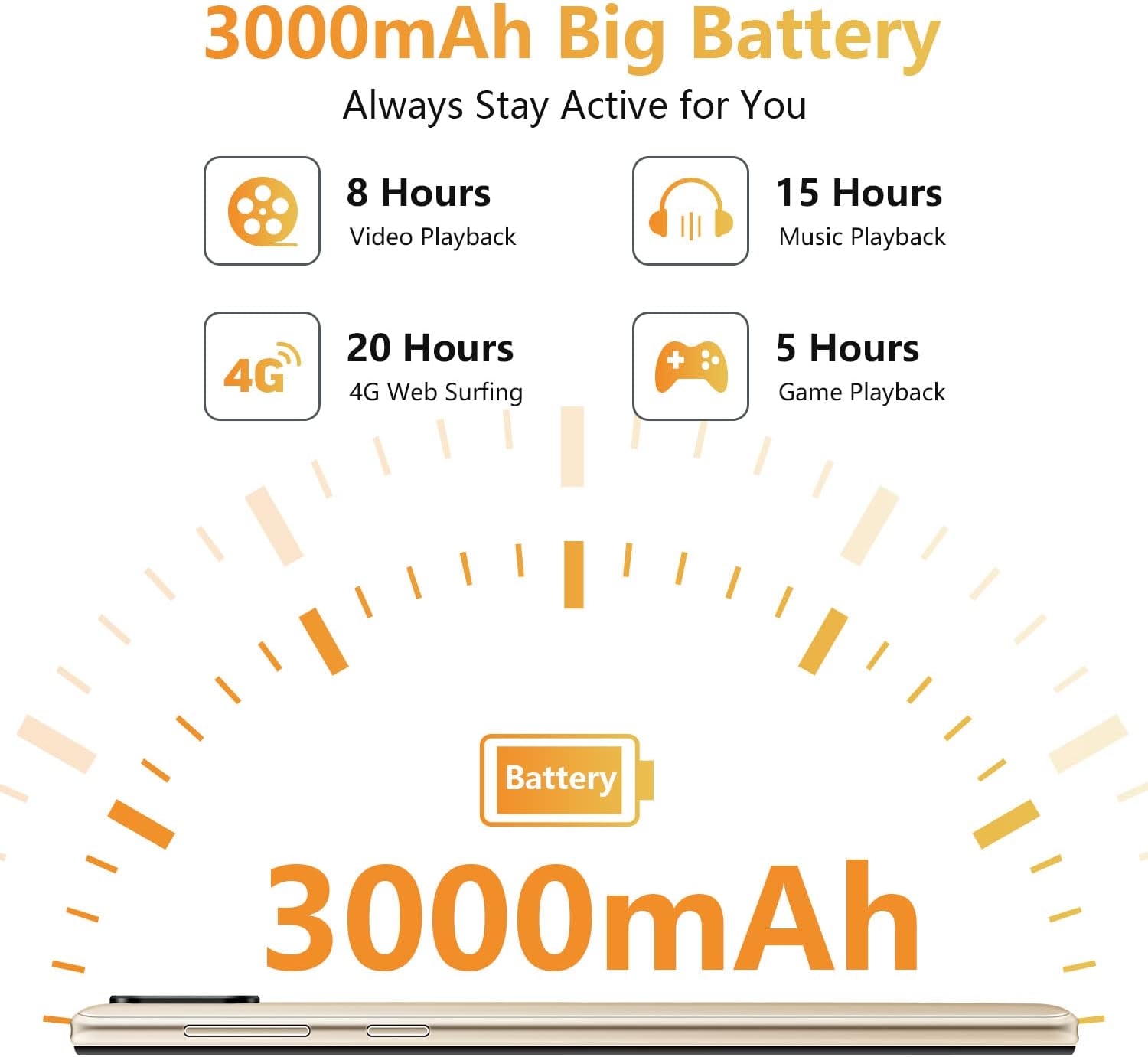
Image: All items included in the Xgody X13 retail box.
3. Setup
3.1. Battery, SIM Card, and Micro SD Card Installation
The Xgody X13 smartphone requires the battery to be inserted before first use. It supports dual SIM cards (Micro SIM) and a Micro SD card for expandable storage up to 256GB.
- Carefully remove the back cover of the phone.
- Insert the provided battery into its compartment, ensuring the contacts align correctly.
- Locate the SIM card slots. Insert your Micro SIM cards into the designated slots (SIM 1 and SIM 2).
- If using expandable storage, insert a Micro SD card into the dedicated Micro SD card slot.
- Replace the back cover, ensuring it clicks securely into place.

Image: Internal view of the phone showing battery, SIM, and Micro SD card slots.
3.2. Initial Power On and Setup
After installing the battery, SIM cards, and Micro SD card:
- Press and hold the Power button (located on the right side of the phone) until the Xgody logo appears.
- Follow the on-screen prompts to complete the initial setup, including language selection, Wi-Fi connection, Google account setup, and security settings.
Video: Unboxing and initial setup guide for the Xgody X13 smartphone, demonstrating battery and SIM card installation, and first power-on.
4. Operating Instructions
4.1. Basic Navigation
The Xgody X13 runs on Android 9.0, offering a user-friendly interface. Navigate using touch gestures:
- Tap: Select an item or open an app.
- Swipe: Scroll through screens or lists.
- Pinch: Zoom in or out on photos and web pages.
- Long Press: Access contextual menus or move app icons.
4.2. Face Recognition
The Xgody X13 features face recognition for quick and secure unlocking. To set up:
- Go to Settings > Security & location > Face Unlock.
- Follow the on-screen instructions to register your face. Ensure good lighting and hold the phone at eye level.
- Once set up, you can unlock your phone by simply looking at the front camera.

Image: Face ID icon, indicating the face recognition unlock feature.
4.3. Camera Usage
The phone is equipped with dual 5MP cameras (front and rear). To take photos or videos:
- Open the Camera application.
- Tap the shutter button to take a photo.
- Switch between photo and video modes as needed.
- Use the front/rear camera toggle to select your desired camera.

Image: A user taking a photo with the 5MP front camera.
4.4. Battery Management
The 3000mAh battery provides extended usage. To optimize battery life:
- Adjust screen brightness.
- Close unused applications running in the background.
- Enable battery saver mode when needed.
- Charge the phone fully before first use and avoid letting the battery drain completely regularly.

Image: Battery life estimates for various activities on the Xgody X13.
5. Specifications
Key technical specifications of the Xgody X13 Smartphone:
| Feature | Specification |
|---|---|
| Model Name | XGODY - X13 |
| Operating System | Android 9.0 |
| Screen Size | 6.1 Inches |
| Resolution | 2560 x 1440 |
| RAM | 2 GB |
| Memory Storage Capacity | 16 GB (Expandable up to 256GB via Micro SD) |
| Battery Capacity | 3000 mAh |
| Cellular Technology | 2G, 3G, 4G |
| Wireless Connectivity | Bluetooth, Wi-Fi |
| Human Interface Input | Touchscreen |
| Item Weight | 15.2 ounces |
Video: Overview of Xgody X13 features including camera, processor, memory, face ID, battery, screen, 4G, and Android 9.0.
6. Network Compatibility
The Xgody X13 is an unlocked 4G smartphone compatible with AT&T (except AT&T/Cricket) and T-Mobile networks, and their MVNO networks. It is not compatible with Verizon or CDMA Networks like Sprint and Boost Mobile.
Always verify compatibility with your carrier directly for their Bring Your Own Device (BYOD) program.
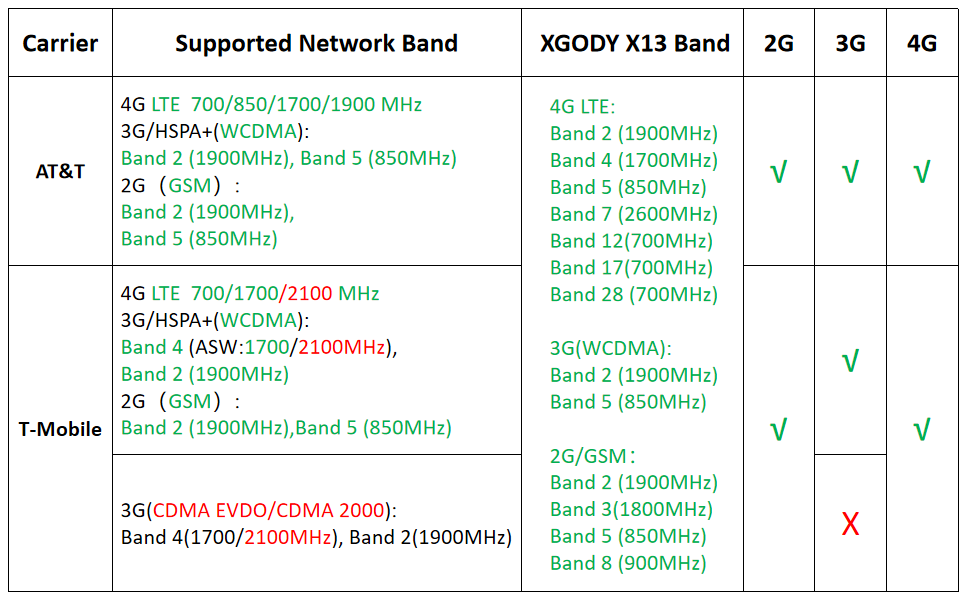
Image: Network band compatibility chart for Xgody X13 with major US carriers.
7. Troubleshooting
7.1. Phone Not Turning On
- Ensure the battery is correctly installed and charged. Connect the phone to a charger for at least 15 minutes before attempting to power it on.
- Press and hold the Power button for 10-15 seconds to force a restart.
7.2. Network Connectivity Issues
- Verify that your SIM card is correctly inserted and activated with your carrier.
- Check your phone's network settings (Settings > Network & internet > Mobile network) to ensure mobile data is enabled and the correct APN settings are configured.
- Confirm your carrier's network bands are compatible with the Xgody X13.
- Restart the phone.
7.3. Slow Performance
- Close unnecessary background applications.
- Clear cache and data for frequently used apps.
- Ensure sufficient storage space is available (Settings > Storage).
- Perform a factory reset as a last resort (Settings > System > Reset options > Erase all data (factory reset)). Note: This will delete all data on your phone. Back up important information first.
8. Maintenance
- Keep your phone clean using a soft, dry cloth. Avoid harsh chemicals.
- Protect the screen with the provided screen protector and use the phone case to prevent physical damage.
- Avoid exposing the phone to extreme temperatures or moisture.
- Regularly back up your data to prevent loss.
- Keep the software updated to the latest version available for optimal performance and security.
9. Warranty and Support
For warranty information and technical support, please refer to the warranty card included in your product packaging or visit the official Xgody website. Keep your proof of purchase for warranty claims.