1. Introduction
Thank you for choosing the YRU C126 Ultimate Car Phone Holder Mount. This product is designed to provide a secure and versatile solution for holding your smartphone in your vehicle. With military-grade certification and a robust 360° rotation suction cup, it offers stability and convenience across various mounting options including dashboard, windshield, and air vent. This manual will guide you through the installation, operation, and maintenance of your new car phone holder.
2. What's in the Box
- 1x YRU C126 Phone Holder (2023 Version, compatible with 99% of phones/cases)
- 1x Suction Mount (Diameter: 2.8"/Length: 5-9"/No Yellow/Melt)
- 1x Air Vent Clip (Steel-cored, Rubber-coated)
- 1x Cable Clip (=Tidy/Happy/Handy/Safe)
- 1x 5 Years Support Card
3. Setup Instructions
3.1 General Assembly
- Unscrew the Nut: Locate the nut on the back of the phone holder and unscrew it.
- Attach Mount: Insert the ball joint of your chosen mount (suction or air vent) into the back of the holder.
- Tighten the Nut: Screw the nut back on and tighten it to secure the holder to the mount.
Video: Demonstrates the simple assembly process of the YRU car phone holder.
3.2 Suction Mount Installation (Dashboard/Windshield)
- Clean the Surface: Use the included wet and dry wipes to thoroughly clean the dashboard or windshield surface where you intend to install the mount. Ensure the surface is smooth, flat, and free of dust, dirt, gaps, or cracks.
- Position the Mount: Place the suction cup firmly on the cleaned surface.
- Press and Lock: Press down on the suction cup for 5 seconds, then press the lock button to create a strong vacuum seal.
- Cure Time: For maximum adhesion, allow the suction cup to set for at least 1 hour before attaching your phone. Optimal installation temperature is 68°F to 77°F (10°C to 25°C).

Image: Visual guide for installing the suction cup mount on a dashboard.
Important Note: Leather (except faux and synthetic leather), waxed, or oiled dashboards are not suitable for suction cup mounts. In such cases, use the mount on the windshield or air vent instead. If the outside temperature exceeds 113°F (45°C), it is recommended to use the air vent mount.
3.3 Air Vent Clip Installation
- Attach Air Vent Clip: If not already attached, connect the air vent clip to the phone holder using the ball joint and nut as described in General Assembly.
- Adjust Clip: The innovative screw-type clip can be tightened or loosened to securely clamp vent blades of any thickness (vertical or horizontal).
- Secure to Vent: Insert the clip onto a vent blade and tighten the knob until it is firmly in place. The soft rubber pads protect the blade from scratches and provide anti-shock stability.

Image: Demonstrates the secure installation of the air vent clip.
3.4 Cable Manager Installation
The included 2-cable organizer is made of premium soft silicone rubber. Peel off the adhesive backing and stick it to a clean, flat surface in your car. It can hold various types of cords (phone, GPS, camera, earphone) to keep your car tidy and ensure safe driving.

Image: Shows the cable manager holding charging cables neatly.
4. Operating Instructions
4.1 Inserting and Removing Your Phone
- Inserting: Gently push your phone into the cradle. The clamp arms will automatically adjust and secure your phone.
- Removing: Press either of the two enlarged release buttons located on the sides of the holder. The clamp arms will open, allowing you to easily remove your phone.
Video: Demonstrates the ease of inserting and removing a phone from the holder.
4.2 Adjusting Viewing Angle and Position
- 360° Rotation: The holder features a 360° rotatable ball joint, allowing you to adjust your phone to any desired portrait or landscape viewing angle without removing it.
- Telescopic Arm: The telescopic arm can be extended from 5.5 inches to 9.2 inches and adjusted vertically to optimize your viewing position. Tighten the knob on the arm to secure your preferred length and angle.
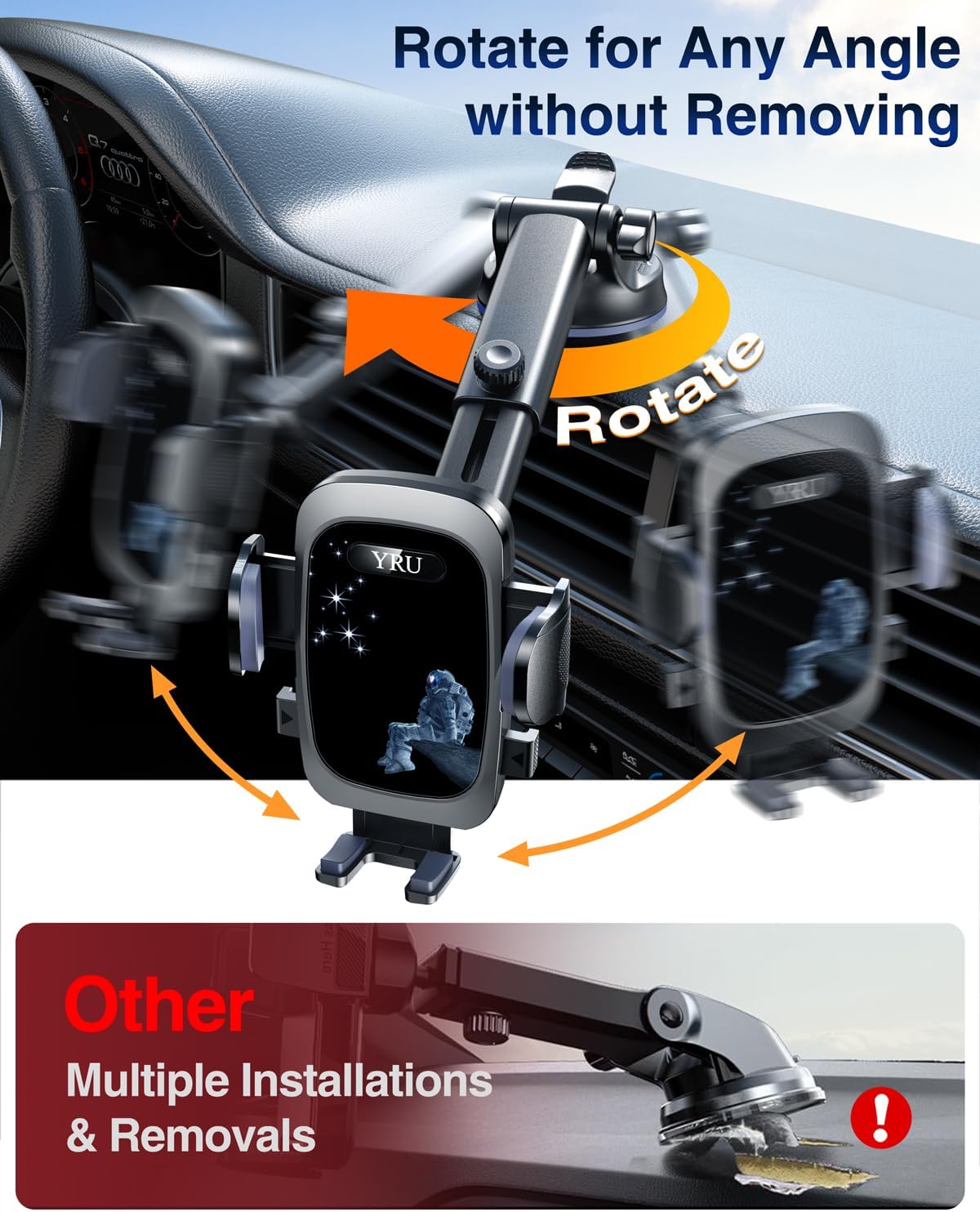
Image: Illustrates the 360° rotation and telescopic arm adjustments for optimal viewing.
5. Maintenance
- Cleaning the Suction Cup: If the suction cup loses its stickiness, rinse it with warm water and let it air dry. It will recover its adhesive properties and can be reused multiple times.
- General Cleaning: Wipe the phone holder with a soft, damp cloth to remove dust and grime. Avoid using harsh chemicals or abrasive cleaners.
6. Troubleshooting
- Suction Cup Not Sticking:
- Ensure the mounting surface is clean, dry, and smooth. Use the provided wipes.
- Press firmly for 5 seconds and engage the lock.
- Allow 1 hour for optimal adhesion after installation.
- Avoid leather, waxed, or oiled dashboards. Use windshield or air vent instead.
- In extreme heat (>113°F), consider using the air vent mount.
- Air Vent Clip Loose:
- Ensure the screw-type knob on the clip is tightened securely onto the vent blade.
- Verify the clip is properly hooked onto the back of the vent blade.
- Phone Not Fitting Securely:
- Check the depth of the phone cradle (0.8 inches, thick case friendly).
- Ensure the clamp arms are fully engaged around your phone (width 2.4-4.6 inches).
7. Specifications
| Feature | Detail |
|---|---|
| Model Number | C126 |
| Package Dimensions | 6.06 x 4.88 x 3.66 inches |
| Item Weight | 10.5 ounces |
| Phone Cradle Depth | 0.8 inches (Thick Case Friendly) |
| Clamp Arm Width | 2.4 - 4.6 inches (Universal Phone Friendly) |
| Suction Base Diameter | 2.9 inches |
| Telescopic Arm Length | 5.5 - 9.2 inches |
| Materials | Premium PC+ABS material |
| Certifications | Military-grade Shockproof, RoHS, CP65, REACH |
8. Warranty and Support
YRU stands behind its products with a 5-year refund or replacement support. We are committed to providing intimate service for 60 months. If you encounter any issues or have questions about your YRU C126 Car Phone Holder Mount, please do not hesitate to contact our customer support team.
How to Contact YRU Support on Amazon:
- Go to the product page on Amazon.
- Click on the 'YRU Store' link (usually near the product title).
- On the store page, look for a 'Contact Seller' or 'Ask a question' option.
- Alternatively, if you have purchased the item, go to 'Your Orders', find the YRU C126, and click 'Get Product Support'.

Image: Provides visual guidance on how to contact YRU customer support via Amazon.


