
1. Introduction
This manual provides detailed instructions for the safe operation, assembly, and maintenance of your Comfort Zone CZST180SBS-EU Smart WiFi Oscillating Stand Fan. This 18-inch fan features Powr Curve™ technology, a JET STREAM 6-blade design, and a TRIPLE ZONE tri-curve grille for enhanced airflow and reduced noise. It offers smart control via a mobile app and voice commands, along with adjustable height and wall-mountable versatility.
2. Important Safety Information
READ ALL INSTRUCTIONS BEFORE USING THIS FAN.
- Always unplug the fan before cleaning, servicing, or relocating.
- Do not use the fan in wet locations such as bathrooms or laundry areas.
- Ensure the fan is placed on a stable, level surface to prevent tipping.
- Keep fingers, hair, and loose clothing away from the fan blades during operation.
- Do not operate any fan with a damaged cord or plug. Discard fan or return to an authorized service facility for examination and/or repair.
- Do not run cord under carpeting. Do not cover cord with throw rugs, runners, or similar coverings. Arrange cord away from traffic area and where it will not be tripped over.
- This fan is equipped with a safety fused plug. Do not remove or tamper with the plug.
- This product is for indoor use only.
3. Package Contents
Verify that all components are present before beginning assembly.
- Fan Head Assembly (includes motor, blades, and grilles)
- Adjustable Stand Pole
- Round Base
- Mounting Bracket (for wall-mount option)
- Hardware (screws, washers, nuts)
- Power Cord with Safety Fused Plug
- Product Manual (this document)
4. Assembly Instructions
Follow these steps to assemble your Comfort Zone Stand Fan for pedestal use.
- Attach Stand Pole to Base: Securely fasten the adjustable stand pole to the round base using the provided screws and washers. Ensure it is stable.
- Attach Fan Head to Stand Pole: Carefully align the fan head assembly with the top of the stand pole. Secure it in place with the designated locking mechanism or screws.
- Adjust Height: Loosen the height adjustment knob on the stand pole, extend or retract the pole to your desired height (between 44" and 53"), and then tighten the knob firmly.

Image 1: Illustration showing the fan components for quick and easy assembly, highlighting the safety fused plug. The fan base, adjustable pole, and fan head are shown separately, along with a close-up of the plug.
5. Installation Options
Your Comfort Zone fan offers both pedestal and wall-mountable configurations.
5.1 Pedestal Fan Setup
After completing the assembly steps above, place the fan on a flat, stable surface. Ensure the power cord is not obstructed and is within reach of a suitable electrical outlet.
5.2 Wall-Mount Installation
To mount the fan on a wall:
- Select Location: Choose a suitable wall location, ensuring it is structurally sound and near a power outlet. Avoid areas where the fan could be easily bumped or where its oscillation might be obstructed.
- Attach Mounting Bracket: Use the provided mounting bracket and hardware to securely attach the bracket to the wall. Ensure it is level and firmly anchored.
- Mount Fan Head: Carefully attach the fan head assembly to the installed wall bracket. Follow the specific instructions in the included hardware kit for secure attachment.
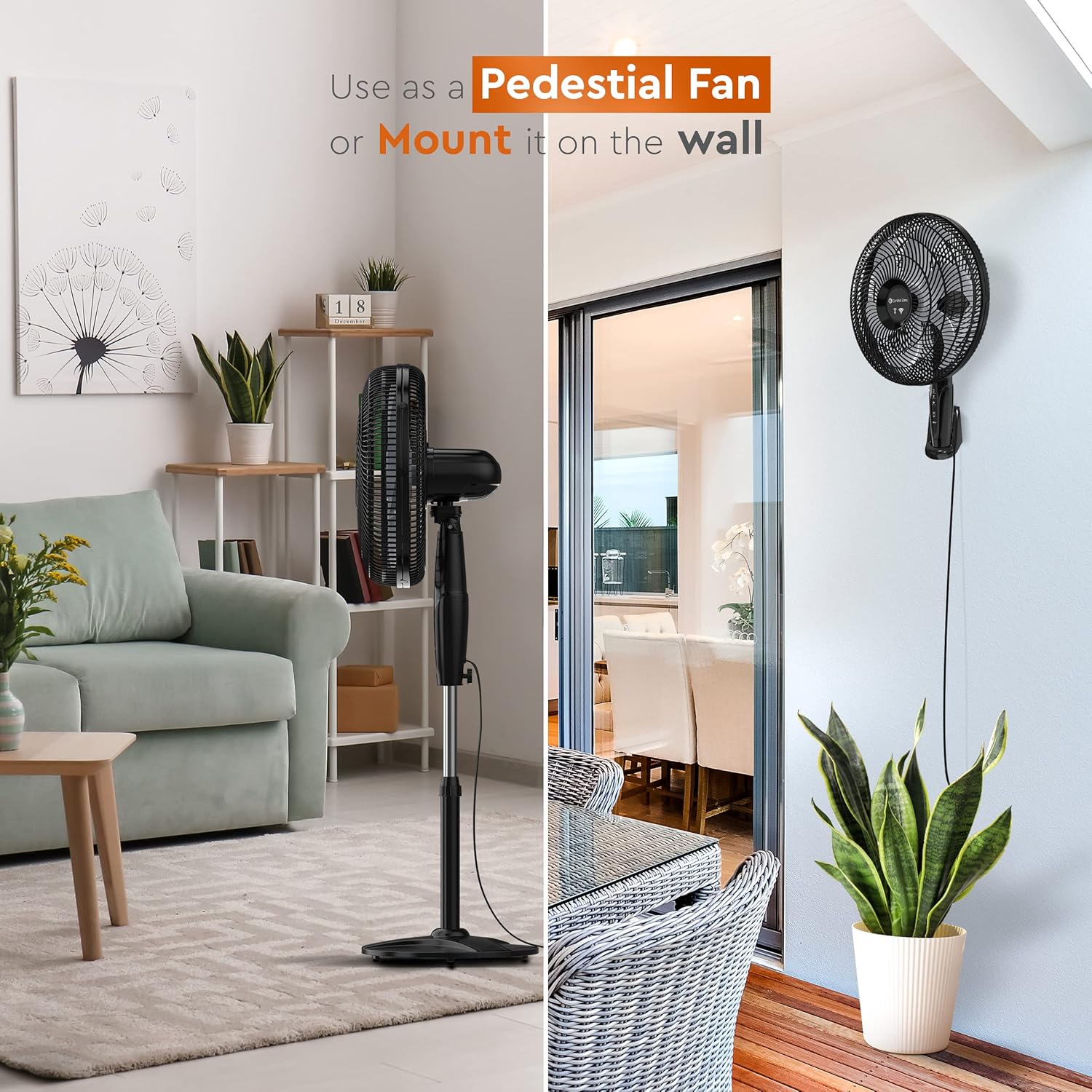
Image 2: A split image demonstrating the fan's versatility, showing it configured as a pedestal fan in a living room on the left, and mounted on a wall in a dining area on the right.
6. Smart Control Setup (WiFi & Voice Control)
Your Comfort Zone fan can be controlled via a smartphone app and voice commands.
- Download App: Download the "Comfort Zone Smart" app from your device's app store (iOS or Android).
- Create Account: Open the app and follow the on-screen instructions to create a new user account or log in if you already have one.
- Add Device: Plug in your fan. In the app, select "Add Device" or the '+' icon. Follow the app's prompts to connect your fan to your home WiFi network. This typically involves putting the fan into pairing mode (refer to the fan's control panel for specific indicators, often a blinking WiFi light).
- Voice Control Integration: Once connected to the app, you can link your Comfort Zone account to voice assistants like Amazon Alexa or Google Assistant through their respective apps. Search for the "Comfort Zone Smart" skill/service and enable it.
Once set up, you can use voice commands such as "Alexa, turn on the fan" or "Hey Google, set fan speed to 2."

Image 3: A close-up of the fan grille showcasing the Power Curve Technology and a hand holding a smartphone displaying the Comfort Zone app interface for adjusting fan settings via WiFi.

Image 4: A detailed view of the fan's control panel buttons and a smartphone screen showing the corresponding app controls, illustrating how to adjust speed, oscillation, and timer.
7. Operating Instructions
Operate your fan using either the control panel on the unit, the Comfort Zone Smart app, or voice commands.
7.1 Control Panel
- Power On/Off: Press the power button to turn the fan on or off.
- Speed Control: Repeatedly press the speed button to cycle through the 3 available speed settings (Low, Medium, High).
- Oscillation: Press the oscillation button to start or stop the fan head from moving side-to-side.
- Timer: Press the timer button to set the fan to automatically turn off after a specified duration.
7.2 Smart App Control
Using the Comfort Zone Smart app, you can:
- Turn the fan on/off.
- Adjust fan speed (3 settings).
- Control oscillation.
- Set and manage the full-function timer.
7.3 Voice Control
After linking to your voice assistant, use commands such as:
- "Alexa/Hey Google, turn on [Fan Name]."
- "Alexa/Hey Google, turn off [Fan Name]."
- "Alexa/Hey Google, set [Fan Name] to speed 1/2/3."
- "Alexa/Hey Google, turn on oscillation for [Fan Name]."

Image 5: The Comfort Zone Smart WiFi fan positioned next to a bed, with callouts indicating features like push-button control with 3 speed settings, triple-zone tri-curve grille for noise reduction, 6-blade design for maximum cooling, full-function timer, and widespread oscillation.

Image 6: The fan in a room with a window, illustrating its adjustable height feature, which can be customized from 44 to 53 inches. The image also shows the 19-inch base diameter.
8. Maintenance
Regular cleaning helps maintain fan performance and extends its lifespan.
- Always unplug the fan before cleaning.
- Use a soft, damp cloth to wipe the exterior surfaces of the fan. Do not use abrasive cleaners or chemicals.
- To clean the fan blades, you may need to carefully remove the front grille. Refer to the assembly instructions in reverse for safe disassembly and reassembly.
- Ensure all parts are completely dry before plugging the fan back in.
- Store the fan in a cool, dry place when not in use.
9. Troubleshooting
If your fan is not operating correctly, consult the following common issues and solutions:
| Problem | Possible Cause | Solution |
|---|---|---|
| Fan does not turn on. | No power; Fused plug tripped. | Ensure fan is plugged into a working outlet. Check the fused plug and replace the fuse if necessary (refer to plug instructions). |
| Weak airflow. | Fan blades or grilles are dirty. | Clean the fan blades and grilles as described in the Maintenance section. |
| Fan is noisy. | Loose parts; Fan not on a level surface. | Check for any loose screws or components and tighten them. Ensure the fan is on a stable, level surface. |
| WiFi connection issues. | Incorrect WiFi password; Router too far; App not updated. | Verify WiFi password. Move fan closer to router. Update the Comfort Zone Smart app. Re-pair the device if necessary. |
10. Specifications
- Model: CZST180SBS-EU
- Brand: Comfort Zone
- Color: Black
- Electric Fan Design: Floor Fan (Pedestal/Stand)
- Power Source: Corded Electric
- Product Dimensions: 16.54"D x 16.54"W x 54.33"H (Adjustable Height: 44" to 53")
- Special Features: Adjustable Height, Oscillating, Programmable, Wi-Fi Enabled, Voice Control
- Noise Level: 55 Decibels
- Wattage: 88 watts
- Number of Blades: 6
- Air Flow Capacity: 1974 Cubic Feet Per Minute
- Blade Length: 18 Inches
- Voltage: 120V
- Switch Type: Push Button
- Item Weight: 13.9 Pounds
- Indoor/Outdoor Usage: Indoor
- Control Method: App, Voice
- Number of Power Levels: 3
- Manufacturer: Mr. Brands, LLC.
- Installation Type: Wall-mountable, Floor Mount
- UPC: 075877253118
11. Warranty and Support
11.1 Warranty Information
This Comfort Zone fan comes with a 1 Year Warranty Against Manufacturer Defects. Please retain your proof of purchase for warranty claims. For specific terms and conditions, refer to the warranty card included with your product or contact customer support.
11.2 Customer Support
For technical assistance, troubleshooting beyond this manual, or warranty inquiries, please contact Comfort Zone customer support. Contact information can typically be found on the manufacturer's website or on the product packaging.
12. Product Overview Video
Video 1: An official video from Mr. Brands LLC. (Comfort Zone manufacturer) showcasing the Comfort Zone fan lineup. This video provides a general overview of various fan models and their features, including design and functionality.


