
TOUR BOX TourBox Elite AMTBECA
TOUR BOX Elite Bluetooth Video Editing Controller Instruction Manual
Brand: TOUR BOX
Model: TourBox Elite AMTBECA
Introduction
The TOUR BOX Elite is a professional controller designed to enhance creative workflows in various digital applications. It offers dual connectivity via Bluetooth and USB-C, providing a stable and high-performance experience on macOS and Windows operating systems. This device is intended for desktop use and is not compatible with Linux or mobile devices such as iPads and Android tablets.
Key Features:
- Dual Connectivity: Supports Bluetooth and USB-C for flexible connection options.
- Extensive Software Compatibility: Works with major creative software including Premiere, Photoshop, Final Cut Pro, Lightroom Classic, DaVinci Resolve, Capture One, After Effects, Clip Studio Paint, SAI, Camera Raw, AutoCAD, and Blender.
- Customizable System: Allows users to configure each knob, button, and combined key to suit individual habits and usage scenarios. Features customizable screen menus and powerful macro functions.
- Tactile Control: Provides precise, intuitive control with tactile feedback from dials, knobs, and scrolls, especially beneficial for video editing and color grading.
- Photography Post-Processing: Enables one-handed control for tasks like image selection, color grading, and adjustments.
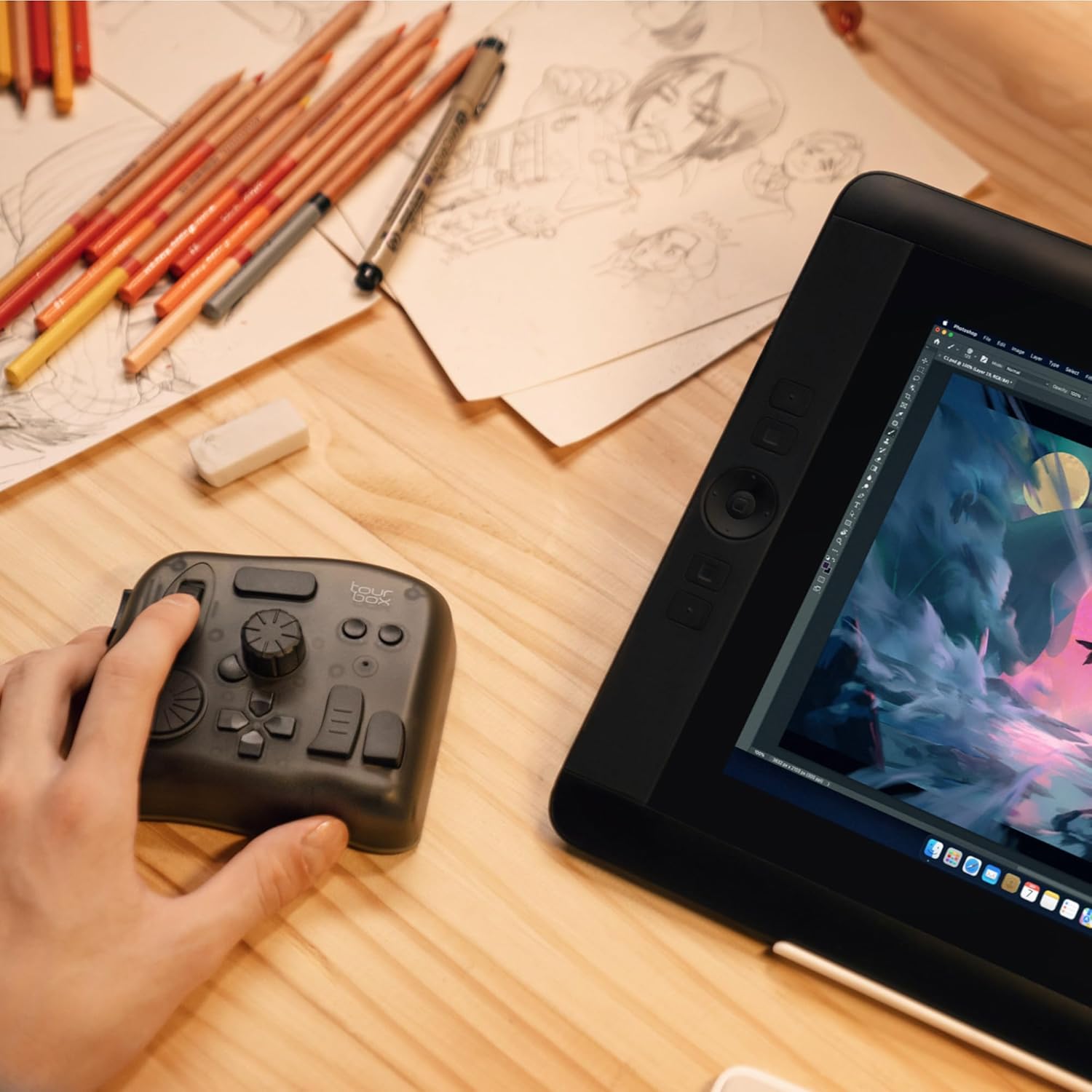
- Drawing Assistant: Compatible with drawing tablets and pen displays, allowing adjustment of brush parameters, canvas manipulation, and tool switching.
What's in the Box
- TourBox Elite (Device Only)
- Quick Start Guide
- TourBoxConsole Software (Downloadable)
- 2 AA batteries (included)
Setup
1. Software Installation:
Download and install the TourBox Console software from the official TOUR BOX website. This software is essential for customizing the controller's functions and managing presets.
2. Connectivity:
The TourBox Elite offers two connection methods:
- USB-C: Connect the TourBox Elite directly to your computer using a USB-C cable (not included with this specific variant). This provides a stable wired connection.
- Bluetooth: Ensure your computer's Bluetooth is enabled. The TourBox Elite supports dual-channel Bluetooth for seamless switching between two computers. Follow your operating system's instructions to pair the device.
Note: For optimal performance and stability, especially during critical tasks, a wired USB-C connection is recommended. Bluetooth connectivity may experience occasional interruptions depending on your system and environment.
Operating the TourBox Elite
1. Customization with TourBox Console:
The TourBox Console software is your primary interface for customizing the controller. It allows you to:
- Assign Functions: Map individual buttons, dials, and combinations to specific actions or shortcuts within your preferred software.
- Create Presets: Develop custom presets for different applications (e.g., Photoshop, Premiere Pro, Lightroom). The console can automatically switch between presets based on the active application.
- Macro Functions: Program complex sequences of actions into a single button or combination for streamlined workflows.
- Haptic Feedback: Adjust the intensity of the two-level haptic feedback for tactile confirmation of actions.
- Speed Modes: Select from three different speed modes for dials and scrolls to match your precision requirements.
2. General Usage:
The TourBox Elite is designed for intuitive, one-handed control, allowing your other hand to remain on your mouse or pen tablet. Familiarize yourself with the unique shapes and positions of the buttons and dials for eyes-free operation.
3. Application-Specific Usage Examples:
- Video Editing (e.g., Premiere Pro, DaVinci Resolve, Final Cut Pro): Use the jog wheels and dials for precise timeline scrubbing, zooming, marking in/out points, and quick cuts. Assign buttons for play/pause, ripple delete, and other common editing commands.
- Photo Editing (e.g., Lightroom Classic, Photoshop, Capture One): Utilize dials for fine-tuning exposure, contrast, highlights, shadows, and color adjustments. Buttons can be assigned for image selection, tool switching, and layer management.
- Digital Painting (e.g., Clip Studio Paint, SAI): Adjust brush size, flow, opacity, and hardness with a single knob. Assign buttons for canvas rotation, movement, zooming, and quick tool changes.
Media Integration
Product Images:




Official Product Videos:
Specifications
| Brand | TOUR BOX |
| Model Number | TourBox Elite AMTBECA |
| ASIN | B0B5XCMFQD |
| UPC | 850040209112 |
| Connectivity | Bluetooth & USB-C |
| Operating System Compatibility | macOS, Windows (Desktop only) |
| Color | Black (Without Cable) |
| Material | Plastic |
| Item Weight | 13.3 ounces (376 Grams) |
| Product Dimensions | 4.57 x 3.98 x 1.73 inches |
| Batteries | 2 AA batteries required (included) |
| Operating Temperature | 15 Degrees Celsius |
| Language | English |
Troubleshooting
- Bluetooth Connectivity Issues: If the device frequently disconnects or is not recognized via Bluetooth, try connecting via USB-C. Ensure your computer's Bluetooth drivers are up to date. Restarting the TourBox Console software or your computer may also resolve the issue.
- Software Not Responding: If the TourBox Console software stops responding, restart the application. Ensure the TourBox Elite is properly connected (wired or Bluetooth).
- Custom Shortcuts Not Working: If you have custom shortcuts in your editing software, ensure they do not conflict with the TourBox Elite's default or custom settings. You may need to adjust either the software's shortcuts or the TourBox Console's mappings.
- Device Not Waking Up: If the device does not wake up from sleep mode, try tapping a button or reconnecting it. For persistent issues, a wired connection might be more reliable.
Warranty and Support
- 30-day Refund/Replacement: Eligible for refund or replacement within 30 days of purchase.
- 12-Month Warranty: The product is covered by a 12-month warranty.
- Lifetime Technical Support: TOUR BOX provides lifetime technical support for this product.
For further assistance, please refer to the official TOUR BOX website or contact customer support.