
Introduction
Thank you for purchasing the Kakanuo Touch Control Bedside Lamp. This modern and versatile lamp is designed to enhance your living space with its 3-way dimmable lighting, convenient USB-A and USB-C charging ports, and elegant design. This manual provides detailed instructions for setup, operation, maintenance, and troubleshooting to ensure optimal performance and longevity of your lamp.

Image: Kakanuo Touch Control Bedside Lamp in use, highlighting its touch control and charging capabilities.
Safety Information
Please read all safety instructions before using the lamp. Keep this manual for future reference.
- Ensure the lamp is placed on a stable, flat surface to prevent tipping.
- Do not expose the lamp to water or excessive humidity.
- Unplug the lamp from the power outlet before cleaning or replacing the bulb.
- Use only the specified bulb type (E27 LED) to avoid damage or fire hazards.
- Keep out of reach of children and pets.
- Do not attempt to disassemble or repair the lamp yourself. Contact customer support if issues arise.
Package Contents
Verify that all items are included in your package:
- 1 x Bedside Lamp with power cord
- 1 x Fabric Lampshade
- 1 x E27 Dimmable LED Bulb
- 1 x User Manual
Setup Instructions
Follow these steps to assemble your Kakanuo Bedside Lamp:
- Unscrew the fixing ring: Carefully unscrew the fixing ring from the lampholder.
- Install the lampshade: Place the fabric lampshade onto the lampholder.
- Tighten the fixing ring: Screw the fixing ring back onto the lampholder to secure the lampshade.
- Install the E27 bulb: Gently screw the included E27 LED bulb into the lampholder until it is secure.
- Connect to power: Plug the lamp's power cord into a standard 220V electrical outlet.
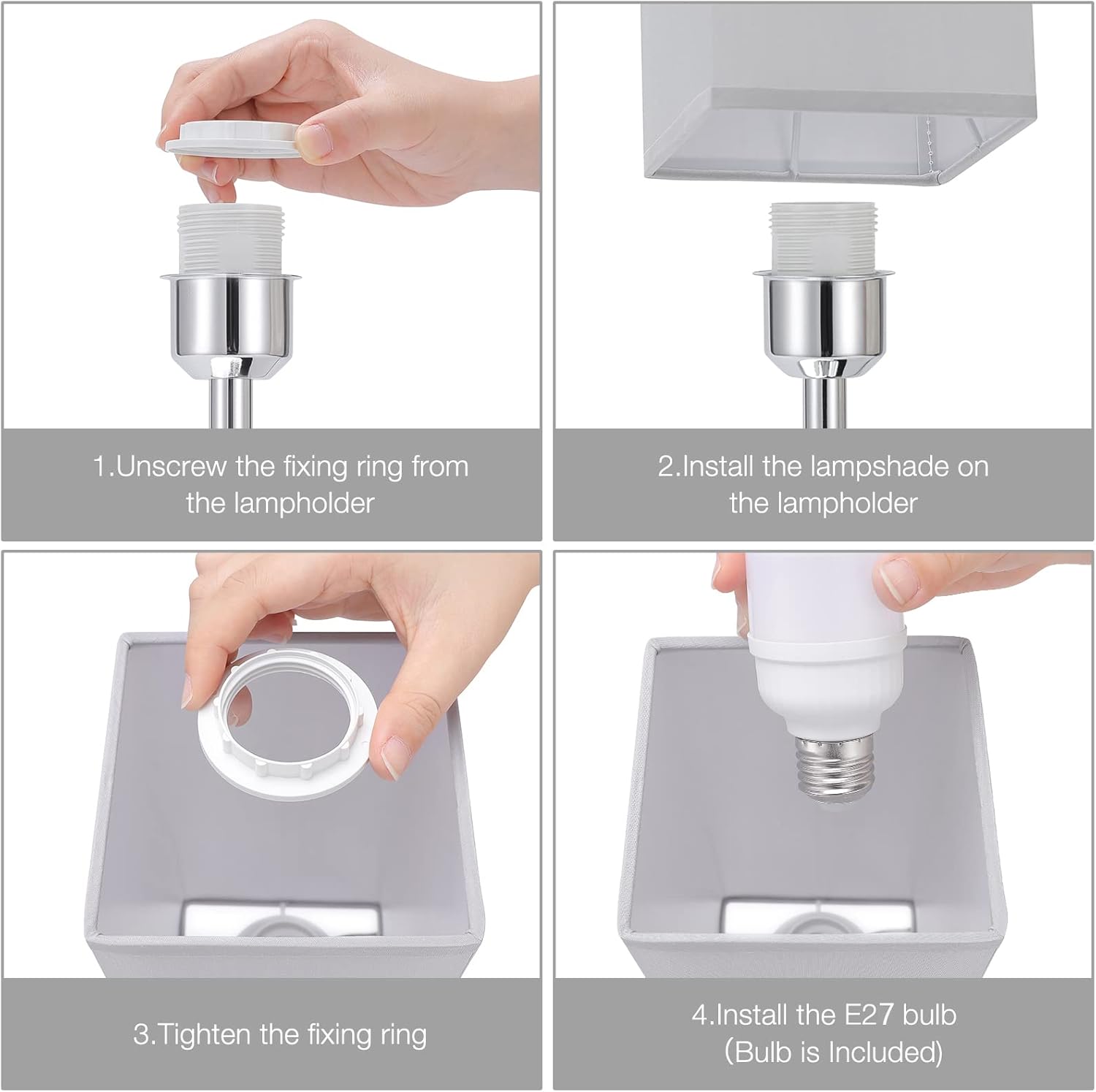
Image: Step-by-step assembly guide for the lamp.
Operating Instructions
3-Way Dimmable Touch Control
The lamp features a convenient touch control system. Simply touch any metallic part of the lamp base or stem to adjust the brightness:
- First Touch (30% Brightness): Provides a soft, warm glow, ideal for sleeping, nursing, or creating a relaxed ambiance.
- Second Touch (65% Brightness): Offers comfortable illumination, perfect for leisure activities like watching TV or using your phone.
- Third Touch (100% Brightness): Delivers bright light, suitable for reading, working, or tasks requiring full illumination.
- Fourth Touch: Turns the lamp off.

Image: Visual representation of the three brightness levels.
USB-A and USB-C Charging Ports
This lamp is equipped with both a USB-A and a USB-C charging port (5V/2.1A) located on the base. These ports allow you to conveniently charge your electronic devices, such as phones, laptops, humidifiers, or headphones, whether the lamp is turned on or off.

Image: The lamp's USB-A and USB-C charging ports in use.
Maintenance
Cleaning
To clean your lamp, first ensure it is unplugged from the power outlet. Use a soft, dry cloth to wipe down the metal base and lampshade. Avoid using abrasive cleaners or solvents, as these may damage the finish.
Bulb Replacement
The lamp comes with an E27 LED bulb. If a replacement is needed, ensure the lamp is unplugged and the bulb has cooled down. Unscrew the old bulb and screw in a new E27 LED bulb. The recommended replacement bulb ASIN is B0C5HZLN3F.
Troubleshooting
| Problem | Possible Cause | Solution |
|---|---|---|
| Lamp does not turn on. | Not plugged in; loose bulb; power outage; faulty bulb. | Check power connection; tighten bulb; check power supply; replace bulb. |
| Touch control is unresponsive. | Lamp not properly grounded; electrical interference. | Ensure lamp is on a stable surface; try a different outlet; avoid placing near other electronic devices. |
| USB ports are not charging devices. | Lamp not plugged in; device cable is faulty; device requires more power than supplied. | Ensure lamp is plugged in; try a different USB cable; check device power requirements. |
| Light flickers. | Loose bulb; incompatible bulb; unstable power supply. | Tighten bulb; ensure E27 LED bulb is used; try a different outlet. |
Specifications
| Brand | Kakanuo |
| Model Number | 248370031 |
| Dimensions (L x W x H) | 11.3 x 11.3 x 35.5 cm |
| Weight | 670 grams |
| Material | Metal base, Fabric lampshade |
| Input Voltage | 220 Volts |
| Bulb Type | E27 LED (Included) |
| Bulb Wattage | 6 Watts |
| Color Temperature | 3000 Kelvin (Warm White) |
| Special Features | 3-Way Dimmable Touch Control, 1x USB-C Port, 1x USB-A Port (5V/2.1A) |
| Energy Efficiency Rating | F (View EPREL) |
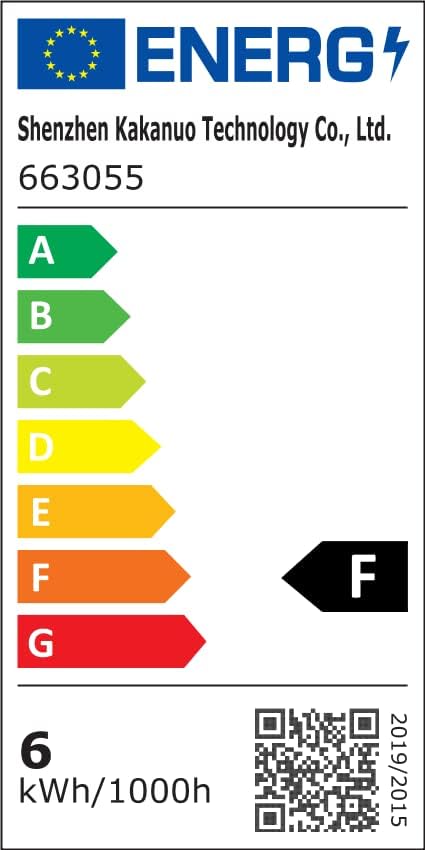
Image: Energy efficiency label for the lamp.
Warranty and Support
Kakanuo is committed to providing 100% customer satisfaction with our products and services. While specific warranty details are not provided in this manual, please retain your proof of purchase for any potential claims.
For any questions, concerns, or technical support, please contact Kakanuo customer service through the retailer's platform or visit the official Kakanuo brand store for more information: