
Dieffematic 88001-0222
ZL57 Electronic Board User Manual
Model: 88001-0222
Product Overview
The Dieffematic ZL57 Electronic Board (Model 88001-0222) is an original replacement control unit designed for CAME gate automation systems. This board manages the functions of gate motors, ensuring reliable and efficient operation. It is crucial for controlling various aspects of the gate's movement, safety features, and accessory connections.
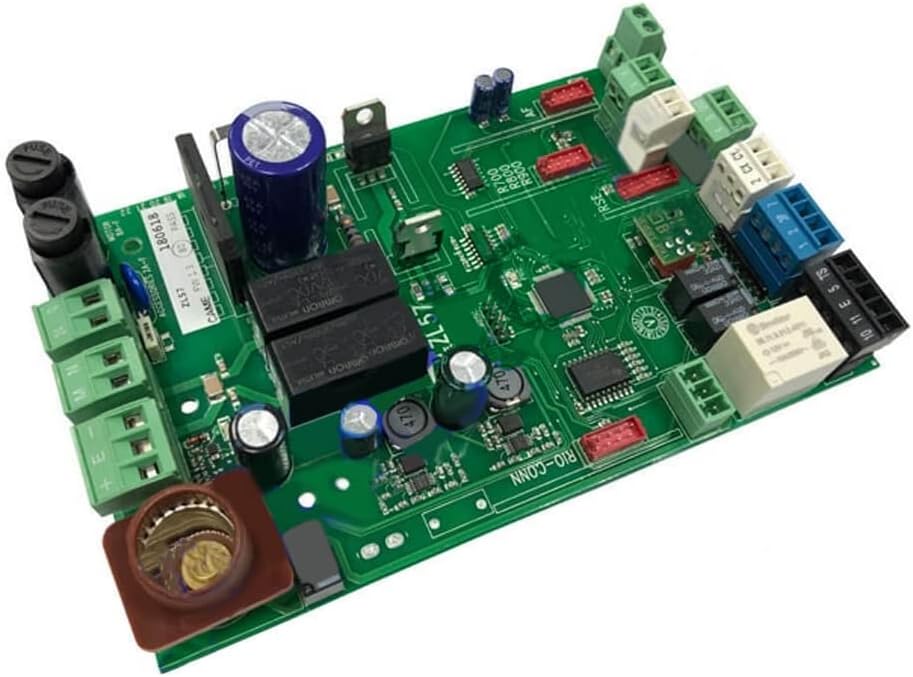
Figure 1: Dieffematic ZL57 Electronic Board (Model 88001-0222). This image shows the complete circuit board with various components, connectors, and fuses.
Safety Information
Always disconnect power before installation or maintenance. Installation should only be performed by qualified personnel in compliance with local electrical codes and safety regulations. Ensure all connections are secure and correctly polarized. Do not attempt to repair the board if you are not qualified; contact a professional technician.
Setup and Installation
This section outlines the general steps for installing the ZL57 electronic board. Refer to the specific wiring diagrams provided with your CAME gate motor system for detailed connection instructions.
- Power Disconnection: Ensure the main power supply to the gate system is completely disconnected before beginning any work.
- Old Board Removal: Carefully disconnect all wires from the existing control board, noting their positions and labels. Take photographs if necessary for reference. Remove the old board from its housing.
- New Board Placement: Install the new ZL57 board into the control unit housing, ensuring it is securely mounted.
- Wiring Connections: Reconnect all wires to the corresponding terminals on the new ZL57 board. Pay close attention to motor connections (M, N, E), power supply (L, N), safety devices (photocells, safety edges), command inputs (open, close, pedestrian), and accessory outputs.
- Fuse Installation: Verify that all necessary fuses are correctly inserted into their respective holders on the board. The board includes fuse holders for protection.
- Initial Power-Up: Once all connections are verified, restore power to the system. Observe the indicator lights on the board for proper operation.
- Parameter Configuration: Refer to your CAME gate system's manual for instructions on configuring operational parameters such as motor force, opening/closing times, and automatic closing delays. This typically involves dip switches or potentiometers on the board.
Figure 2: Detail of the ZL57 board showing various connection terminals (green, blue, white, black) for power, motor, and accessories, along with fuse holders.
Operating Instructions
The ZL57 board controls the gate's operation based on inputs from various devices. Once installed and configured, the gate system will operate according to the programmed parameters.
- Remote Control Operation: Use your paired remote control to send open/close commands to the gate.
- Wired Push Button: If a wired push button is connected, pressing it will cycle the gate's operation (open-stop-close-stop).
- Safety Devices: Photocells and safety edges will prevent the gate from closing if an obstruction is detected, or reverse its movement if an obstruction is encountered during closing.
- Automatic Closing: If configured, the gate will automatically close after a set delay once it has fully opened.
Maintenance
The ZL57 electronic board itself requires minimal maintenance. However, regular checks of the overall gate system are recommended to ensure longevity and proper function.
- Visual Inspection: Periodically inspect the board for any signs of damage, loose connections, or corrosion. Ensure the housing is sealed to protect against moisture and dust.
- Terminal Tightness: Check that all wire terminals are securely tightened. Loose connections can lead to intermittent operation or component damage.
- Fuse Check: If the system experiences a power issue, check the fuses on the board. Replace blown fuses only with fuses of the same type and rating.
- System Cleaning: Keep the area around the control board clean and free from debris, insects, or cobwebs.
Troubleshooting
This section provides guidance for common issues. For complex problems, consult a qualified technician.
| Problem | Possible Cause | Solution |
|---|---|---|
| Gate does not respond to commands. | No power, blown fuse, remote control battery dead, safety device activated. | Check power supply. Inspect fuses on the board and replace if blown. Replace remote control battery. Check photocells for obstructions or misalignment. |
| Gate opens but does not close. | Safety device (photocells, safety edge) continuously activated or faulty. | Inspect safety devices for obstructions. Clean photocell lenses. Check wiring of safety devices. Temporarily bypass safety devices (for testing only, with extreme caution) to confirm fault. |
| Gate stops mid-movement. | Obstruction detected, motor overload, faulty limit switch. | Remove any obstructions. Check motor for overheating. Inspect and adjust limit switches if applicable to your gate system. |
| Gate operates erratically. | Loose wiring, interference, faulty component on board. | Check all wiring connections for tightness. Ensure no strong electromagnetic interference sources are nearby. If problem persists, professional inspection is required. |
Specifications
- Model: ZL57
- Part Number: 88001-0222
- Brand: Dieffematic (Original Replacement for CAME)
- Type: Electronic Control Board
- Compatibility: Designed for specific CAME gate automation systems. Refer to your CAME motor manual for exact compatibility.
- ASIN: B0B5VNX9PX
- First Available Date: July 5, 2022
Warranty and Support
This product is an original replacement part. For warranty information, please refer to the terms and conditions provided by the original seller or manufacturer, Dieffematic. Keep your proof of purchase for any warranty claims.
For technical support or further assistance, please contact the Dieffematic customer service or a certified CAME technician. Do not attempt unauthorized repairs, as this may void any applicable warranty and could lead to further damage or safety hazards.
Seller: DIEFFEMATIC (via Amazon.it)
Ask a question about this manual
Ask about setup, troubleshooting, compatibility, parts, safety, or missing instructions. Manuals+ will review the question and use this page’s manual context to help answer it.