
1. Introduction
This manual provides essential information for the installation, operation, and maintenance of the Dieffematic CAME ZN7 Control Board, model 3199ZN7. This board is a replacement component designed for CAME BXV series gearmotors, ensuring proper functionality and control of your gate automation system. Please read these instructions carefully before proceeding with installation or use.
2. Safety Information
Important Safety Instructions:
- Installation and maintenance must be performed by qualified personnel only.
- Disconnect power to the gate operator before performing any work on the control board or motor.
- Ensure all electrical connections comply with local regulations and standards.
- Do not expose the control board to moisture, extreme temperatures, or corrosive substances.
- Always use original replacement parts to ensure compatibility and safety.
- Keep children and pets away from the gate area during operation and maintenance.
3. Product Overview
The CAME ZN7 Control Board (model 3199ZN7) is a critical electronic component for CAME BXV series sliding gate operators. It manages the motor's functions, safety devices, and accessory connections. This board is compatible with CAME BXV gearmotors, including models SDN4, SDN6, SDN8, SDN10, SDN4-110, SDN6-110, SDN8-110, and SDN10-110.
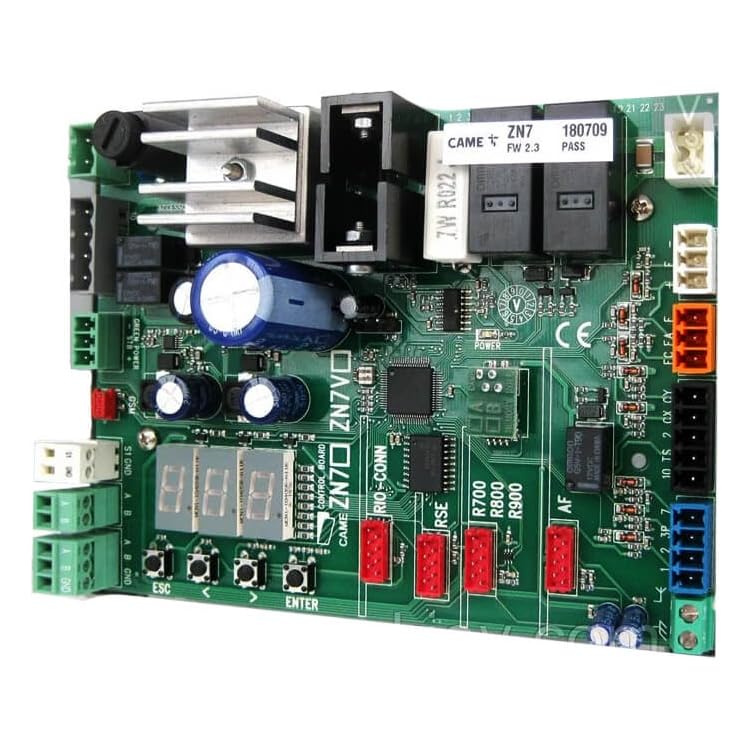
Image 1: CAME ZN7 Control Board (Model 3199ZN7). This image displays the main electronic circuit board with various connectors and components.
4. Setup and Installation
Note: Installation should only be performed by a qualified technician.
- Power Disconnection: Ensure the main power supply to the gate operator is completely disconnected before beginning any work.
- Access the Control Unit: Open the housing of the CAME BXV gearmotor to access the existing control board.
- Document Connections: Carefully photograph or sketch the wiring connections of the old board before disconnecting them. This will aid in re-connecting the new board correctly.
- Remove Old Board: Disconnect all wires and mounting screws securing the old ZN7 board. Remove it from the housing.
- Install New Board: Position the new Dieffematic CAME ZN7 Control Board (3199ZN7) in the same location. Secure it with the appropriate mounting screws.
- Reconnect Wiring: Following your documentation, carefully reconnect all wires to their corresponding terminals on the new board. Double-check each connection for accuracy and security.
- Initial Power-Up and Testing:
- Restore power to the gate operator.
- Observe any indicator lights on the board for proper power and status.
- Perform initial programming steps as per the specific CAME BXV gearmotor manual (e.g., motor learning, remote control pairing).
- Test all safety devices (photocells, safety edges) to ensure they function correctly.
- Operate the gate through several full cycles to confirm smooth and correct operation.
- Close Housing: Once all tests are successful, securely close the gearmotor housing.
5. Operating Instructions
The CAME ZN7 Control Board facilitates the operation of your CAME BXV series sliding gate. Once installed and configured, the gate can be operated via various methods connected to the board:
- Remote Controls: Use programmed remote controls to open, close, or stop the gate.
- Keypads/Access Control Systems: If connected, enter the correct code or present an authorized credential to operate the gate.
- Push Buttons: External push buttons (e.g., for pedestrian access) can be wired to the board for specific functions.
- Automatic Closing: The board can be configured for automatic closing after a set time, provided safety devices are active.
Refer to the specific CAME BXV gearmotor user manual for detailed programming and operational settings, as the ZN7 board acts as the central processing unit for these functions.
6. Maintenance
Regular maintenance helps ensure the longevity and reliable operation of your gate system. While the ZN7 control board itself requires minimal direct maintenance, periodic checks of the overall system are recommended:
- Visual Inspection: Periodically inspect the control board for any signs of damage, loose connections, or corrosion. Ensure the housing is sealed to protect against environmental elements.
- Cleanliness: Keep the area around the control board clean and free from dust, debris, and insects.
- Wiring Checks: Ensure all wiring connections to the board are secure and free from fraying or damage.
- Safety Device Testing: Regularly test all connected safety devices (photocells, safety edges) to confirm they are functioning correctly.
- Professional Servicing: It is recommended to have the entire gate automation system, including the control board, inspected by a qualified technician at least once a year.
7. Troubleshooting
If you encounter issues with your gate automation system after installing the ZN7 control board, consider the following common troubleshooting steps:
| Problem | Possible Cause | Solution |
|---|---|---|
| Gate does not respond to commands. | No power, remote control battery dead, safety devices obstructed, incorrect wiring. | Check power supply. Replace remote battery. Clear safety device path. Verify wiring connections. |
| Gate opens but does not close. | Safety devices (photocells) obstructed or faulty, automatic closing disabled. | Check photocells for obstructions or misalignment. Test photocell functionality. Verify automatic closing setting. |
| Gate stops unexpectedly during operation. | Obstruction detected, motor overload, faulty safety device. | Inspect gate path for obstructions. Check motor for signs of overheating. Test safety devices. |
| Indicator lights on board are off or flashing abnormally. | No power, board fault, specific error code. | Check power supply. Consult the CAME BXV gearmotor manual for specific error codes indicated by flashing lights. |
If problems persist after attempting these solutions, contact a qualified technician for further assistance.
8. Specifications
| Feature | Detail |
|---|---|
| Brand | Dieffematic |
| Model Number | 3199ZN7 |
| Compatibility | CAME BXV series gearmotors (SDN4, SDN6, SDN8, SDN10, SDN4-110, SDN6-110, SDN8-110, SDN10-110) |
| ASIN | B0B5VKVCWM |
| Manufacturer | Dieffematic |
| Date First Available | August 19, 2022 |
9. Warranty and Support
Specific warranty information for the Dieffematic CAME ZN7 Control Board (model 3199ZN7) is not provided in the available product data. Please refer to the purchase documentation or contact your retailer or Dieffematic directly for warranty details.
For technical support or further assistance, it is recommended to contact a qualified gate automation technician or the official Dieffematic support channels.