
villastar YC-005
Villastar Pool Heat Pump YC-005 User Manual
Model: YC-005 | Brand: Villastar
1. Introduction
Thank you for choosing the Villastar Pool Heat Pump YC-005. This manual provides essential information for the safe and efficient operation, installation, and maintenance of your new pool heater. Please read this manual thoroughly before installation and use, and keep it for future reference.
The Villastar YC-005 is designed to efficiently heat above-ground pools up to 5,000 gallons, extending your swimming season and enhancing your pool experience. It features a high-power compressor, pure titanium heat exchanger, and an intelligent control system for ease of use and energy efficiency.

Figure 1: Front view of the Villastar Pool Heat Pump YC-005.
2. Safety Information
Always follow basic safety precautions when installing and operating this electrical appliance to reduce the risk of fire, electric shock, and injury.
- Read all instructions before using the heat pump.
- Ensure the power supply matches the specifications of the unit (110V).
- Do not operate the heat pump if the power cord or plug is damaged.
- Keep children and unauthorized persons away from the unit during operation.
- Do not attempt to service or repair the unit yourself. Refer all servicing to qualified personnel.
- Ensure proper grounding to reduce the risk of electric shock.
- Always disconnect power before performing any maintenance or troubleshooting.
3. Product Overview
3.1 Components
The Villastar YC-005 Pool Heat Pump consists of the main heat pump unit, power cable, and necessary connection fittings.

Figure 2: Villastar Pool Heat Pump YC-005 with included accessories.
3.2 Key Features
- High Efficiency: COP 4.45 for energy-saving operation.
- Wide Application: Suitable for above-ground pools up to 5,000 gallons and underground pools up to 4,000 gallons.
- Durable Construction: Galvanized steel housing for rust and deterioration resistance.
- Advanced Heat Exchanger: Pure titanium heat exchanger for optimal heat transfer.
- Intelligent Control: LED display for easy temperature setting and monitoring.
- Quiet Operation: Designed for low noise levels (approx. 50dB).

Figure 3: Internal view highlighting the 100% Titanium Heat Exchanger for durability and efficiency.

Figure 4: Ultra Gold Evaporator Fin, designed for efficient heat transfer from air to pool water.

Figure 5: Brushless DC Fan Motor, ensuring precise and efficient operation with low noise.
4. Setup and Installation
The Villastar YC-005 is designed for quick and easy installation without requiring professional plumbing. Follow these steps for proper setup:
4.1 Required Materials (Not Included)
- Filter pump (recommended GPH 1500-2500)
- Corrugated pipes (1.2 inch / 32mm water pipe connection)
- Clamps (for securing pipes)
4.2 Installation Steps
- Prepare Auxiliary Materials: Gather all necessary pipes, clamps, and the filter pump.
- Attach Clamps to Pipes: Slide the clamps onto the corrugated pipes.
- Connect Heat Pump Fittings: Securely attach the heat pump inlet and outlet joint fittings to the heat pump unit.
- Connect Water Pump Union: Connect the water pump union to the pipe that will lead to the filter pump.
- Connect All Components: Connect the pipes from the pool to the filter pump, then from the filter pump to the heat pump inlet, and finally from the heat pump outlet back to the pool. Ensure all connections are tight and secure using the clamps.
- Prime the System: Before powering on, add water to the filter pump to remove any trapped air. This ensures proper water flow and prevents damage to the pump.
- Power On and Debug: Once the system is filled with water and all connections are secure, plug in the heat pump and filter pump. Follow the operating instructions to set your desired temperature.
Video 1: Step-by-step installation guide for the Villastar Pool Heat Pump.
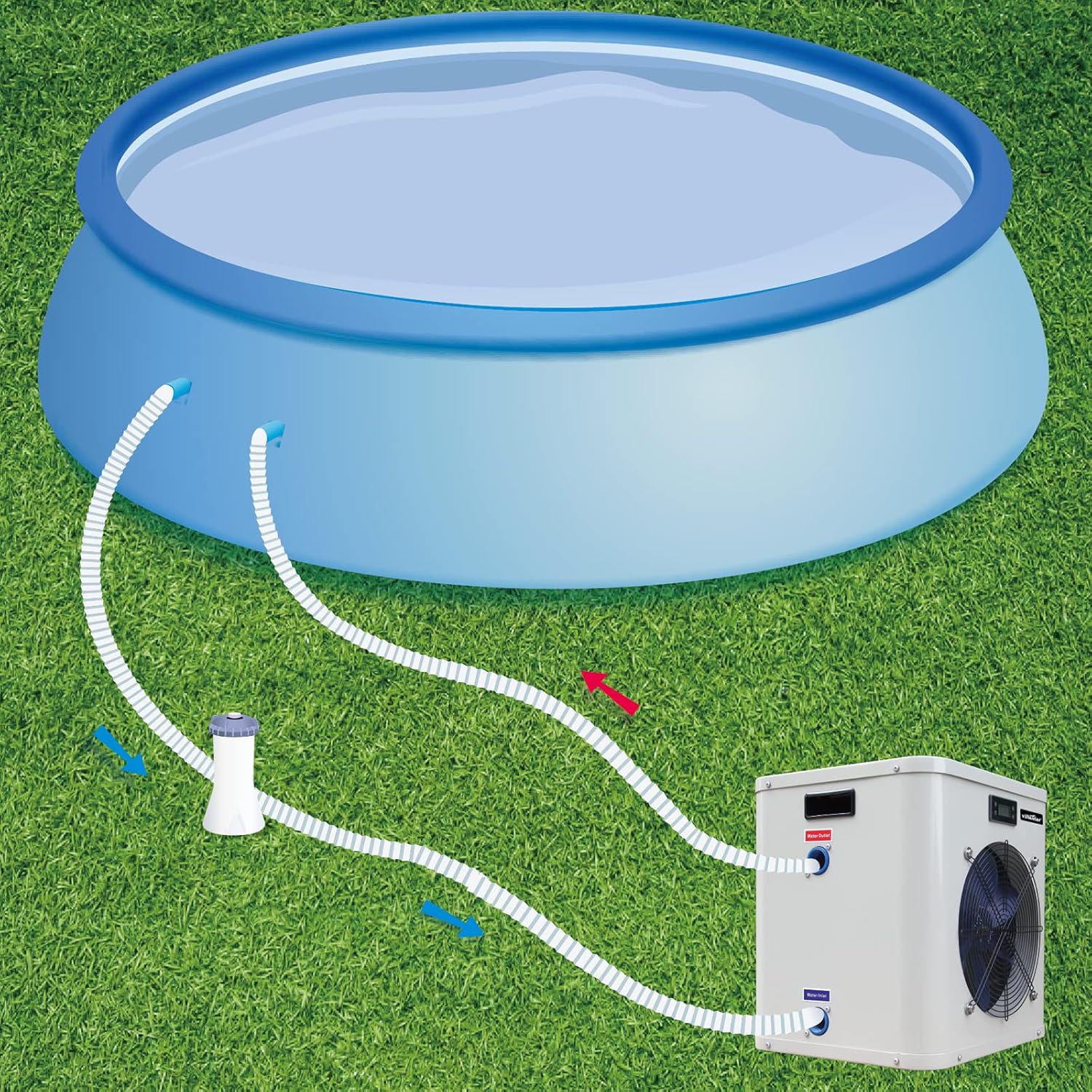
Figure 6: Typical installation diagram showing the heat pump connected to the pool and filter pump.
5. Operating Instructions
5.1 Control Panel
The heat pump features an intuitive LED display for easy control.
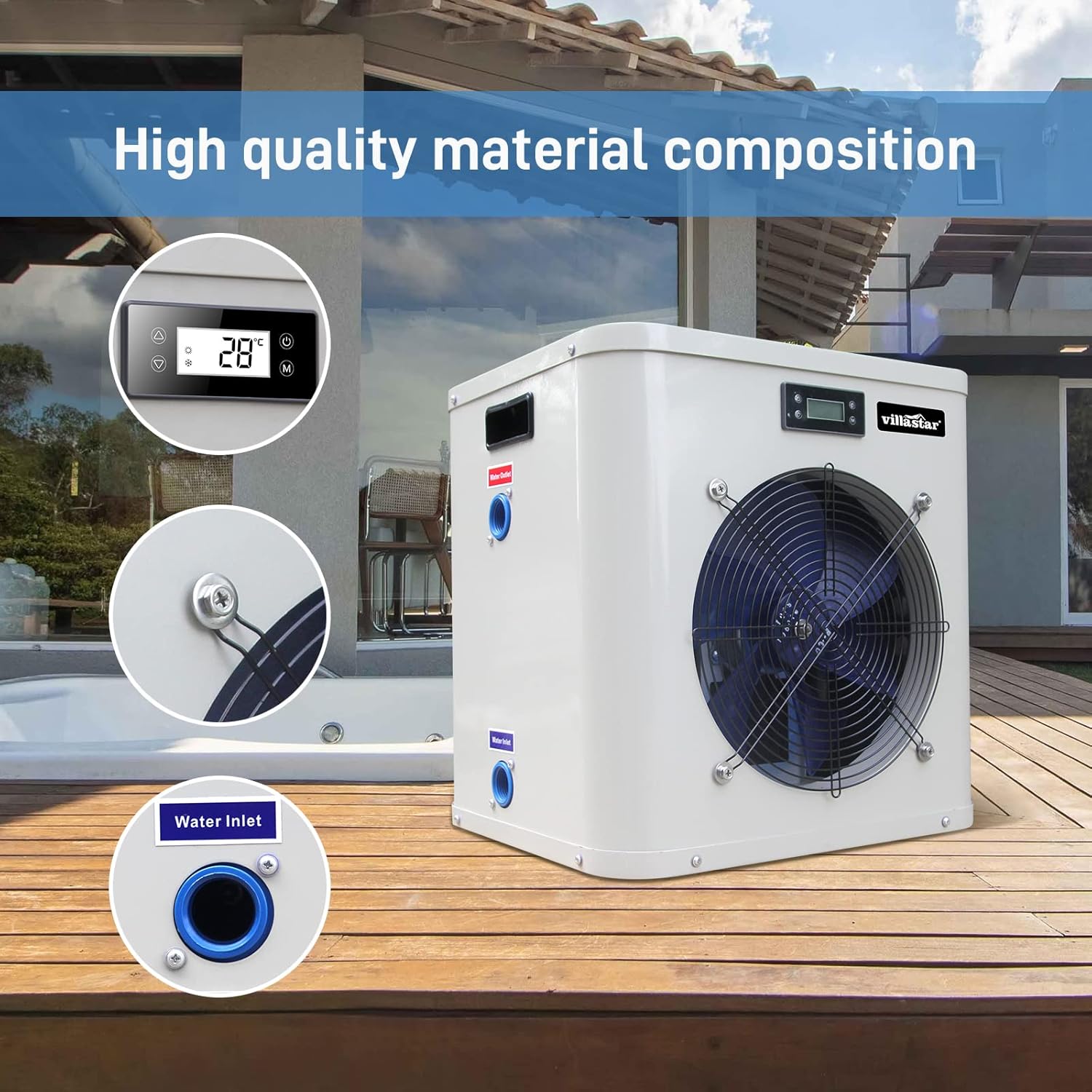
Figure 7: Close-up of the control panel and water inlet/outlet.
5.2 Setting Temperature
- Ensure the unit is powered on and water is flowing through the system.
- Use the Up and Down arrows on the control panel to adjust the desired water temperature.
- The display will show the current water temperature and the set temperature.
- The heat pump will automatically turn on or off to maintain the set temperature.
The device can operate at outdoor temperatures ranging from 23°F to 109.4°F, and the pool can be heated up to 104°F.
6. Maintenance
Regular maintenance ensures optimal performance and longevity of your Villastar Pool Heat Pump.
- Clean the Unit: Periodically wipe down the exterior of the heat pump with a soft, damp cloth. Do not use harsh chemicals or abrasive cleaners.
- Check Airflow: Ensure the fan and air intake/outlet are free from obstructions (leaves, debris, etc.) to maintain proper airflow.
- Inspect Connections: Regularly check all pipe connections for leaks and ensure clamps are secure.
- Winterization: If you live in an area with freezing temperatures, properly winterize the unit by draining all water from the heat pump and pipes to prevent freeze damage. Consult a professional if unsure.
7. Troubleshooting
If you encounter issues with your heat pump, refer to the following common troubleshooting steps:
| Problem | Possible Cause | Solution |
|---|---|---|
| Heat pump not turning on. | No power, tripped breaker, loose connection. | Check power supply, reset breaker, ensure all connections are secure. |
| Water not heating. | Insufficient water flow, air in system, incorrect temperature setting, ambient temperature too low. | Ensure filter pump is running and water flow is adequate (1500-2500 GPH). Remove air from the system. Verify temperature setting. Note operating temperature range (23°F to 109.4°F). |
| Unusual noise from unit. | Obstruction in fan, loose components. | Inspect fan for debris. Check for any loose screws or panels. If noise persists, contact support. |
| Water leaking from unit. | Loose pipe connections, damaged seals. | Tighten all pipe connections. Inspect seals for damage. If leaking continues, contact support. |
For issues not listed above or if solutions do not resolve the problem, please contact Villastar customer support.
8. Specifications
| Feature | Detail |
|---|---|
| Model Number | YC-005 |
| Heating Capacity | 16,000 BTU/hr |
| Max Pool Volume (Above Ground) | Up to 5,000 gallons |
| Max Pool Volume (Underground) | Up to 4,000 gallons |
| Power Supply | 110-120V/60Hz |
| Max Power Input | 4623 BTU/hr |
| Max Current | 7.1 A |
| COP (Coefficient of Performance) | 4.45 |
| Operating Temperature Range (Outdoor) | 23°F to 109.4°F |
| Heating Temperature Range (Pool) | Up to 104°F |
| Cooling Temperature Range (Pool) | 46°F-82°F |
| Noise Level | 50dB(A) |
| Recommended Water Flow | 1500-2500 GPH |
| Product Dimensions (L x W x H) | 16.5 x 15 x 20 inches (approx.) |
| Item Weight | 66 pounds |

Figure 8: Dimensions of the Villastar Pool Heat Pump YC-005.

Figure 9: Detailed technical specifications for the YC-005 model.
9. Warranty and Support
Villastar products are designed for quality and reliability. For specific warranty details, please refer to the warranty card included with your product or contact Villastar customer service directly.
Customer Support:
For technical assistance, troubleshooting, or warranty claims, please contact Villastar customer support through the following channels:
- Online: Visit the official Villastar store on Amazon: Villastar Amazon Store
- Email: Refer to your product packaging or included documentation for direct email support.
Please have your model number (YC-005) and purchase date ready when contacting support.
Related documentsYC-005


Ask a question about this manual
Ask about setup, troubleshooting, compatibility, parts, safety, or missing instructions. Manuals+ will review the question and use this page’s manual context to help answer it.