
Crony SD-306Plus
Crony SD-306Plus Karaoke Speaker System User Manual
Model: SD-306Plus
1. Introduction
Thank you for purchasing the Crony SD-306Plus Karaoke Speaker System. This device is designed to provide a high-quality audio experience for family entertainment, featuring dual Bluetooth 4.2 connectivity, a powerful 30W speaker, and two wireless microphones. Please read this manual carefully before use to ensure proper operation and to maximize the lifespan of your product.
2. Safety Information
- Do not expose the device to water or excessive moisture.
- Avoid placing the device near heat sources or in direct sunlight.
- Do not attempt to disassemble or repair the device yourself. Refer all servicing to qualified personnel.
- Use only the provided charging cable and adapter (5V-2A) to charge the speaker and microphones.
- Keep out of reach of children.
3. Package Contents
Please check the package to ensure all items are present:
- 1 x Crony SD-306Plus Speaker
- 2 x Wireless Microphones
- 1 x USB Charging Cable
- 1 x Audio Cable
- 1 x User Manual (this document)
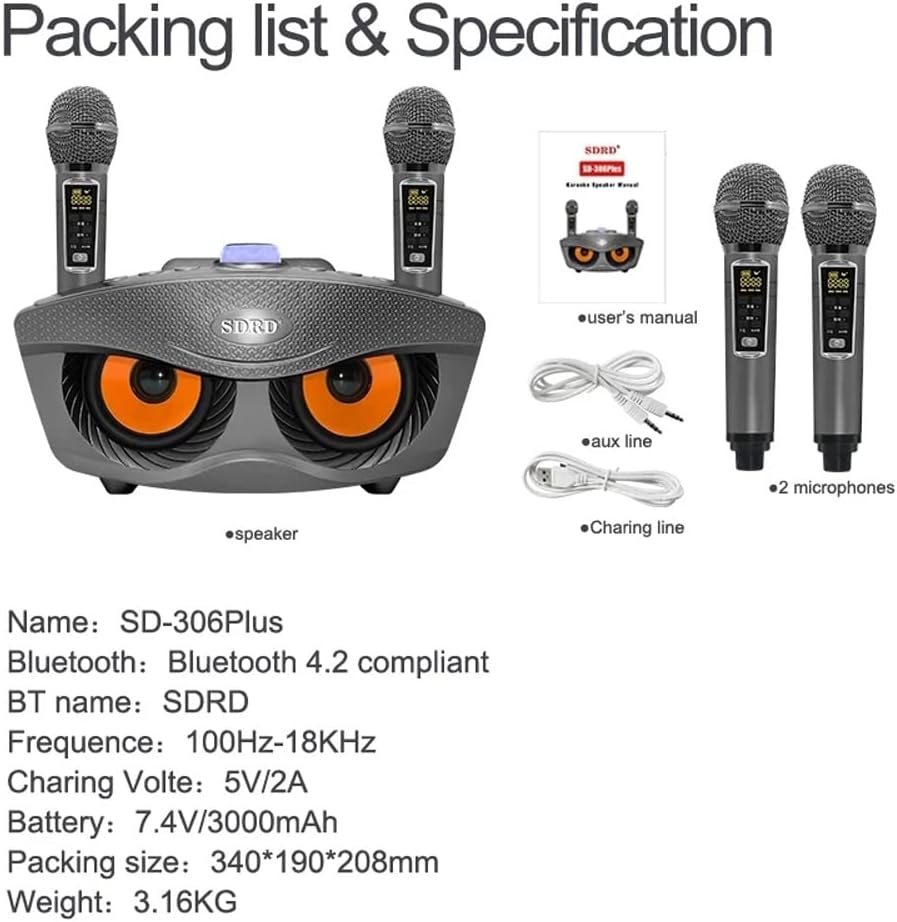
Image: Contents of the Crony SD-306Plus package, including the speaker, two microphones, charging cable, audio cable, and user manual.
4. Product Features
- Dual Bluetooth 4.2 Connectivity: Seamless wireless connection up to 10 meters.
- Powerful Sound Output: Two 15W speakers (total 30W) for rich, clear audio.
- Integrated Sound Card Functions: Features for voice changing (Men, Women, Child), Mic Priority, KTV Mode, and Concert Mode.
- Long Battery Life: Built-in 3000mAh 7.4V battery for 2-3 hours of playing time.
- Wireless Microphones: Two wireless microphones with a range of 10 meters.
- Multiple Playback Modes: Supports USB, TF card, Bluetooth, and AUX input.
- Bass Boost: Enhanced bass for a more immersive audio experience.

Image: Illustration emphasizing the dual 15W speaker power and sound quality of the Crony SD-306Plus.
5. Component Identification
Familiarize yourself with the various buttons and ports on your SD-306Plus speaker:

Image: Detailed view of the speaker's control panel, showing buttons for EQ, Music Original, Mode, Volume, Mic Priority, KTV, Concert Hall, Previous/Volume Down, Play/Pause, and Next/Volume Up. Also indicates voice change functions (Men, Women, Child).
- EQ: Equalizer settings.
- MUSIC ORIG: Toggles original music sound.
- MODE: Switches between USB, TF, Bluetooth, and AUX input modes.
- VOL-/VOL+: Adjusts the main volume.
- MIC PRIORITY: Prioritizes microphone audio over music.
- KTV MODE: Activates KTV (Karaoke) specific sound effects.
- CONCERT HALL: Simulates a concert hall acoustic environment.
- PREV/VOL-: Skips to the previous track or decreases volume.
- PAUSE/PLAY: Plays or pauses the current track.
- NEXT/VOL+: Skips to the next track or increases volume.
- Voice Change Buttons: Buttons for Men Voice, Women Voice, and Child Voice effects.
6. Setup
6.1 Initial Charging
Before first use, fully charge the speaker and both microphones. Refer to Section 8 for charging instructions.
6.2 Powering On/Off
Locate the power switch on the speaker and microphones. Toggle to turn on or off.
6.3 Bluetooth Connection
To connect your device via Bluetooth:
- Turn on the Crony SD-306Plus speaker. It will automatically enter Bluetooth pairing mode.
- On your mobile phone or other Bluetooth-enabled device, open the Bluetooth settings.
- Search for available devices and select "SDRD" (the Bluetooth name for the speaker).
- Once connected, you will hear a confirmation sound from the speaker.

Image: Visual representation of connecting the speaker to a smartphone via Bluetooth for wireless music playback.
7. Operating Instructions
7.1 Playing Music
- Bluetooth: After successful pairing, play music from your connected device.
- USB/TF Card: Insert a USB drive or TF card into the respective port. The speaker will automatically switch to the corresponding mode and begin playing.
- AUX Input: Connect an external audio source using the provided audio cable to the AUX port. Press the MODE button to select AUX input.
7.2 Using Microphones
Turn on both wireless microphones. They will automatically connect to the speaker. Adjust microphone volume directly on the microphone or through the speaker's controls if available.
7.3 Sound Card Functions
Utilize the dedicated buttons on the speaker's control panel for various sound effects:
- Voice Change: Press the 'Man', 'Girl', or 'Child's voice' buttons to alter your microphone voice.
- Mic Priority: Press 'MIC Priority' to lower music volume automatically when speaking into the microphone.
- KTV Mode: Press 'KTV' for a typical karaoke sound effect.
- Concert Hall: Press 'Concert Hall' to simulate a larger acoustic space.
8. Charging
8.1 Charging the Speaker
Connect the provided USB charging cable to the speaker's charging port and the other end to a 5V-2A USB power adapter (not included). The charging indicator will show the charging status. A full charge takes approximately 3-4 hours.
8.2 Charging the Microphones
The microphones can be charged in two ways:
- Via USB Charging Line: Connect the microphone directly to a USB power source using a USB charging cable.
- With Speaker: Place the microphone into its designated slot on the speaker. The speaker will charge the microphone when connected to power or if the speaker has sufficient battery.

Image: Instructions for charging the wireless microphones, either independently via USB or by docking them into the main speaker unit.
Microphone charging time is approximately 1-2 hours.
9. Maintenance
- Clean the speaker and microphones with a soft, dry cloth. Do not use abrasive cleaners or solvents.
- Store the device in a cool, dry place away from direct sunlight and extreme temperatures.
- If not used for extended periods, charge the battery every 3 months to maintain its lifespan.
10. Troubleshooting
| Problem | Possible Cause | Solution |
|---|---|---|
| No power | Battery is depleted | Charge the speaker/microphones fully. |
| No sound | Volume too low; Incorrect mode; Device not connected | Increase volume; Select correct input mode (Bluetooth, USB, AUX); Reconnect Bluetooth device. |
| Microphone not working | Microphone off; Battery low; Out of range | Turn on microphone; Charge microphone; Move closer to speaker (within 10m). |
| Bluetooth disconnection | Device out of range; Interference | Move Bluetooth device closer to speaker; Avoid obstacles; Turn off other Bluetooth devices. |
11. Specifications
| Feature | Detail |
|---|---|
| Model | SD-306Plus |
| Bluetooth Version | Bluetooth 4.2 |
| Bluetooth Distance | 10 meters |
| Speaker Power | 2 x 15W (Total 30W) |
| Speaker Specifications | 4 inch external magnetic |
| Frequency Response | 100Hz-18KHz |
| Battery Specification | Built-in 18650 3000mAh 7.4V |
| Playing Time | 2-3 hours |
| Charger Specification | 5V-2A |
| Charging Time (Speaker) | 3-4 hours |
| Microphone Distance | 10 meters |
| Microphone Charging Time | 1-2 hours |
| Product Dimensions | 340 x 190 x 208 mm (19D x 34W x 20.8H cm) |
| Product Weight | 2 kg (3.16 kg packaged) |
12. Warranty and Support
Crony products are manufactured to high quality standards. For warranty information or technical support, please refer to the warranty card included with your purchase or contact your local retailer or Crony customer service. Please retain your proof of purchase for any warranty claims.
Ask a question about this manual
Ask about setup, troubleshooting, compatibility, parts, safety, or missing instructions. Manuals+ will review the question and use this page’s manual context to help answer it.