
1. Product Overview
The Candy Smart Linea Pura air conditioner is a monosplit system designed for efficient cooling and heating of indoor spaces. This model features a 24000 BTU indoor unit, suitable for rooms up to 70 m², and includes a heat pump for year-round comfort. It also incorporates a Self-Clean function for improved air quality and can be controlled remotely via the hOn app.

Figure 1: Candy Smart Linea Pura Air Conditioner indoor and outdoor units. The image displays both the indoor unit (top) and the outdoor unit (bottom) of the Candy Smart Linea Pura air conditioner, providing a complete view of the system components.
2. Safety Information
Please read all safety instructions carefully before installation and operation. Failure to follow these instructions may result in electric shock, fire, injury, or property damage.
- Installation must be performed by a qualified professional in accordance with local and national electrical and safety codes.
- Do not attempt to repair or modify the unit yourself. Contact qualified service personnel for all repairs.
- Ensure the power supply matches the specifications listed on the unit's nameplate.
- Keep the area around the outdoor unit clear of obstructions.
- Do not insert fingers or objects into the air inlet/outlet.
- If abnormal operation (e.g., burning smell, unusual noise) occurs, immediately turn off the unit and disconnect power.
3. Package Contents
Verify that all the following items are included in your package:
- 1 x Indoor Unit (24000 BTU)
- 1 x Outdoor Unit
- 1 x Remote Control
- User Manual (this document)
- Installation Kit (may vary, consult installer)
4. Setup and Installation
The Candy Smart Linea Pura air conditioner is a split system requiring professional installation. This section provides general guidance; refer to the detailed installation manual provided to your installer for specific instructions.
4.1 Room Suitability
The 24000 BTU indoor unit is designed for optimal performance in rooms up to approximately 70 m² with a standard ceiling height of 2.7 meters. Ensure the chosen location allows for proper airflow and maintenance access.
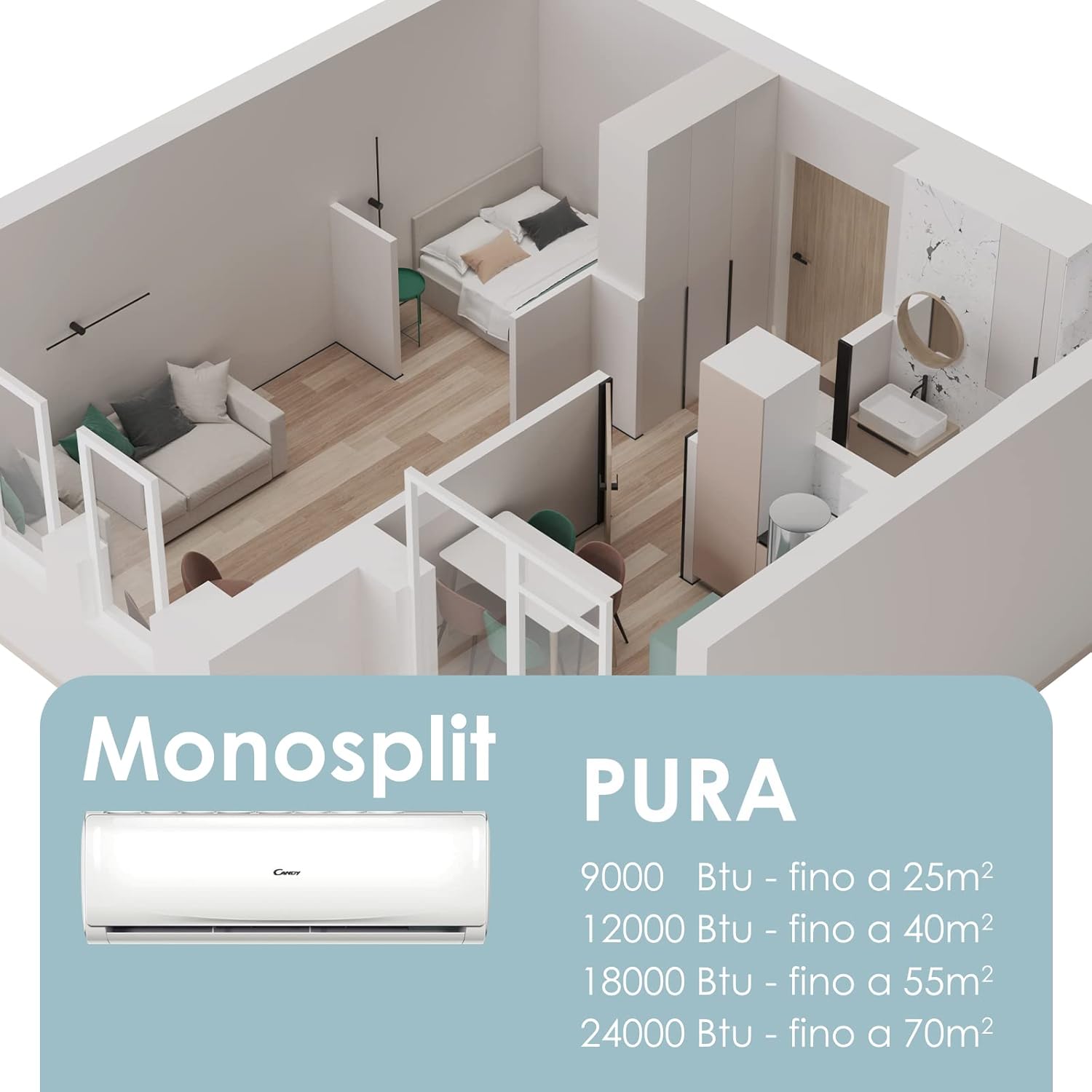
Figure 2: Room size recommendations for Candy Pura air conditioners. A diagram illustrating recommended room sizes in square meters for various BTU capacities of the Candy Pura monosplit air conditioners, including the 24000 BTU model suitable for up to 70 m².
4.2 Professional Installation
Due to the complexity of refrigerant handling and electrical connections, professional installation is mandatory for this split-system air conditioner. Your installer will handle:
- Mounting the indoor and outdoor units.
- Connecting refrigerant lines.
- Electrical wiring.
- Drainage pipe installation.
- System vacuuming and refrigerant charging.
- Initial system testing.
5. Operating Instructions
Your Candy Smart Linea Pura air conditioner offers various modes and functions for optimal comfort. Control is primarily done via the included remote control or the hOn app.
5.1 Remote Control Operation
The remote control allows you to adjust temperature, select operating modes, set fan speed, and activate special functions.

Figure 3: Remote control usage. A woman is shown comfortably adjusting the settings of the Candy Smart Linea Pura air conditioner using its remote control, highlighting ease of use.
- Power Button: Press to turn the unit ON or OFF.
- Mode Selection: Cycle through modes: Cool, Heat, Fan, Dry, Auto.
- Temperature Adjustment: Use ▲ / ▼ buttons to set desired temperature.
- Fan Speed: Adjust fan speed (Low, Medium, High, Auto).
- Swing Function: Activate horizontal and/or vertical louver swing for even air distribution.
- Timer Function: Set the unit to turn ON or OFF automatically after a specified time.
5.2 hOn App Connectivity
The hOn app allows for remote control and advanced management of your air conditioner from your smartphone or tablet.

Figure 4: Controlling the unit with the hOn app. This image illustrates a user interacting with the hOn application on a smartphone to remotely manage the Candy Smart Linea Pura air conditioner's functions.
- Download the hOn app from your device's app store.
- Create an account or log in.
- Follow the in-app instructions to connect your Candy Smart Linea Pura air conditioner to your Wi-Fi network.
- Once connected, you can adjust temperature, change settings, select modes, and program schedules remotely.
6. Maintenance
Regular maintenance ensures optimal performance, energy efficiency, and longevity of your air conditioner.
6.1 Self-Clean Function
The Self-Clean function utilizes cold expansion technology to remove accumulated dirt, bacteria, and mold from the evaporator coil during defrosting, promoting cleaner air and maintaining efficiency.

Figure 5: Self-Clean function. The image highlights the Self-Clean function of the air conditioner, indicating its capability to maintain internal cleanliness and hygiene.
To activate the Self-Clean function, refer to your remote control or hOn app instructions. It is recommended to use this function periodically, especially during high usage seasons.
6.2 Air Filter Cleaning
Clean the air filters every two weeks or more frequently if the unit is used heavily or in dusty environments. Clogged filters reduce efficiency and airflow.
- Turn off the air conditioner and disconnect power.
- Open the front panel of the indoor unit.
- Remove the air filters.
- Clean filters with a vacuum cleaner or wash them with lukewarm water and mild detergent.
- Rinse thoroughly and allow to dry completely in a shaded area before reinserting.
- Close the front panel and restore power.
6.3 General Cleaning
Wipe the indoor unit's exterior with a soft, damp cloth. Do not use harsh chemicals, abrasives, or solvents. For the outdoor unit, ensure coils are free of debris and fins are not bent. Professional cleaning of coils is recommended annually.
7. Troubleshooting
Before contacting service, try the following solutions for common issues:
| Problem | Possible Cause | Solution |
|---|---|---|
| Unit does not turn on | No power, remote control batteries low | Check power supply, replace remote batteries. |
| Insufficient cooling/heating | Clogged air filters, windows/doors open, incorrect mode, temperature setting too high/low | Clean filters, close openings, select correct mode, adjust temperature. |
| Unusual noise | Loose parts, foreign objects, normal operating sounds (e.g., refrigerant flow) | Check for loose parts, remove objects. If persistent or loud, contact service. |
| Water leakage from indoor unit | Clogged drain pipe, improper installation | Check and clear drain pipe. If issue persists, contact installer. |
If the problem persists after attempting these solutions, please contact qualified service personnel.
8. Specifications
Key technical specifications for the Candy Smart Linea Pura Air Conditioner (Model: HRPURASET0004):
| Feature | Specification |
|---|---|
| Brand | CANDY |
| Model Number | HRPURASET0004 |
| Cooling Capacity | 24000 BTU |
| Heating Feature | Yes (Heat Pump) |
| Energy Efficiency (Cooling) | A++ |
| Energy Efficiency (Heating) | A+ |
| Seasonal Energy Efficiency Ratio (SEER) | 16 |
| Voltage | 230 Volt AC |
| Noise Level (Indoor Unit) | 33 dBa (minimum) |
| Noise Level (Outdoor Unit) | 64 Decibels |
| Special Features | Self-Clean, hOn App Connectivity |
| Recommended Room Size | Up to 70 m² |

Figure 6: Energy efficiency label. An energy label is displayed, detailing the energy efficiency ratings (A++ for cooling, A+ for heating) of the Candy Smart Linea Pura air conditioner.
9. Warranty and Support
Your Candy Smart Linea Pura air conditioner is covered by a manufacturer's warranty. Please refer to the warranty card included with your product for specific terms and conditions, including warranty period and coverage details.
For technical support, service requests, or warranty claims, please contact Candy customer service or your authorized dealer. Ensure you have your model number (HRPURASET0004) and proof of purchase available when contacting support.
Contact Information: Please visit the official Candy website for the most up-to-date contact details for your region.


