
1. Introduction
This manual provides essential information for the safe and efficient operation of your Mi-Heat Ballu Rapid 1800W Convector Heater. Please read these instructions carefully before use and retain them for future reference.
The Ballu Rapid convector heater is designed to provide fast and efficient heating for indoor spaces up to 37 m². It features a digital inverter for precise temperature control, a WiFi module for app-based control, and multiple safety functions.

Image 1.1: Mi-Heat Ballu Rapid 1800W Convector Heater, highlighting its 1800 Watt power and suitability for rooms up to 37 square meters.
2. Safety Instructions
Always observe the following safety precautions to reduce the risk of fire, electric shock, or injury.
- Electrical Safety: Ensure the heater is connected to a grounded outlet with the correct voltage (240V). Do not overload electrical circuits.
- Placement: Position the heater on a stable, level surface. Maintain adequate clearance from walls, furniture, curtains, and other combustible materials (minimum 50 cm). Do not cover the heater.
- Water and Moisture: Do not use the heater in bathrooms, laundry areas, or similar wet locations. The unit is splash water protected (IP24), but direct water exposure should be avoided.
- Overheating Protection: The heater is equipped with an automatic overheating protection sensor that will shut off the unit if it becomes too hot. If this occurs, unplug the heater, allow it to cool, and check for any obstructions before restarting.
- Tip-Over Protection: An integrated tip-over switch will automatically turn off the heater if it is accidentally knocked over.
- Child Safety: Activate the child lock function to prevent unintended operation by children. Do not leave children unsupervised near the operating heater.
- Maintenance: Always unplug the heater before cleaning or performing any maintenance.
- Frost Protection: The heater includes a frost protection function to prevent room temperatures from falling below 5 °C.

Image 2.1: Overview of the integrated safety features: Tip-over Protection, Childlock/Keylock, Overheating Protection, and IP24 Splash Water Protection.
3. Package Contents
Carefully unpack the box and ensure all items are present and undamaged. If any items are missing or damaged, contact your retailer.
- Ballu Rapid Convector Heater Unit
- Set of Wheels (for freestanding use)
- Wall Mounting Kit (brackets, screws, anchors)
- WiFi Module (USB stick)
- User Manual
4. Setup
4.1 Assembly for Freestanding Use (with Wheels)
- Carefully place the heater upside down on a soft, clean surface to prevent scratches.
- Attach the wheel assemblies to the designated slots on the bottom of the heater. Ensure they click securely into place.
- Return the heater to an upright position.
4.2 Wall Mounting
- Select a suitable wall location, ensuring adequate clearance from ceilings, floors, and adjacent walls (refer to safety instructions).
- Using the provided wall mounting brackets as a template, mark the drilling points on the wall.
- Drill holes and insert the appropriate wall anchors.
- Secure the mounting brackets to the wall using the provided screws.
- Carefully hang the heater onto the wall brackets, ensuring it is securely seated.

Image 4.1: The Ballu Rapid heater offers flexible mounting options, including wall mounting and a stand with 360° casters for portability.
4.3 WiFi Module Installation
- Locate the USB port on the side or back of the heater.
- Insert the provided WiFi module (USB stick) into the USB port.
- The heater is now ready for app connectivity.
5. Operating Instructions
5.1 Control Panel Overview
The heater features a modern touch display with an LED screen for easy control.
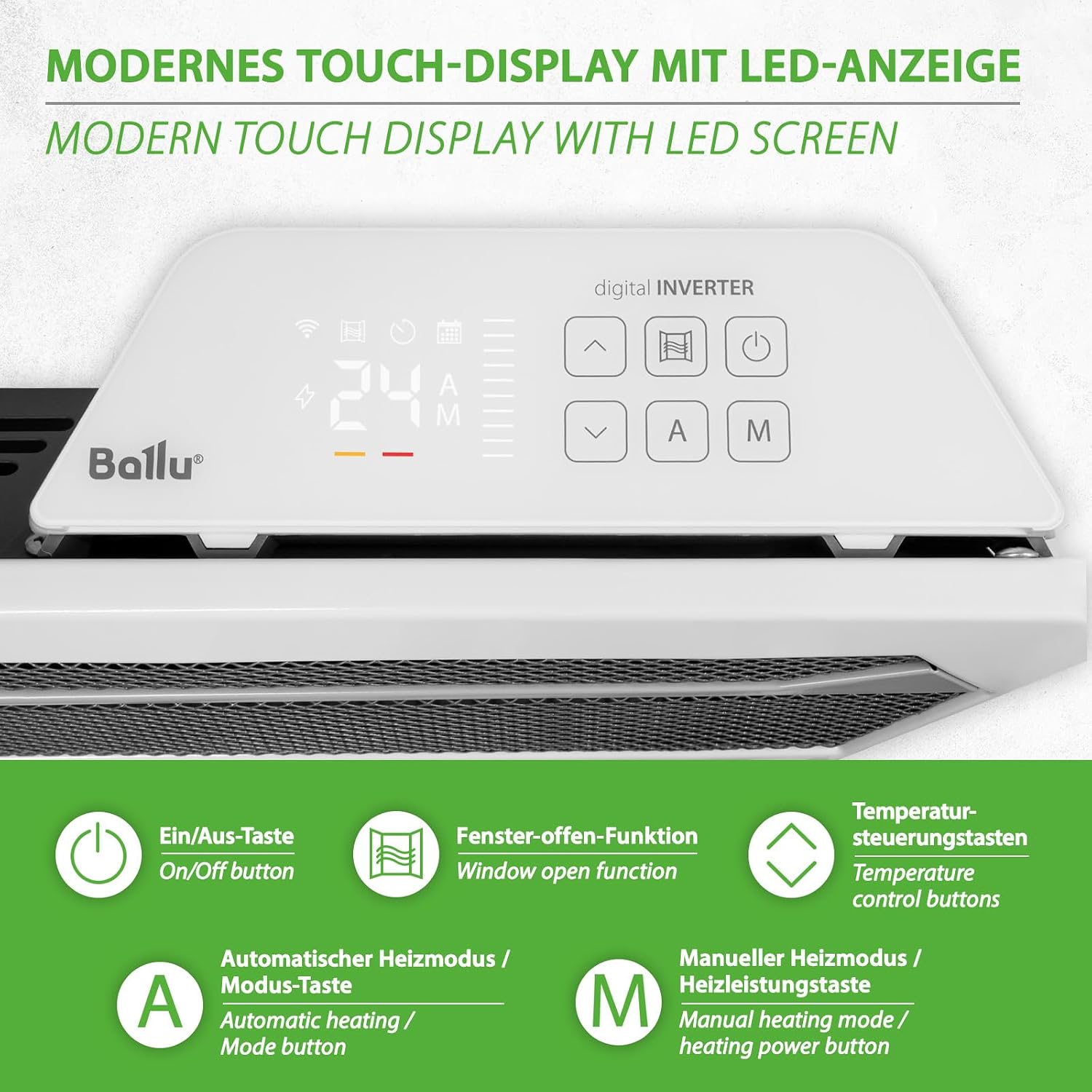
Image 5.1: Modern touch display with LED screen, illustrating the various control buttons: On/Off, Window Open Function, Temperature Control, Automatic Heating/Mode, and Manual Heating/Heating Power.
- On/Off Button: Powers the unit on or off.
- Window Open Function: Activates or deactivates the open window detection.
- Temperature Control Buttons (Up/Down): Adjusts the desired temperature.
- Automatic Heating / Mode Button (A): Switches between automatic heating modes.
- Manual Heating / Heating Power Button (M): Adjusts manual heating power levels.
5.2 Basic Operation
- Plug the heater into a suitable power outlet.
- Press the On/Off button to power on the heater.
- Use the Temperature Control Buttons to set your desired room temperature between +5 °C and +35 °C. The digital inverter technology will automatically adjust heating power to maintain this temperature efficiently.
5.3 Advanced Functions
- Digital Inverter Control: The heater automatically adjusts its power output based on the difference between the set temperature and the actual room temperature, leading to energy savings.
- Weekly Program: Utilize the weekly programming feature to set specific heating schedules for different days and times. This can be configured via the control panel or the ClimatOn app.
- Open Window Detection: When activated, the heater will detect a sudden drop in temperature (indicating an open window) and temporarily pause heating to save energy. Heating resumes when the window is closed or after a set period.
- Frost Protection Function: This function ensures the room temperature does not fall below 5 °C, protecting against freezing.
- Child Lock: Press and hold the designated button (refer to control panel diagram) to activate or deactivate the child lock, preventing accidental changes to settings.
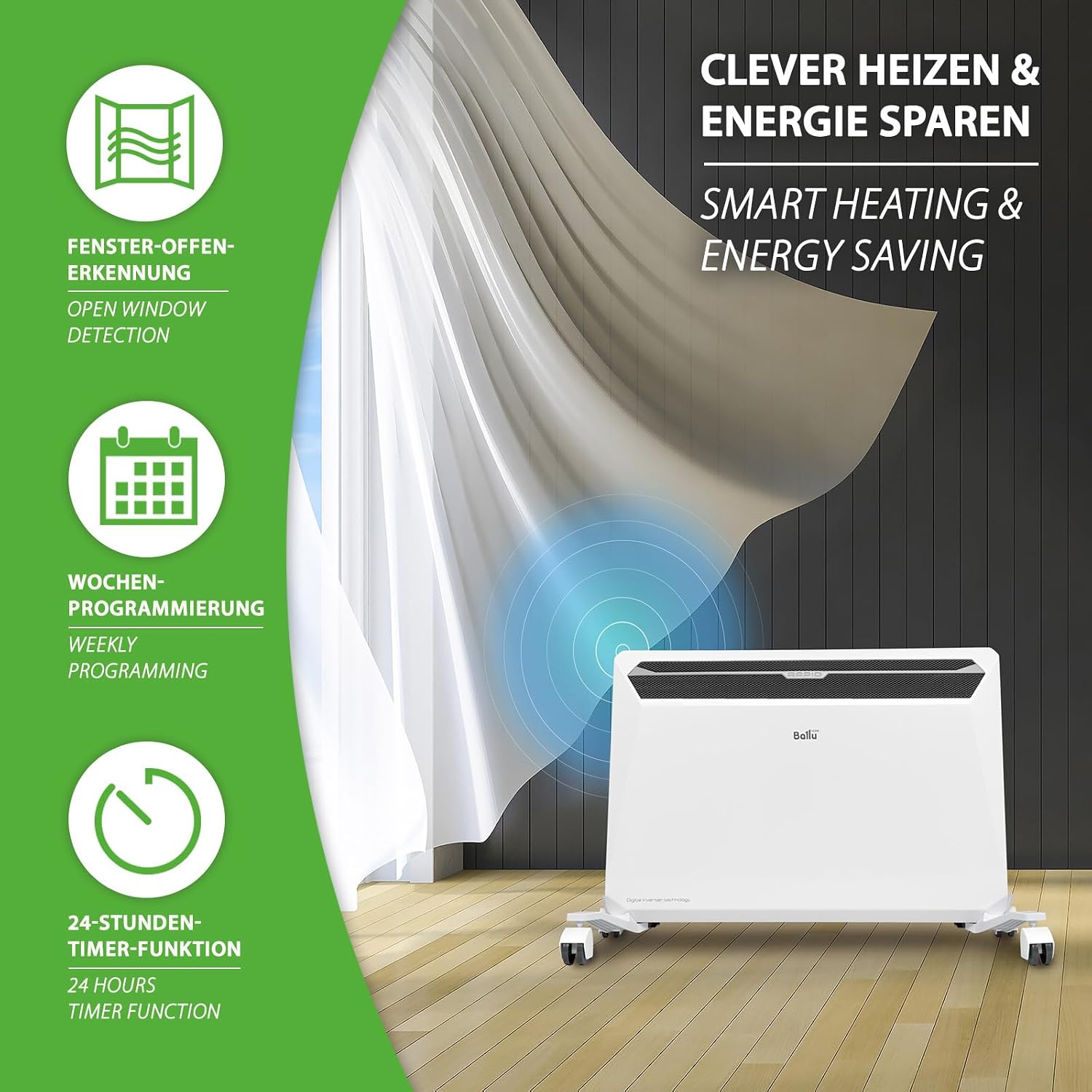
Image 5.2: Smart heating and energy-saving features: Open Window Detection, Weekly Programming, and 24-Hour Timer Function.
5.4 WiFi Control via ClimatOn App
With the WiFi module installed, you can control and program your heater remotely using the ClimatOn app on your smartphone.
- Download the App: Search for "ClimatOn" in the Google Play Store (for Android) or Apple App Store (for iOS) and install it on your smartphone.
- Pairing: Follow the in-app instructions to connect your heater to your home WiFi network and pair it with the app. This typically involves putting the heater into pairing mode and entering your WiFi credentials.
- Remote Control: Once paired, you can adjust temperature, set weekly programs, activate functions like open window detection, and monitor the heater's status from anywhere.

Image 5.3: The ClimatOn app allows for comprehensive control of the heater, including target temperature, heating intensity, and scheduling, from your smartphone.
6. Maintenance
Regular cleaning and maintenance ensure optimal performance and longevity of your heater.
- Cleaning: Before cleaning, always unplug the heater and allow it to cool completely. Wipe the exterior surfaces with a soft, damp cloth. Do not use abrasive cleaners, solvents, or harsh chemicals.
- Dust Removal: Periodically use a vacuum cleaner with a brush attachment to remove dust from the air inlets and outlets.
- Storage: If storing the heater for an extended period, unplug it, clean it thoroughly, and store it in a dry, dust-free location.
7. Troubleshooting
If you encounter issues with your heater, refer to the following table before contacting customer support.
| Problem | Possible Cause | Solution |
|---|---|---|
| Heater does not turn on. | No power supply; Tip-over switch activated; Overheating protection activated. | Check power cord and outlet; Ensure heater is upright; Unplug and allow to cool, then check for obstructions. |
| Heater not heating effectively. | Temperature setting too low; Open window detected; Room size exceeds capacity. | Increase set temperature; Close windows/doors; Ensure heater is appropriate for room size (max 37 m²). |
| WiFi connection issues. | WiFi module not inserted; Incorrect WiFi password; Router too far; App not updated. | Ensure WiFi module is correctly inserted; Re-enter WiFi credentials; Move heater closer to router; Update ClimatOn app. |
| Child lock is active. | Child lock engaged. | Press and hold the child lock button to deactivate. |
8. Specifications
| Feature | Specification |
|---|---|
| Brand | Mi-Heat |
| Model | Ballu Rapid |
| Power Output | 1800 W |
| Voltage | 240 V |
| Heating Method | Convection |
| Temperature Range | +5 °C to +35 °C |
| Recommended Room Size | Up to 37 m² |
| Item Weight | 5.39 kg |
| Dimensions (with casters) | 70.5 cm (W) x 44.5 cm (H) x 22.5 cm (D) |
| Dimensions (without casters) | 64 cm (W) x 41.3 cm (H) x 12.9 cm (D) |
| Cable Length | 120 cm |
| Special Features | Digital display, Child safety, Thermostat, Tip-over protection, Wall mounting, WiFi module, Weekly program, Open window detection, Frost protection |
| Indoor/Outdoor Use | Indoor |

Image 8.1: Detailed measurements of the Ballu Rapid heater, including dimensions with and without casters, and cable length.
9. Warranty and Support
For warranty information or technical support, please refer to the documentation provided with your purchase or contact your retailer. Keep your proof of purchase for any warranty claims.

