
Introduction
This manual provides essential information for the proper use and maintenance of your JBL Tune Flex TWS wireless Bluetooth earbuds. Please read it carefully to ensure optimal performance and longevity of your device.
The JBL Tune Flex TWS wireless Bluetooth earbuds offer an immersive listening experience with JBL Pure Bass Sound. Their ergonomic design ensures comfortable listening all day long. Adaptive Noise Cancelling blocks distractions for full focus, while Ambient Aware keeps you aware of your surroundings for safe outdoor activities. Enjoy a long battery life of up to 32 hours (8 hours in earbuds + 24 hours in charging case) and fast charging: 10 minutes of charging adds 2 hours of playtime. With IPX4 water resistance, you don't have to worry about sweat during intense workouts or heavy rain. Additionally, 4 microphones ensure clear and hassle-free hands-free calling.
Included in the box:
- 1 x JBL Tune Flex TWS wireless Bluetooth earbuds (Black)
- 1 x Charging case
- 1 x USB-C charging cable
- Ear tips (various sizes)
- Quick start guide
- Safety sheet
Setup
1. Charging the Earbuds and Case
Before first use, fully charge the earbuds and the charging case. Connect the provided USB-C cable to the charging case and a power source. The LED indicators on the case will show the charging status.

Image: The JBL Tune Flex TWS charging case with an orange USB-C charging cable connected, indicating the charging process.
A full charge provides up to 32 hours of combined playtime (8 hours in earbuds + 24 hours from the case). A quick 10-minute charge can provide an additional 2 hours of playtime.
2. Pairing with a Bluetooth Device
- Open the charging case. The earbuds will automatically enter pairing mode.
- On your device (smartphone, tablet, etc.), go to Bluetooth settings and enable Bluetooth.
- Select "JBL Tune Flex" from the list of available devices.
- Once connected, a confirmation sound will play, and the earbuds will be ready for use.
3. Choosing the Right Ear Tips
The JBL Tune Flex TWS comes with multiple sizes of ear tips. Selecting the correct size is crucial for optimal sound quality, noise cancellation, and comfort. Experiment with different sizes to find the best fit for your ears.
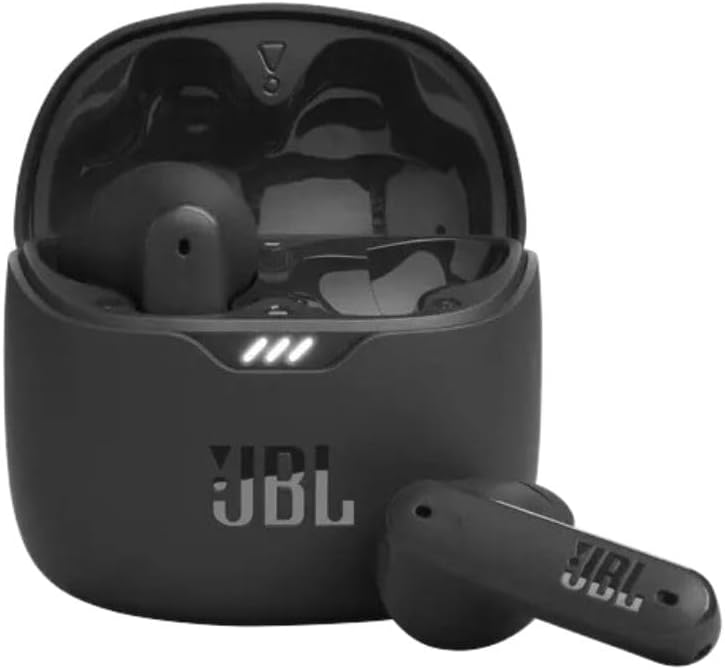
Image: The JBL Tune Flex TWS earbuds resting inside their open charging case, ready for use or charging.
4. JBL Headphones App
Download the JBL Headphones app from your device's app store for additional features and customization options, including equalizer settings, touch control customization, and ambient sound control.
Operating Instructions
1. Power On/Off
- Power On: Open the charging case, or take the earbuds out of the case. They will power on automatically.
- Power Off: Place the earbuds back into the charging case and close the lid. They will power off automatically.
2. Touch Controls
The JBL Tune Flex TWS earbuds feature intuitive touch controls on each earbud. Functions can be customized via the JBL Headphones app.
| Action | Function (Default) |
|---|---|
| Single tap (Left/Right) | Play/Pause, Answer/End Call |
| Double tap (Right) | Next Track |
| Double tap (Left) | Previous Track |
| Triple tap (Right) | Voice Assistant |
| Long press (Left) | Toggle Active Noise Cancelling / Ambient Aware |
| Long press (Right) | Volume Up |
3. Active Noise Cancelling (ANC) and Ambient Aware
- Active Noise Cancelling: Reduces external noise for an immersive audio experience. Activate this feature in noisy environments.
- Ambient Aware: Allows you to hear your surroundings while listening to audio, enhancing safety during outdoor activities or when interacting with others.
- Toggle between ANC, Ambient Aware, and Off using the touch controls or the JBL Headphones app.
4. Hands-Free Calling
The earbuds are equipped with 4 microphones for clear hands-free calls. Use the touch controls to answer or end calls.
Maintenance
1. Cleaning
- Regularly clean the earbuds and charging case with a soft, dry, lint-free cloth.
- Remove ear tips and clean them with mild soap and water, then dry thoroughly before reattaching.
- Ensure charging contacts on both earbuds and case are clean and free of debris to prevent charging issues.
2. Water Resistance
The JBL Tune Flex TWS earbuds are IPX4 water-resistant, meaning they are protected against splashing water from any direction. They are suitable for workouts and light rain but should not be submerged in water.
3. Storage
When not in use, store the earbuds in their charging case to protect them and keep them charged. Store the case in a cool, dry place away from extreme temperatures.
Troubleshooting
Common Issues and Solutions:
- No Sound/Poor Sound Quality:
- Ensure earbuds are charged and properly paired.
- Check volume levels on both the earbuds and your connected device.
- Clean ear tips and earbud grilles for any obstructions.
- Try different ear tip sizes for a better seal.
- Earbuds Not Charging:
- Ensure the charging cable is securely connected to both the case and the power source.
- Clean the charging contacts on both the earbuds and inside the case.
- Verify the charging case itself has power.
- Pairing Issues:
- Ensure Bluetooth is enabled on your device and the earbuds are in pairing mode.
- Forget/remove "JBL Tune Flex" from your device's Bluetooth list and try pairing again.
- Ensure no other devices are actively connected to the earbuds.
- Earbuds Disconnecting:
- Ensure you are within the Bluetooth range of your device.
- Check for interference from other wireless devices.
Resetting the Earbuds
If you experience persistent issues, a factory reset may resolve the problem. Refer to the JBL Headphones app or the official JBL support website for specific instructions on how to perform a factory reset for your JBL Tune Flex TWS.
Specifications
| Feature | Detail |
|---|---|
| Brand | JBL |
| Model | JBLTFLEXBLK |
| Connectivity | Wireless, Bluetooth |
| Earbud Battery Life | Up to 8 hours |
| Total Battery Life (with case) | Up to 32 hours |
| Fast Charging | 10 minutes charge for 2 hours playtime |
| Water Resistance | IPX4 |
| Microphones | 4 (for clear calls) |
| Sound Technology | JBL Pure Bass Sound |
| Frequency Range | 20 Hz - 20 kHz |
| Sensitivity | 110 dB |
| Impedance | 32 Ohm |
| Controls | Touch-bediening |
| Weight | 48 Grams |
| Noise Control | Active Noise Cancelling, Ambient Aware |
Warranty Information
Your JBL Tune Flex TWS earbuds are covered by a manufacturer's warranty. Please refer to the warranty card included in your product packaging or visit the official JBL website for detailed warranty terms and conditions specific to your region.
Support
For further assistance, technical support, or to download the full user manual, please visit the official JBL support website:
You can also find FAQs and troubleshooting guides on the support page.


