
1. Introduction
The EONON Video Output Adapter A0595 is designed to expand the display capabilities of your compatible EONON car navigation system. This adapter converts the video signal from your car navigation unit into an RCA output, allowing you to connect and display content on external monitors such as headrest monitors or flip-down monitors. This enables full-screen sharing for passengers, enhancing the in-car entertainment experience.
This manual provides detailed instructions for the proper installation, operation, and maintenance of your EONON Video Output Adapter A0595.
2. Product Overview
The EONON Video Output Adapter A0595 is a compact device that facilitates video signal conversion. It features a USB input for connection to the car navigation system and two RCA output ports for connecting to external displays.

Figure 2.1: EONON Video Output Adapter A0595. This image shows the compact black adapter with a USB connector on one end and two yellow RCA output jacks on the other, labeled 'USB' and 'CVBS'.
2.1. Key Features
- Dual RCA Output: Simultaneously output video to two external monitors.
- Full Screen Sharing: Display the car navigation screen content on connected external displays.
- Compact Design: Small and lightweight for easy installation.
- Compatibility: Designed for use with specific EONON car navigation systems, including UX6SKJ-PRO-MAX, GA2198J, GA2197, GA2190K, GA2193J, GA2195J, GA2193K, and GA2196K.
3. Setup and Installation
Follow these steps to properly install your EONON Video Output Adapter A0595.
3.1. Package Contents
- EONON Video Output Adapter A0595
- RCA cables (may be sold separately or included with your car navigation system/monitors)
3.2. Connection Diagram

Figure 3.1: Connection diagram illustrating how the EONON Video Output Adapter connects a car navigation unit to a flip-down monitor and a headrest monitor via RCA cables.
3.3. Installation Steps
- Identify Ports: Locate the USB video output port on your compatible EONON car navigation system and the RCA video input ports on your external monitors (e.g., headrest monitors, flip-down monitors).
- Connect Adapter to Navigation: Insert the USB connector of the EONON Video Output Adapter A0595 into the designated USB video output port on your EONON car navigation system.
- Connect RCA Cables: Connect one end of the RCA video cables (typically yellow connectors) to the RCA output ports on the A0595 adapter.
- Connect to Monitors: Connect the other end of the RCA video cables to the RCA video input ports on your external monitors. Ensure a secure connection for all cables.
- Secure Wiring: Route all cables neatly and securely to prevent interference with vehicle operation and to avoid damage.
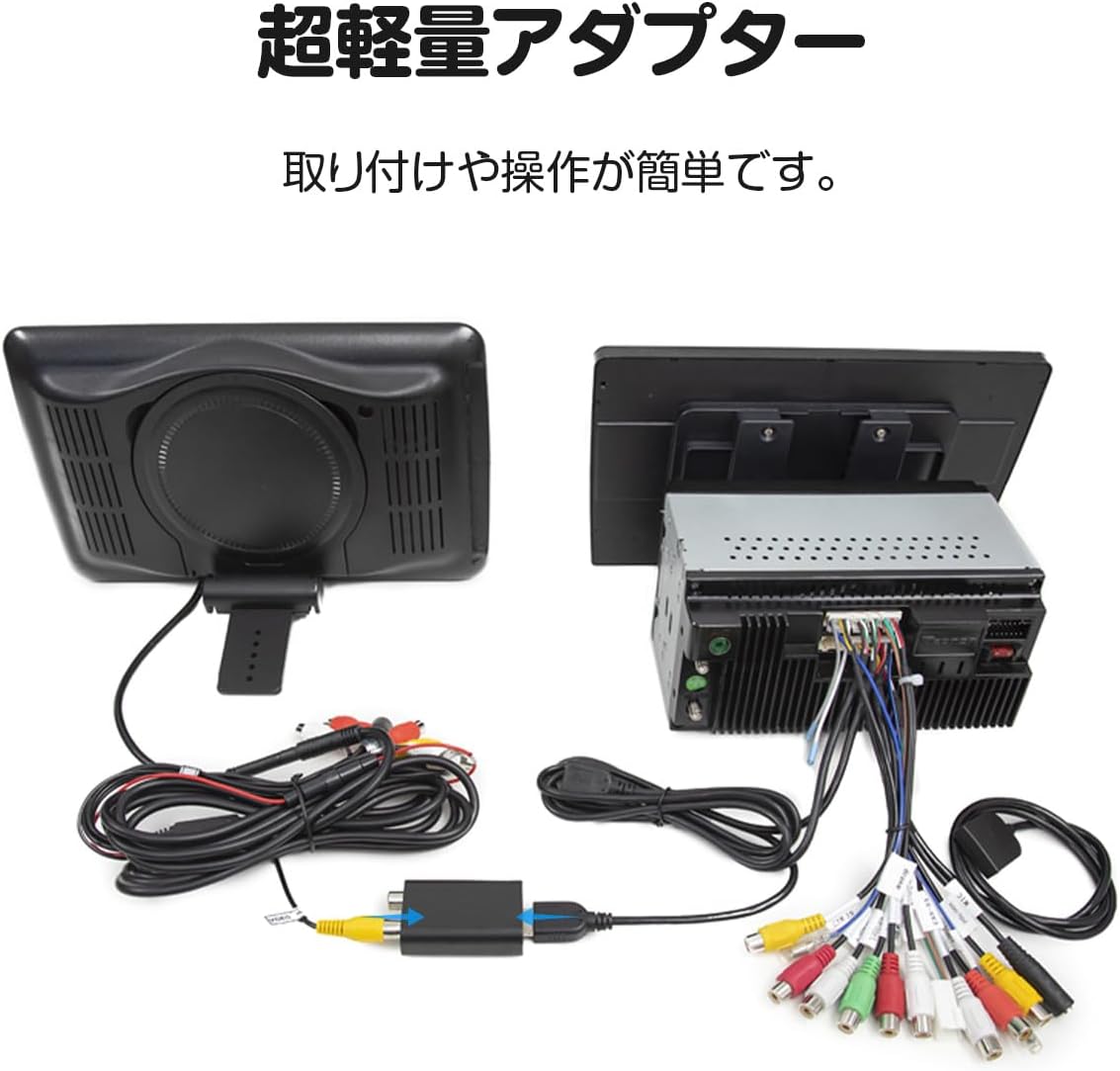
Figure 3.2: The EONON Video Output Adapter shown connected to a car stereo unit via USB, with RCA cables extending to other components. This image demonstrates the physical connection setup.
4. Operating Instructions
Once the EONON Video Output Adapter A0595 is correctly installed, follow these steps to operate it:
- Power On: Turn on your vehicle's ignition and ensure your EONON car navigation system and all connected external monitors are powered on.
- Select Input: On your external monitors, select the correct RCA video input source. Refer to your monitor's user manual for specific instructions on input selection.
- Display Content: The content displayed on your EONON car navigation system should now be mirrored on the connected external monitors. You can play videos, navigation maps, or other media from your car navigation system.
- Adjust Settings: If necessary, adjust the display settings (e.g., brightness, contrast) on your external monitors for optimal viewing.
5. Maintenance
To ensure the longevity and optimal performance of your EONON Video Output Adapter A0595, follow these maintenance guidelines:
- Cleaning: Use a soft, dry cloth to clean the adapter. Avoid using liquid cleaners or solvents, as they may damage the device.
- Cable Management: Ensure all cables are securely connected and not subjected to excessive tension or sharp bends, which can cause damage.
- Environmental Conditions: Avoid exposing the adapter to extreme temperatures, direct sunlight, or excessive moisture.
- Storage: If storing the adapter for an extended period, disconnect it from all devices and store it in a cool, dry place.
6. Troubleshooting
If you encounter issues with your EONON Video Output Adapter A0595, refer to the following troubleshooting tips:
- No Video Output:
- Ensure the adapter is securely connected to the USB port of the car navigation system.
- Verify that the RCA cables are firmly connected to both the adapter and the external monitors.
- Check that the external monitors are powered on and set to the correct RCA video input source.
- Confirm that your EONON car navigation system is outputting video correctly.
- Poor Video Quality:
- Check for any loose cable connections.
- Ensure the RCA cables are not damaged or kinked.
- Adjust display settings (brightness, contrast, sharpness) on the external monitors.
- Intermittent Signal:
- Inspect all connections for looseness.
- Ensure the adapter and cables are not being jostled or pulled during vehicle movement. Secure them properly.
If the problem persists after trying these steps, please contact EONON customer support for further assistance.
7. Specifications
Technical specifications for the EONON Video Output Adapter A0595:
| Specification | Detail |
|---|---|
| Brand | Eonon |
| Model Number | A0595 |
| Product Dimensions (L x W x H) | 7.1 x 3.3 x 2 cm |
| Product Weight | 40 g (0.04 kg) |
| Connector Type | USB (Input), RCA (Output) |
| Compatible Devices | Monitors, EONON Car Navigation Systems (UX6SKJ-PRO-MAX, GA2198J, GA2197, GA2190K, GA2193J, GA2195J, GA2193K, GA2196K) |
| Power Source | No batteries required (powered via USB) |

Figure 7.1: Diagram showing the dimensions of the EONON Video Output Adapter A0595: 59mm (length including USB), 52mm (body length), 33mm (width), and 20mm (height).
8. Warranty and Support
For warranty information and customer support, please refer to the documentation provided with your original EONON car navigation system or visit the official EONON website. If you require assistance with the EONON Video Output Adapter A0595, please contact EONON customer service directly.
You can find more information and contact details on the EONON brand store page: EONON Official Store