
Inrico B01
Inrico B01 Wireless Bluetooth Speaker Microphone User Manual
Model: B01
1. Introduction
The Inrico B01 Wireless Bluetooth Speaker Microphone is designed to enhance communication for users of Android and iOS smart devices. This device pairs easily via Bluetooth 4.2 and offers features such as Push-to-Talk (PTT) and volume control, making it ideal for use with applications like Zello and RealPTT. Full functionality may vary depending on the specific application and its support for external devices.
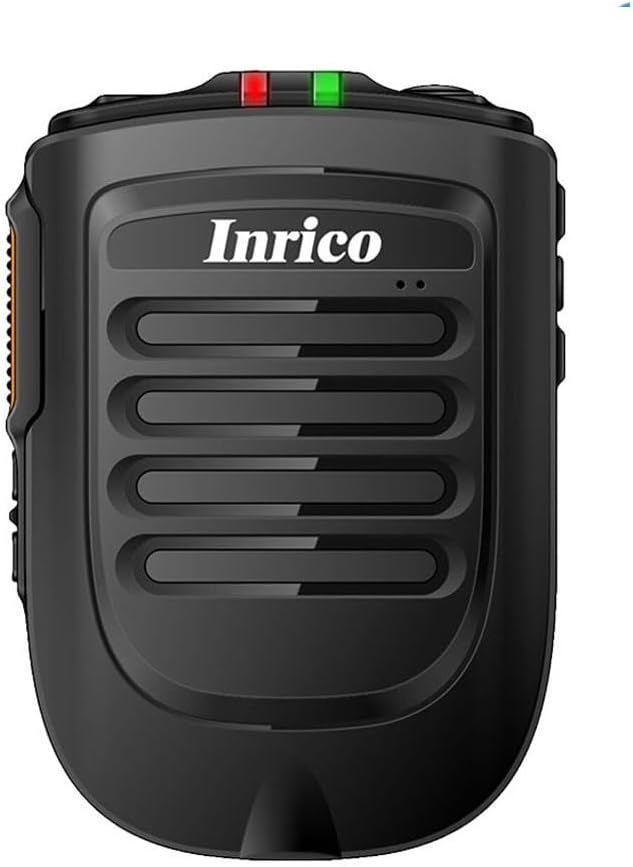
Figure 1: Front view of the Inrico B01 Wireless Bluetooth Speaker Microphone. This image shows the sleek black design with the Inrico logo and speaker grille.
2. Product Features
- Embedded PTT and Volume Control Buttons: Designed for easy access and operation, compatible with applications like Zello and other popular communication platforms.
- 3.5mm Earphone Jack: Allows for connection of external listen-only earpieces for private audio.
- LED Indicator: A discreet LED on the top of the speaker provides visual status in various environments.
- Application Compatibility: Works effectively with Zello and RealPTT. Note that some features may not be fully supported by other applications.
- Desktop Charger Compatibility: Designed to be compatible with the B01 Desktop Charger (sold separately).
- Included Components: Comes with a Micro USB Cable for charging.
3. Package Contents
Upon opening the package, please verify that all the following items are included:
- Inrico B01 Wireless Bluetooth Speaker Microphone
- USB Charger
- USB Data Cable
- Instruction Manual (this document)
- Belt Clip
- Lithium Ion Battery (pre-installed or separate)
4. Device Layout and Controls
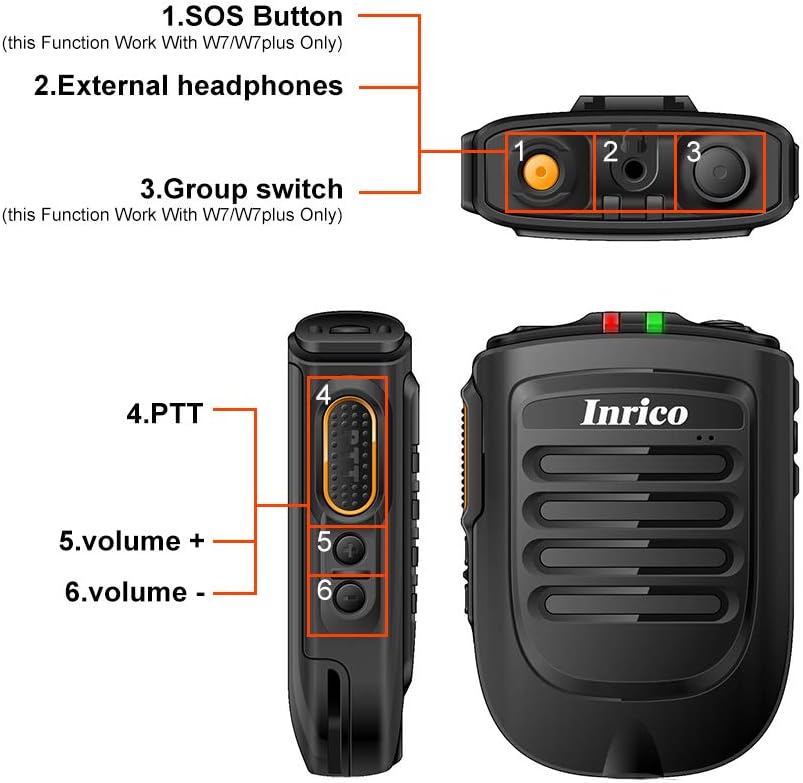
Figure 2: Detailed diagram illustrating the various buttons and ports on the Inrico B01.
- 1. SOS Button: (Functionality may depend on application and device compatibility, e.g., W7/W7plus).
- 2. External Headphones Jack: 3.5mm port for connecting an external earpiece.
- 3. Group Switch: (Functionality may depend on application and device compatibility, e.g., W7/W7plus).
- 4. PTT (Push-to-Talk) Button: Main communication button.
- 5. Volume + Button: Increases audio volume.
- 6. Volume - Button: Decreases audio volume.
5. Setup
5.1 Charging the Device
Before initial use, fully charge the Inrico B01. Connect the provided USB data cable to the device's charging port and the other end to a USB charger or a computer's USB port. The LED indicator will show charging status (refer to LED indicator section for details).

Figure 3: Illustration of the Inrico B01's 2000mAh battery capacity and estimated usage times. The image shows battery level indicators and approximate talking, PTT, and standby times.
| Metric | Approximate Time |
|---|---|
| Talking time | ≈14 hours |
| PTT time | ≈14 hours |
| Standby time | >90 hours |
5.2 Bluetooth Pairing
- Ensure the Inrico B01 is powered on and in pairing mode (refer to device's LED indicator for pairing status, usually a blinking blue light).
- On your smartphone (Android or iOS), navigate to the Bluetooth settings.
- Search for available devices. The Inrico B01 should appear in the list (e.g., "Inrico B01" or similar).
- Select the Inrico B01 to initiate pairing. If prompted for a passcode, enter "0000" (four zeros).
- Once paired, the LED indicator on the B01 will change to a solid blue light, indicating a successful connection.
6. Operating Instructions
6.1 Using Push-to-Talk (PTT)
After successfully pairing the device with your smartphone and configuring it within your chosen communication application (e.g., Zello, RealPTT):
- Open your communication application on your smartphone.
- To transmit, press and hold the PTT button (labeled '4' in Figure 2) on the Inrico B01. Speak clearly into the microphone.
- Release the PTT button to stop transmitting and listen for replies.
6.2 Adjusting Volume
Use the Volume + (labeled '5' in Figure 2) and Volume - (labeled '6' in Figure 2) buttons on the side of the device to adjust the speaker's output volume.
6.3 Using the Earphone Jack
For private listening, connect a 3.5mm listen-only earpiece to the external headphones jack (labeled '2' in Figure 2) on the top of the device. Audio will be routed to the earpiece instead of the internal speaker.
6.4 LED Indicator Status
- Blue LED Blinking: Device is in pairing mode or waiting for connection.
- Blue LED Solid: Device is successfully connected via Bluetooth.
- Red LED Solid: Device is charging.
- Green LED Solid: Device is fully charged.
- Red LED Blinking: Low battery warning.
7. Maintenance
- Cleaning: Wipe the device with a soft, dry cloth. Do not use harsh chemicals or abrasive cleaners.
- Storage: Store the device in a cool, dry place away from direct sunlight and extreme temperatures.
- Battery Care: To prolong battery life, avoid fully discharging the battery frequently. Charge the device regularly, even if not in use for extended periods.
- Water Resistance: This device is not waterproof. Avoid exposure to water or excessive moisture.

Figure 4: Image showing the metal sheet on the battery cover, designed for compatibility with magnetic car holders. This feature allows for convenient mounting in vehicles.
8. Troubleshooting
| Problem | Possible Cause | Solution |
|---|---|---|
| Device does not power on. | Low or no battery charge. | Charge the device fully using the provided USB cable and charger. |
| Cannot pair with smartphone. | Bluetooth is off on smartphone; device not in pairing mode; too far from smartphone. | Ensure Bluetooth is enabled on your phone. Put the B01 into pairing mode. Keep devices within 10 meters. Try restarting both devices. |
| No audio from speaker/earpiece. | Volume too low; device not connected; application not configured correctly. | Increase volume. Verify Bluetooth connection. Check audio settings within your communication application. |
| PTT button not working. | Application not running or not configured to recognize the PTT button. | Ensure your communication application is active and properly configured to use the external PTT button. Some applications may require specific settings. |
9. Specifications

Figure 5: Physical dimensions and weight of the Inrico B01. The image provides measurements in both millimeters and feet, and weight in grams and ounces.
| Parameter | Value |
|---|---|
| Brand | Inrico |
| Model Name | B01 |
| Bluetooth Version | 4.2 |
| Bluetooth Protocol | HFP / HSP / A2DP / AVRCP / SPP |
| Transmission Range | 10m |
| Transmission Power | CLASS2, 4dbm |
| Sensitivity | 80dBm < 0.1%BER |
| Audio Performance | SBC Decode |
| Audio to Noise Ratio | ≥75dB |
| Speaker Power | 1W/8R (116dB) |
| LED Indicator | Blue/Green LED Indicator |
| Earphone Jack | 3.5mm |
| Battery Capacity | 2000mA @ 3.7V (Lithium Ion) |
| Dimensions (L*W*H) | 90 x 63 x 25.6 mm (approx. 3.54 x 2.48 x 1.01 inches) |
| Item Weight | 8.8 ounces (approx. 249 grams) |
| Compatible Devices | Smartphone (Android and iOS) |
| UPC | 785582409181 |

Figure 6: The Inrico B01 is compatible with various mobile radios, such as the TM-7 7plus, expanding its utility beyond just smartphones.
10. Warranty and Support
For warranty information and technical support, please refer to the official Inrico website or contact your point of purchase. Keep your purchase receipt as proof of purchase for warranty claims.
For further assistance, you may also refer to the product page on Amazon.
Related documentsB01


Ask a question about this manual
Ask about setup, troubleshooting, compatibility, parts, safety, or missing instructions. Manuals+ will review the question and use this page’s manual context to help answer it.