
1. Introduction
The 3DMaterials SuperPCS ENGR-C37L is a high-performance 3D printer resin designed for industrial and precision applications. It offers a unique combination of toughness, fast printing capabilities, and high resolution, making it suitable for a wide range of 3D printing projects. This manual provides essential information for the safe and effective use of SuperPCS resin.
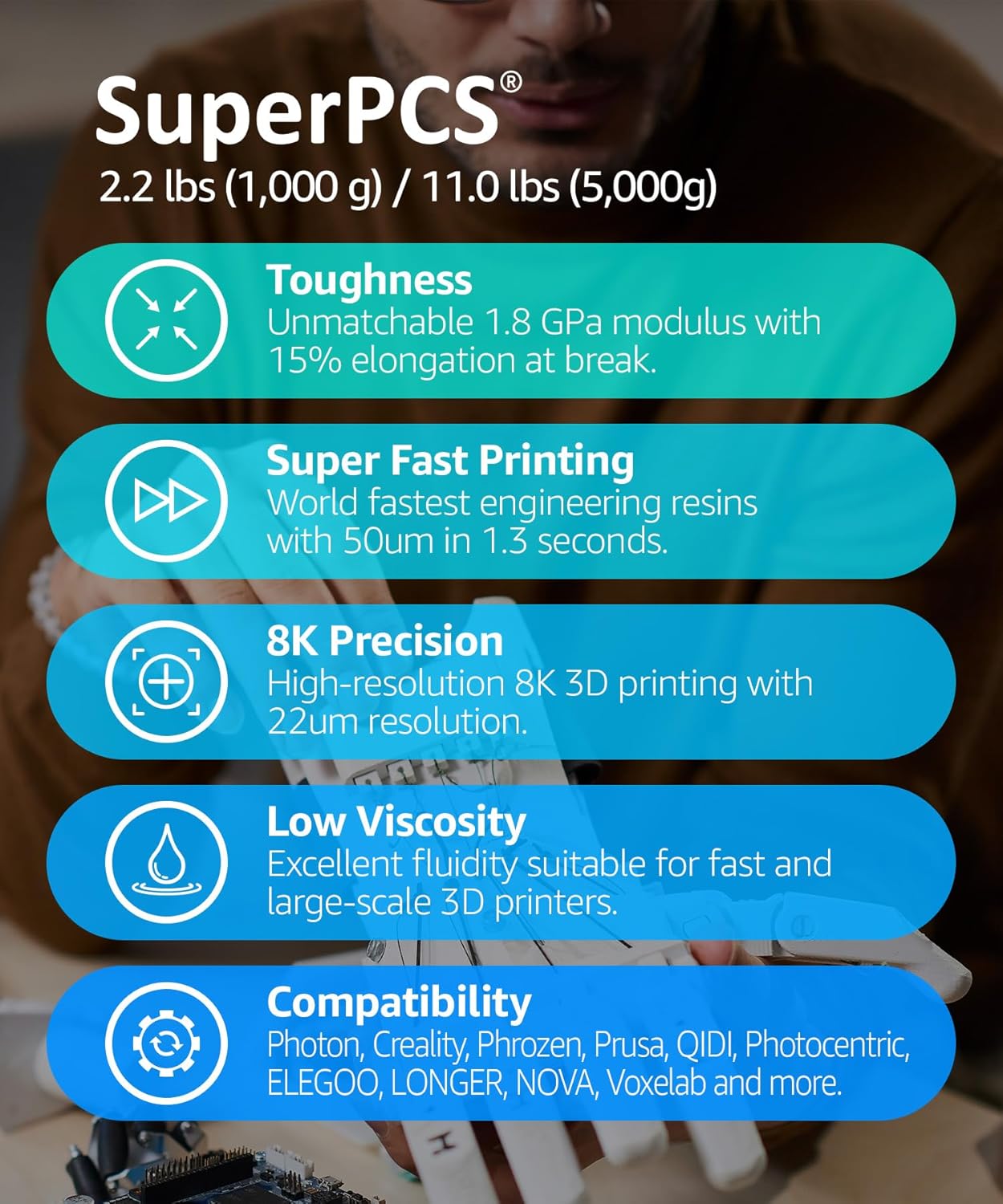
Figure 1: Key features of SuperPCS resin, highlighting its performance characteristics.
- Toughness: Features a 1.8 GPa tensile and 2.8 GPa flexural modulus with 15% elongation at break.
- Fast Printing: Capable of curing 50µm layers in 1.5 seconds on monochrome LCD printers.
- 8K Precision: Optimized for high-resolution 4K and 8K LCD systems, achieving 22µm resolution.
- Low Viscosity: Ensures excellent fluidity for high-speed, high-resolution printing.
- Broad Compatibility: Designed to work with various regular and mono LCD 3D printers.
2. Safety Information
Always prioritize safety when handling 3D printer resins. Failure to follow safety guidelines can result in personal injury or property damage.
- Personal Protective Equipment (PPE): Always wear appropriate PPE, including nitrile gloves and safety glasses, when handling liquid resin.
- Ventilation: Use resin in a well-ventilated area to minimize exposure to fumes.
- Skin Contact: Avoid direct skin contact. If resin comes into contact with skin, wash immediately with soap and water.
- Eye Contact: In case of eye contact, flush thoroughly with water for at least 15 minutes and seek medical attention.
- Ingestion: Do not ingest. If swallowed, do not induce vomiting. Seek immediate medical attention.
- Storage: Store resin in a cool, dry, dark place, away from direct sunlight and heat sources. Keep the bottle tightly sealed when not in use.
- Disposal: Dispose of cured resin and waste resin according to local regulations. Liquid resin should not be poured down drains.
3. Setup
Proper setup is crucial for successful 3D printing with SuperPCS resin.
3.1 Workspace Preparation
- Ensure your printing area is clean, well-ventilated, and free from direct sunlight.
- Prepare a flat, stable surface for your 3D printer.
- Have all necessary tools ready, including gloves, safety glasses, paper towels, and IPA (Isopropyl Alcohol) for cleaning.
3.2 Resin Handling
- Before each use, gently shake the SuperPCS resin bottle for at least 30 seconds to ensure proper mixing of components.
- Carefully pour the desired amount of resin into the printer's resin vat. Avoid overfilling.
- If the resin has been sitting for an extended period, allow it to reach room temperature (20-25°C / 68-77°F) before use.
3.3 Printer Compatibility
SuperPCS resin is formulated for broad compatibility with various LCD 3D printers. It is optimized for both regular and monochrome LCD systems.

Figure 2: SuperPCS resin is compatible with a wide range of mono and RGB LCD 3D printers.
For specific printer settings and profiles, refer to the 3DMaterials website or your printer manufacturer's recommendations. Common compatible brands include Photon, Creality, Phrozen, Prusa, QIDI, Photocentric, ELEGOO, LONGER, NOVA, Voxelab, and EPAX.
4. Operating Instructions
Follow these guidelines for optimal printing results with SuperPCS resin.
4.1 Recommended Print Settings
Optimal print settings can vary depending on your specific 3D printer model, ambient temperature, and desired layer height. The following are general recommendations:
- Layer Height: 0.025mm - 0.1mm (25-100µm). For 8K precision, use smaller layer heights.
- Bottom Exposure Time: 20-40 seconds (for initial layers to ensure adhesion).
- Normal Exposure Time: 1.5-3 seconds (for monochrome LCD printers at 50µm layer height). Adjust based on your printer's UV light power.
- Lift Speed: 40-60 mm/min.
- Retract Speed: 150-200 mm/min.
- Supports: Use medium to heavy supports for complex or overhanging geometries.
Always perform calibration prints to fine-tune settings for your specific setup.

Figure 3: SuperPCS resin offers excellent fluidity and various benefits for high-quality prints.
4.2 Post-Processing
- Washing: After printing, carefully remove the print from the build plate. Wash the printed part thoroughly in Isopropyl Alcohol (IPA) (95% or higher) or a dedicated resin cleaner for 2-5 minutes. Use an ultrasonic cleaner or a wash station for best results.
- Drying: Allow the part to air dry completely or use compressed air to remove any residual cleaning solution. Ensure no liquid remains on the surface before curing.
- Curing: Place the dried part in a UV curing chamber. Cure for 5-15 minutes, depending on the size and geometry of the part, and the power of your UV curing unit. Over-curing can lead to brittleness.
- Support Removal: Remove supports after washing and before final curing for easier detachment and a cleaner surface finish.

Figure 4: Examples of high-precision, durable parts printed with SuperPCS resin.
5. Mechanical Properties
SuperPCS resin is engineered for robust mechanical performance, suitable for functional prototypes and end-use parts.

Figure 5: Mechanical properties of SuperPCS resin (post-cured).
| Property | Metric Value | Imperial Value |
|---|---|---|
| Tensile Strength at Break | 48 MPa | 6,962 psi |
| Secant Modulus | 1,702 MPa | 247 ksi |
| Elongation at Break | < 15.0 % | < 15.0 % |
Note: Properties may vary depending on part geometry, printing orientation, and specific print settings. Data obtained from parts printed using a mono LCD printer, 50 µm, and post-cured with 20mW/cm² of 395 nm LED light for 10 minutes.
6. Maintenance
Proper maintenance ensures the longevity of your resin and printer components.
6.1 Cleaning the Resin Vat
- After printing, if you do not plan to print again soon, filter any unused resin from the vat back into its original bottle using a fine mesh filter to remove cured particles.
- Clean the resin vat with IPA and a soft cloth. Avoid abrasive materials that could scratch the FEP film.
- Inspect the FEP film for any damage or cloudiness. Replace if necessary.
6.2 Storing Unused Resin
- Store filtered resin in its original opaque bottle, tightly sealed.
- Keep the bottle in a cool, dry, and dark place, away from direct sunlight and UV light sources.
- Avoid extreme temperature fluctuations.
6.3 Disposal of Waste Resin
- Liquid Resin: Never pour liquid resin down the drain. Cure small amounts of liquid resin under UV light until solid, then dispose of it as regular plastic waste.
- IPA Waste: IPA used for washing parts will contain dissolved resin. Allow the IPA to sit in a clear container under sunlight until the resin precipitates and cures. Filter out the cured resin and dispose of the clean IPA responsibly or reuse it.
- Always adhere to local environmental regulations for chemical waste disposal.
7. Troubleshooting
This section addresses common issues encountered during 3D printing with resin.
7.1 Print Failures (e.g., parts not sticking to build plate, partial prints)
- Build Plate Leveling: Ensure the build plate is properly leveled and calibrated according to your printer's instructions.
- Bottom Exposure Time: Increase the bottom layer exposure time to improve adhesion to the build plate.
- Temperature: Ensure the ambient temperature is within the recommended range (20-25°C). Cold resin can lead to adhesion issues.
- Supports: Verify that your model has adequate and properly placed supports, especially for overhanging sections.
- Resin Quality: Ensure the resin is well-mixed and not expired.
7.2 Curing Issues (e.g., sticky parts, over-cured/brittle parts)
- Sticky Parts: Ensure parts are thoroughly washed and dried before post-curing. Increase post-curing time slightly if parts remain tacky.
- Over-cured/Brittle Parts: Reduce post-curing time. Ensure the UV light source is not too intense or the exposure duration is not excessive.
- Washing: Inadequate washing can leave uncured resin on the surface, making parts sticky.
7.3 Dimensional Inaccuracy
- Print Settings: Fine-tune normal exposure time. Over-exposure can lead to slight over-curing and dimensional expansion, while under-exposure can cause shrinkage.
- Calibration: Perform calibration prints (e.g., calibration matrix) to dial in exposure settings for precise dimensions.
- Post-Curing: Consistent post-curing is important. Excessive post-curing can sometimes affect dimensions.
8. Specifications
Detailed specifications for the 3DMaterials SuperPCS ENGR-C37L resin.

Figure 6: SuperPCS resin is available in 1000g and 5000g sizes.
| Property | Value |
|---|---|
| Brand | 3DMaterials |
| Model Number | ENGR-C37L |
| Material | 3D Printer Resin |
| Color (Current Variant) | White |
| Item Weight | 1000 Grams (1 kg) |
| Product Dimensions | 7.8 x 7.8 x 24 cm |
| Manufacturer | 3DMaterials Co., Ltd. |
| Compatible Devices | LCD 3D Printers (various brands) |
| Supported File Format | STL, OBJ (for 3D models) |
9. Warranty and Support
3DMaterials is committed to providing high-quality products and customer satisfaction.
9.1 Product Warranty
This product is covered by a standard manufacturer's warranty against defects in materials and workmanship. Please retain your proof of purchase for warranty claims. For specific warranty terms and conditions, refer to the official 3DMaterials website or contact customer support.
9.2 Customer Support
If you encounter any issues or have questions regarding the SuperPCS resin, please contact 3DMaterials customer support. Our team is available to assist you with technical inquiries, troubleshooting, and product information.
For the most up-to-date contact information, please visit the official 3DMaterials website: www.3dmaterials.com