
1. Introduction
This manual provides detailed instructions for the OOWOLF Monitor Light Bar Pro-Plus, Model TL03. It covers product setup, operational procedures, maintenance guidelines, troubleshooting tips, and comprehensive specifications. Please read this manual thoroughly to ensure proper use and to maximize the benefits of your monitor light bar.
2. Package Contents
Verify that all items listed below are included in your package:
- OOWOLF Computer Monitor Lamp
- Wireless Remote Control
- USB-C Charging Cable
- User Manual (this document)
3. Setup Guide
3.1 Mounting the Light Bar
The OOWOLF Monitor Light Bar is designed for easy and secure attachment to most monitors. It utilizes a combination of a gentle spring and a counterweight to maintain position without damaging your screen.
- Gently open the clamp mechanism on the light bar.
- Position the light bar on top of your monitor, ensuring the front light faces your desk and the backlight faces the wall behind the monitor.
- Adjust the counterweight at the back to ensure a stable fit. The small lip at the front helps prevent overlap with monitors that have small bezels.
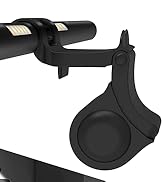
Figure 1: Illustration of the light bar's mounting mechanism.
3.2 Connecting Power
Connect the provided USB-C cable to the light bar's power input and the other end to a 5V USB power source (e.g., computer USB port, power bank, or USB wall adapter).
Figure 2: USB-C power connection.
4. Operating Instructions
The OOWOLF Monitor Light Bar is controlled via its wireless remote. Ensure the remote has power and is within range of the light bar.
4.1 Remote Control Functions
The wireless remote control allows for convenient adjustment of the light bar's settings. The remote features dedicated buttons for various functions:
- On/Off: Powers the light bar on or off.
- Brightness Adjustment (+/-): Increases or decreases the light intensity. This is a stepless dimming feature.
- Front Light Control: Toggles or adjusts the front-facing light.
- Backlight Control: Toggles or adjusts the rear-facing backlight.
- Indicate Light: (Function not explicitly detailed, typically a status indicator).

Figure 3: Wireless remote control functions.
4.2 Adjusting Brightness and Color Temperature
The light bar offers stepless dimming and adjustable color temperature to suit various tasks and environments.
- Brightness: Use the '+' and '-' buttons on the remote to adjust the brightness from 0% to 100%. The light bar remembers your last brightness setting.
- Color Temperature: The light bar supports color temperatures from 3100K (warm white) to 6500K (cool white). Use the dedicated color temperature buttons on the remote to cycle through or adjust the desired warmth.
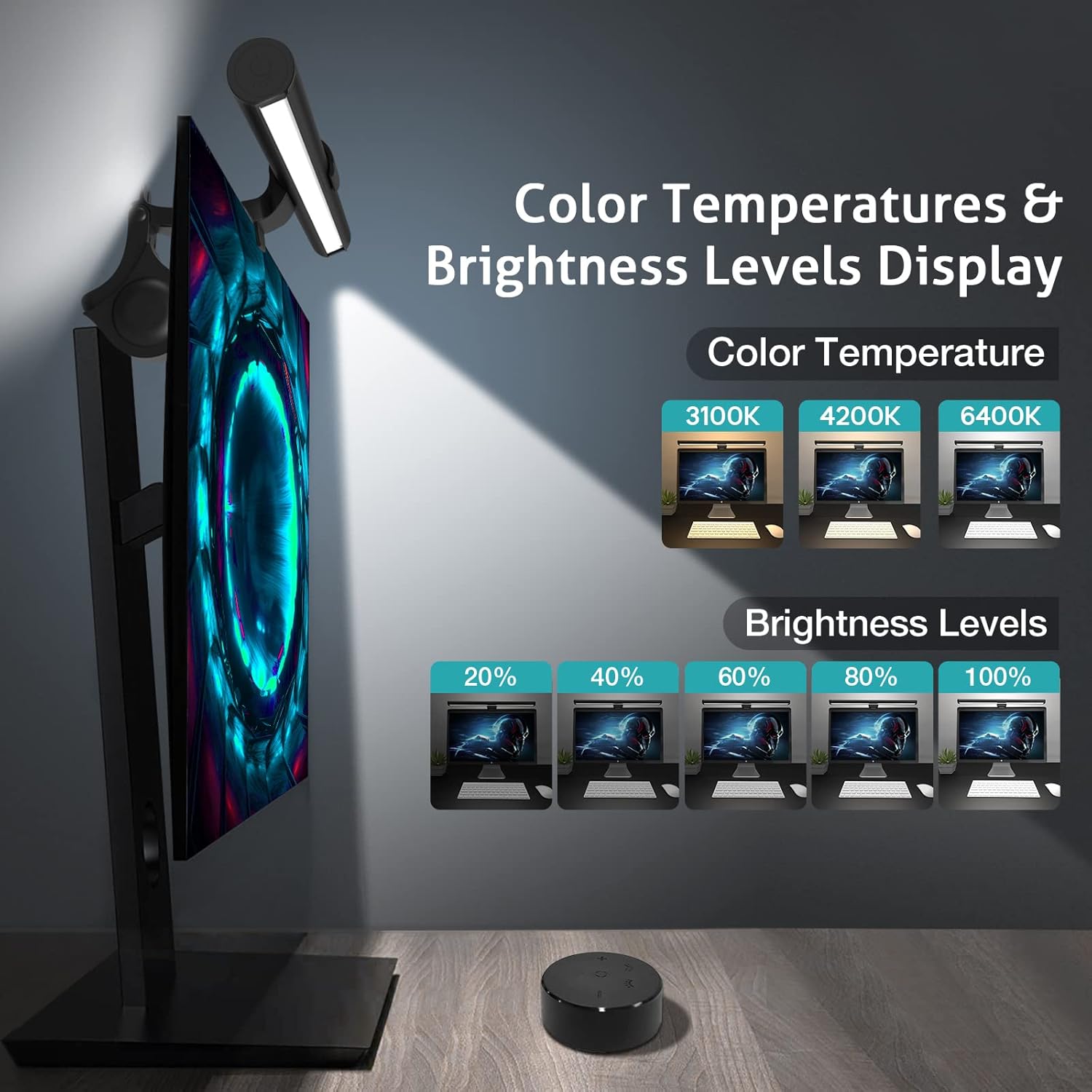
Figure 4: Color temperature and brightness level display.
4.3 Eye Care Features
The OOWOLF Monitor Light Bar incorporates several features designed to reduce eye strain and enhance visual comfort:
- No Blue Light Hazard: The lamp minimizes blue light exposure, which can contribute to eye fatigue during prolonged screen use.
- Flicker-Free Lighting: Advanced technology ensures a consistent and stable light output, eliminating visible flicker that can cause discomfort.
- High CRI (Color Rendering Index) ≥95: A high CRI ensures that colors on your screen and workspace appear more accurate and vibrant, closer to natural light.
- Asymmetric Light Source: The design directs light onto your desk area, preventing glare on your screen and direct light into your eyes. The 60° beam angle avoids glare, while the 120° beam angle supplies ample environmental light.
- Convenient Backlight Feature: The backlight provides a soft ambient glow behind your monitor, reducing the contrast between the screen and the surrounding environment, further minimizing eye strain.

Figure 5: Blue light reduction.

Figure 6: High CRI for natural color reproduction.

Figure 7: Asymmetric light design for glare prevention.

Figure 8: Dimmable front and back light functionality.
5. Maintenance
To ensure the longevity and optimal performance of your OOWOLF Monitor Light Bar, follow these simple maintenance guidelines:
- Cleaning: Disconnect the power before cleaning. Use a soft, dry cloth to wipe the light bar and remote control. Avoid using abrasive cleaners, solvents, or harsh chemicals, as these can damage the finish or electronic components.
- Storage: If storing the light bar for an extended period, ensure it is clean and dry. Store it in a cool, dry place away from direct sunlight and extreme temperatures.
6. Troubleshooting
If you encounter any issues with your OOWOLF Monitor Light Bar, please refer to the following common problems and solutions:
- Light Bar Does Not Turn On:
- Ensure the USB-C cable is securely connected to both the light bar and the power source.
- Verify that the power source (e.g., USB port, wall adapter) is functional.
- Check the remote control battery. Replace if necessary.
- Remote Control Not Responding:
- Ensure the remote control battery is not depleted.
- Confirm there are no obstructions between the remote and the light bar.
- If the issue persists, try unplugging the light bar from power for a few minutes and then reconnecting it to reset the device.
- Light Bar Appears Unstable on Monitor:
- Adjust the counterweight at the back of the light bar to achieve a more secure fit.
- Ensure the monitor's thickness is compatible with the light bar's clamping mechanism.
- Inconsistent Brightness or Flickering:
- While the light bar features flicker-free technology, ensure the power source provides stable 5V output.
- If using a USB hub, try connecting directly to a computer port or wall adapter.
7. Specifications
| Feature | Detail |
|---|---|
| Model Number | TL03 |
| Product Dimensions | 0.79"D x 16.14"W x 0.79"H |
| Item Weight | 1.19 pounds |
| Material | Aluminum |
| Finish Type | Polished |
| Light Source Type | LED |
| Number of Light Sources | 84 |
| Wattage | 5.00 Watts |
| Voltage | 5 Volts |
| Brightness | 300 Lumen |
| Color Temperature | 3100K - 6500K (Adjustable) |
| Color Rendering Index (CRI) | ≥95 |
| Control Method | Remote Control |
| Power Source | Corded Electric (USB-C) |
| Cable Length | 59 Inches |
| Special Features | Adjustable Color Temperature, Dimmable, Remote Control, Backlight, No Glare, Eye Caring, Flicker-Free |
8. Warranty Information
The OOWOLF Monitor Light Bar Pro-Plus (Model TL03) comes with a 1-year limited warranty from the date of purchase. This warranty covers manufacturing defects and issues arising from normal use. Please retain your proof of purchase for warranty claims. For specific terms and conditions, or to initiate a warranty claim, please contact customer support.
9. Customer Support
For further assistance, technical support, or inquiries regarding your OOWOLF Monitor Light Bar, please visit the official OOWOLF store or contact their customer service department.
OOWOLF Store: https://www.amazon.com/stores/OOWOLF/page/89547BC8-2A8C-41F2-9EE8-DA80D7F234C8
