
MYHGRC MYHGRC
MYHGRC Universal Remote Control Instruction Manual
Model: MYHGRC
Introduction
This manual provides detailed instructions for setting up and operating your MYHGRC Universal Remote Control. This remote is designed to control a wide range of audio/video devices, including televisions, Blu-ray/DVD players, streaming media players, soundbars, and cable receivers. Please read this manual carefully before use to ensure proper functionality and to maximize your user experience.
Product Overview
The MYHGRC Universal Remote Control offers a convenient solution for managing multiple entertainment devices with a single unit. Its ergonomic design and intuitive button layout ensure ease of use for all users.

Image: Front view of the MYHGRC Universal Remote Control.
Key Features:
- Universal compatibility with various audio/video devices.
- Lightweight and ergonomic design for comfortable handling.
- Durable ABS material construction.
- Infrared (IR) connectivity for stable performance.
- Simple setup process with direct code entry or automatic code search.

Image: Visual representation of the remote's features, including ABS material, infrared technology, stable performance, silicone buttons, comfortable design, and suitability for all users.
Device Compatibility:
This universal remote is compatible with a wide range of brands and device types, including:

Image: The remote control displayed alongside various compatible devices, including televisions, Blu-ray/DVD players, streaming media players, soundbars, and cable receivers.
- Televisions: Samsung, LG, Sony, TCL, Hisense, Sharp, Sanyo, Insignia, Philips, Toshiba, Hitachi, Panasonic, and many other brands.
- Blu-ray/DVD Players
- Streaming Media Players
- Soundbars
- Cable Receivers
Setup Instructions
1. Battery Installation
The remote control requires two AAA batteries (not included). Follow these steps to install them:
- Open the battery compartment cover on the back of the remote control.
- Insert two AAA batteries, ensuring the correct polarity (+ and -) as indicated inside the compartment.
- Close the battery compartment cover securely.
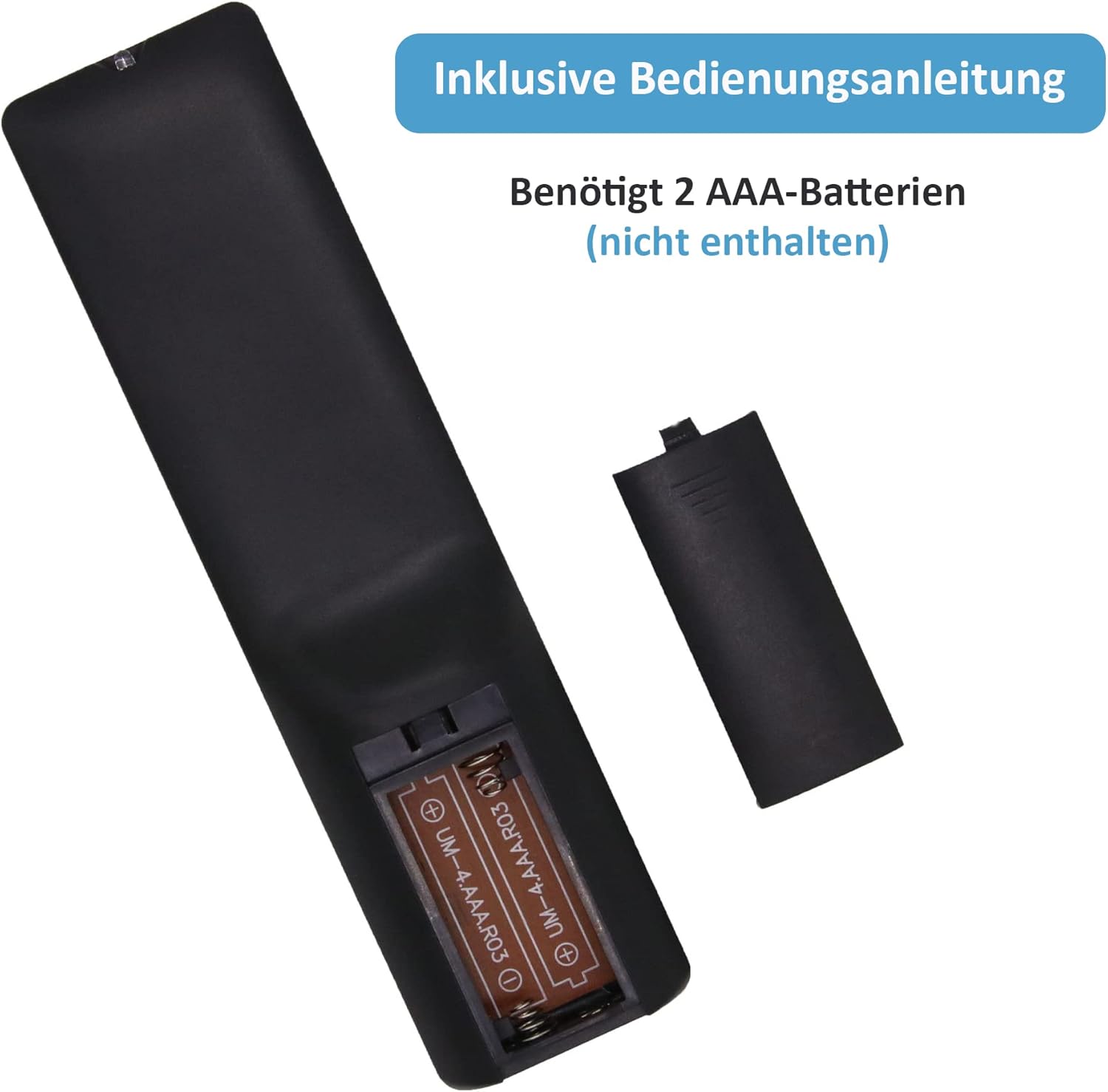
Image: Rear view of the remote control showing the open battery compartment and AAA batteries.
2. Programming the Remote Control
To control your devices, the remote must be programmed. There are two primary methods for programming:
- Direct Code Entry: This method involves entering a specific code for your device's brand. A detailed list of codes is provided in the manual included with your remote.
- Automatic Code Search: If you cannot find a code or prefer an automated process, the remote can search for the correct code. Refer to the included manual for step-by-step instructions on performing an automatic code search.
Note: The remote control includes a comprehensive manual with detailed operating steps for programming. Please follow those instructions carefully for successful setup.
Operating Instructions
Once programmed, your MYHGRC Universal Remote Control can operate your selected audio/video devices. Below is a guide to the remote's buttons and their general functions.

Image: Detailed diagram of the remote control with each button labeled and its corresponding function.
Button Functions:
- Power Button (Red): Turns the selected device on or off.
- Input: Selects video inputs.
- Device Selection Buttons (TV, CBL, DVD, AUX): Selects the device to be controlled (Television, Cable Box, DVD/Blu-ray Player, Auxiliary device).
- Playback Controls (Play, Stop, Pause, Fast Forward, Rewind, Record): Controls media playback functions for compatible devices.
- Setup: Used for remote control programming.
- A, B, C, D Buttons (Colored): Access additional functions for DVRs, cable, and satellite receivers.
- Home/Guide: Accesses functions on streaming devices or guide on cable/satellite receivers.
- Menu: Displays the on-screen menu.
- Navigation Pad (Up, Down, Left, Right, OK): Navigates menus and confirms selections.
- Exit: Exits current menu or function.
- Info (*): Displays show/content information on screen.
- Volume (+/-): Adjusts volume up or down.
- Mute: Mutes or unmutes audio.
- Channel (Up/Down): Changes channels up or down.
- Number Pad (0-9): Enters channel numbers or other numerical inputs.
- Dot (.): For selecting digital channels (e.g., 4.1).
- Enter: Confirms channel selection or other inputs. On some devices, the Enter button must be pressed after the channel.
Maintenance
To ensure the longevity and optimal performance of your MYHGRC Universal Remote Control, please follow these maintenance guidelines:
- Cleaning: Wipe the remote control with a soft, dry cloth. Do not use liquid cleaners or abrasive materials, as they may damage the surface or internal components.
- Battery Replacement: Replace batteries when the remote's response becomes sluggish or stops working. Always replace both batteries at the same time with new ones of the same type (AAA).
- Storage: Store the remote in a cool, dry place away from direct sunlight and extreme temperatures.
- Avoid Drops: While made from durable ABS material, avoid dropping the remote to prevent internal damage.
Troubleshooting
If you encounter issues with your universal remote control, refer to the following common problems and solutions:
- Remote is not working:
- Check if the batteries are installed correctly with the correct polarity.
- Replace old batteries with new AAA batteries.
- Ensure the remote is pointed directly at the device's IR receiver.
- Verify that the remote is programmed correctly for the selected device. Re-attempt programming if necessary.
- Some buttons do not work:
- This may indicate an incorrect code. Try programming the remote with a different code for your device, if available.
- Ensure the correct device mode (TV, CBL, DVD, AUX) is selected.
- Remote does not control a specific device:
- Confirm that the device is compatible with a universal remote.
- Try all available codes for your device brand from the included manual.
- Perform an automatic code search as described in the included manual.
- Short operating range:
- Replace the batteries.
- Ensure there are no obstructions between the remote and the device.
- The maximum range is approximately 10 meters (33 feet).
Specifications
| Brand | MYHGRC |
| Model Name | MYHGRC |
| Model Number | MYHGRC |
| Connectivity Technology | Infrared (IR) |
| Compatible Devices | Televisions, Blu-ray/DVD Players, Streaming Media Players, Soundbars, Cable Receivers |
| Maximum Supported Devices | 1 (at a time, after selection) |
| Color | Black |
| Material | ABS |
| Product Dimensions | Approximately 16.6 cm x 5 cm x 2 cm (6.5 x 2 x 0.8 inches) |
| Weight | Approximately 25 grams (0.88 ounces) |
| Remote Control Range | Approximately 10 meters (33 feet) |
| Batteries Required | 2 x AAA batteries (not included) |
| Country of Origin | China |

Image: Side and front views of the remote control with approximate dimensions in centimeters and inches.
Support
For any questions or further assistance regarding your MYHGRC Universal Remote Control, please do not hesitate to contact us. We are committed to providing a satisfactory solution to your inquiries.
Please refer to the contact information provided with your purchase or on the product packaging for direct support.
Related documentsMYHGRC

Ask a question about this manual
Ask about setup, troubleshooting, compatibility, parts, safety, or missing instructions. Manuals+ will review the question and use this page’s manual context to help answer it.