
1. Introduction
Thank you for choosing the AMIR Analog Alarm Clock. This manual provides detailed instructions for setting up, operating, and maintaining your new alarm clock. Please read this manual thoroughly before use to ensure proper function and longevity of the product.

Front view of the AMIR Analog Alarm Clock, showcasing its square design and clear analog dial.
2. Product Overview
Familiarize yourself with the components of your AMIR Analog Alarm Clock:

Detailed back view of the AMIR Analog Alarm Clock, indicating key controls.
- Speaker: Emits the alarm sound.
- Snooze/Light Button: Activates the snooze function and temporary night light.
- Alarm Switch (ON/OFF): Toggles the alarm function on or off.
- Alarm Knob: Used to set the desired alarm time.
- Time Knob: Used to set the current time.
- Battery Compartment: Houses the AA battery.
3. Setup
3.1 Battery Installation
- Open the battery compartment cover located on the back of the clock.
- Insert one (1) AA battery, ensuring the polarity (+/-) matches the diagram inside the compartment.
- Close the battery compartment cover securely.
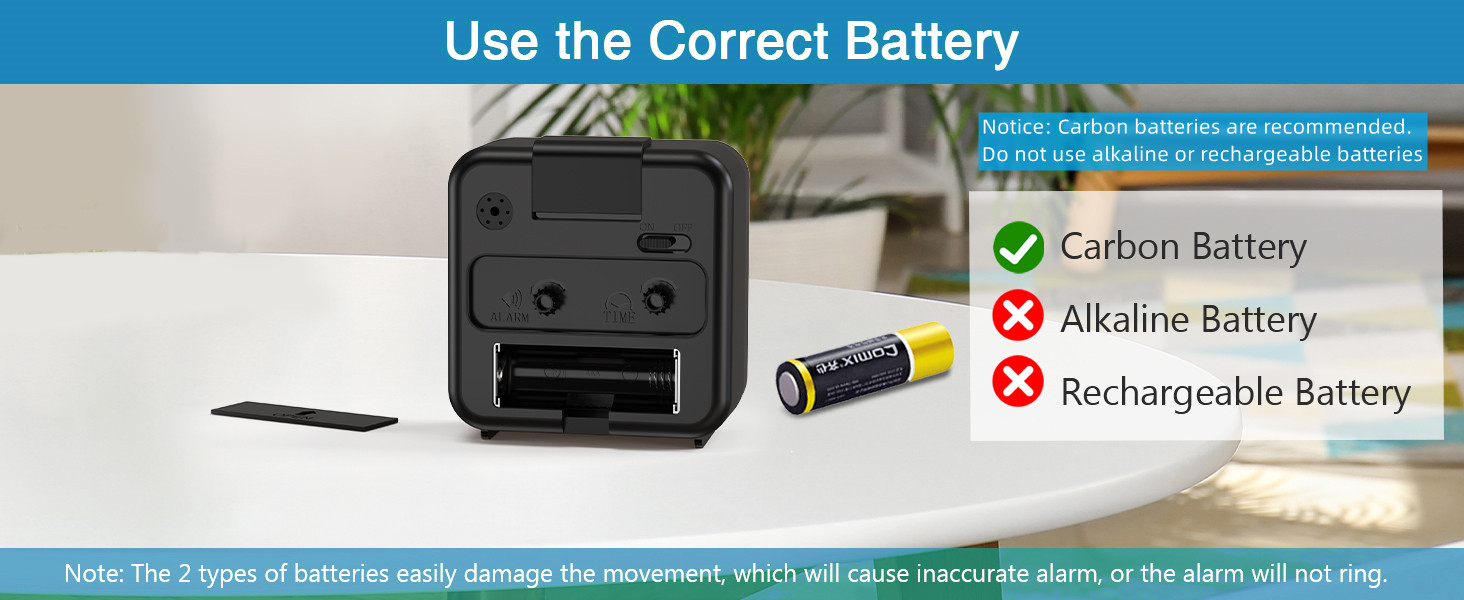
An illustration advising the use of carbon batteries and cautioning against alkaline or rechargeable batteries for optimal clock performance.
Important: Use high-quality carbon batteries. Avoid using strong alkaline or rechargeable batteries, as they can damage the movement and affect time accuracy or alarm function.
3.2 Setting the Current Time
- Locate the Time Knob on the back of the clock.
- Rotate the Time Knob in either direction until the hour and minute hands display the correct current time.
3.3 Setting the Alarm Time
- Locate the Alarm Knob on the back of the clock.
- Rotate the Alarm Knob until the alarm hand points to your desired wake-up time.
4. Operating Instructions
4.1 Activating/Deactivating the Alarm
- To activate the alarm, slide the Alarm Switch to the "ON" position.
- To deactivate the alarm, slide the Alarm Switch to the "OFF" position.
4.2 Snooze Function
When the alarm sounds, press the large Snooze/Light Button on the top of the clock. The alarm will pause for approximately 5 minutes and then sound again. This can be repeated until the alarm switch is turned off.

Graphic illustrating the 5-minute snooze function and the gradually increasing volume of the alarm sound.
4.3 Night Light Function
Press the large Snooze/Light Button on the top of the clock to temporarily illuminate the clock face. This light is designed for quick time checks in low-light conditions and will turn off when the button is released.

The alarm clock displaying its soft yellow night light feature, illuminating the dial for visibility in the dark.
4.4 Silent Operation
The AMIR Analog Alarm Clock features a non-ticking quartz movement, ensuring a quiet environment for sleep or work.

The alarm clock placed on a bedside table next to a sleeping person, emphasizing its silent, non-ticking movement for undisturbed sleep.
4.5 Ascending Beep Alarm
The alarm sound starts softly and gradually increases in volume, providing a gentle wake-up experience. If not turned off, the alarm will continue to ring for approximately 40-45 minutes, with 5-minute snooze intervals.
5. Maintenance
- Battery Replacement: Replace the AA battery when the clock hands slow down, the alarm weakens, or the night light dims. Always use carbon batteries.
- Cleaning: Wipe the clock with a soft, dry cloth. Do not use abrasive cleaners or immerse the clock in water.
- Storage: If storing the clock for an extended period, remove the battery to prevent leakage.
6. Troubleshooting
- Problem: Clock is not working or time is inaccurate.
- Solution: Check the battery. Ensure it is inserted correctly with the correct polarity. Replace with a fresh carbon AA battery. Avoid alkaline or rechargeable batteries as they can cause irregular operation.
- Problem: Alarm is not sounding.
- Solution: Ensure the Alarm Switch on the back of the clock is in the "ON" position. Check and replace the battery if necessary.
- Problem: Clock is making a constant grinding or ticking noise despite being advertised as silent.
- Solution: This can sometimes occur due to battery issues or minor movement misalignment. Try replacing the battery with a new, high-quality carbon AA battery. Gently tap the clock to see if the noise subsides. If the issue persists, contact customer support.
- Problem: Night light is dim or not working.
- Solution: The night light's brightness is dependent on battery strength. Replace the AA battery with a fresh one.
7. Specifications
| Brand | AMIR |
| Model | B0B5BYVG1D |
| Color | Black |
| Display Type | Analog |
| Special Features | Alarm, Large Display, Mood Light, Silent Clock, Snooze |
| Product Dimensions | 3"W x 3"H |
| Power Source | Battery Powered (1 AA battery required, not included) |
| Item Weight | 3.35 ounces |
| Frame Material | Metal |
8. Warranty and Support
AMIR is committed to providing high-quality products. Your AMIR Analog Alarm Clock comes with the following:
- 6 Months Return Policy
- 24 Months Warranty
- Lifetime Support
For any questions, concerns, or technical assistance, please contact AMIR customer support through the retailer's platform or the official AMIR website. Please have your product model number (B0B5BYVG1D) and purchase information ready when contacting support.