1. Introduction
This manual provides essential instructions for the safe and effective use of your PREMIER ADAPTER 8 Mode 30V 9W LED Controller Power Supply. This device is designed to power low-voltage LED lighting products, offering multiple lighting effects. Please read this manual thoroughly before installation and operation.
Safety Information
- Ensure the power supply is disconnected from the mains before any installation or maintenance.
- This product is designed for use with 30V 0.3A low-voltage LED devices only. Using it with incompatible devices may cause damage or safety hazards.
- Do not disassemble or modify the power supply. Refer all servicing to qualified personnel.
- Keep away from children.
2. Product Overview
The PREMIER ADAPTER 8 Mode LED Controller Power Supply is a Class 2 power unit designed for various low-voltage LED applications. It features a push-button control for cycling through 8 distinct lighting modes.
Key Features
- 8 Function Modes: Includes Combination, In Waves, Sequential, Slo-Glo, Chasing/Flash, Slow Fade, Twinkle/Flash, and Steady On.
- Push-Button Control: Easily switch between lighting modes.
- Compatibility: Specifically designed for 30V 0.3A low-voltage LED devices.
- Certifications: Conforms to UL/UKCA/CE standards, ensuring safety and quality.
- Indoor/Outdoor Use: Raintight design suitable for both indoor and outdoor environments.
What's in the Box
- One (1) 30V 9W LED Power Supply with 8-mode button switch and screw socket.

Image 2.1: Front view of the PREMIER ADAPTER 8 Mode 30V 9W LED Controller Power Supply, showing the US plug and the output connector with a mode button.
3. Setup
Follow these steps to correctly set up your LED Controller Power Supply:
- Verify Compatibility: Before connecting, ensure your LED device requires a 30V, 0.3A, 9W power supply and has a compatible two-pin screw-type connector. Check the voltage, current, and wattage specifications of your LED lights.
- Connect the LED Device: Align the two-pin screw-type connector of your LED lighting device with the output port of the power supply. Gently push and twist the connector clockwise until it is securely fastened.
- Plug into Power Outlet: Insert the US 2-pin plug of the power supply into a standard 120V AC wall outlet.
- Power On: Once connected, your LED lights should illuminate. If not, refer to the Troubleshooting section.

Image 3.1: Visual guide illustrating the correct connection of the two-pronged spiral interface and examples of incorrect connections. The image also highlights the 8-function display button.
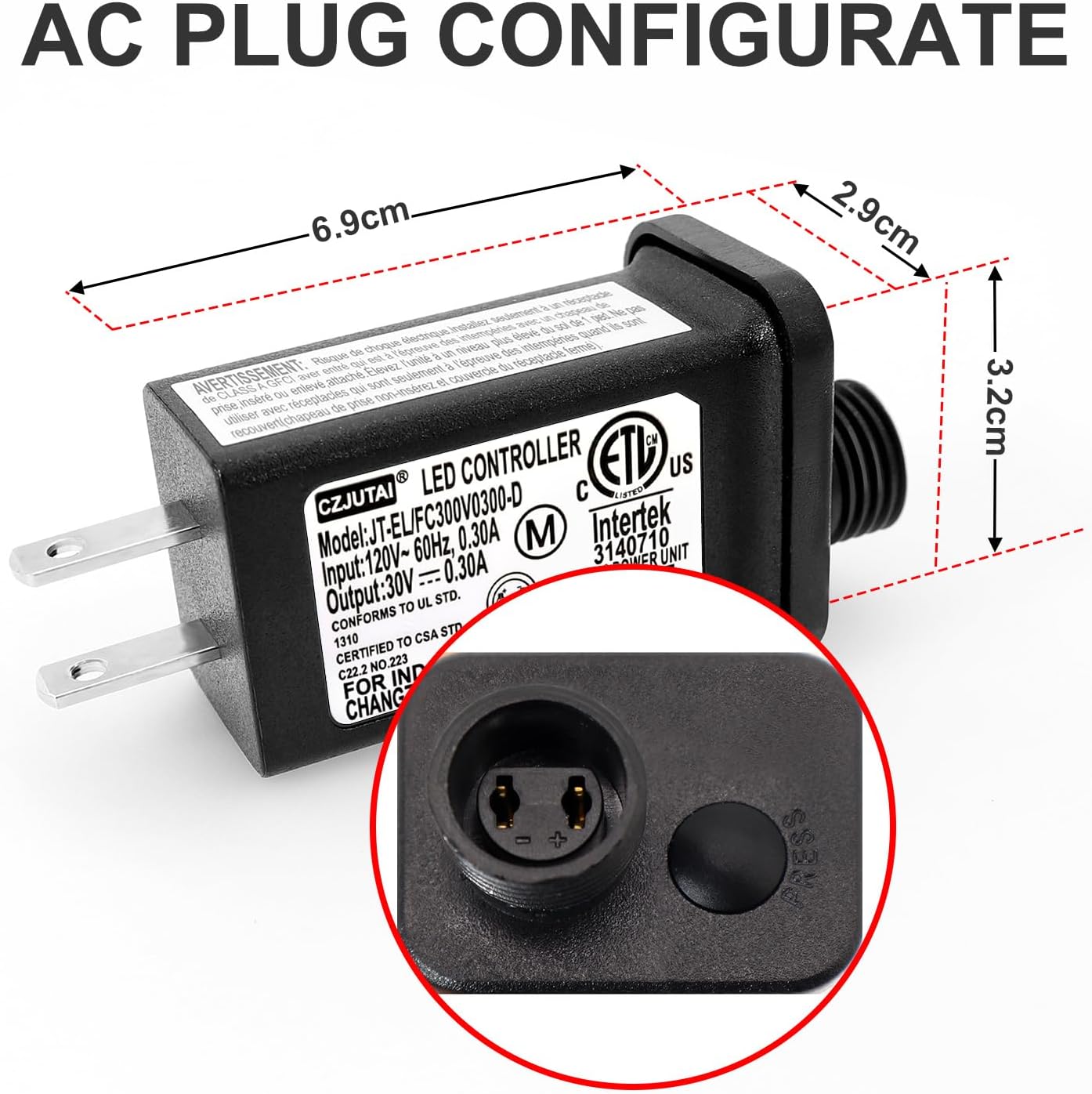
Image 3.2: Diagram showing the physical dimensions of the power supply unit, including length, width, and height in centimeters.
Compatibility with Other Models
This adapter is also compatible with other CZJUTAI LED Controller models, specifically JT-EL/FC300V0120-C (30V, 0.20A, 0.12A output) and JT-EL/FC300V0200-C (30V, 0.20A, 0.20A output), provided they use the same two-pin screw socket type.

Image 3.3: Visual representation of the power supply's compatibility with other CZJUTAI LED controller models, highlighting the matching socket type.
4. Operating Instructions
The LED Controller Power Supply features a single push-button to cycle through its 8 lighting modes.
- Power On: Once connected to a power source and your LED lights, the unit will typically default to the first mode or the last mode used.
- Change Modes: Press the small black button located on the output end of the power supply to cycle through the following 8 modes:
- Combination
- In Waves
- Sequential
- Slo-Glo
- Chasing/Flash
- Slow Fade
- Twinkle/Flash
- Steady On
- Select Mode: Continue pressing the button until your desired lighting effect is displayed. The unit will retain the selected mode until the power is disconnected.
Applications
This power supply is suitable for various 30V 0.3A low-voltage LED devices, including:
- Holiday decoration lights
- Christmas tree lights
- LED string lights
- Lawn lamps
- Curtain lights
- Fairy lights
- Rope lights

Image 4.1: Examples of various LED lighting products that can be powered by this controller, such as laser lights, Christmas LED decorations, and lawn lamps.
5. Maintenance
Proper maintenance ensures the longevity and safe operation of your LED Controller Power Supply.
- Cleaning: Disconnect the power supply from the outlet before cleaning. Use a soft, dry cloth to wipe the exterior. Do not use liquid cleaners or immerse the unit in water.
- Storage: When not in use, store the power supply in a cool, dry place, away from direct sunlight and extreme temperatures.
- Inspection: Periodically inspect the power supply and its cables for any signs of damage, such as frayed wires, cracks, or loose connections. If damage is found, discontinue use immediately and replace the unit.
- Environmental Use: This power supply is designed for both indoor and outdoor use, featuring a raintight construction. However, avoid prolonged submersion in water or exposure to extreme weather conditions beyond its intended design.

Image 5.1: The power supply unit shown with water splashing on it, illustrating its suitability for indoor and outdoor use due to its raintight design.
6. Troubleshooting
If you encounter issues with your LED Controller Power Supply, refer to the following common problems and solutions:
| Problem | Possible Cause | Solution |
|---|---|---|
| LED lights do not turn on. | No power to the outlet, loose connection, incompatible LED device, faulty power supply. | Check the power outlet with another device. Ensure all connections are secure. Verify your LED device's voltage and current requirements match the power supply. If issues persist, the power supply may be faulty. |
| LED lights flicker or dim. | Loose connection, overloaded circuit, faulty LED lights. | Ensure connections are tight. Confirm the total wattage of your LED lights does not exceed the power supply's 9W capacity. Test with different LED lights if possible. |
| Mode button does not change effects. | Button malfunction, internal fault. | Ensure the button is pressed firmly. Disconnect and reconnect power to reset the unit. If the problem continues, the unit may be defective. |
| Power supply feels excessively hot. | Overload, poor ventilation, internal fault. | Immediately disconnect power. Ensure the total wattage of connected lights is within the 9W limit. Ensure the unit has adequate ventilation. If overheating persists, discontinue use. |
If troubleshooting steps do not resolve the issue, please contact customer support for further assistance.
7. Specifications
| Specification | Detail |
|---|---|
| Model | CZJUTAI JT-EL/FC300V0300-C 30V9W |
| Input | 120V~, 60Hz, 0.30A |
| Output | 30V — 0.30A, 9W |
| Plug Type | US 2-Pin |
| LED Modes | 8 (Combination, In Waves, Sequential, Slo-Glo, Chasing/Flash, Slow Fade, Twinkle/Flash, Steady On) |
| Certifications | UL, UKCA, CE, Intertek 3140710, CSA STD. C22.2 NO.223 |
| Environmental Rating | Raintight (For Indoor and Outdoor Use) |
| Item Weight | 1.76 ounces (50 Grams) |
| Package Dimensions | 4.17 x 2.17 x 1.73 inches |
| Manufacturer | CZJUTAI |

Image 7.1: Certifications and warranty information, including CE, RoHS compliance, and a 3-year warranty seal.
8. Warranty and Support
Warranty Information
This PREMIER ADAPTER product is covered by a 3-Year Warranty from the date of purchase. This warranty covers manufacturing defects and ensures the product meets its specified performance. Please retain your proof of purchase for warranty claims.
EU Spare Part Availability Duration: 3 Years.
Customer Support
For technical assistance, troubleshooting not covered in this manual, or warranty claims, please contact PREMIER ADAPTER customer support. Refer to the product packaging or the retailer's website for contact details.
When contacting support, please have your product model number (JT-EL/FC300V0300-C 30V9W) and purchase information ready.


