
1. Introduction
This manual provides detailed instructions for the safe and effective use of your HTRC P35 Smart Battery Charger and Maintainer. The HTRC P35 is an intelligent, multi-functional device designed to charge and maintain various 12V and 24V batteries, including lead-acid (AGM, Gel, MF, EFB, SLA, VRLA, WET), Lithium, and LiFePO4 types. It features a 7-level automatic charging process, a repair mode for old batteries, and multiple safety protections. Please read this manual thoroughly before operating the device.

Figure 1: HTRC P35 Smart Battery Charger. This image displays the main unit of the HTRC P35 charger, featuring its digital display, control buttons, power plug, and red and black alligator clips for battery connection.
2. Safety Instructions
To prevent personal injury or damage to the charger or battery, always observe the following safety precautions:
- Read all instructions before using the charger.
- Do not charge non-rechargeable batteries. This charger is designed for 12V/24V lead-acid (AGM, Calcium, GEL, MF, EFB, SLA, VRLA, WET), Lithium, and LiFePO4 batteries only.
- Ensure proper ventilation during charging. Batteries can produce explosive gases.
- Avoid sparks and flames near the battery.
- Wear eye protection and gloves when working with batteries.
- Connect the charger to the battery correctly: Connect the red (+) clamp to the positive terminal and the black (-) clamp to the negative terminal. Ensure a secure connection.
- Disconnect the AC power before connecting or disconnecting the battery clamps.
- Do not expose the charger to rain or moisture. It is designed for indoor use.
- Keep out of reach of children.
- Do not operate the charger if it has been damaged in any way.
- The charger includes multiple safety protections: spark-proof, short-circuit, reverse polarity, undervoltage, overvoltage, overcurrent, and overheat protection. The casing is made of flame-retardant material.
3. Package Contents
Verify that all items are present in the package:
- HTRC P35 Smart Battery Charger Unit
- Reinforced Alligator Clips with Protective Cover
- 2x Cable Lugs for Long-Term Connection
- Power Cable (3m pure copper core)
- User Manual

Figure 2: Package Contents. This image illustrates all components included with the HTRC P35 charger: the main charger unit, power cable, alligator clips, cable lugs, and the user manual.
4. Product Overview
The HTRC P35 is designed for versatility and efficiency, offering advanced features for battery charging and maintenance.
4.1 Key Features
- Wide Application: Compatible with 12V/24V Lead-acid (AGM, Calcium, GEL, MF, EFB, SLA, VRLA, WET), Lithium, and LiFePO4 batteries.
- 7-Level Automatic Charging: Optimizes battery power precisely and gently through stages including desulfation, soft start, bulk charging, absorption, trickle charge, battery test, recondition, float & maintenance, and small current maintenance.
- Intelligent Repair Mode: Activates and repairs old, weak, or idle lead-acid batteries.
- Multiple Safety Protections: Spark-proof, short-circuit, reverse polarity, undervoltage, overvoltage, overcurrent, and overheat protection.
- User-Friendly Interface: 4 charging modes selectable with a single button, 3-level current adjustment (up to 35A for 12V, 18A for 24V).
- LCD Display: Shows battery voltage, charging current, charging temperature, and full battery status.
- Automatic Temperature Compensation: Adjusts charging power based on ambient temperature to prevent over-charging in hot weather and under-charging in cold weather.
4.2 Supported Battery Types
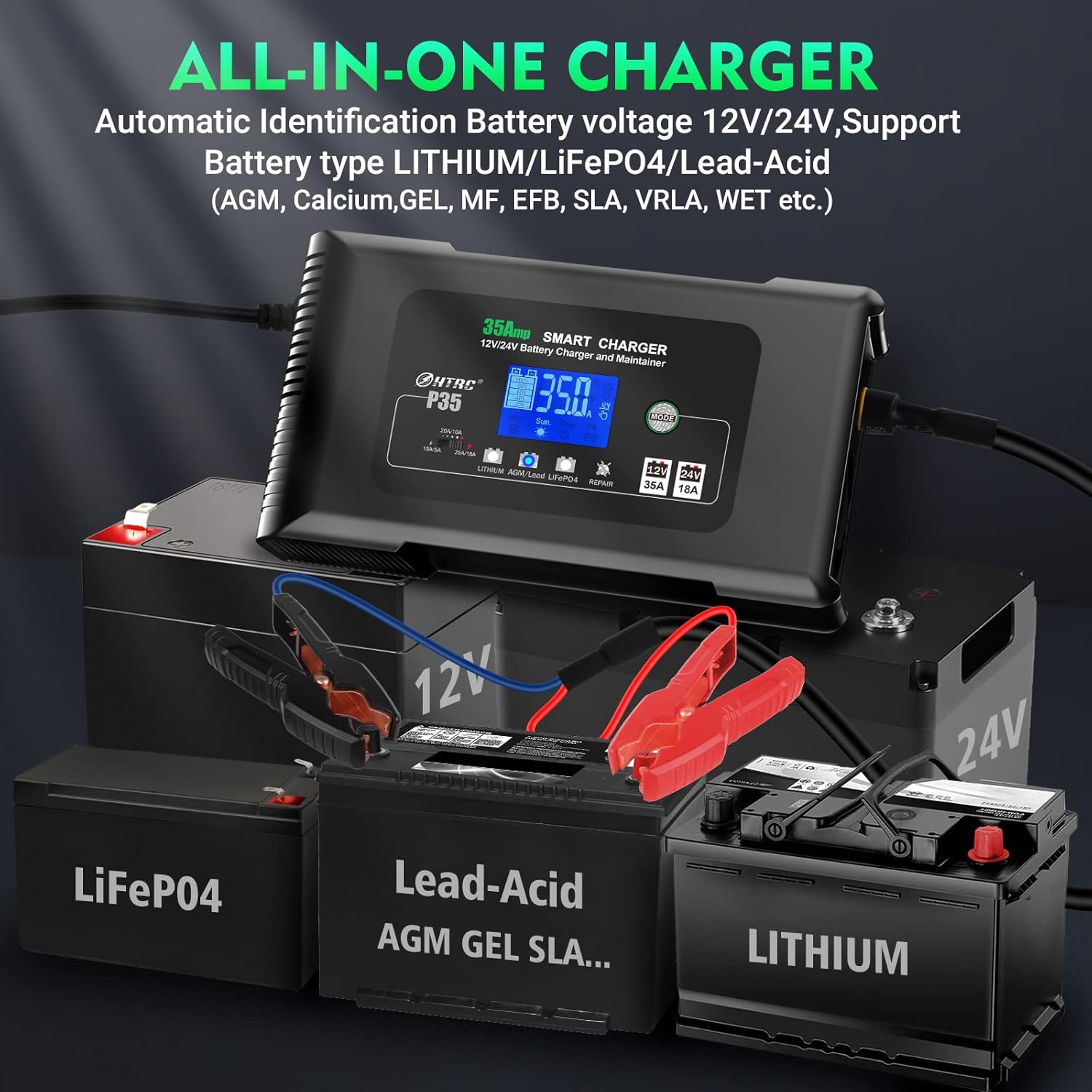
Figure 3: All-in-One Charger. This image highlights the HTRC P35's compatibility with multiple battery types, including Lithium, LiFePO4, and various Lead-Acid batteries (AGM, GEL, SLA).
The HTRC P35 automatically identifies 12V/24V battery voltage and supports the following battery chemistries:
- Lead-Acid Batteries: AGM, Calcium, GEL, MF (Maintenance Free), EFB (Enhanced Flooded Battery), SLA (Sealed Lead-Acid), VRLA (Valve Regulated Lead-Acid), WET (Flooded).
- Lithium Batteries
- LiFePO4 Batteries
Important: Do not attempt to charge other types of batteries not listed above.
5. Specifications
| Parameter | Value |
|---|---|
| Brand | HTRC |
| Model Number | P35 |
| Input Voltage | 12 Volts |
| Output Voltage | 12 Volts (DC) |
| Current Rating | 35 A |
| Amperage | 35 A |
| Product Dimensions | 12P x 13l x 6.5H cm |
| Item Weight | 1000 Grams |
| Compliance | CE |
6. Setup
Follow these steps to set up your HTRC P35 battery charger:
- Ensure the charger is disconnected from AC power before making any battery connections.
- Identify battery terminals: Locate the positive (+) and negative (-) terminals on your battery. The positive terminal is usually marked with a plus sign and is larger, while the negative terminal is marked with a minus sign.
- Connect the red (+) alligator clip from the charger to the positive (+) terminal of the battery.
- Connect the black (-) alligator clip from the charger to the negative (-) terminal of the battery. Ensure both connections are firm and secure.
- Plug the charger's power cable into a standard AC power outlet. The charger will power on and display information on its LCD screen.

Figure 4: Connecting the Charger. This image shows a person connecting the red and black alligator clips of the HTRC P35 charger to a car battery, demonstrating the proper setup procedure.
7. Operating Instructions
The HTRC P35 offers various modes and settings for optimal battery charging.
7.1 Mode Selection
The charger features 4 selectable modes. Press the "MODE" button to cycle through the available options:

Figure 5: 4 Modes Selectable. This image illustrates the charger's display indicating the different charging modes: Lithium, AGM/Lead-acid, LiFePO4, and Repair, which can be selected using the "MODE" key.
- Lithium Mode: For 12V/24V Lithium batteries.
- AGM/Lead-acid Mode: For 12V/24V AGM, Gel, MF, EFB, SLA, VRLA, WET lead-acid batteries.
- LiFePO4 Mode: For 12V/24V LiFePO4 batteries.
- Repair Mode: Specifically designed to repair and activate old, weak, or idle lead-acid batteries. This mode is not for Lithium or LiFePO4 batteries.
Select the mode that corresponds to your battery type. The charger will automatically detect the battery voltage (12V or 24V).
7.2 Charging Process
The HTRC P35 utilizes a 7-level smart charging process to optimize battery health and longevity.
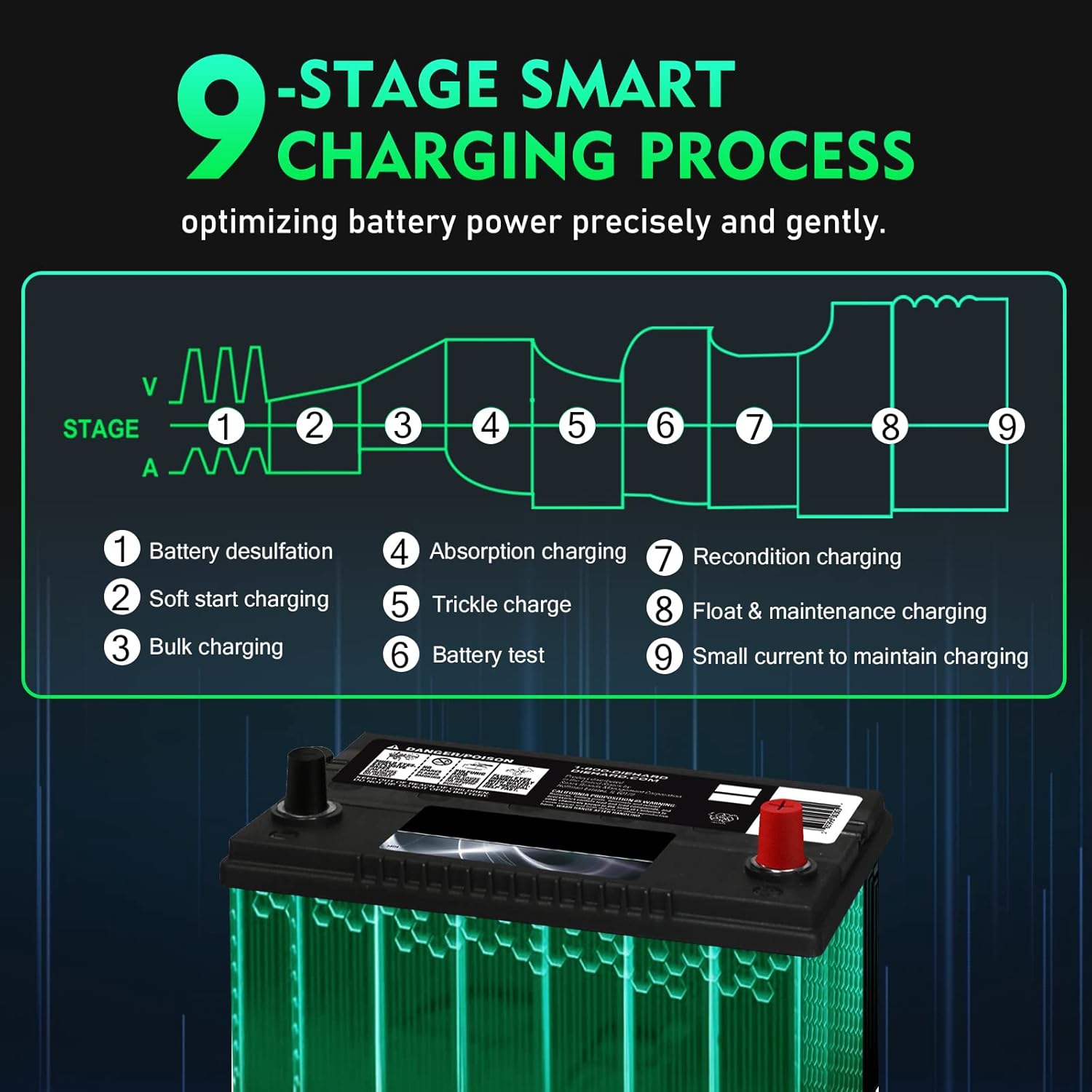
Figure 6: 9-Stage Smart Charging Process. This diagram visually explains the nine stages of the charging process, including battery desulfation, soft start, bulk charging, absorption, trickle charge, battery test, recondition, float & maintenance, and small current maintenance.
- Battery Desulfation: Removes sulfate from battery plates.
- Soft Start Charging: Gradually introduces current to the battery.
- Bulk Charging: Charges the battery to approximately 80% capacity.
- Absorption Charging: Charges the battery to 100% at a decreasing current.
- Trickle Charge: Maintains the battery at full charge.
- Battery Test: Checks battery condition.
- Recondition Charging: Restores battery capacity (part of repair mode).
- Float & Maintenance Charging: Keeps the battery at optimal voltage.
- Small Current to Maintain Charging: Ensures long-term battery health.
7.3 Current Adjustment
The charger allows for 3-level current adjustment (BIS 35A). Refer to the charger's display for current selection options.
- For 12V batteries: Charging current can be adjusted from 10A to 35A.
- For 24V batteries: Charging current can be adjusted from 5A to 18A.
7.4 Automatic Temperature Compensation

Figure 7: Automatic Temperature Compensation. This image shows the charger's display adapting to different temperatures, indicating its ability to adjust charging parameters for both hot and cold weather conditions to prevent over or under-charging.
The charger automatically adjusts its charging parameters based on the ambient temperature. This feature helps prevent over-charging in hot environments and under-charging in cold environments, ensuring optimal battery health and performance across various climates.
8. Maintenance
Proper maintenance ensures the longevity and reliable operation of your HTRC P35 charger.
- Cleaning: Disconnect the charger from power and wipe the exterior with a soft, dry cloth. Do not use solvents or abrasive cleaners.
- Storage: Store the charger in a cool, dry place when not in use. Keep cables neatly coiled.
- Cable Inspection: Regularly inspect the power cable and battery clamps for any signs of damage, wear, or corrosion. Replace if necessary.
- Fuse Replacement: The charger features a replaceable fuse. If the charger stops functioning, check the fuse and replace it with one of the same rating if blown.
9. Troubleshooting
If you encounter issues with your HTRC P35 charger, refer to the following common problems and solutions:
- Charger does not power on:
- Ensure the power cable is securely plugged into a working AC outlet.
- Check the charger's internal fuse and replace if blown.
- Battery not charging:
- Verify that the red (+) and black (-) alligator clips are correctly and securely connected to the battery terminals.
- Ensure the correct charging mode is selected for your battery type.
- The battery might be severely discharged or damaged. Try the "Repair Mode" for lead-acid batteries if applicable.
- Error message on LCD:
- Refer to the specific error code displayed on the screen. Common errors relate to reverse polarity, short circuits, or over-temperature.
- Disconnect the charger, resolve the issue (e.g., correct polarity), and reconnect.
- Charger gets hot during operation:
- Some heat generation is normal during charging.
- Ensure adequate ventilation around the charger. If it becomes excessively hot or displays an overheat warning, disconnect it and allow it to cool down.
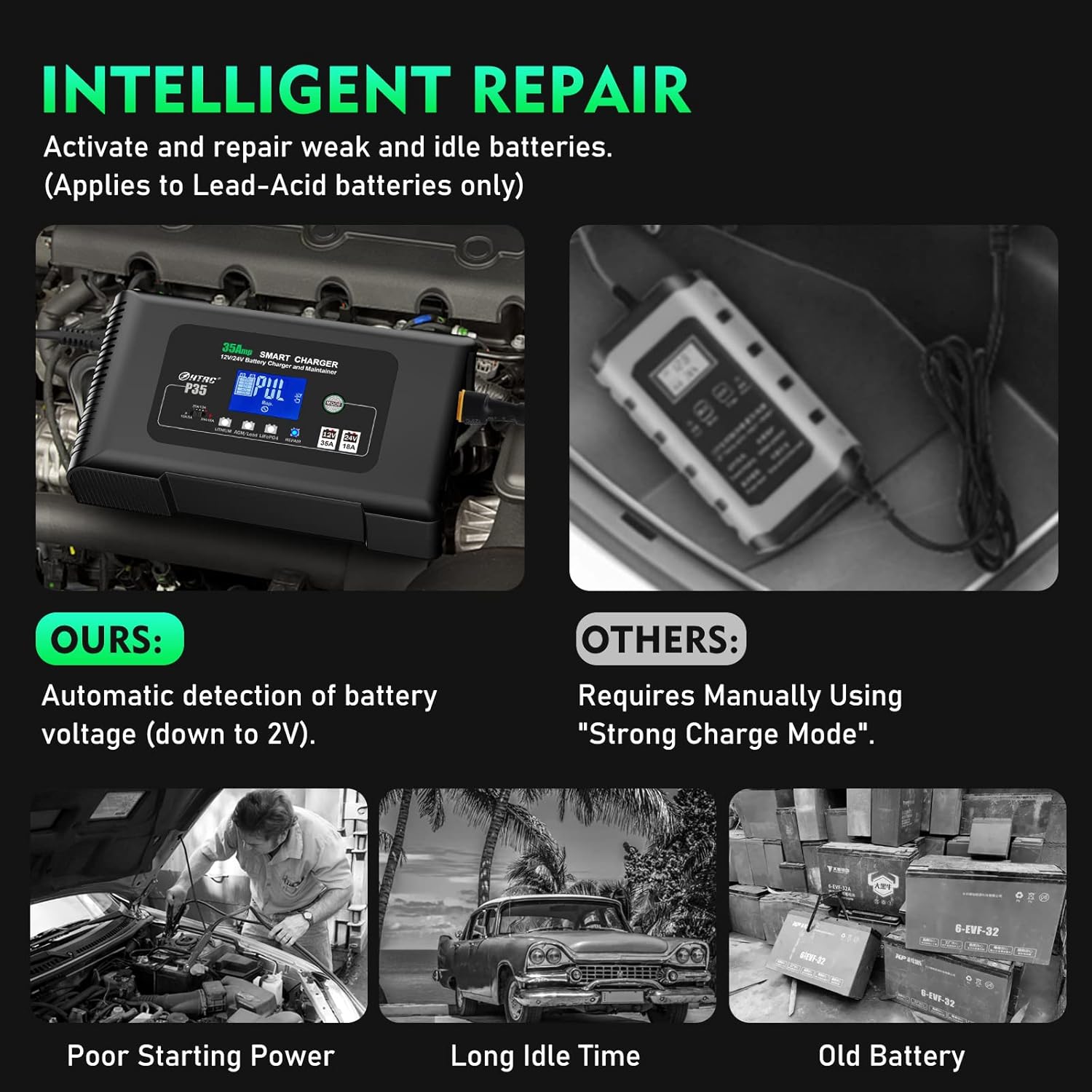
Figure 8: Intelligent Repair Function. This image illustrates the HTRC P35 charger in its repair mode, designed to activate and restore weak or idle lead-acid batteries, contrasting it with other chargers that might require manual strong charge modes.
10. Warranty and Support
For any questions, technical assistance, or warranty claims regarding your HTRC P35 Smart Battery Charger, please contact HTRC customer support. Refer to the contact information provided with your purchase documentation or visit the official HTRC website for support details.
HTRC is committed to providing advanced battery chargers and comprehensive after-sales support.


