
Introduction
This manual provides essential instructions for the safe and effective use, charging, and maintenance of your Zeee 4S Lipo Battery 10000mAh 14.8V 120C with EC5 Connector. Please read this manual thoroughly before using the battery to ensure proper operation and longevity.
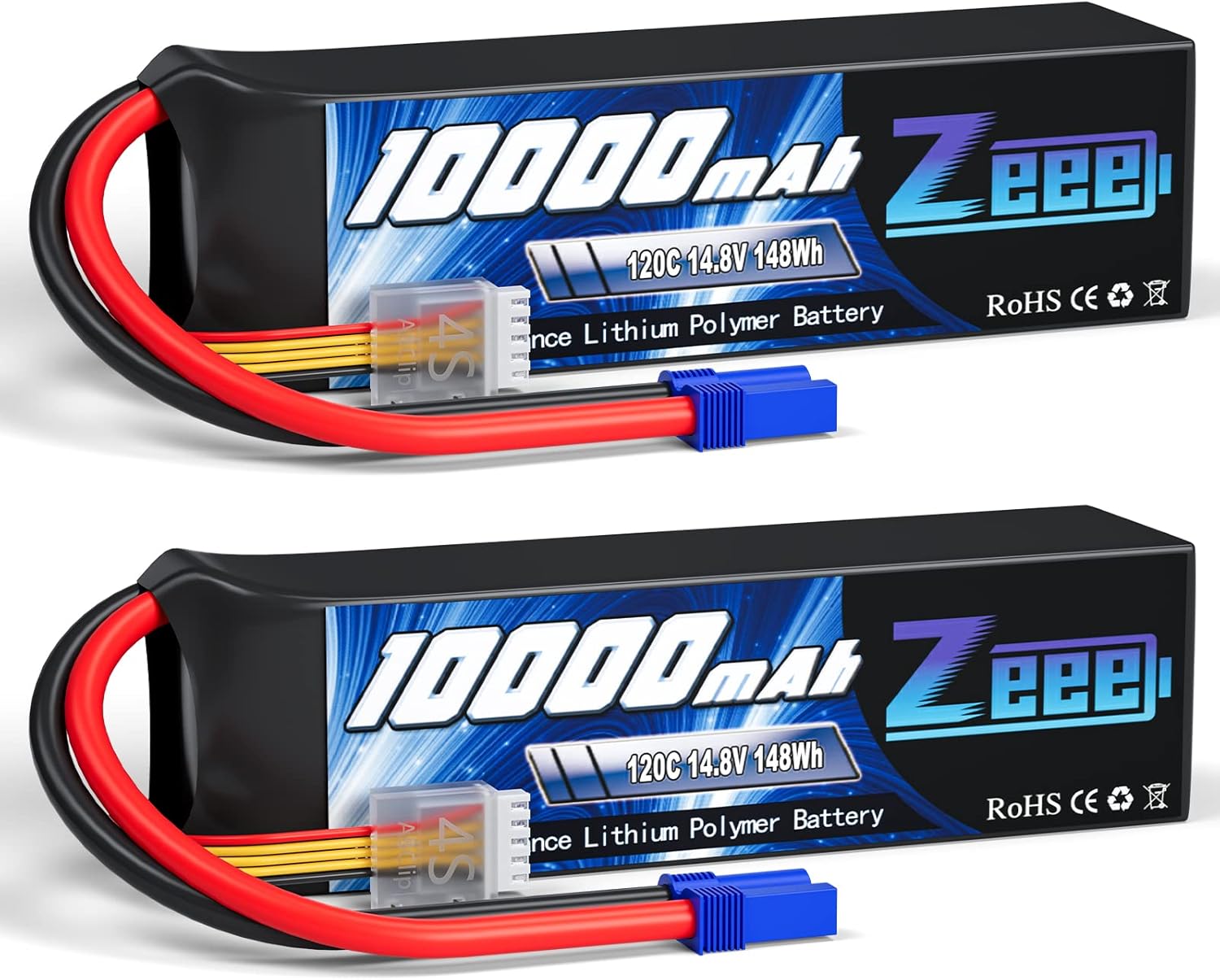
Image: Two Zeee 4S 10000mAh 14.8V Lipo Batteries, featuring black soft cases, red and black main power wires with blue EC5 connectors, and white JST-XH balance connectors.
Product Specifications
The Zeee 4S 10000mAh Lipo Battery is designed for high-performance RC models. Key specifications are detailed below:
| Feature | Specification |
|---|---|
| Battery Voltage | 14.8V (4S) |
| Capacity | 10000mAh |
| Discharge Rate | 120C |
| Configuration | 4S1P |
| Cell Voltage Range | 3.2V - 4.2V |
| Connector Type | EC5 |
| Balance Connector | JST-XH |
| Dimensions (L*W*H) | 169mm * 48mm * 42mm (6.65 * 1.89 * 1.65 inches) |
| Weight | 713g (25.15oz) |

Image: A diagram illustrating the precise dimensions (length, width, height) of the Zeee 4S 10000mAh Lipo Battery, along with its weight and key specifications.

Image: Detailed view of the Zeee Lipo Battery's components, highlighting the JST-XH balance connector, EC5 discharging plug, and 10AWG silicone wire.
Safety Warnings and Guidelines
Lithium Polymer (LiPo) batteries require careful handling to prevent damage, fire, or injury. Adhere to the following safety guidelines:
- Read Manual: Always read and understand the safety manual before using the battery.
- LiPo Specific Charger: Use only a Lithium Polymer (LiPo) specific balance charger. Using incorrect chargers can lead to severe damage or fire.
- Charge Rate: The suggested charge rate is 0.5C - 1C. Do not exceed this rate.
- Never Charge Unattended: Always monitor the battery during charging.
- Fireproof Container: Charge and store LiPo batteries in a fireproof or fire-resistant container (e.g., LiPo safe bag).
- Avoid Physical Damage: Do not puncture, drop, or expose the battery to impact. Discontinue use immediately if the battery is damaged or swollen.
- Temperature: Do not charge or store batteries in extreme temperatures. Keep away from direct sunlight and heat sources.
- Disposal: Dispose of damaged or old batteries responsibly according to local regulations.
Setup and Charging
Before first use, and after each discharge, the battery must be charged correctly.
- Inspect Battery: Before charging, visually inspect the battery for any signs of damage, swelling, or exposed wires. Do not charge a damaged battery.
- Connect to Charger: Connect the main EC5 connector of the battery to the appropriate port on your LiPo balance charger. Then, connect the JST-XH balance connector to the balance port on the charger.
- Charger Settings: Set your balance charger to the correct LiPo charging mode, voltage (14.8V or 4S), and capacity (10000mAh). Ensure the charge current is set between 0.5C and 1C (5A to 10A for a 10000mAh battery).
- Begin Charging: Start the charging process. Monitor the battery and charger throughout the entire charging cycle.
- Charging Completion: Once the charger indicates completion, disconnect the battery. The battery cells should be balanced to 4.2V per cell.

Image: A Zeee Lipo Battery connected to a balance charger, demonstrating the proper setup for charging and emphasizing the recommended 0.5-1C charge rate.
Operation
The Zeee 4S 10000mAh Lipo Battery is designed for use in various RC models. Ensure compatibility with your specific vehicle before connecting.
- Compatibility: This battery is compatible with RC cars, trucks, tanks, and other hobby models that require a 4S 14.8V LiPo battery with an EC5 connector. Always verify that the voltage, dimensions, and plug type match your model's requirements.
- Connection: Carefully connect the EC5 connector of the battery to your RC model's Electronic Speed Controller (ESC). Ensure a secure connection.
- Discharge Limits: Do not discharge the battery below 3.2V per cell (12.8V for a 4S battery). Over-discharging can permanently damage the battery and reduce its lifespan. Use an ESC with a low-voltage cutoff (LVC) set appropriately for LiPo batteries.
- Monitoring: During operation, monitor the battery's performance. If you notice a significant drop in power or any unusual behavior, stop using the battery immediately.

Image: A collage of different RC vehicles, such as a monster truck navigating rough terrain and a racing car, illustrating the powerful performance capabilities when using the Zeee Lipo Battery.
Maintenance and Storage
Proper maintenance and storage are crucial for extending the life and ensuring the safety of your LiPo battery.
- Storage Voltage: For long-term storage, charge or discharge the battery to its storage voltage, typically 3.8V per cell (15.2V for a 4S battery). Most LiPo chargers have a dedicated "Storage" mode.
- Storage Environment: Store batteries in a cool, dry place, away from direct sunlight, heat sources, and flammable materials. A fireproof LiPo safe bag or container is highly recommended.
- Regular Inspection: Periodically inspect batteries for any signs of damage, swelling, or connector issues.
- Avoid Full Discharge: Never store a fully discharged battery for extended periods, as this can lead to irreversible damage.
Troubleshooting
If you encounter issues with your Zeee Lipo Battery, consider the following common problems and solutions:
- Battery Not Charging:
- Ensure all connectors (main and balance) are securely plugged into the charger.
- Verify that the charger settings (LiPo mode, cell count, voltage, current) are correct.
- Check for any visible damage to the battery or charger cables.
- Reduced Runtime or Power:
- Ensure the battery is fully charged and balanced before use.
- Check if the battery has been over-discharged in previous uses.
- Inspect for any physical damage or swelling, which can indicate internal cell degradation.
- Battery Swelling:
- Immediately discontinue use and charging. Swelling indicates internal damage and a potential fire hazard.
- Place the swollen battery in a fireproof container and dispose of it safely according to local regulations. Do not attempt to use or repair a swollen battery.
If troubleshooting steps do not resolve the issue, please contact customer support.
Warranty and Support
Zeee is committed to providing high-quality products. For any product-related issues or support, please contact us through the following methods:
- Amazon Orders: Navigate to "Your Orders" on Amazon, then select the "Contact Seller" option for your purchase.
- Storefront Inquiry: Visit the Zeee storefront on Amazon and click "Ask a question."
Our support team aims to respond within 24 hours.