
Introduction
This manual provides comprehensive instructions for the Accutime Kids SEGA Sonic The Hedgehog Digital Flashing LCD Quartz Wrist Watch, Model SNC40063MAZ. Please read this manual carefully to ensure proper setup, operation, and maintenance of your watch. Retain this manual for future reference.
Product Overview
The Accutime Sonic The Hedgehog Digital Watch set includes the following components:
- Sonic The Hedgehog Digital Wrist Watch
- Blue Survival Band (paracord style with compass/whistle)
- Blue Sweat-Band
- Flashlight Keychain
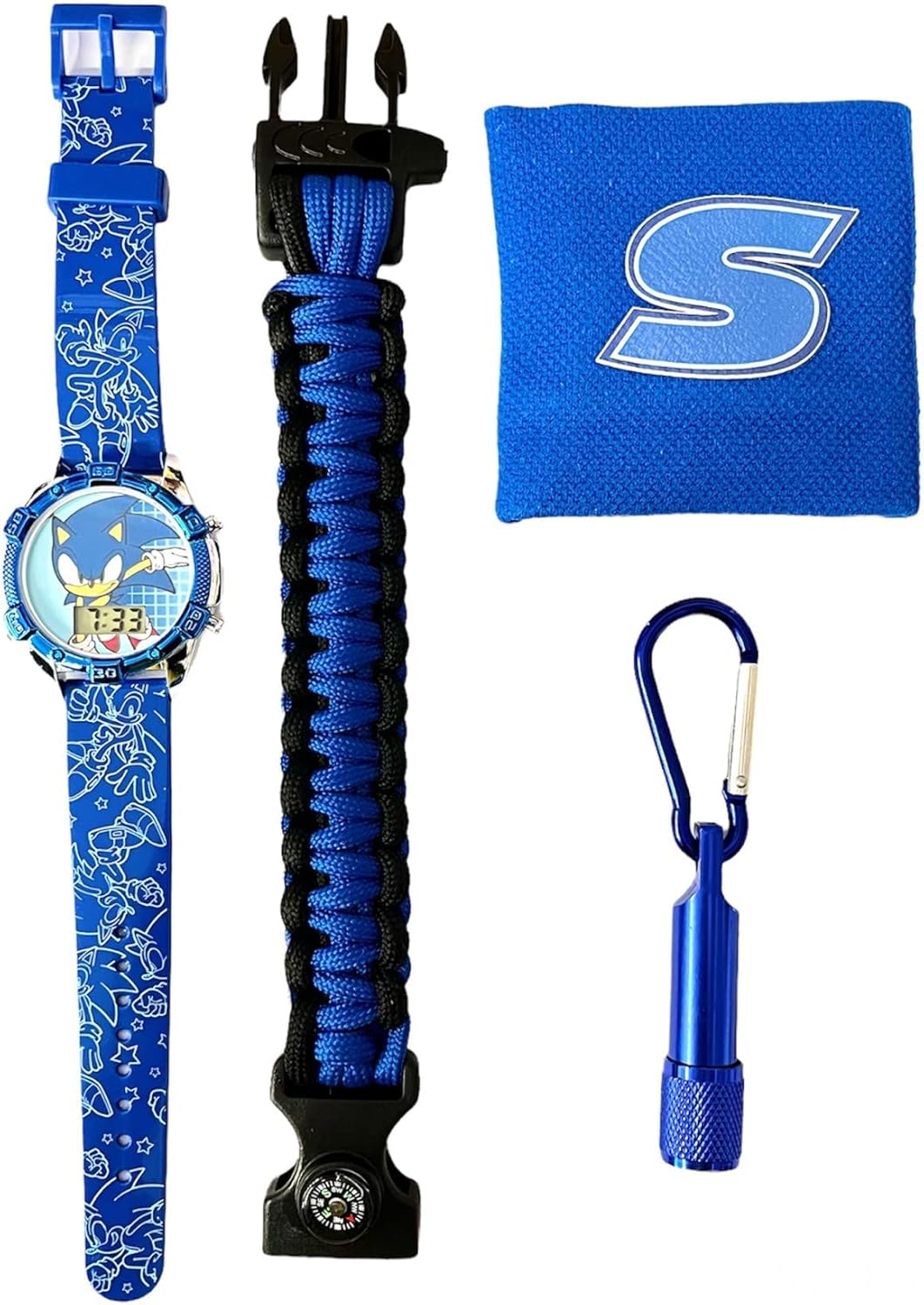
Figure 1: Complete Accutime Sonic The Hedgehog Digital Watch Set, including the digital watch, survival band, sweat-band, and flashlight keychain.

Figure 2: Front view of the digital watch face, displaying Sonic The Hedgehog character and the LCD time display.

Figure 3: Side profile of the digital watch, showing the control buttons on the casing.
Setup
1. Battery Installation
The watch comes with a pre-installed battery. No initial battery installation is required. If the display is blank or dim, the battery may need replacement (refer to the Maintenance section).
2. Setting the Time
To set the time on your digital watch, follow these general steps. Button functions may vary slightly, but typically involve a "Mode" button and a "Set" or "Adjust" button.
- Locate the buttons on the side of the watch casing. There are usually two or three buttons. For this manual, we will refer to them as Button A (top right) and Button B (bottom right).
- Press Button A repeatedly until the time display starts flashing, indicating it is in setting mode.
- While the hours are flashing, press Button B to advance the hour. Continue pressing until the correct hour is displayed. Pay attention to AM/PM if your watch has a 12-hour format.
- Press Button A again to move to the minutes setting. The minutes display will start flashing.
- Press Button B repeatedly to advance the minutes until the correct minute is displayed.
- Press Button A one more time to exit the setting mode. The time will now be set.
- If your watch has a date display, similar steps will apply to set the month and day after setting the time.
Note: If the watch has more buttons, consult the specific button functions for "Mode," "Set," or "Light" to adjust the time.
Operating Instructions
1. Viewing the Time
The digital time is continuously displayed on the LCD screen. No special action is required to view the current time.
2. Activating Flashing Lights
This watch features cool flashing lights. To activate the lights, locate the dedicated light button, usually on the side of the watch casing (often the top-left button, or a distinct button). Press this button once to illuminate the display with flashing lights. The lights will typically remain active for a few seconds before turning off automatically.
Maintenance
1. Cleaning
To clean your watch, gently wipe the casing and strap with a soft, dry cloth. For stubborn dirt, a slightly damp cloth can be used, but ensure no moisture enters the watch casing. Avoid using harsh chemicals or abrasive cleaners.
2. Battery Replacement
When the watch display becomes dim or stops functioning, the battery may need replacement. This watch uses a standard watch battery. Battery replacement should ideally be performed by a qualified watch technician to prevent damage to the watch's internal components and to ensure proper sealing (though this watch is not water resistant, proper reassembly is still important).
- Open the back casing of the watch using a small screwdriver or watch tool.
- Carefully remove the old battery, noting its orientation.
- Insert a new, identical watch battery with the correct polarity.
- Replace the back casing securely.
3. Water Resistance
Important: This watch is NOT water resistant. Avoid exposing the watch to water, including showering, swimming, or heavy rain, as this will cause damage not covered by warranty.
Troubleshooting
| Problem | Possible Cause | Solution |
|---|---|---|
| Display is blank or dim. | Battery is depleted. | Replace the watch battery (refer to Maintenance section). |
| Time is incorrect. | Time was not set correctly or buttons were pressed accidentally. | Reset the time according to the "Setting the Time" instructions. |
| Flashing lights do not activate. | Low battery or malfunction. | Check battery level. If battery is new and lights still don't work, contact support. |
| Watch is not functioning after contact with water. | Water damage. | This watch is not water resistant. Water damage is irreversible and not covered by warranty. |
Specifications
- Model Number: SNC40063MAZ
- Display Type: Digital LCD
- Movement: Quartz
- Power Source: Watch Battery (included)
- Water Resistance: None
- Manufacturer: Accutime Watch Corp.
- Package Dimensions: 9.53 x 6.81 x 3.39 inches
- Item Weight: 5.61 ounces
Warranty Information
This Accutime Sonic The Hedgehog Digital Watch comes with a One Year Warranty from Accutime Watch. This warranty covers manufacturing defects under normal use. It does not cover damage resulting from misuse, accidents, unauthorized repairs, or water exposure.
For warranty claims or service, please retain your proof of purchase and contact Accutime Watch customer support.
Support
For further assistance, questions, or to report issues not covered in this manual, please contact Accutime Watch customer support. Refer to the product packaging or the official Accutime website for current contact information.
You can visit the Accutime Store for more information: Accutime Store on Amazon

