
1. Introduction
This manual provides detailed instructions for the Citizen Eco-Drive Pilot Chronograph Watch, Model CB5006-02L. This timepiece combines Citizen's innovative Eco-Drive technology, which harnesses light energy, with precise Atomic Timekeeping for unparalleled accuracy. Designed for functionality and durability, it features a pilot-inspired design with multiple advanced functions.

Image 1.1: Front view of the Citizen Eco-Drive Pilot Chronograph Watch, Model CB5006-02L, showcasing its blue dial and black bracelet.
2. Key Features
- Eco-Drive Technology: Powered by any light source, eliminating the need for battery replacement.
- Atomic Timekeeping: Synchronizes with atomic clocks for superior accuracy, with time adjustment available in 24 time zones.
- Chronograph: 1-second chronograph measures up to 60 minutes.
- Perpetual Calendar: Automatically adjusts for odd and even months and leap years.
- 12/24 Hour Time Display: Option to display time in 12-hour or 24-hour format.
- Alarm Function: Integrated alarm for daily reminders.
- Power Reserve Indicator: Displays the remaining charge level.
- Luminous Hands/Markers: Enhanced visibility in low-light conditions.
- Sapphire Crystal: Highly scratch-resistant watch face.
- Water Resistance: Rated for 200 meters (660 feet), suitable for professional marine activity and serious surface water sports.
- Case and Bracelet: Durable black stainless steel case with a matching black bracelet.
3. Initial Setup
3.1. Charging Your Eco-Drive Watch
Your Citizen Eco-Drive watch is powered by light. To ensure optimal performance, it is crucial to keep the watch sufficiently charged. Expose the watch face to light regularly. For initial charging or if the watch has stopped, place it under direct sunlight or bright artificial light for several hours. The power reserve indicator will show the current charge level.
Video 3.1: An official video from Citizen Watch Group explaining the Eco-Drive technology and how it converts light into energy to power the watch.
3.2. Atomic Time Synchronization
The watch automatically receives time signals from atomic clocks to maintain precise time. This synchronization typically occurs overnight. Ensure the watch is placed in an area where it can receive signals, ideally near a window and away from electronic interference. If manual synchronization is needed, refer to the detailed instructions in the full user manual available on the Citizen website.
Video 3.2: An official video from Citizen Watch Group demonstrating how Atomic Timekeeping technology works to ensure accurate time.
3.3. Setting Time Zones
Your watch supports 24 time zones. To adjust the time zone, pull the crown out to the designated position (refer to the full manual for specific crown positions). Rotate the crown or use the pushers to select your desired city code, which corresponds to a specific time zone. Push the crown back in to set the time zone.
4. Operating Your Watch
4.1. Using the Chronograph
The 1-second chronograph can measure elapsed time up to 60 minutes. To start the chronograph, press the upper right pusher. Press it again to stop. To reset the chronograph to zero, press the lower right pusher.
4.2. Perpetual Calendar
The perpetual calendar automatically adjusts the date, including for leap years, once correctly set. No manual adjustment is required for the date at the end of the month.
4.3. 12/24 Hour Time Display
The watch can display time in either 12-hour or 24-hour format. The current mode is typically indicated on a sub-dial. Refer to the full instruction manual for specific steps to switch between these display modes.
4.4. Setting the Alarm
Your watch is equipped with an alarm function. To set the alarm, pull the crown out to the alarm setting position (refer to the full manual). Use the pushers to set the desired alarm time. Push the crown back in to activate the alarm. The alarm can be turned on or off via a dedicated sub-dial or pusher.
4.5. Power Reserve Indicator
The power reserve indicator sub-dial shows the approximate remaining charge of your watch. When the indicator is low, expose the watch to light to recharge it. A fully charged watch can operate for several months in darkness.
5. Care and Maintenance
- Cleaning: Wipe the watch regularly with a soft, dry cloth to remove dirt and smudges. For the bracelet, a soft brush with mild soap and water can be used, ensuring to rinse thoroughly and dry completely.
- Water Resistance: The watch is water resistant to 200 meters. Ensure the crown is pushed in completely before exposing the watch to water. Avoid operating pushers underwater.
- Temperature: Avoid exposing the watch to extreme temperatures (hot or cold) or sudden temperature changes, as this can affect its performance and longevity.
- Chemicals: Keep the watch away from chemicals, solvents, and detergents, which can damage the case, crystal, or strap.
- Storage: When not in use, store the watch in a well-lit area to maintain its charge. Avoid storing it in dark places for extended periods.
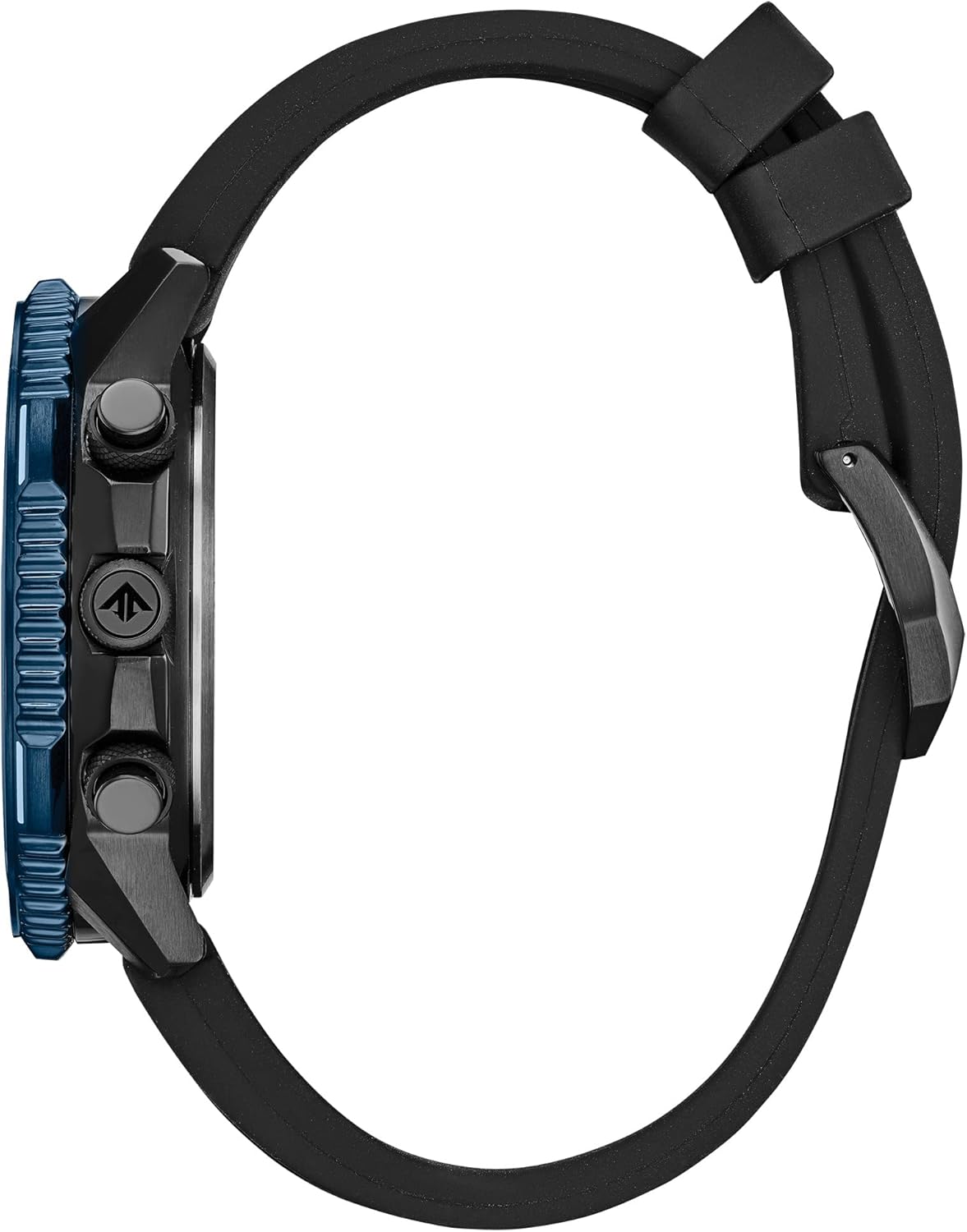
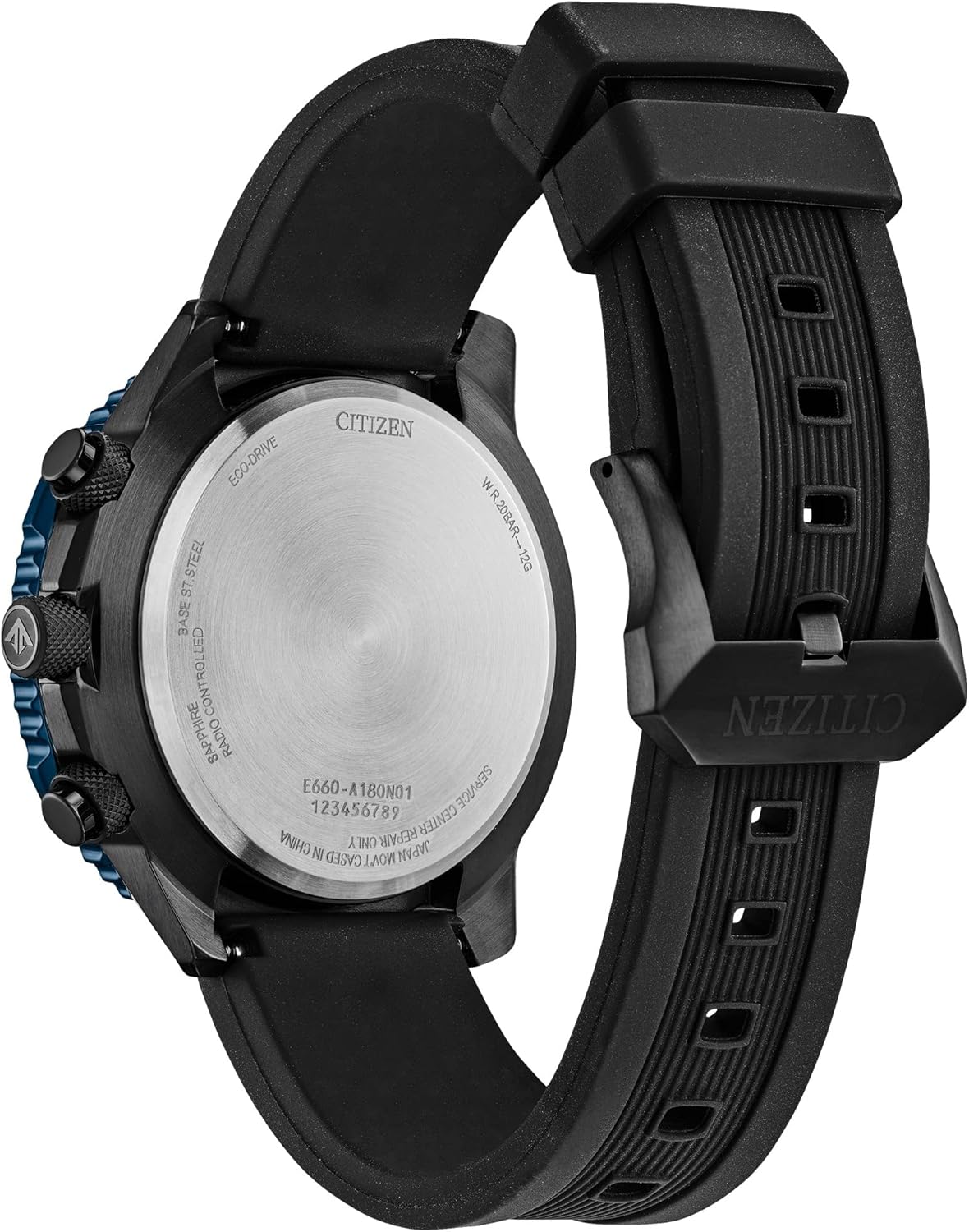
Image 5.1: Side and back views of the watch, showing the crown, pushers, and case back details.
6. Troubleshooting
- Watch has stopped or is running intermittently: The watch may be insufficiently charged. Expose the watch face to bright light for several hours.
- Time is incorrect: The watch may not have successfully received the atomic time signal. Try placing the watch near a window overnight for automatic synchronization. Manual time setting or signal reception can also be attempted (refer to the full manual).
- Date is incorrect: Ensure the perpetual calendar is correctly set. If the watch has been uncharged for a long period, it might require a full reset and time/date adjustment.
- Hands are not aligned: In rare cases, the hands may become misaligned. A hand alignment correction procedure is available in the full user manual.
For more complex issues or if troubleshooting steps do not resolve the problem, please contact Citizen customer support or visit an authorized service center.
7. Specifications
| Feature | Detail |
|---|---|
| Model Number | CB5006-02L |
| Movement | Eco-Drive (Light-Powered Quartz) |
| Timekeeping | Atomic Timekeeping with Radio Control |
| Case Material | Black Stainless Steel |
| Crystal | Sapphire Crystal |
| Water Resistance | 200 Meters (660 Feet) |
| Functions | Chronograph, Perpetual Calendar, 12/24 Hour Time, Alarm, Power Reserve Indicator, 24 Time Zones |
| Batteries | 1 Lithium Ion battery required (included, rechargeable via Eco-Drive) |
| Manufacturer | Citizen Watch Company |
8. Warranty Information
This Citizen Eco-Drive Pilot Chronograph Watch comes with a 5-Year Limited Warranty. This warranty covers manufacturing defects under normal use. Please retain your proof of purchase. For complete details regarding warranty coverage, terms, and conditions, including international warranty information, please refer to the official Citizen website or the warranty card included with your watch.
9. Customer Support
For further assistance, detailed operating instructions, or service inquiries, please visit the official Citizen Watch Company website or contact their customer service department. You can typically find contact information and a comprehensive digital manual on their support pages.
Official Website: www.citizenwatch.com


