Introduction
The Cooler Master HAF 700 is engineered to maximize component potential and ensure smooth system operation through superior thermal efficiency. This manual provides detailed instructions for setting up, operating, and maintaining your HAF 700 PC case.
Key Features
High Airflow Design with Mesh Front Panel

The HAF 700 embodies the spirit of HAF's performance-oriented design, featuring a mesh front panel with large filtered intakes. This design promotes high airflow, crucial for keeping internal components running at optimal temperatures.
Mammoth Radiator Support

This case offers unparalleled options for out-of-the-box cooling support. Users can choose between a selection of radiator sizes in various mounting locations, including up to dual 360mm or 420mm radiators.
Addressable Gen 2 RGB Fans

Equipped with dual 200mm Sickleflow Addressable Gen 2 RGB 3-Pin PWM fans. These fans feature a refreshed frosted blade design to enhance light dispersion for a more vibrant and luminescent effect. ARGB Gen 2 allows each LED to be independently controlled for ultimate creative freedom, requiring an ARGB supporting motherboard.
Extensive Motherboard and GPU Compatibility

The HAF 700 is capable of housing up to E-ATX motherboards such as the Dominus Extreme, as well as any sized graphics cards in both horizontal and vertical orientations.
USB 3.2 Gen 2 Type C Connectivity

USB 3.2 Gen 2 Type C ports are built into the I/O panel, allowing for multi-purpose, streamlined data transmission. The front I/O also includes four USB 3.2 Gen 1 (3.0) ports.
Tool-less Removable Panels

The exclusive tool-less removable top panel design allows for easy removal of panels. Cooling components can be effortlessly installed, accessed, and maintained. The rear chambers also include a tool-less, swiveling drive cage for quick access to hard drives.
Setup Guide
Follow these steps for initial setup of your Cooler Master HAF 700 PC case.
1. Unboxing and Initial Inspection
Carefully remove the case from its packaging. The packaging is designed for easy removal. Inspect the case for any visible damage. Note that the case is approximately 43.1 pounds (19.5 kg) without components, so handle with care.
2. Panel Removal
The HAF 700 features a tool-less design for easy access.
- Side Panels: Locate the single thumbscrew at the top rear of the case. Remove it, then slide the top part of the side panel back about 1 inch. The side doors will pop off with a gentle tug.
- Top Panel: Remove the single thumbscrew on the back of the case. The main top panel can then easily slide off. For full removal of the top section (e.g., for radiator installation), remove two additional screws after the side panel is off.
- Front Panel: Locate the lever at the bottom of the front panel. Pull on it to release the panel easily. This reveals the two 200mm front fans.

Image: HAF 700 with side panel removed, showing internal layout.
3. Motherboard Installation
The motherboard tray supports ITX, Micro-ATX, ATX, E-ATX, SSI-EEB, and SSI-CEB motherboards. Align your motherboard with the standoffs and secure it with screws.
4. Cooling System Installation
The HAF 700 offers extensive cooling options:
- Front: Supports two 200mm fans (pre-installed) or radiators up to 420mm.
- Top: Supports up to two 360mm or one 420mm radiator. The top bracket is removable for easier installation.
- Rear: Supports two 120mm exhaust fans (pre-installed).
- Bottom: Features a modular cooling bracket that supports three 120mm or 140mm fans, or radiators up to 420mm. This bracket can be angled or fully removed.
- Side Mount: A multi-use section next to the motherboard tray supports four 120mm or three 140mm fans, or radiators up to 480mm.
5. Storage Installation
The case supports up to 15 hard drives. Towards the front of the case, there are three removable brackets that support either a single 2.5-inch or 3.5-inch hard drive. These brackets utilize plastic locks for tool-less installation and removal. A large hard drive cage with four removable plastic trays is also available, each supporting a 2.5-inch or 3.5-inch drive. This cage can be rotated out or fully removed.
6. Power Supply Installation
The power supply is mounted vertically below the hard drive cage. Ensure proper cable routing through the designated cutouts.
7. Cable Management
The main motherboard tray has a total of seven cable routing holes, all with rubber inserts. The rear of the case features external tie-down points and included Velcro straps in the accessories box to help manage all your cables for a clean build.
Operating Instructions
The HAF 700's ARGB lighting can be controlled via Cooler Master's MasterPlus+ software. The included fans are pre-wired to a fan and ARGB hub, which connects to your PC via an internal USB header. This allows for easy control of lighting effects, colors, and speed.
Maintenance
Regular maintenance ensures optimal performance and longevity of your PC case.
- Dust Filters: The bottom of the case features a removable dust filter that pulls out from the side. Regularly clean this filter to prevent dust buildup and maintain airflow.
- Fan Cleaning: Periodically clean the fan blades and grilles to remove dust. The removable panels make this process easier.
- General Cleaning: Use a soft, dry cloth to wipe down the exterior of the case. Avoid abrasive cleaners or solvents.
Troubleshooting
If you encounter issues with your HAF 700 case, consider the following common solutions:
- No Power: Ensure all power supply connections are secure, including the main motherboard power, CPU power, and GPU power. Check the power button connection to the motherboard.
- Fans Not Spinning/RGB Not Working: Verify that the fan and ARGB hub is properly connected to the power supply and the internal USB header on your motherboard. Ensure the MasterPlus+ software is installed and running correctly.
- Overheating: Check that all fans are spinning correctly and that dust filters are clean. Ensure proper airflow by checking for obstructions inside the case.
- Loose Components: The tool-less design is convenient, but ensure all components (especially storage drives and panels) are securely latched or screwed into place after installation or maintenance.
Specifications
| Feature | Detail |
|---|
| Brand | Cooler Master |
| Model Name | HAF 700 |
| Item Model Number | 9B11-119-437 |
| Case Type | Tower |
| Motherboard Compatibility | Extended ATX (ITX, Micro-ATX, ATX, E-ATX, SSI-EEB, SSI-CEB) |
| Dimensions (LxWxH) | 26.22 x 11.46 x 24.65 inches |
| Item Weight | 43.1 pounds |
| Color | Black |
| Material | Metal |
| USB 3.0 Ports | 4 |
| USB 3.2 Gen 2 Type C Ports | 1 |
| Cooling Method | Air |
| Light Color | Multiple Colors (ARGB) |
Performance Benchmarks
The following charts illustrate the thermal and acoustic performance of the Cooler Master HAF 700, compared to other cases. Tests were conducted using an AMD Ryzen 5 3600X, ASUS Prime X570-Pro, EVGA GeForce RTX 3060 XC Gaming, G.SKILL Trident Z Royal DDR4-3200 16GB, and be quiet! Pure Rock Slim 2.
CPU Temperature (°C) - Idle

Chart showing CPU idle temperatures across various PC cases.
CPU Temperature (°C) - Load
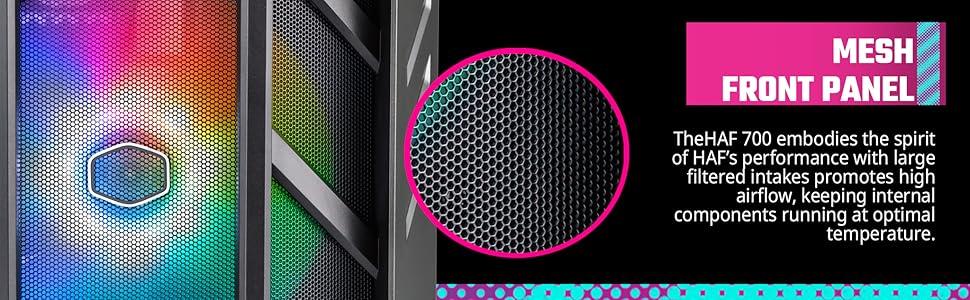
Chart showing CPU load temperatures across various PC cases.
GPU Temperature (°C) - Idle
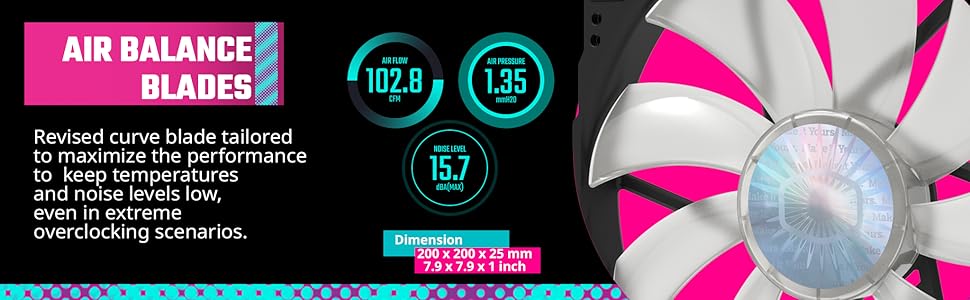
Chart showing GPU idle temperatures across various PC cases.
GPU Temperature (°C) - Load

Chart showing GPU load temperatures across various PC cases.
Noise Levels (dBA) - Front of Case - Idle

Chart showing noise levels from the front of the case at idle.
Noise Levels (dBA) - Front of Case - Load

Chart showing noise levels from the front of the case under load.
Noise Levels (dBA) - Side of Case - Idle

Chart showing noise levels from the side of the case at idle.
Noise Levels (dBA) - Side of Case - Load
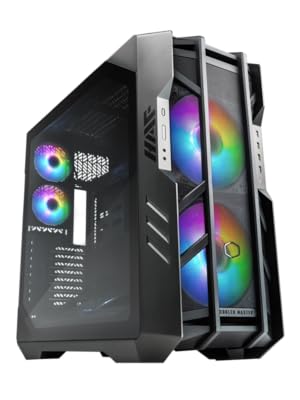
Chart showing noise levels from the side of the case under load.
Warranty and Support
The Cooler Master HAF 700 comes with a manufacturer's warranty. For detailed warranty information and support, please refer to the official Cooler Master website or contact their customer service.
Protection plans are available for purchase:
- 3-Year Protection Plan: $36.99
- 4-Year Protection Plan: $47.99
- Complete Protect: $16.99/month (covers all eligible past and future purchases)
This product is eligible for 30-day easy returns when purchased from Amazon.com.


