
DAREU A98 Pro
DAREU A98 Pro Mechanical Gaming Keyboard User Manual
Model: A98 Pro | Brand: DAREU
Introduction
This manual provides comprehensive instructions for the DAREU A98 Pro Tri-Mode Mechanical Gaming Keyboard. It covers setup, operation, maintenance, and troubleshooting to ensure optimal performance and longevity of your device. The A98 Pro features a gasket structure, hot-swappable switches, an LED screen, and versatile connectivity options including Bluetooth 5.1, 2.4G wireless, and USB-C wired modes.
Package Contents
Please verify that all items are present in your package:
- DAREU A98 Pro Mechanical Gaming Keyboard
- 9 Extra Keycaps
- Keycap/Switch Puller (2-in-1 tool)
- 6 Feet USB Cable (USB-A to USB-C)
- User Manual (this document)
- Operation Card
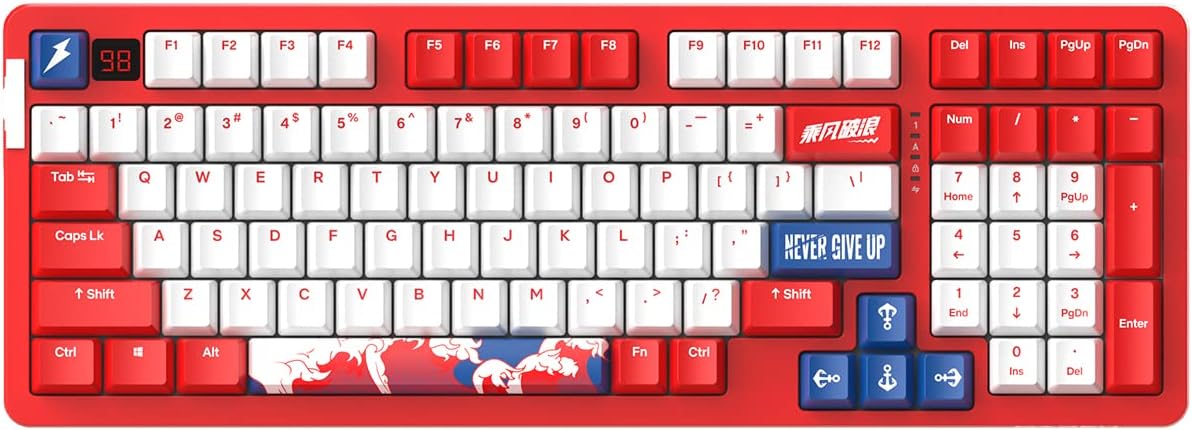
Image: The DAREU A98 Pro Mechanical Gaming Keyboard in Sailing Red, showcasing its 98-key layout with red and white keycaps and blue accent keys.
Features
- Extreme Feel: Engineered for a superior typing and gaming experience.
- Gasket High-precision Structure: Features an ergonomic precise fixed position, interior sound-absorbing space design, and multi-layer sound-absorbing silicone pad. This design absorbs impact from keypresses, providing a flexible, softer, quieter, and cleaner typing experience.
- DAREU High-precision V3 Sky Switches (Linear): With 40±3gf actuation force and a fence-type switch core structure for diamond-like stability.
- BT5.0/2.4G/USB-C Triple Mode Connectivity: Allows connection to multiple devices. Includes a mechanical toggle switch for mode selection. USB-C cable length is 1.8m. Wireless operation distance is less than 10 meters.
- Hot Swappable & PBT Keycaps: Compatible with 3-pin/5-pin hotswap switches. Equipped with durable PBT Double Shot and Dye-sublimation Keycaps.
- DAREU Professional Driver Support: Customize 1.68M colors for lighting modes, macro keys, and usage ambiances.
- 4000 mAh Battery & Multi-platform Compatibility: Provides approximately 45 hours of game time on a single charge. Compatible with Mac OS, Windows, Linux, iOS, Android, and more.

Image: An exploded diagram illustrating the high-precision gasket structure of the DAREU A98 Pro keyboard, showing layers including the PBT keycaps, upper cover, mode mechanical switch, V3 Sky Switches, silicone gasket, muffler gasket, PCB board, bottom case silicone gasket, receiver, and bottom cover.

Image: Detailed components of the DAREU High-precision V3 Sky Switch, including the fence-type switch core, PC transparent upper cover, high-density gold-plated spring, high precision cross contact copper sheet, and precisely positioned switch bottom base.

Image: The DAREU A98 Pro keyboard with a large graphic indicating its 4000 mAh battery capacity, highlighting the long-lasting power for extended use.
Setup
1. Wired Connection (USB-C)
Connect the provided USB-C cable to the keyboard's USB-C port and the other end (USB-A) to an available USB port on your computer. The keyboard will be automatically recognized and ready for use. This mode also charges the keyboard's internal battery.
2. 2.4G Wireless Connection
Locate the 2.4G wireless receiver (dongle) usually stored in a compartment on the keyboard. Plug the receiver into an available USB port on your computer. Switch the mode mechanical toggle switch on the keyboard to the 2.4G position. The keyboard should connect automatically. If not, refer to the "Troubleshooting" section.
3. Bluetooth 5.1 Connection
Switch the mode mechanical toggle switch on the keyboard to the Bluetooth position. The keyboard will enter pairing mode (indicated by a flashing LED on the screen or a specific key). On your device (computer, tablet, smartphone), go to Bluetooth settings and search for "DAREU A98 Pro" or a similar name. Select the keyboard to pair. Once paired, the LED indicator will become solid.
The keyboard supports connecting to multiple Bluetooth devices. Refer to the Operation Card for specific key combinations to switch between paired Bluetooth devices.
Operating Instructions
LED Screen Functionality
The integrated LED screen displays various information such as battery level, connection mode (wired, 2.4G, BT), and potentially active profiles or settings. Consult the Operation Card for detailed interpretations of the screen indicators.
RGB Backlighting Customization
The DAREU A98 Pro features customizable RGB backlighting with 1.68 million colors. Lighting modes can be adjusted directly on the keyboard using specific key combinations (refer to the Operation Card) or through the DAREU Professional Driver software.

Image: A computer screen displaying the DAREU Professional Driver software interface, showing options for customizing lighting modes, macro keys, and other settings for the keyboard.
Macro Key Programming
Utilize the DAREU Professional Driver software to program custom macro keys. This allows you to assign complex sequences of commands or keystrokes to a single key for enhanced productivity or gaming performance.
Hot-Swappable Switches
The A98 Pro supports 3-pin/5-pin hot-swappable switches. To replace a switch, gently use the provided 2-in-1 puller tool to remove the keycap, then use the switch puller end to carefully extract the switch. Align the pins of the new switch with the holes on the PCB and press firmly until it clicks into place. Ensure the pins are not bent before insertion.

Image: A close-up view demonstrating the process of installing a mechanical switch into a hot-swappable keyboard, highlighting the ease of customization.
Battery Management
The keyboard is equipped with a 4000 mAh battery. Charge the keyboard using the provided USB-C cable. The LED screen will indicate the current battery level. For optimal battery life, fully charge the keyboard before first use and avoid completely draining the battery frequently.
Maintenance
- Cleaning: Use a soft, dry cloth to wipe the keyboard surface. For deeper cleaning, remove keycaps using the provided puller and use compressed air to clear debris from between switches. Do not use harsh chemicals or abrasive materials.
- Storage: Store the keyboard in a cool, dry place away from direct sunlight and extreme temperatures.
- Cable Care: Avoid bending or crimping the USB cable excessively to prevent damage.
Troubleshooting
- Keyboard not responding (Wired):
- Ensure the USB-C cable is securely connected to both the keyboard and the computer.
- Try a different USB port on your computer.
- Test with a different USB-C cable if available.
- Wireless connection issues (2.4G/Bluetooth):
- Ensure the keyboard's mode switch is set to the correct wireless mode (2.4G or BT).
- For 2.4G, ensure the receiver is securely plugged into a USB port and is within range (less than 10 meters).
- For Bluetooth, ensure Bluetooth is enabled on your device and the keyboard is in pairing mode. Try unpairing and re-pairing the keyboard.
- Interference from other wireless devices can affect performance. Try moving the keyboard closer to the receiver/device or away from other wireless sources.
- Battery indicator not stable or charging issues:
- Ensure you are using the provided USB-C cable or a high-quality USB-A to USB-C cable for charging. Some USB-C to USB-C cables may not be compatible for charging.
- Verify the charging port on the keyboard is clean and free of debris.
- If the battery indicator seems erratic, try fully charging the keyboard and then discharging it through normal use before recharging.
- Software/Driver issues:
- Download the latest DAREU Professional Driver software from the official DAREU website.
- Ensure your operating system is up to date.
- Temporarily disable any antivirus or firewall software that might be interfering with the driver installation or operation.
Specifications
| Feature | Detail |
|---|---|
| Product Dimensions | 15.75 x 5.51 x 1.57 inches |
| Item Weight | 2.64 pounds |
| Manufacturer | DAREU |
| Item Model Number | A98 Pro |
| Batteries | 1 Lithium Ion battery required (included) |
| Connectivity Technology | 2.4G Wireless, BT5.1, USB-C |
| Keyboard Description | Gaming |
| Special Features | Backlit, Battery LED Screen, Customizable Display Keys, Ergonomic, Rechargeable |
| Color | Sailing Red (specific model) |
| Number of Keys | 98 |
| Keyboard Backlighting | RGB |
| Style | Modern |
| First Available Date | July 27, 2022 |
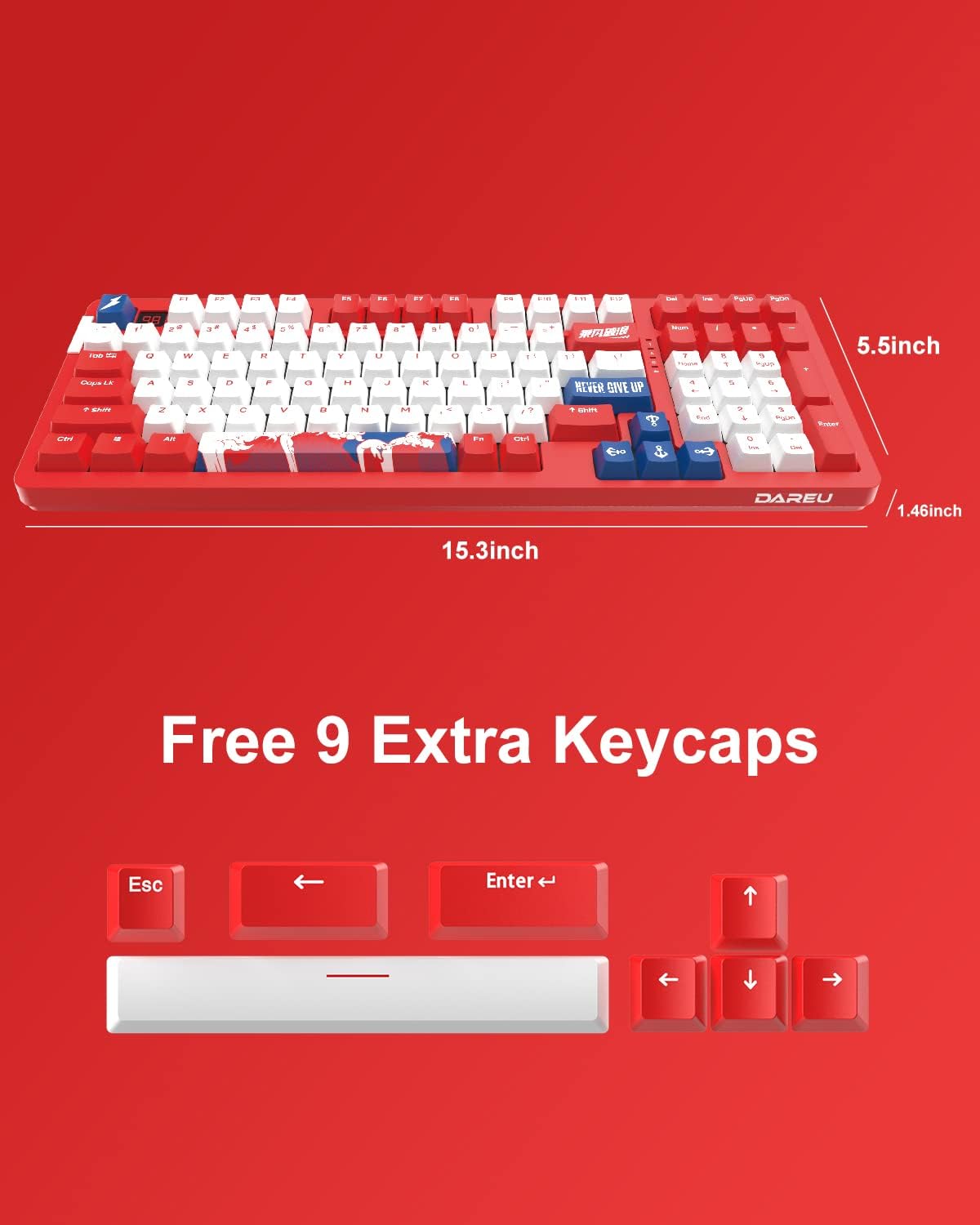
Image: The DAREU A98 Pro keyboard with indicated dimensions of 15.3 inches in length, 5.5 inches in width, and 1.46 inches in height.
Official Product Video
Video: An official product video from DAREU GAMING showcasing the DAREU A98 Pro Gasket Hot Swappable Mechanical Gaming Keyboard, highlighting its design and features.
Warranty and Support
For any questions, technical assistance, or support regarding your DAREU A98 Pro keyboard, please do not hesitate to contact our after-sales team. Contact information can typically be found on the Operation Card included in your package or on the official DAREU website.
Related documentsA98 Pro


Ask a question about this manual
Ask about setup, troubleshooting, compatibility, parts, safety, or missing instructions. Manuals+ will review the question and use this page’s manual context to help answer it.