
Introduction
This manual provides detailed instructions for the proper setup, operation, and maintenance of your Sherwood RV-7050R Audio/Video DSP Receiver. Please read this manual thoroughly before using the receiver to ensure optimal performance and safety.
Safety Information
CAUTION: TO PREVENT ELECTRIC SHOCK, DO NOT REMOVE COVER. NO USER-SERVICEABLE PARTS INSIDE. REFER SERVICING TO QUALIFIED SERVICE PERSONNEL.
Always ensure the receiver is disconnected from the power outlet before performing any connections or maintenance. Do not expose the unit to rain or moisture to prevent fire or electric shock. Ensure adequate ventilation around the unit to prevent overheating.
Product Overview
The Sherwood RV-7050R is an Audio/Video DSP Receiver designed to deliver high-quality audio and video performance for your home entertainment system. Featuring Digital Signal Processing (DSP) and Dolby Pro Logic capabilities, this receiver enhances your listening experience with various sound modes and surround sound configurations. It supports multiple audio and video inputs, allowing connection to a wide range of devices.
Setup
Rear Panel Connections
The rear panel of the RV-7050R provides all necessary input and output terminals for connecting your audio and video components, speakers, and antennas. Refer to the image below for a visual guide to the connections.
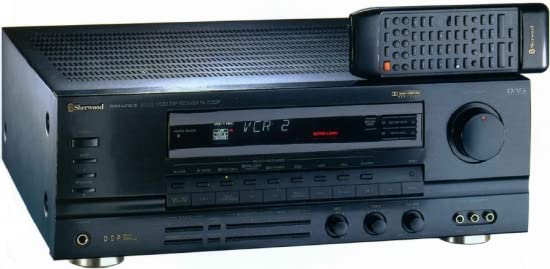
Image: Rear panel of the Sherwood RV-7050R Audio/Video DSP Receiver. This view displays the AC input, speaker terminals, various audio/video input/output jacks, antenna connections, and pre-out connections.
Detailed Connection Points:
- AC Input / AC Outlet: The main power input for the receiver (230V~50Hz, 800W). An additional AC outlet is provided for connecting other components (SWITCHED 100W MAX).
- Speaker Terminals (8Ω): Connect your speakers here. The receiver supports Front (Left/Right), Center, and Rear (Left/Right) speakers. Ensure correct polarity (+ to + and - to -). For Front Speakers, the manual indicates support for 8Ω MIN/SPEAKERS and 4Ω MIN/SPEAKERS.
- Antenna Connections:
- FM 75Ω: Connect an FM antenna here.
- AM LOOP: Connect the supplied AM loop antenna.
- GND: Ground terminal for antenna connections.
- Pre-Outs (FRONT, CENTER, REAR): These RCA jacks provide pre-amplified audio output for connecting to external power amplifiers.
- DIGILINK: Specific digital link connection.
- Audio/Video Inputs: Multiple RCA input sets for various audio and video sources (e.g., VCR1, VCR2, TAPE/MD, CD, LDP, TV/AUX, PHONO). Connect your source devices to these inputs.
- Video Out Monitor: RCA jack for connecting to a monitor or TV to display video output from selected video sources.
Connecting Speakers
Connect your speakers to the corresponding terminals on the rear panel. For optimal sound, ensure that the positive (+) terminal on the receiver connects to the positive (+) terminal on the speaker, and the negative (-) terminal on the receiver connects to the negative (-) terminal on the speaker. The RV-7050R supports a 5.1 surround sound channel configuration.
Connecting Audio/Video Sources
Use RCA cables to connect your audio and video source components (e.g., DVD player, VCR, CD player) to the appropriate input jacks on the receiver's rear panel. For video sources, connect both the audio (red/white) and video (yellow) cables.
Connecting Antennas
For FM reception, connect a 75Ω FM antenna to the dedicated FM terminal. For AM reception, connect the supplied AM loop antenna to the AM LOOP terminals. Ensure the GND terminal is properly connected if required by your antenna setup.
Operating Instructions
Power On/Off
Press the POWER button on the front panel or remote control to turn the receiver on or off. The unit will enter standby mode when turned off.
Input Selection
Use the INPUT SELECTOR knob or buttons on the front panel or remote to choose the desired audio/video source (e.g., CD, DVD, VCR1, TV/AUX, PHONO).
Volume Control
Adjust the master volume using the large VOLUME knob on the front panel or the volume buttons on the remote control.
DSP Modes and Surround Sound
The RV-7050R features Digital Signal Processing (DSP) and Dolby Pro Logic. Use the DSP mode buttons to select various sound fields and surround sound effects. Refer to the front panel controls for specific DSP mode selection. Dolby Pro Logic processing allows for a surround sound experience from stereo sources.
Maintenance
To maintain the performance and appearance of your receiver:
- Cleaning: Wipe the exterior surfaces with a soft, dry cloth. Do not use abrasive cleaners, waxes, or solvents.
- Ventilation: Ensure that the ventilation slots on the top and sides of the receiver are not blocked to prevent overheating.
- Power Cord: Regularly check the power cord for any damage. If damaged, contact qualified service personnel for replacement.
Troubleshooting
If you encounter issues with your receiver, refer to the following common troubleshooting steps:
- No Power: Check if the power cord is securely plugged into both the receiver and a working wall outlet. Ensure the power button is pressed.
- No Sound:
- Verify that the correct input source is selected.
- Check speaker connections for proper polarity and secure fit.
- Ensure the volume is not set to minimum or muted.
- No Video:
- Confirm the correct video input source is selected.
- Check video cable connections between the source, receiver, and TV/monitor.
- Distorted Sound: Check speaker wiring, ensure input cables are securely connected, and try a different audio source.
If problems persist, refer servicing to qualified service personnel as indicated in the safety information.
Specifications
| Feature | Specification |
|---|---|
| Model Number | RV-7050R |
| Brand | Generic (Sherwood branded) |
| Connectivity Technology | HDMI, 3.5mm Jack, RCA |
| Compatible Devices | Smartphone, Speaker |
| Total HDMI Ports | 1 |
| Audio Output Mode | Stereo, Surround, Mono |
| Surround Sound Channel Configuration | 5.1 |
| Output Power | 200 Watts |
| Number of Channels | 2 (for stereo output, but 5.1 surround configuration implies more channels for processing) |
| Output Wattage | 200 Watts |
| Audio Output Type | Speakers |
| Format | WAV |
| UPC | 632286267268 |
| ASIN | B0B554QYD2 |
Warranty and Support
For warranty information and technical support, please refer to the documentation provided with your purchase or contact the retailer. Keep your proof of purchase for warranty claims.
