1. Introduction
Thank you for choosing the AQL Evade 2 Wireless Bluetooth Earbuds. These earbuds are designed to provide a high-quality audio experience with features optimized for streaming music and clear voice calls. This manual will guide you through the setup, operation, and maintenance of your new earbuds.
Package Contents:
- AQL Evade 2 Wireless Bluetooth Earbuds (Left and Right)
- Charging Case
- User Manual (This document)
- Charging Cable
2. Product Overview
Familiarize yourself with the components of your AQL Evade 2 earbuds and charging case.
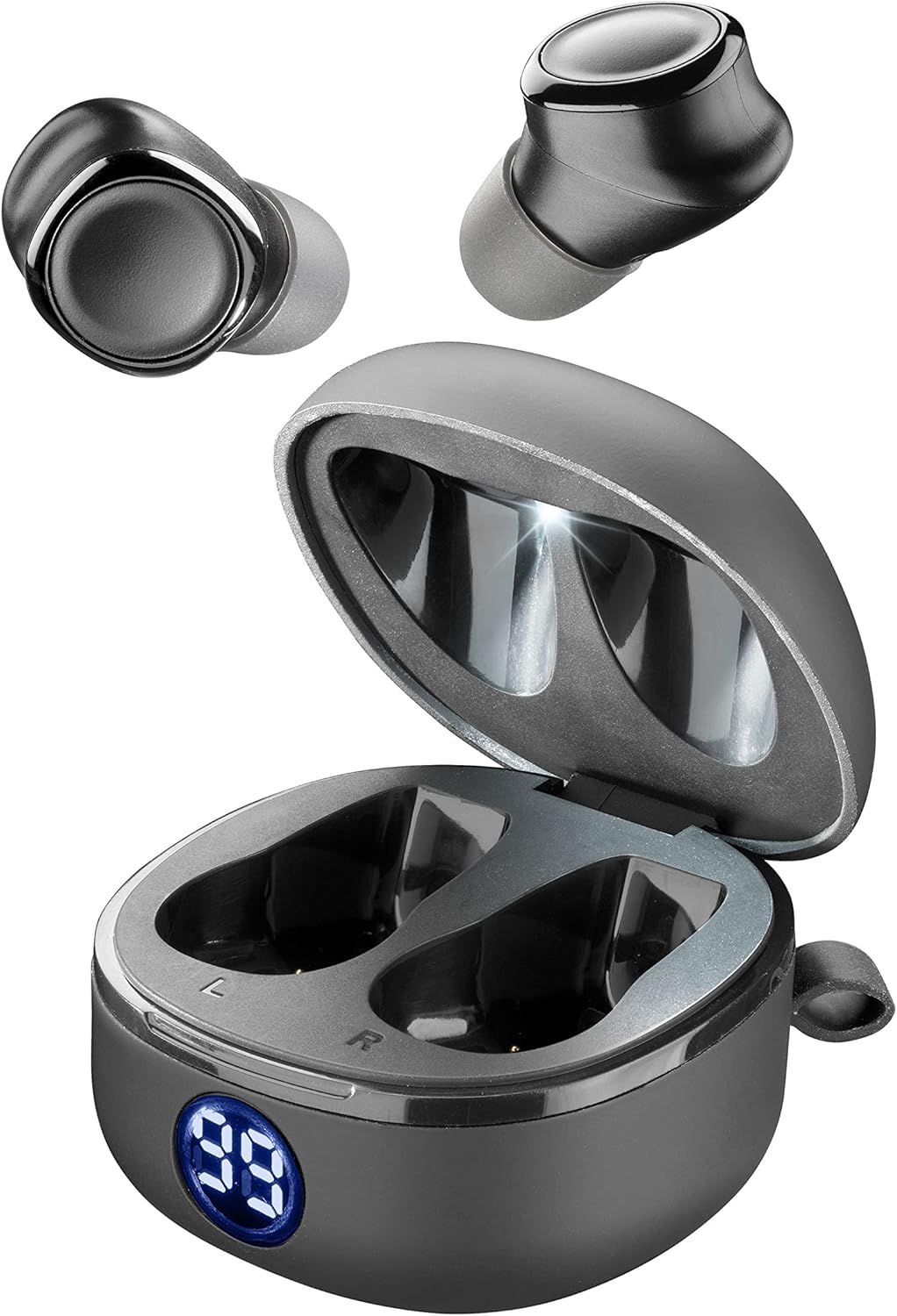
Figure 2.1: AQL Evade 2 Earbuds and Charging Case. This image displays the two earbuds positioned above their open charging case, which features a digital battery indicator.

Figure 2.2: Top view of AQL Evade 2 Earbuds in Charging Case. This image shows the earbuds placed inside the charging case, with a clear view of the charging contacts and the digital battery display.

Figure 2.3: Close-up of a single AQL Evade 2 Earbud. This detailed view highlights the ergonomic design and the in-ear capsule with noise isolation features.
Key Features:
- Streaming Top Sound Technology: Optimizes audio rendering for streaming music.
- In-Ear Capsule with Noise Isolation: Provides an immersive listening experience by reducing ambient noise.
- Clear VOICE MICROPHONE: Enhances call quality for clear conversations.
- PUMP BASS: Delivers rich bass reproduction for dynamic sound.
- Universal Remote Control with Microphone: Allows control of volume, tracks, and calls directly from the earbuds.
3. Setup
3.1 Initial Charging
Before first use, fully charge the earbuds and the charging case.
- Place both earbuds into the charging case. Ensure they are correctly seated in their respective slots (L for left, R for right).
- Connect the charging case to a USB power source using the provided charging cable.
- The digital display on the charging case will indicate the battery level. Allow approximately 1.5 hours for a full charge of the earbuds. The case can provide up to 6 full charges for the earbuds.
- Once fully charged, disconnect the charging cable.
3.2 Bluetooth Pairing
Pair your AQL Evade 2 earbuds with your smartphone or other Bluetooth-enabled device.
- Ensure the earbuds are charged and inside the charging case.
- Open the charging case. The earbuds will automatically enter pairing mode, indicated by a flashing LED light on the earbuds (refer to product for specific LED behavior).
- On your device, go to Bluetooth settings and turn Bluetooth on.
- Search for available devices. Select "AQL Evade 2" or "BTEVADE2TWSK" from the list.
- Once connected, the LED indicator on the earbuds will stop flashing and remain solid or turn off, indicating a successful connection.
- For subsequent uses, the earbuds will automatically connect to the last paired device when removed from the case, provided Bluetooth is enabled on the device.
Note: If pairing fails, place the earbuds back in the case, close it, wait a few seconds, then reopen and try again.
4. Operating Instructions
The AQL Evade 2 earbuds feature touch controls for various functions.
4.1 Music Playback
- Play/Pause: Single tap on either earbud.
- Next Track: Double tap on the right earbud.
- Previous Track: Double tap on the left earbud.
- Volume Up: Triple tap on the right earbud.
- Volume Down: Triple tap on the left earbud.
4.2 Call Management
- Answer/End Call: Single tap on either earbud during an incoming call or active call.
- Reject Call: Press and hold either earbud for 2 seconds during an incoming call.
- Activate Voice Assistant: Press and hold either earbud for 3 seconds (e.g., Siri, Google Assistant).
4.3 Power On/Off
- Power On: Earbuds automatically power on when removed from the charging case.
- Power Off: Earbuds automatically power off when placed back into the charging case and the lid is closed.
5. Maintenance
Proper care will extend the lifespan of your AQL Evade 2 earbuds.
5.1 Cleaning
- Use a soft, dry, lint-free cloth to clean the earbuds and charging case.
- Do not use abrasive cleaners, solvents, or aerosol sprays.
- Gently clean the charging contacts on both the earbuds and the case with a dry cotton swab if necessary.
5.2 Storage
- When not in use, always store the earbuds in their charging case to protect them and keep them charged.
- Store the device in a cool, dry place, away from extreme temperatures and direct sunlight.
5.3 Battery Care
- To preserve battery life, avoid fully discharging the earbuds or charging case frequently.
- Charge the device regularly, even if not in frequent use, to prevent deep discharge.
6. Troubleshooting
Refer to this section for solutions to common issues.
| Problem | Possible Cause | Solution |
|---|---|---|
| Earbuds not pairing/connecting. | Bluetooth off on device, earbuds not in pairing mode, interference. |
|
| No sound from one earbud. | Low battery, earbud not properly connected, individual earbud issue. |
|
| Poor sound quality. | Low battery, distance from device, interference, dirty earbuds. |
|
| Earbuds not charging. | Dirty charging contacts, faulty cable/charger, case battery empty. |
|
7. Specifications
| Feature | Detail |
|---|---|
| Model Number | BTEVADE2TWSK |
| Brand | AQL AUDIO QUALITY LAB |
| Connectivity Technology | Wireless (Bluetooth) |
| Ear Placement | In-Ear |
| Form Factor | In-Ear |
| Noise Isolation | Acoustic Isolation |
| Microphone Technology | Stereo, Clear VOICE MICROPHONE |
| Control Method | Touch Control |
| Battery Life (Earbuds) | Up to 5 hours |
| Charging Time (Earbuds) | Approx. 1.5 hours |
| Charging Case Capacity | Provides up to 6 full charges for earbuds |
| Frequency Range | 20 Hz - 20,000 Hz |
| Compatible Devices | Mobile phones, smartphones, tablets, music players (iPhone, Samsung, Oppo, Huawei, etc.) |
| Material | Silicone, Plastic |
| Color | Black |
8. Warranty and Support
For warranty information and technical support, please refer to the official AQL AUDIO QUALITY LAB website or contact their customer service directly. Keep your proof of purchase for warranty claims.
Manufacturer: CellularLine S.p.A.
For further assistance, visit: AQL Official Website


