
1. Introduction
This manual provides detailed instructions for the assembly, operation, and maintenance of your Flysky Mesh Office Chair, Model FS-5001. Designed for ergonomic support and comfort, this chair is suitable for various settings including home offices, study rooms, and meeting areas. Please read these instructions carefully before assembly and use to ensure proper function and safety.
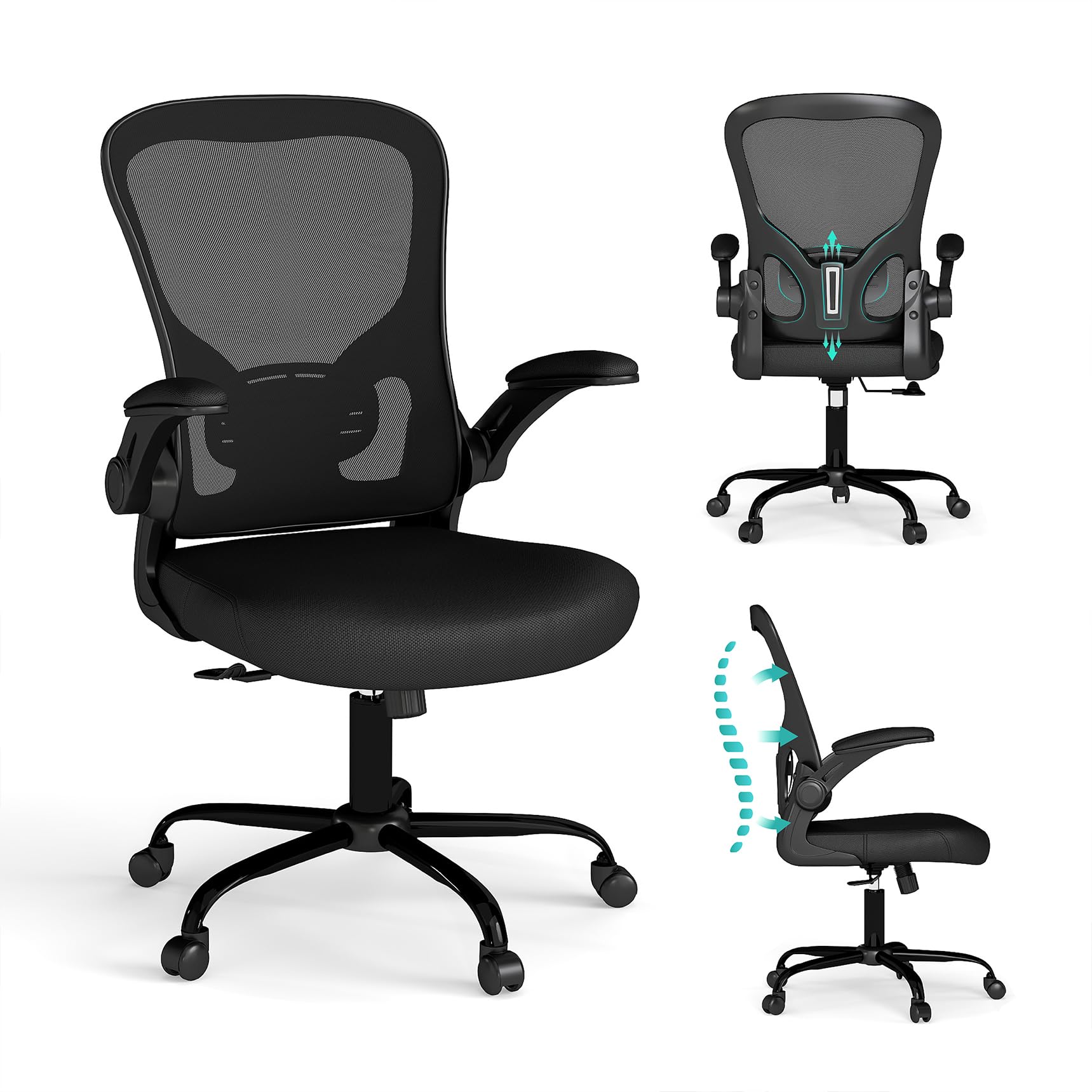
Image 1: Front view of the Flysky Mesh Office Chair.
2. Safety Information
- Do not exceed the maximum load capacity of 250 lbs (approximately 113 kg).
- Avoid violent reclining and frequent rocking to extend the service life of the chair and prevent potential safety hazards.
- Ensure all screws and bolts are securely tightened before use. Periodically check and re-tighten as necessary.
- Keep small parts away from children during assembly.
- Use the chair on a flat, stable surface.
3. Package Contents
Before beginning assembly, please verify that all components are present and undamaged. If any parts are missing or damaged, contact customer support.
- Seat Cushion
- Backrest
- Armrests (2)
- Chair Base
- Casters (5)
- Gas Lift Cylinder
- Mechanism Plate
- Assembly Tools (Allen wrench, screws, washers)
- Instruction Manual (this document)
4. Assembly Instructions
Assembly is typically completed in about 15 minutes. Follow these steps carefully:
- Install Base and Wheels: Insert the five casters into the holes at the end of each leg of the chair base. Push firmly until they click into place.
- Insert Gas Lift: Place the gas lift cylinder into the center hole of the assembled chair base.
- Attach Armrests to Backrest: Secure the armrests to the backrest using the provided screws. Ensure they are oriented correctly.
- Connect Backrest to Seat: Attach the backrest assembly to the seat cushion using the appropriate screws.
- Install Mechanism to Seat: Secure the mechanism plate to the underside of the seat cushion using the designated screws. Ensure the front of the mechanism faces the front of the seat.
- Assemble Entire Chair: Carefully place the assembled seat and backrest onto the gas lift cylinder. Press down firmly to secure.

Image 2: Step-by-step assembly diagram for the office chair.
Assembly Video
Video 1: Official assembly guide for the Flysky FS-5001 office chair, demonstrating each step for easy setup.
5. Operating Instructions and Adjustments
Your Flysky Mesh Office Chair offers several adjustable features to enhance your comfort and support.
5.1. Height Adjustment
To adjust the seat height, locate the lever on the right side beneath the seat. While seated, pull the lever up to lower the seat. To raise the seat, stand up and pull the lever up. Release the lever at your desired height.
5.2. Tilt and Recline Function
The chair features a tilt lock function and a recline range of 90-135 degrees. Use the lever on the left side beneath the seat to lock or unlock the tilt mechanism. To adjust the recline tension, turn the round knob located at the front underside of the seat. Turn clockwise to increase tension (making it harder to recline) and counter-clockwise to decrease tension (making it easier to recline).

Image 3: Illustration of the chair's recline and tilt-rock capabilities, including adjustment controls.
5.3. Flip-Up Armrests
The upholstered armrests can be flipped up to allow the chair to be stored closer to your desk, saving space. Simply lift the armrests upwards until they lock into the vertical position. To return them to the down position, gently pull them down.

Image 4: The chair with armrests flipped up for space-saving storage.
5.4. Lumbar Support
The ergonomic design of the backrest and lumbar support is intended to conform to the natural curve of your spine, reducing pressure and muscle fatigue during long periods of sitting.

Image 5: Demonstrating the ergonomic back design and lumbar support of the Flysky chair.
5.5. 360-Degree Swivel and Rolling Casters
The chair features a 360-degree swivel function for easy movement and access to different areas of your workspace. The solid universal casters are designed for smooth, silent movement across hard floor surfaces.
5.6. High-Density Seat Cushion
The seat cushion is constructed with high-density memory foam and sponge, providing a soft yet supportive base that retains its shape over time, reducing discomfort in the hips during extended use.

Image 6: Layers of the high-quality memory foam seat cushion for enhanced comfort.
Operational Overview Video
Video 2: Overview of the ergonomic features and adjustments of the Flysky office chair.
6. Maintenance
- Cleaning: Wipe clean with a damp cloth. Avoid harsh chemicals or abrasive cleaners that may damage the mesh or fabric.
- Regular Checks: Periodically inspect all screws and connections to ensure they remain tight. Re-tighten if necessary to maintain stability and safety.
- Caster Care: Keep casters free of hair and debris to ensure smooth rolling.
7. Troubleshooting
If you encounter any issues with your Flysky Mesh Office Chair, please refer to the following common solutions:
- Chair Squeaks: Check and tighten all assembly screws. A small amount of silicone lubricant can be applied to moving parts if needed.
- Difficulty Adjusting Height: Ensure the gas lift lever is fully engaged. If the issue persists, the gas lift cylinder may need replacement.
- Chair Feels Unstable: Verify that all casters are fully inserted into the base and all screws are tightened. Ensure the chair is on a level surface.
- Casters Not Rolling Smoothly: Check for debris (hair, lint) wrapped around the caster wheels and remove it.
8. Specifications
| Feature | Detail |
|---|---|
| Brand | Flysky |
| Model Name | FS-5001 |
| Color | Black |
| Material | Mesh (Back), High-density sponge (Seat) |
| Product Dimensions (D x W x H) | 21.7"D x 19.7"W x 22.4"H |
| Item Weight | 16 g (Note: This weight seems incorrect for a chair, likely a data entry error in source. Actual weight would be significantly higher.) |
| Maximum Weight Recommendation | 300 pounds (136 kg) |
| Additional Features | Adjustable Height, Back Support, Ergonomic, Flip-up Arm Rest, Swivel |
| Reclining Position Count | More than 1 (90-135 degrees) |
| Frame Material Type | Stainless Steel |
| Surface Recommendation | Hard Floor |

Image 7: Detailed product dimensions.
9. Warranty and Support
Flysky is dedicated to creating high-quality home and office seating. If you encounter any issues or have questions regarding your product, please feel free to message us. We aim to provide a response within 2 hours to ensure your complete satisfaction.
For returns, the product is eligible for a refund or replacement within 30 days of purchase, subject to the retailer's return policy.

