
MONODEAL AS60
MONODEAL Wireless Headphones User Manual
Model: AS60 (CTFAS60)
Introduction
Thank you for choosing the MONODEAL Wireless Headphones. This manual provides essential information for setting up, operating, and maintaining your headphones to ensure optimal performance and longevity. These headphones are designed for TV watching, offering a clear, wireless audio experience with a wide range and multiple audio modes.
Safety Information
- Do not expose the device to extreme temperatures, humidity, or liquids.
- Avoid dropping or subjecting the headphones and transmitter to strong impacts.
- Use only the provided power adapter and cables.
- Do not attempt to disassemble or repair the device yourself. Refer to qualified service personnel.
- Keep out of reach of children.
- Prolonged listening at high volume levels may cause hearing damage. Adjust volume to a comfortable level.
- Ensure proper ventilation around the charging dock.
Package Contents
Verify that all items are present in your package:
- MD60 Wireless Headphones (x1)
- Wireless Transmitter & Charging Base (x1)
- AC Micro USB Adapter (x1)
- RCA to 3.5mm Cable (x1)
- Optical Cable (x1)
Product Overview
Headphones
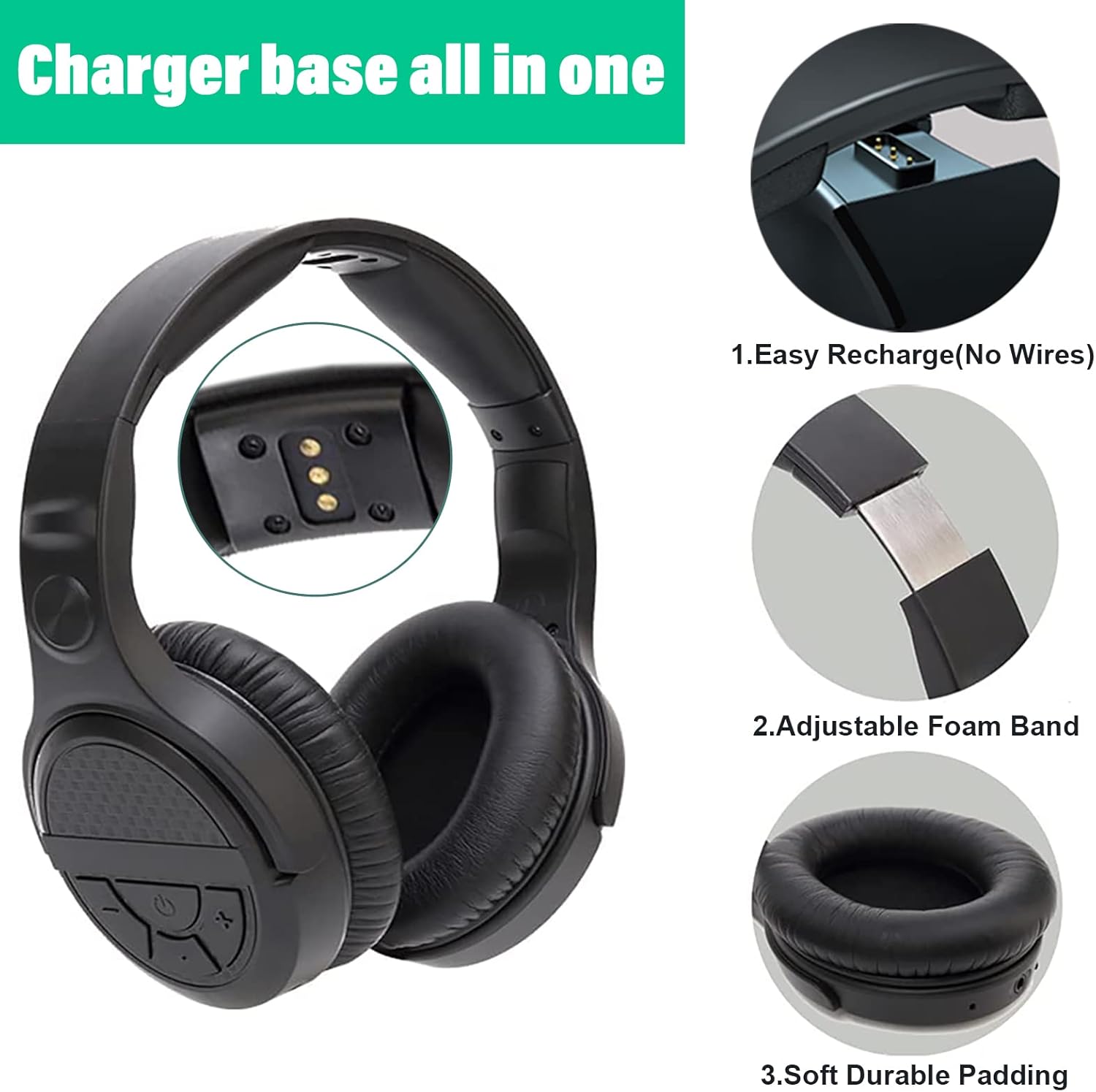
The headphones feature intuitive controls on the earcup, charging contacts for easy docking, an adjustable foam band for comfort, and soft, durable padding on the earcups.
- Control Buttons: Located on the right earcup for volume, power, and audio mode selection.
- Adjustable Headband: Allows for a comfortable fit for various head sizes.
- Soft Ear Pads: Designed for extended wear comfort and to seal in audio.
- Charging Contacts: Located on the underside of the headband for charging on the dock.
Transmitter & Charging Dock

The base serves as both the wireless transmitter and the charging station for the headphones.
- Power Switch: Located on the back of the base.
- Audio Input Ports: Includes AUX/3.5mm, RCA, and Optical for wide compatibility.
- AC Power Input: For connecting the power adapter.
- Charging Pins: Located on the upright stand to connect with headphone charging contacts.
Setup
1. Powering the Transmitter
- Connect the provided AC Micro USB adapter to the "AC" port on the back of the transmitter base.
- Plug the AC adapter into a wall outlet.
- Flip the power switch on the back of the transmitter base to the "ON" position.
2. Connecting to Your Audio Source (TV/Audio Device)
The MONODEAL headphones offer multiple connection options. Choose the one that best suits your TV or audio device.
Optical Audio Connection (Recommended for Digital Audio)

Use the optical cable for digital audio output from your TV or audio device.
- Connect one end of the optical cable to the "Optical" port on the transmitter base.
- Connect the other end to the Optical Audio Out port on your TV or audio device.
- Important: On your TV's audio settings, set the Digital Audio Output format to "PCM" or "Stereo". Dolby/DTS formats are not supported.
RCA Audio Connection (Analog Audio)

Use the RCA to 3.5mm cable for analog audio output.
- Connect the 3.5mm end of the RCA to 3.5mm cable to the "AUX/3.5mm" port on the transmitter base.
- Connect the red and white RCA plugs to the corresponding "Audio Out" ports (usually red and white) on your TV or audio device.
- Note: Not compatible with RCA outputs on the back of AV receivers/amplifiers.
3.5mm AUX Audio Connection (Analog Audio)

For devices with a 3.5mm audio output jack (e.g., headphone jack on TV, smartphone, computer).
- Connect a 3.5mm audio cable (not included) from your device's 3.5mm audio output to the "AUX/3.5mm" port on the transmitter base.
3. Pairing Headphones with Transmitter (Automatic)
The headphones and transmitter are designed for automatic pairing. Once both are powered on and connected, they should connect quickly.
- Ensure the transmitter is powered on and connected to an audio source.
- Press and hold the power button on the headphones until they turn on.
- The headphones will automatically connect to the transmitter. No manual pairing is required.
Operating Instructions
Powering On/Off
- To turn on the headphones: Press and hold the power button on the right earcup until the indicator light illuminates.
- To turn off the headphones: Press and hold the power button until the indicator light turns off.
Volume Control
- Use the volume up (+) and volume down (-) buttons on the right earcup to adjust the listening volume.
Audio Modes

The headphones feature three distinct audio modes to enhance your listening experience. Press the "Mode" button on the right earcup to cycle through them:
- Normal Mode: Balanced sound profile for general listening.
- Music Mode: Enhanced audio for musical content, often with richer bass and clearer highs.
- Movie Mode: Optimized for cinematic experiences, providing a more immersive soundstage and enhanced dialogue clarity.
Charging the Headphones

The transmitter base also functions as a charging dock.
- Place the headphones onto the charging pins of the transmitter base. Ensure the charging contacts on the headphones align with the pins on the dock.
- A red indicator light on the base will illuminate, indicating that the headphones are charging.
- The light will turn off when the headphones are fully charged (approximately 3 hours for a full charge).
- A full charge provides up to 10 hours of audio playtime.
Wireless Range and Performance

The MONODEAL headphones utilize 2.4GHz RF wireless technology, offering a stable connection with minimal static and interference.
- The wireless range is up to 197 feet (60 meters), even through walls.
- This technology ensures audio and image synchronization without noticeable delay.
Maintenance
- Cleaning: Use a soft, dry cloth to clean the headphones and transmitter base. Do not use abrasive cleaners or solvents.
- Storage: When not in use for extended periods, store the headphones on the charging dock in a cool, dry place away from direct sunlight.
- Battery Care: To prolong battery life, avoid fully discharging the headphones frequently. Charge them regularly.
Troubleshooting
| Problem | Possible Cause | Solution |
|---|---|---|
| No sound from headphones. |
|
|
| Static or intermittent audio. |
|
|
| Headphones not charging. |
|
|
| TV internal speakers muted. |
|
|
Specifications
| Model Name | AS60 |
| Item Model Number | CTFAS60 |
| Connectivity Technology | Wireless (2.4GHz RF) |
| Wireless Range | Up to 197 feet (60 meters) |
| Audio Input Ports | Optical, RCA, 3.5mm AUX |
| Battery Life | Up to 10 hours |
| Charging Time | Approximately 3 hours |
| Frequency Range | 20 Hz to 20,000 Hz |
| Weight | 6 oz (headphones), 1.41 pounds (package weight) |
| Material | Plastic |
Warranty and Support
MONODEAL products come with a standard warranty. For specific warranty terms and conditions, please refer to the warranty card included in your package or visit the official MONODEAL website.
If you encounter any issues or have questions not covered in this manual, please contact MONODEAL customer support:
- Online Support: Visit the MONODEAL Store on Amazon for FAQs and contact information.
- Email Support: Refer to your product packaging or warranty card for the dedicated support email address.
Please have your product model (AS60) and purchase details ready when contacting support.
Official Product Video
This video demonstrates the key features and setup process of the MONODEAL Wireless Headphones, including connecting to a TV and using the charging dock.
Related documentsAS60


Ask a question about this manual
Ask about setup, troubleshooting, compatibility, parts, safety, or missing instructions. Manuals+ will review the question and use this page’s manual context to help answer it.