
Introduction
The DIGITEK DSG-007F is a 3-axis handheld gimbal designed for smartphones, providing stabilization for smooth video recording and photography. This device features high-precision physical anti-shake technology, eliminating the need for manual balancing in many scenarios. It supports various creative operation modes and allows for easy switching between horizontal and vertical shooting orientations.
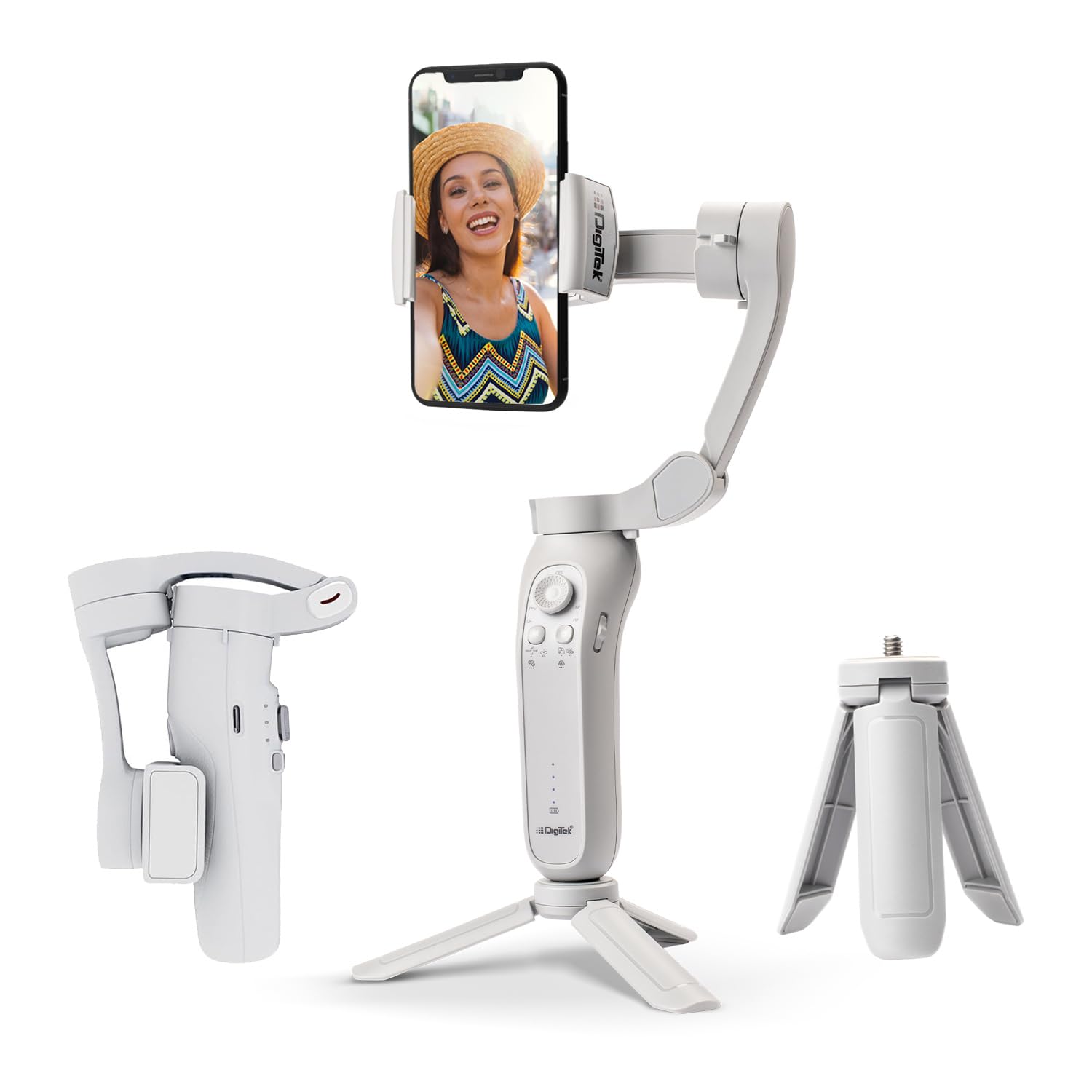
Image: The Digitek DSG-007F 3-Axis Smartphone Gimbal with a smartphone mounted, shown in an upright position on its integrated mini tripod.
What's in the Box
Carefully unpack the box and ensure all items are present:
- Gimbal Unit
- Carry Case
- Charging Connector (USB Cable)
- User Manual

Image: The complete package contents of the Digitek DSG-007F gimbal, including the gimbal unit, mini tripod, charging cable, wrist strap, and user manual.
Setup Instructions
- Charge the Gimbal: Before first use, fully charge the gimbal using the provided charging connector. Connect the USB cable to the gimbal's charging port and a suitable USB power adapter (not included). The charging indicator light will show the charging status.
- Mount Your Smartphone: Extend the phone clamp and securely place your smartphone in the clamp. Ensure the phone is centered and balanced as much as possible. The gimbal is designed to work without extensive manual balancing.
- Download the App: For full functionality and advanced features, download the "Gimbal Pro2" application on your smartphone.
- Power On: Press and hold the power button to turn on the gimbal. The gimbal will self-calibrate and stabilize.

Image: A visual guide indicating where to scan a QR code to download the "Gimbal Pro2" application, highlighting the gimbal's compatibility with various smartphone brands.
Scan the QR code or visit http://www.fhosafodsy432.com/2aebfja to download the Gimbal Pro2 App.
Operating Instructions
The DSG-007F offers multiple operation modes and controls for versatile shooting.
Operation Modes:
- All Follow Mode: The gimbal follows all pan, tilt, and roll movements of your hand, providing dynamic and fluid shots.
- Half Follow Mode: The gimbal follows pan and tilt movements, keeping the roll axis locked for stable horizontal footage.
- All Lock Mode: All three axes are locked, keeping the camera fixed on a single point regardless of gimbal movement.

Image: A visual representation of the gimbal's three creative operation modes and its ability to switch between horizontal and vertical shooting with a single button press.
Key Functions:
- Mode Switching: Press the mode button (refer to the gimbal's control panel) to cycle through the available operation modes.
- Horizontal/Vertical Switching: A single button press allows you to switch between horizontal (landscape) and vertical (portrait) shooting orientations.
- AI Face Tracking: When used with the companion app, the gimbal can utilize AI technology for automatic subject tracking, keeping faces or objects centered in the frame.

Image: The gimbal's real-time face tracking capability, demonstrating how it keeps subjects centered during video recording.
Maintenance
- Cleaning: Use a soft, dry cloth to clean the gimbal. Avoid using liquid cleaners or solvents.
- Storage: When not in use, store the gimbal in its carry case in a cool, dry place. The foldable design makes it compact for storage and travel.
- Battery Care: To prolong battery life, avoid fully discharging the battery frequently. Charge it regularly, even if not in use for extended periods.

Image: The Digitek DSG-007F gimbal in its folded configuration, highlighting its compact size for easy storage and transport.
Troubleshooting
- Gimbal not powering on: Ensure the battery is sufficiently charged. Connect the charging cable and try again after a few minutes.
- Unstable footage:
- Ensure your smartphone is securely mounted and centered in the clamp.
- Check if the gimbal is in the correct operating mode for your desired shot.
- Perform a gimbal calibration via the "Gimbal Pro2" app if available.
- App connectivity issues:
- Ensure Bluetooth is enabled on your smartphone.
- Restart both the gimbal and your smartphone.
- Update the "Gimbal Pro2" app to the latest version.
- Gimbal not responding to controls: Power off and restart the gimbal. If the issue persists, ensure the app is not interfering with manual controls.
Product Specifications
| Model Name | DSG 007F |
| Brand | Digitek |
| Color | Light Gray |
| Compatible Devices | Cellphone (most smartphones like iPhone, Samsung, Google Pixel, Realme X, Oppo, Vivo, Nokia, etc.) |
| Product Dimensions (D x W x H) | 10D x 13W x 26H Centimeters |
| Item Weight | 0.65 Kilograms |
| Maximum Weight Recommendation | 362 Grams |
| Tilt Angle | 160° |
| Roll Angle | 325° |
| Pan Angle | 340° |
| Shooting Modes | All follow mode, Half follow mode, All lock mode |
| Image Stabilization Type | Yes |
| Water Resistance Level | Not Water Resistant |
| Country of Origin | China |
Warranty and Support
Warranty: The DIGITEK DSG-007F Gimbal comes with a 6 Months Carry-in warranty from the date of purchase. Please retain your purchase receipt for warranty claims.
Customer Support: For any product-related queries, technical assistance, or warranty claims, please contact Digitek customer care:
Customer Care Number: 1800-123-544-444
Manufacturer: IMS Mercantiles Pvt. Ltd.


