
1. Introduction
This manual provides essential instructions for the safe and efficient operation of your iDance FS400 Funky Skull portable karaoke party system. Please read this manual thoroughly before using the product and retain it for future reference.
2. Safety Information
- Do not expose the unit to rain or moisture to prevent fire or electric shock.
- Do not open the casing. There are no user-serviceable parts inside. Refer all servicing to qualified personnel.
- Avoid placing the unit near heat sources such as radiators, heat registers, stoves, or other apparatus (including amplifiers) that produce heat.
- Protect the power cord from being walked on or pinched, particularly at plugs, convenience receptacles, and the point where they exit from the apparatus.
- Only use attachments/accessories specified by the manufacturer.
- Unplug this apparatus during lightning storms or when unused for long periods of time.
3. Package Contents
Verify that all items listed below are included in your package:
- iDance FS400 Funky Skull Karaoke Speaker
- Quick Start Guide
- USB Charging Cable
- Wired Microphone
- Remote Control
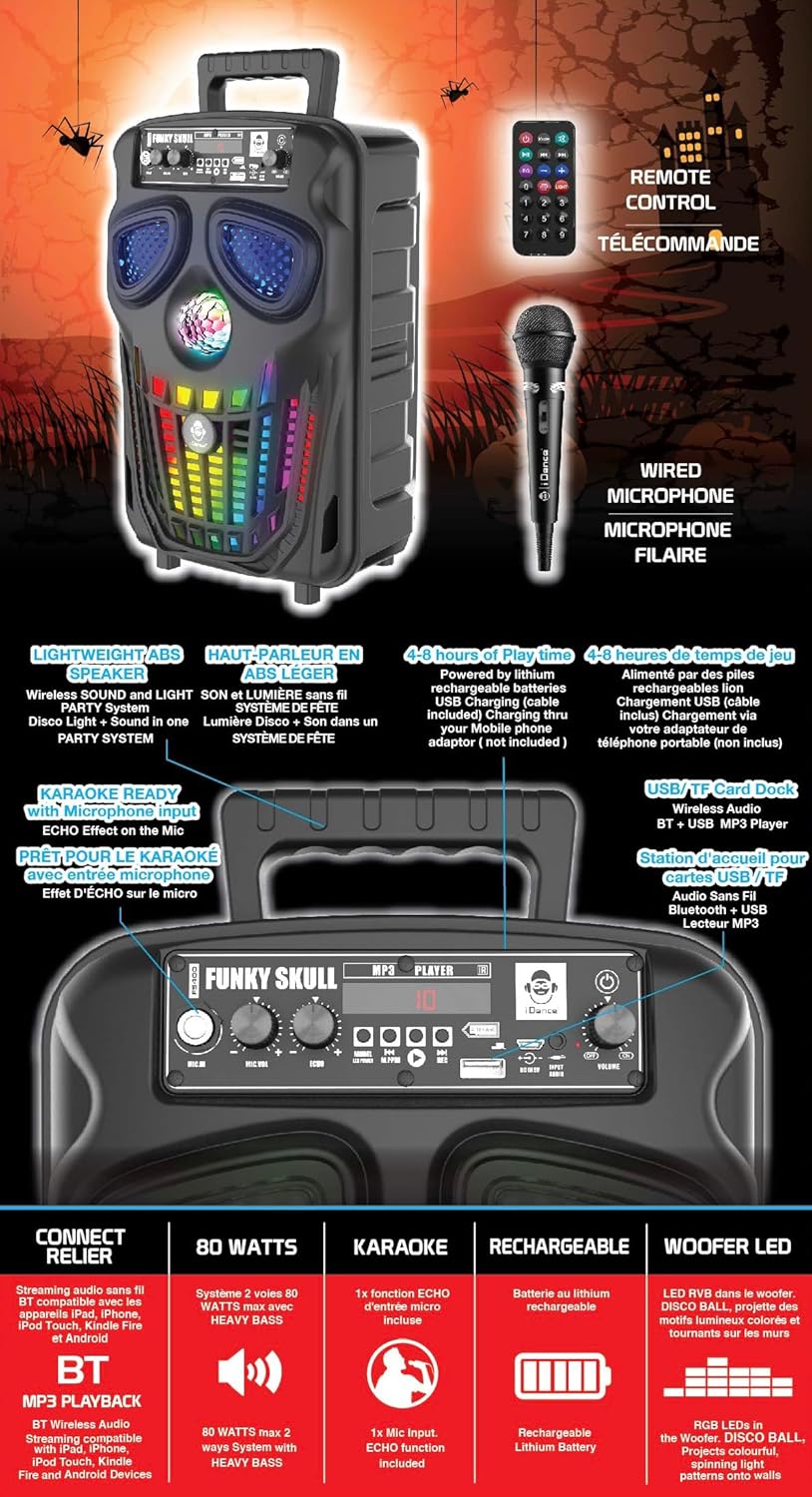
Figure 3.1: iDance FS400 Funky Skull speaker with its accessories, including the wired microphone, remote control, and USB charging cable.
4. Product Overview
The iDance FS400 Funky Skull is a portable karaoke party system featuring Bluetooth connectivity, integrated LED lights, and a wired microphone for karaoke functions. It is designed for ease of transport with an XXL rear handle.
4.1 Key Features
- Bluetooth Connectivity: Wirelessly stream audio from compatible devices.
- Karaoke Ready: Includes a wired microphone input with echo effect.
- Dynamic Lighting: Features a disco ball and multi-color LED lights in the woofer.
- Portable Design: Equipped with an XXL rear handle for easy carrying.
- Rechargeable Battery: Provides 4 to 8 hours of playtime on a single charge.
- MP3 Player: Supports playback from USB drives and TF cards.
4.2 Control Panel

Figure 4.1: Detailed view of the control panel on the iDance FS400 Funky Skull speaker.
The control panel includes:
- MIC.IN: Microphone input jack.
- MIC.VOL: Microphone volume control knob.
- ECHO: Echo effect control knob for the microphone.
- MODE: Button to switch between input modes (Bluetooth, USB, TF Card).
- PLAY/PAUSE/REC: Play/Pause button for media playback, also used for recording.
- PREVIOUS/NEXT: Buttons for track navigation.
- USB Port: For USB drive playback.
- TF CARD Slot: For TF card playback.
- DC 5V IN: Charging port.
- VOLUME: Master volume control knob.
- POWER: Power On/Off switch.
5. Setup
5.1 Initial Charging
Before first use, fully charge the speaker. Connect the supplied USB charging cable to the DC 5V IN port on the speaker and the other end to a compatible USB power adapter (not included). The charging indicator will illuminate during charging and turn off or change color when fully charged.
5.2 Connecting the Microphone
Insert the wired microphone's plug into the MIC.IN jack on the control panel.
6. Operating Instructions
6.1 Power On/Off
Slide the POWER switch to the 'ON' position to turn on the speaker. Slide it to 'OFF' to power down.
6.2 Bluetooth Pairing
- Turn on the iDance FS400 speaker. It will automatically enter Bluetooth pairing mode.
- Activate Bluetooth on your mobile device (smartphone, tablet, etc.).
- Search for available devices and select "iDance FS400" from the list.
- Once connected, you will hear an audible confirmation. You can now stream audio wirelessly.
6.3 Karaoke Function
- Ensure the wired microphone is connected to the MIC.IN jack.
- Play your desired music via Bluetooth, USB, or TF card.
- Adjust the microphone volume using the MIC.VOL knob.
- Rotate the ECHO knob to add an echo effect to your vocals.
6.4 USB/TF Card Playback
- Insert a USB drive into the USB Port or a TF card into the TF CARD Slot.
- The speaker will automatically detect and begin playing MP3 files. If not, press the MODE button to switch to USB/TF mode.
- Use the PREVIOUS and NEXT buttons to skip tracks.
- Press the PLAY/PAUSE button to pause or resume playback.
6.5 LED Lights
The iDance FS400 features a disco ball and multi-color LED lights in the woofer that activate automatically when the speaker is powered on and playing music, enhancing the party atmosphere.
6.6 Remote Control
The included remote control allows for convenient operation of the speaker from a distance. Functions typically include power, mode selection, volume control, track navigation, and play/pause.
7. Charging the Battery
The iDance FS400 is powered by a built-in rechargeable lithium-ion battery. To charge:
- Connect the USB charging cable to the DC 5V IN port on the speaker.
- Connect the other end of the USB cable to a standard USB power source (e.g., a USB wall adapter, computer USB port).
- The charging indicator light will show the charging status.
- A full charge provides approximately 4 to 8 hours of playtime, depending on usage and volume levels.
8. Maintenance
8.1 Cleaning
Wipe the speaker with a soft, dry cloth. Do not use abrasive cleaners or solvents, as they may damage the finish. Ensure no liquids enter the speaker openings.
8.2 Storage
When not in use for extended periods, store the speaker in a cool, dry place away from direct sunlight and extreme temperatures. It is recommended to charge the battery periodically to maintain its lifespan.
9. Troubleshooting
| Problem | Possible Cause | Solution |
|---|---|---|
| Speaker does not power on. | Battery is depleted. | Connect the speaker to a power source using the USB charging cable and allow it to charge. |
| No sound from speaker. | Volume is too low or muted. Incorrect input mode. | Increase the master volume. Press the MODE button to select the correct input source (Bluetooth, USB, TF). |
| Bluetooth device cannot pair. | Speaker is not in pairing mode. Device is too far. | Ensure the speaker is on and in Bluetooth mode. Move the device closer to the speaker. Restart both devices. |
| Microphone not working. | Microphone not connected properly. MIC.VOL is too low. | Ensure the microphone is fully plugged into the MIC.IN jack. Increase the MIC.VOL knob. |
10. Specifications

Figure 10.1: Dimensions of the iDance FS400 Funky Skull speaker.
| Feature | Specification |
|---|---|
| Model Number | FS400 FUNKY SKULL |
| Dimensions (H x W x D) | 36 x 23 x 19 cm |
| Weight | 2 Kilograms |
| Speaker Size | 6 Inches (Woofer) |
| Max Output Power | 200 Watts |
| Frequency Response | 2000 Hz |
| Impedance | 4 ohms |
| Battery Type | Lithium-ion (Rechargeable) |
| Playtime | 4 to 8 hours |
| Connectivity | Bluetooth |
| Control Method | Tactile |
| Included Components | Speaker, Quick Start Guide, USB Charging Cable, Wired Microphone, Remote Control |
| Material | ABS |
11. Warranty and Support
iDance International Limited guarantees the availability of spare parts for this product for a period of 2 years from the date of purchase. For technical support or service inquiries, please refer to the contact information provided in your Quick Start Guide or visit the official iDance website.
