
1. Introduction
This manual provides detailed instructions for the proper setup, operation, and maintenance of your Elikliv EDM202 Flex Digital Microscope. Please read this manual thoroughly before using the device to ensure safe and efficient operation.
2. Product Overview
The Elikliv EDM202 Flex is a versatile digital microscope featuring a 10.1-inch IPS screen, a flexible arm stand, an integrated ring light, and a 24MP camera. It is designed for detailed observation and analysis, suitable for tasks such as soldering, coin inspection, and general microscopic examination. The device supports HDMI and USB output for larger display options.
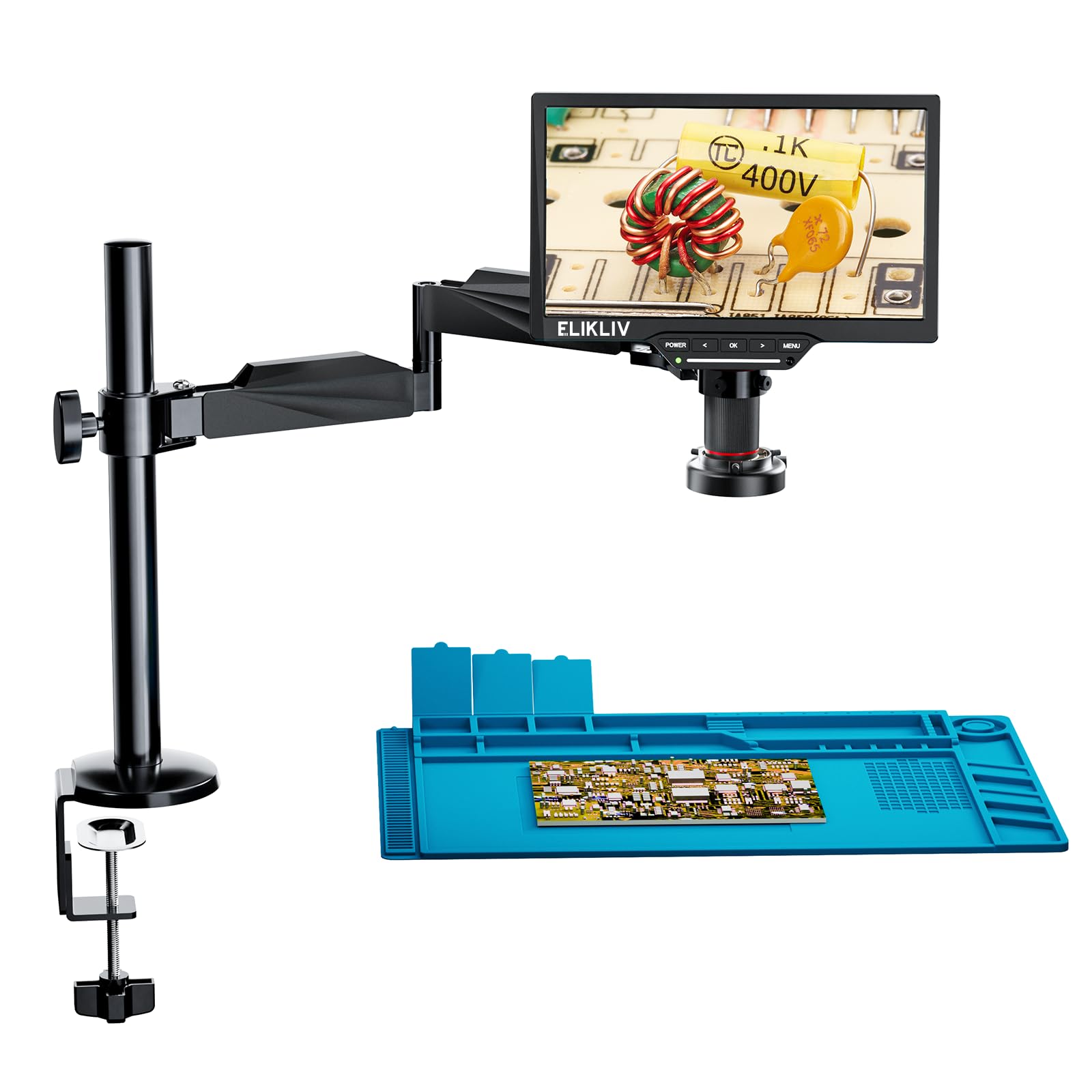
Image: The Elikliv EDM202 Flex Digital Microscope, highlighting its internal Sony sensor for enhanced image clarity and precision.

Image: Close-up view of the 10.1-inch IPS screen, indicating its larger size, increased brightness, and clearer display compared to standard screens.
3. Setup and Assembly
3.1 Unpacking
Carefully remove all components from the packaging. Verify that all parts listed in the packing list are present and undamaged. Keep the packaging for future storage or transport.
3.2 C-Clamp and Pole Installation
- Remove the screw from the bottom of the pole.
- Insert the protective cover into the C-clamp.
- Insert the screw through the C-clamp and into the pole.
- Tighten the screw to secure the pole to the C-clamp.
- Attach the assembled C-clamp and pole to the edge of your desktop and tighten the clamp securely.
Video: Instructions on how to install the flex arm to the EDM202 Flex Soldering Microscope. This video demonstrates the assembly of the C-clamp, pole, and monitor arm.
3.3 Monitor Arm Attachment
- Slide the monitor arm onto the pole at your desired height.
- Secure the monitor arm by tightening its screw.
3.4 Microscope Monitor Installation
- Attach the microscope monitor unit to the end of the monitor arm. Ensure it is firmly secured.
3.5 Ring Light Installation
- Connect the ring light to the microscope lens assembly.
- Plug the ring light's power cable into the designated port on the microscope unit.
Video: Step-by-step guide on how to install the ring light for the EDM202 Flex LCD Microscope.
3.6 Power Connection
Connect the microscope to a power source using the provided adapter. Ensure the power switch is in the 'Off' position before connecting.
4. Operating Instructions
4.1 Basic Functions
- Power On/Off: Press the 'POWER' button to turn the microscope on or off.
- Focus Adjustment: Rotate the focus knob on the microscope body to achieve a clear image.
- Zoom Adjustment: Use the zoom controls on the microscope or remote to adjust magnification (2x-2000x).
- Ring Light Brightness: Adjust the brightness of the ring light using the control knob on the light unit.
- Screen Adjustment: The monitor arm allows for 90° tilt, 180° swivel, and 360° rotation for optimal viewing angles.

Image: Demonstrates the flexible arm of the microscope, allowing for 90-degree tilt, 180-degree swivel, and 360-degree rotation for versatile positioning.

Image: The brightness ring light feature, providing broad workspace illumination, minimized reflections, and adjustable color temperature (6500K-7000K).

Image: Illustration of the microscope's 2x-2000x zoom capability, showing varying levels of magnification on electronic components.
4.2 Image and Video Capture
The microscope allows for capturing high-resolution images and videos. Refer to the on-screen menu for specific options related to photo and video recording. Captured media is stored on the included 32GB memory card.
4.3 HDMI/USB Output
Connect the microscope to an external display (e.g., laptop, television) using an HDMI or USB cable for a larger viewing experience. Select the appropriate input source on your external display.

Image: The microscope connected via HDMI/USB to a larger screen, demonstrating its capability for shared viewing and presentations.
Video: Demonstrates the HDMI/USB output capabilities of the Elikliv EDM202 Flex microscope, showing connection to an external monitor.
4.4 Measurement Functions
The microscope includes on-screen measurement tools such as cross-hairs, rulers, and line indexes. Access these features through the menu to assist with precise observations and measurements.
Video: A short preview demonstrating the on-screen measurement features like cross-hairs and rulers on the Elikliv EDM202 Flex microscope.
4.5 Using the Soldering Mat
The included silicone soldering mat provides a heat-resistant and organized workspace for soldering tasks. Utilize its compartments for small components and tools.

Image: The advanced silicone soldering mat, measuring 11.8 x 17.7 inches, designed to protect the workspace and organize components during soldering.
Video: Instructions on how to effectively use the soldering mat with the EDM202 Flex microscope, including organizing small parts.
Video: An overview of the ELIKLIV EDM202 Flex Digital Soldering Microscope with Boom Arm, showcasing its features and use in soldering applications.
5. Maintenance
5.1 Cleaning
- Lens and Screen: Use a soft, lint-free cloth specifically designed for optical surfaces to clean the lens and screen. Avoid abrasive materials or harsh chemicals.
- Body: Wipe the microscope body with a dry or slightly damp cloth. Do not allow liquids to enter the device.
5.2 Storage
When not in use, store the microscope in a clean, dry environment, away from direct sunlight and extreme temperatures. If storing for an extended period, ensure the device is powered off and disconnected from the power source.
6. Troubleshooting
- No Power: Ensure the power adapter is securely connected to both the microscope and a working power outlet. Check the power button.
- Blurry Image: Adjust the focus knob until the image is clear. Ensure the object is within the microscope's working distance. Clean the lens if necessary.
- No Image on External Display: Verify HDMI/USB cable connections. Ensure the correct input source is selected on the external display.
- Ring Light Not Working: Check the power connection to the ring light and ensure its brightness knob is adjusted.
If you encounter issues not covered here, please contact customer support.
7. Specifications
| Feature | Specification |
|---|---|
| Model Number | EDM202 Flex |
| Screen Size | 10.1 inches |
| Magnification Maximum | 1200x |
| Camera Resolution | 24MP (implied by product title) |
| Light Source Type | LED (Ring Light, Bottom Transmitted Light) |
| Material | Glass (Objective Lens) |
| Real Angle of View | 178 Degrees |
| Voltage | 240 Volts |
| Power Source | Corded Electric |
| Compatible Devices | Laptop, Television |
| Item Weight | 3.78 pounds |
| Package Dimensions | 12.09 x 11.1 x 3.82 inches |
| Date First Available | July 30, 2022 |
| Manufacturer | Elikliv |
8. Warranty and Support
8.1 Warranty Information
Elikliv products are covered by a limited warranty against defects in materials and workmanship. Please refer to the warranty card included with your product or visit the official Elikliv website for detailed warranty terms and conditions.
8.2 Customer Support
For technical assistance, troubleshooting, or any inquiries regarding your Elikliv EDM202 Flex Digital Microscope, please contact Elikliv customer support. Contact details can typically be found on the product packaging or the official Elikliv website.

