
Ohniyou JF2HG
Ohniyou 21-inch Flush Mount Ceiling Fan with Lights and Remote (Model JF2HG) Instruction Manual
Model: JF2HG | Brand: Ohniyou
1. Introduction
Thank you for choosing the Ohniyou 21-inch Flush Mount Ceiling Fan with Lights and Remote. This manual provides detailed instructions for the safe installation, operation, and maintenance of your new ceiling fan. Please read this manual thoroughly before installation and keep it for future reference.
2. Safety Information
Important Safety Instructions:
- Always disconnect power at the main circuit breaker before installation or servicing.
- All wiring must be in accordance with national and local electrical codes. If you are unfamiliar with wiring, consult a qualified electrician.
- Ensure the installation location can support the weight of the fan.
- Do not bend the fan blades during installation or cleaning.
- Keep children away from the fan during operation.
- This fan is designed for indoor use only.
3. Package Contents
Verify that all components are present before beginning installation:
- Ceiling Fan Unit (with integrated LED light)
- Remote Control
- Remote Control Receiver
- Mounting Hardware (screws, wire nuts, etc.)
- Instruction Manual

Image: The Ohniyou 21-inch flush mount ceiling fan, remote control, and smartphone app interface.
4. Product Features
- Compact Design: 21-inch flush mount design suitable for small rooms.
- Powerful Airflow: Angled propeller metal fan blades provide effective air circulation.
- Quiet DC Motor: Operates at less than 30dB for minimal noise.
- Dimmable LED Light: Stepless dimming from 10% to 100% brightness.
- 3 Color Temperatures: Adjustable light color (3000K warm, 4000K neutral, 6500K cool).
- Reversible DC Motor: Supports downdraft (summer) and updraft (winter) modes.
- Remote & APP Control: Convenient control via included remote or smartphone application.
- Memory Function: Retains last light setting when controlled by remote or app.
- Timing Function: 2-hour timer setting.
- Night Light Mode: Dedicated setting for low-light conditions.

Image: Diagram showing the 21-inch dimensions of the fan and a comparison of its airflow with a traditional 42-inch fan, highlighting its efficiency.
5. Setup and Installation
Before Installation:
- Turn off power at the circuit breaker.
- Ensure you have all necessary tools (screwdriver, wire strippers, ladder, etc.).
Installation Steps:
- Prepare the Mounting Bracket:
Secure the mounting bracket to the ceiling junction box using the provided screws. Ensure the bracket is firmly attached and can support the fan's weight.
- Locate Remote Receiver:
The remote control receiver is typically located within the fan's housing. You may need to remove two screws and twist the hanging plate to access it.

Image: Four-panel illustration showing how to remove screws, twist the hanging plate, and locate the remote receiver and remote control within the fan unit.
- Wiring Connections:
Connect the fan's electrical wires to your household wiring according to the wiring diagram in the full manual. Use wire nuts to secure connections. Ensure proper grounding.
- Attach Fan to Mounting Bracket:
Carefully lift the fan unit and attach it to the mounting bracket, ensuring all wires are tucked safely inside the canopy.
- Secure Fan Blades:
Attach the fan blades to the motor housing. Ensure they are securely fastened.
- Install Light Kit:
Connect the light kit wiring and secure the light cover to the fan unit.
6. Operating Instructions
6.1 Remote Control Operation
The included remote control allows for full functionality of your ceiling fan. Ensure 2x AAA batteries (not included) are installed correctly.

Image: Illustration of the remote control and smartphone app interface, detailing functions like dimming, memory, timing, and night mode.
- Light On/Off, Fan & Light All Off: Press the dedicated buttons to control light and fan power.
- Light Setting: Adjust color temperature (warm, neutral, cool) and brightness (10%-100%).
- Pair Code: Used for pairing the remote with the fan.
- Forward/Reverse: Switches between downdraft (summer) and updraft (winter) modes.
- Natural Wind Mode: Simulates a natural breeze.
- Fan Off: Turns off the fan.
- 6 Fan Speeds: Adjust fan speed from 1 (low) to 6 (high).
- Timer: Sets a 2-hour timer for fan operation.
- Night Mode: Activates a low-light, quiet operation mode.
6.2 APP Control Operation
Control your fan using the dedicated smartphone application. The app provides additional convenience and features.
- Download the App: Scan the QR code below or visit http://www.jasonghost.com/fanlamppro/index-en.html to download and install the "FanLamp Pro" app.
- Enable Bluetooth: Open the app and turn on your phone's Bluetooth.
- Power Cycle Fan: Disconnect the power of the fanlight, then reconnect it.
- Pairing: Hit the pair button within the app to connect to your fan.

Image: Screenshot of the FanLamp Pro app interface, showing options for scanning QR codes, managing rooms, and controlling fan and light settings.
6.3 Light Functions
- Dimmable: Adjust light brightness from 10% to 100% using the remote or app.
- Color Temperature: Cycle through warm (3000K), neutral (4000K), and cool (6500K) light settings.
- Memory Function: The fanlight will remember the last brightness and color temperature setting when turned off and on via remote or app. This function does not apply when using a wall switch.

Image: Visual representation of the fan's customizable light, showing stepless dimming from 10% to 100% and three color temperature options (3000K, 4000K, 6500K).
6.4 Fan Functions
- Fan Speed: Select from 6 different fan speeds to achieve desired airflow.
- Reversible Motor:
- Summer Downdraft Mode: Air circulates downward to create a cooling effect.
- Winter Updraft Mode: Air circulates upward to enhance warm air distribution.
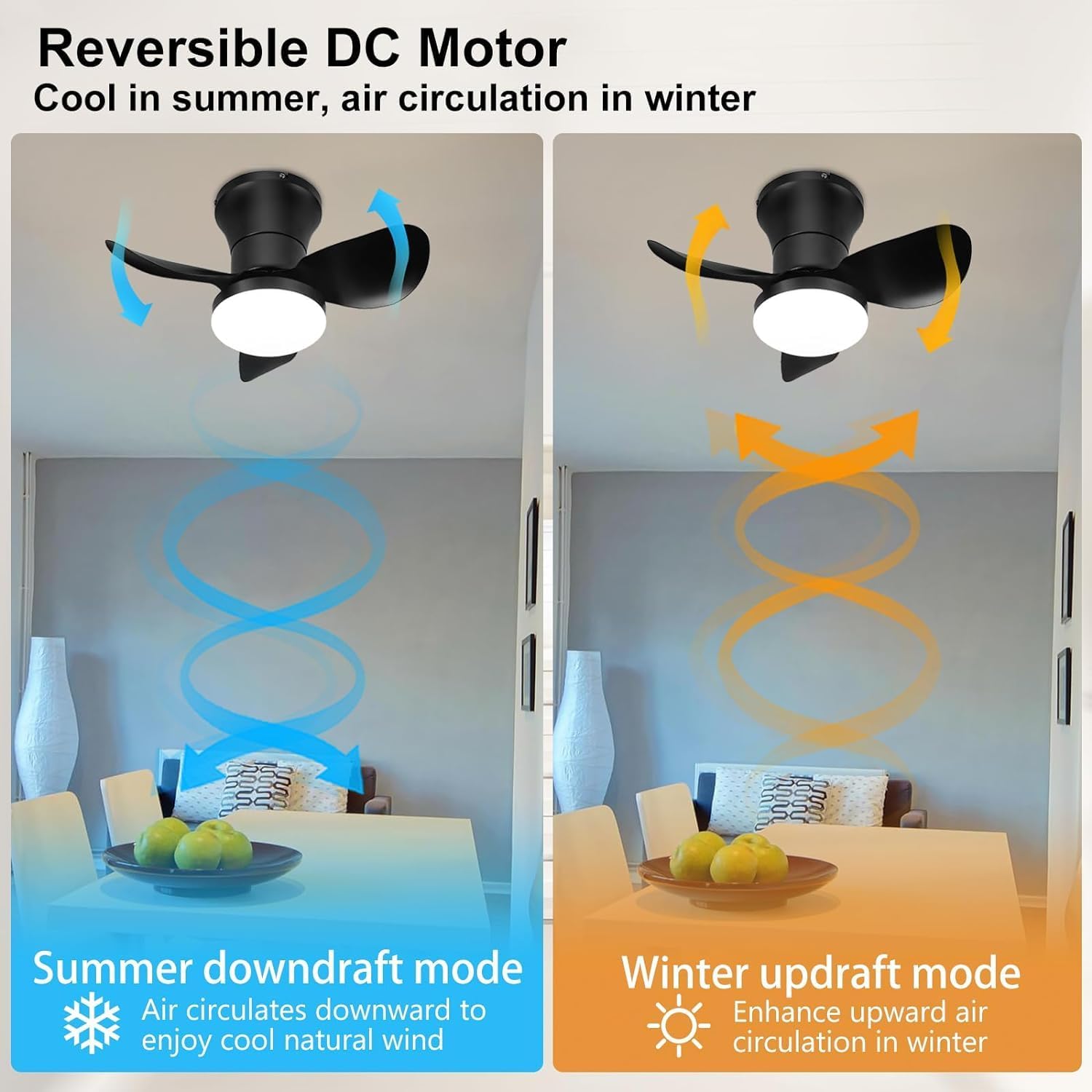
Image: Diagram illustrating the reversible DC motor's downdraft mode for summer cooling and updraft mode for winter air circulation.
- Timer: Use the 2-hour timer function for automatic fan shutdown.
- Night Mode: Engages a quiet, low-speed fan operation suitable for sleeping environments.

Image: Icons representing ultra-quiet operation (<30dB), 2-hour timer, and night mode, with a sleeping child in the background.
7. Maintenance
Regular maintenance ensures optimal performance and longevity of your ceiling fan.
- Cleaning: Use a soft, damp cloth to clean the fan blades and motor housing. Do not use abrasive cleaners or solvents.
- Light Kit: The integrated LED light panel is replaceable. For replacement, please contact customer support.
- Tighten Fasteners: Periodically check and tighten all screws and fasteners to ensure secure operation.

Image: Diagram showing the replaceable LED light panel within the fan, composed of yellow and white light components.
8. Troubleshooting
If you encounter issues with your fan, refer to the following common problems and solutions:
| Problem | Possible Cause | Solution |
|---|---|---|
| Fan does not start | No power; Loose wiring; Remote battery low; Fan not paired with remote/app. | Check circuit breaker; Verify all wire connections; Replace remote batteries; Re-pair remote/app. |
| Light does not work | Loose wiring; LED panel issue. | Check light kit wiring; Contact customer support for LED panel replacement. |
| Fan makes noise | Loose screws; Blades unbalanced; Motor issue. | Tighten all screws; Ensure blades are securely attached; Contact customer support if noise persists. |
| Remote/App not controlling fan | Remote battery low; Not paired; Obstruction. | Replace remote batteries; Re-pair remote/app; Ensure clear line of sight for remote. |
| Memory function not working | Fan turned off by wall switch. | Memory function only works when fan is turned off/on by remote or app, not a wall switch. |
9. Specifications
| Feature | Detail |
|---|---|
| Brand | Ohniyou |
| Model Name | JF2HG |
| Product Dimensions | 20.87"L x 20.87"W x 10.24"H (21 inches diameter) |
| Color | Black |
| Material | Metal |
| Installation Type | Flush Mount |
| Power Source | DC |
| Voltage | 110 Volts |
| Wattage | 30 watts |
| Light Source Type | LED (Dimmable, 3 Color Temperatures) |
| Control Method | Remote Control, APP-based |
| Special Features | APP Operable, Dimmable, Large Air Volume, Night Light Mode, Quiet DC Motor, Reversible Motor |
| Item Weight | 6.77 pounds |
| Indoor/Outdoor Usage | Indoor |
10. Warranty and Support
Warranty: All Ohniyou products purchased come with a 365-day warranty as standard.
For technical support, warranty claims, or any questions regarding your Ohniyou ceiling fan, please refer to the contact information provided with your purchase or visit the official Ohniyou website.
Related documentsJF2HG


Ask a question about this manual
Ask about setup, troubleshooting, compatibility, parts, safety, or missing instructions. Manuals+ will review the question and use this page’s manual context to help answer it.