
1. Product Overview
The FONOBO S9 Pro Smart Window Cleaning Robot is designed for efficient cleaning of various smooth surfaces, including glass, tiles, and mirrors. It features a built-in vacuum motor for strong suction, ensuring it adheres securely to surfaces during operation. The robot incorporates an Uninterruptible Power System (UPS) to prevent falls in case of power loss and intelligent algorithms for edge detection and optimal cleaning path planning.
Product Components

Figure 1: FONOBO S9 Pro Robot Components
This diagram illustrates the key components of the FONOBO S9 Pro robot, including the lanyard hole, horn sound hole, indicator lights (red for abnormal condition, blue for normal, orange for charging, green for charging complete), remote control receiving window, power switch, one-button start, power socket, lower hanging hole, and cleaning cloths.
What's Included
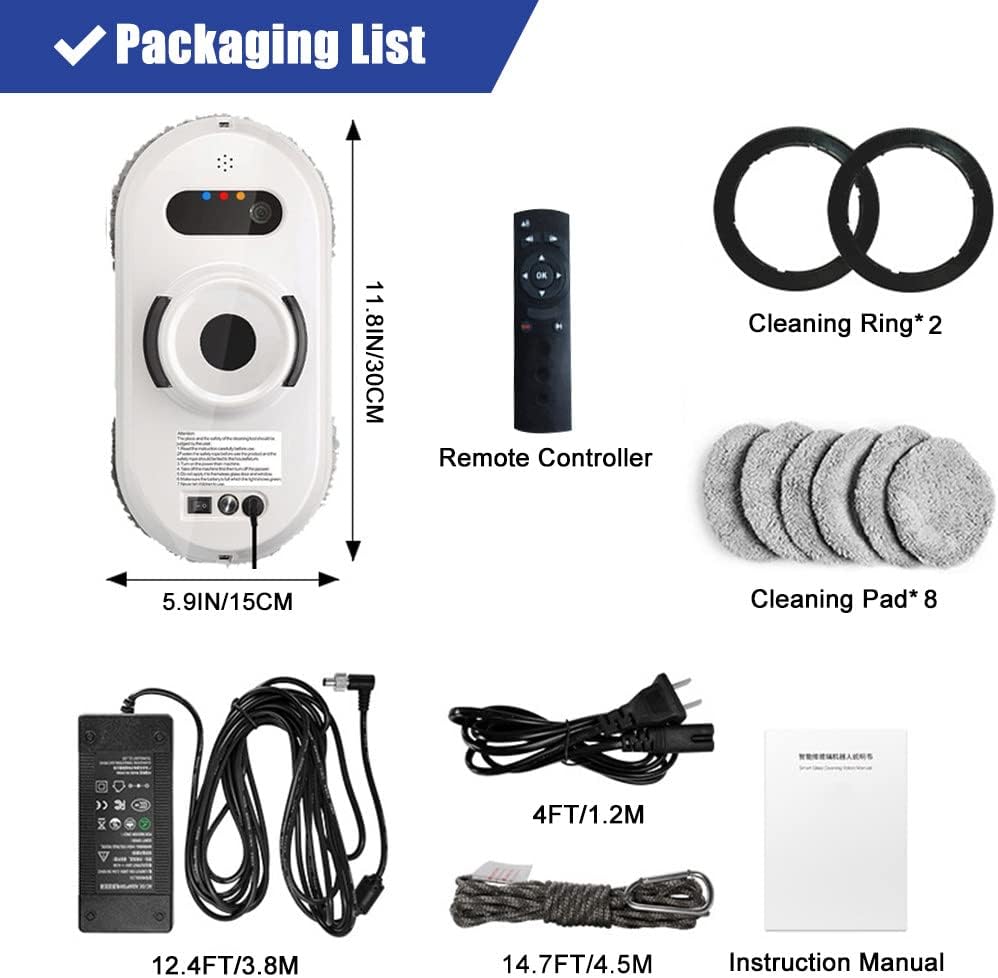
Figure 2: Packaging Contents
- 1 x Window Cleaner Robot
- 8 x Cleaning Pads
- 2 x Cleaning Rings
- 1 x Remote Control
- 1 x Power Adapter + 1 x AC Power Cord
- 1 x 4.5M/14.7ft Safety Rope
- 1 x English User Manual
2. Setup and Preparation
2.1 Safety Rope Attachment
Before operating the robot, always attach the safety rope to a secure indoor fixture. This prevents the robot from falling in case of unexpected power loss or suction failure.
Video 1: Quick Operation Guide (0:00 - 0:20 shows safety rope attachment)
This video provides a quick operation guide for the S9 Pro window cleaning robot, demonstrating initial setup, safety rope attachment, charging, water filling, starting the cleaning process, and storage.
- Place the base station on a smooth, flat surface, avoiding crevices.
- Turn the knob at the rear of the base station clockwise to the "O" position to secure it.
- Insert the safety rope buckle horizontally into the hole on the side of the base station and rotate 90 degrees clockwise to lock.
- Fasten the other end of the safety rope to a sturdy indoor fixture.
2.2 Charging the Robot
Ensure the robot is adequately charged before use. If used for the first time or after a long period of inactivity, it is recommended to charge for at least 15 minutes.
- Connect the power adapter to the base station and then to a power outlet.
- Observe the blue indicator light on the base station to confirm power connection.
- The robot's charging indicator will show a red light when charging and a green light when fully charged.
2.3 Attaching Cleaning Pads and Filling Water
Properly prepare the cleaning pads and water tank for optimal cleaning performance.
- Ensure the cleaning pads are securely installed on the machine's cleaning disks. If a pad falls off, realign it with the buckle.
- Open the water inlet on the robot.
- Insert the water filling port with the provided bottle and add water.
- Before turning on the switch, hold the machine and spray water on the mops 15 to 20 times until the surface of the mop is slightly wet.
3. Operating Instructions
3.1 Starting the Cleaning Process
The robot offers automatic operation modes for comprehensive window cleaning.

Figure 3: Robot in Operation
- Pull out the power cord to the appropriate length.
- Press the machine switch for 3 seconds to confirm it starts working.
- Place the machine on the glass surface.
- Press the Start/Pause button on the robot or use the remote control to initiate cleaning.
3.2 Intelligent Cleaning Modes
The robot features three automatic operation modes for cleaning the entire window, calculating and programming the optimal cleaning path for maximum efficiency.

Figure 4: Intelligent Cleaning Paths
The robot automatically detects window edges and obstacles to ensure thorough coverage.
3.3 Multi-Surface Compatibility
The FONOBO S9 Pro is versatile and can be used on various smooth surfaces beyond just windows.

Figure 5: Applicable Scenarios
It is compatible with glass doors, tiled walls, wardrobes, mirrors, and shower glass, offering convenience and safety for hard-to-reach areas.
Video 2: S9 Pro Window Cleaning Robot with Multi-Functional Station
This video showcases the S9 Pro Window Cleaning Robot with its multi-functional station, highlighting its features and ease of use on various surfaces.
4. Maintenance
4.1 Cleaning Pads
Regular cleaning and replacement of the microfiber pads are essential for effective cleaning.
- After each use, remove the cleaning pads and wash them thoroughly.
- If the glass is very dirty during the first cleaning, it is recommended to completely wet the mop and twist it firmly until it does not drip before attaching it to the cleaning disk.
- If the mop becomes dry during operation, spray water on it 15-20 times. If it is wet but still slippery, replace it with a dry mop.
4.2 Water Tank and Storage
Proper storage ensures the longevity of your robot.
- After cleaning, it is recommended to pour out any remaining water from the robot's water tank.
- Place the robot back into its base station for storage.
- Press the button on the left side of the base station to automatically retract the power cord connected to the machine.
- Press the button on the right side of the base station to automatically retract the power cord connected to the socket.
- Turn the deflation switch counterclockwise to the "T" position on the base station to release suction, then remove the base station.
5. Troubleshooting
Here are solutions to common issues you might encounter:
5.1 Robot Falls During Operation
- Check Safety Rope: Ensure the safety rope is securely attached to both the robot and an indoor fixture.
- Power Loss: The built-in UPS prevents immediate falls. If the machine suddenly powers off during operation, the built-in battery will keep it adsorbed on the glass for 25 minutes. An alarm will sound, indicating it should be removed promptly.
- Insufficient Suction: Ensure the cleaning pads are not overly wet, as this can affect suction power. The suction power is only effective when the robot is connected to power.
5.2 Robot is Out of Reach
- If the machine is in a location that is out of reach, grab the power cord connected to the machine.
- Drag the glass surface horizontally to where you can safely reach it and take off the machine after powering it off.
5.3 Mop Becomes Slippery or Dry
- If the mop is dry, spray water on the mop 15-20 times and restart the machine.
- If the mop is wet but the robot is slipping, replace it with a dry mop.
6. Specifications
| Feature | Specification |
|---|---|
| Brand | FONOBO |
| Special Feature | Bagless |
| Filter Type | Cloth |
| Battery Life | 20 minutes (backup) |
| Power Source | Battery Powered (main operation requires AC power) |
| Form Factor | Robotic |
| Package Dimensions | 11.81 x 9.25 x 5.51 inches |
| Item Weight | 4.73 pounds |
| Manufacturer | FONOBO |
| ASIN | B0B4Z7TYB7 |
| Surface Recommendation | Glass, Tile |
| Controller Type | Remote Control |
| Cleaning Speed | 4 minutes / m² |
| Suction Power | 6000Pa |
| Safety Rope Length | 4.5m / 14.7ft |
7. Warranty and Support
FONOBO is committed to customer satisfaction. For any issues or support needs, please contact our customer service team.
- Contact us via Amazon email or the official website.
- Our support team is available 24/7 to assist you.