
1. Introduction
Thank you for choosing the BLACK+DECKER BD40K27A-JP Cordless Push Driver. This compact and versatile tool is designed for efficient screw tightening and assembly tasks. Featuring a unique push-activated mechanism and integrated LED lighting, it offers convenience and precision for various applications. Please read this manual thoroughly before use to ensure safe and optimal operation.

Image 1.1: The BLACK+DECKER BD40K27A-JP Cordless Push Driver, showcasing its ergonomic design.
2. Safety Information
Always observe basic safety precautions when using electrical tools to reduce the risk of fire, electric shock, and personal injury.
- Read all instructions: Familiarize yourself with the tool's operation and safety guidelines.
- Keep work area clean: Cluttered areas invite accidents.
- Avoid dangerous environments: Do not use power tools in damp or wet locations, or expose them to rain.
- Keep children away: All visitors should be kept at a safe distance from the work area.
- Dress properly: Do not wear loose clothing or jewelry. Wear protective hair covering to contain long hair.
- Use safety glasses: Always wear safety glasses.
- Secure work: Use clamps or a vise to hold work when practical.
- Do not overreach: Keep proper footing and balance at all times.
- Disconnect tools: Unplug tools when not in use, before servicing, or when changing accessories.
- Avoid unintentional starting: Ensure the switch is in the off position before plugging in.
- Use recommended accessories: Consult the manual for recommended accessories.
- Maintain tools with care: Keep tools sharp and clean for best and safest performance.
- Check for damaged parts: Before further use, a guard or other part that is damaged should be carefully checked to determine that it will operate properly and perform its intended function.
- Do not operate power tools near flammable liquids or gases.
3. Package Contents
Verify that all items listed below are included in your package:
- BLACK+DECKER BD40K27A-JP Cordless Push Driver
- Lithium-Ion Battery (integrated)
- USB Charging Cable
- Aluminum Storage Case
- 26 Types of Screwdriver Bits
- Instruction Manual
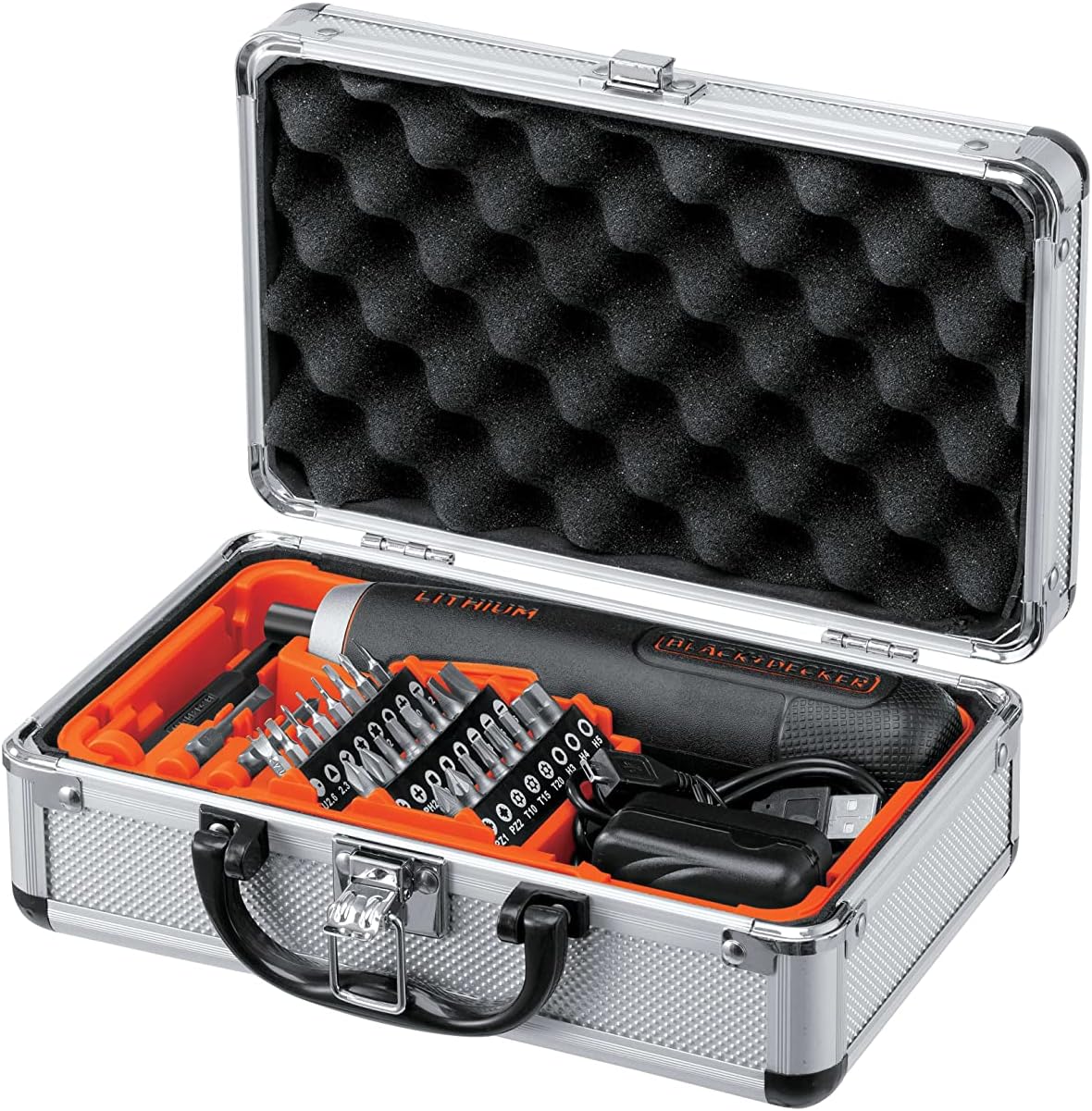
Image 3.1: The BD40K27A-JP Cordless Push Driver kit, including the driver, charging cable, and 26 bits, neatly organized in its aluminum storage case.
4. Product Features
The BD40K27A-JP Cordless Push Driver is engineered with several features to enhance usability and performance:
- Compact and Straight Design: Allows for easy handling and access in tight spaces.
- Push-Activated Mechanism: Automatically rotates when the bit is pressed into the screw, eliminating the need for a traditional trigger switch.
- Integrated Lithium-Ion Battery: Provides reliable cordless power.
- 5-Position Adjustable Clutch: Allows for precise torque control to prevent overtightening or damaging fasteners.
- LED Work Light: Illuminates the work area for improved visibility in dimly lit conditions.
- Battery Level Indicator: Displays the remaining battery charge.

Image 4.1: Detail view of the driver's battery level indicator and forward/reverse switch.

Image 4.2: The driver's integrated LED work light illuminating a dark area.
5. Setup
5.1 Charging the Battery
The BD40K27A-JP comes with an integrated Lithium-Ion battery. Before first use, fully charge the battery.
- Locate the USB charging port on the driver.
- Connect the provided USB charging cable to the driver's port.
- Connect the other end of the USB cable to a compatible USB power adapter (not included) or a computer USB port.
- The battery indicator lights will show charging progress. All lights will illuminate steadily when fully charged.
- Disconnect the charger once charging is complete.
Note: Do not store the tool with a completely discharged battery for extended periods, as this can damage the battery.
5.2 Inserting and Changing Bits
The driver uses standard 1/4-inch hex shank bits.
- Ensure the driver is in the OFF position (center position of the forward/reverse switch).
- Push the desired screwdriver bit firmly into the bit holder until it clicks into place.
- To remove a bit, pull it straight out from the bit holder.
5.3 Adjusting the Clutch
The BD40K27A-JP features a 5-position adjustable clutch to control the torque output. This helps prevent overtightening screws or stripping screw heads.
- Rotate the clutch collar located near the bit holder to select the desired torque setting.
- Lower numbers (1-2) are for smaller screws and softer materials, requiring less torque.
- Higher numbers (3-5) are for larger screws and harder materials, requiring more torque.
- Experiment with different settings on scrap material to find the appropriate torque for your task.
6. Operating Instructions
6.1 Forward/Reverse Rotation
The forward/reverse switch is located on the side of the driver.
- Slide the switch forward (towards the bit) for forward rotation (tightening screws).
- Slide the switch backward (away from the bit) for reverse rotation (loosening screws).
- Position the switch in the center for the OFF/lock position.
6.2 Using the Push-Activated Mechanism
This driver operates without a traditional trigger. Rotation is activated by applying pressure.
- Ensure the forward/reverse switch is set to the desired direction (forward for tightening, reverse for loosening).
- Place the screwdriver bit onto the screw head.
- Apply firm, steady pressure to the back of the driver, pushing it into the screw. The driver will automatically begin to rotate.
- Release pressure to stop rotation.

Image 6.1: Demonstrating the push-activated mechanism for driving a screw into wood.
6.3 Using the LED Work Light
The integrated LED light automatically illuminates when the driver is activated by pressure, providing visibility in dark work areas.
7. Maintenance
7.1 Cleaning
- Keep the ventilation slots of the tool clean to prevent overheating.
- Use a soft, damp cloth to clean the exterior of the tool. Do not use harsh chemicals or abrasive cleaners.
- Never immerse the tool in water or any other liquid.
7.2 Battery Care and Storage
- Store the tool in a cool, dry place, away from direct sunlight and extreme temperatures.
- For long-term storage, charge the battery to approximately 50% capacity.
- Recharge the battery every 3-6 months during long storage periods to maintain battery health.
- Do not store the tool with a completely discharged battery.
8. Troubleshooting
| Problem | Possible Cause | Solution |
|---|---|---|
| Driver does not turn on. | Battery is discharged. Forward/reverse switch is in the center (OFF) position. |
Charge the battery. Slide the switch to forward or reverse. |
| Insufficient power/torque. | Battery is low. Clutch setting is too low. |
Recharge the battery. Adjust the clutch to a higher setting. |
| Bit slips from screw head. | Incorrect bit type/size. Insufficient pressure applied. Clutch setting too high (stripping screw). |
Use the correct bit for the screw. Apply firm, steady pressure. Adjust clutch to a lower setting. |
9. Specifications
| Model Number | BD40K27A-JP |
| Voltage | 3.6 Volts |
| Battery Type | Lithium-Ion (integrated) |
| Clutch Settings | 5 Positions |
| Bit Holder | 1/4-inch Hex |
| Product Dimensions (L x W x H) | 18.5 x 4 x 4 cm |
| Item Weight | 280 g |
| Manufacturer | BLACK+DECKER |
10. Warranty and Support
For warranty information and customer support, please refer to the warranty card included with your product or visit the official BLACK+DECKER website. Keep your purchase receipt as proof of purchase for any warranty claims.
For technical assistance or service inquiries, please contact BLACK+DECKER customer service through their official channels.


