
REDMOND M216S
REDMOND SkyKettle M216S Electric Kettle 1.7L with App Control User Manual
Model: M216S | Brand: REDMOND
Introduction
Thank you for choosing the REDMOND SkyKettle M216S. This electric kettle combines modern design with smart technology, allowing you to control it conveniently via a mobile application. Please read this manual carefully before use to ensure safe and efficient operation of your new appliance. This manual provides essential information on setup, operation, maintenance, and troubleshooting.
Important Safety Instructions
When using electrical appliances, basic safety precautions should always be followed to reduce the risk of fire, electric shock, and/or injury to persons, including the following:
- Read all instructions carefully before using the kettle.
- Do not touch hot surfaces. Use handles or knobs.
- To protect against fire, electric shock, and injury, do not immerse cord, plugs, or the kettle base in water or other liquid.
- Close supervision is necessary when any appliance is used by or near children.
- Unplug from outlet when not in use and before cleaning. Allow to cool before putting on or taking off parts, and before cleaning the appliance.
- Do not operate any appliance with a damaged cord or plug, or after the appliance malfunctions or has been damaged in any manner.
- The use of accessory attachments not recommended by the appliance manufacturer may result in fire, electric shock, or injury to persons.
- Do not use outdoors.
- Do not let cord hang over edge of table or counter, or touch hot surfaces.
- Do not place on or near a hot gas or electric burner, or in a heated oven.
- Always attach plug to appliance first, then plug cord into the wall outlet. To disconnect, turn any control to "off", then remove plug from wall outlet.
- Do not use appliance for other than intended use.
- Extreme caution must be used when moving an appliance containing hot water.
- Ensure the lid is securely closed before operating.
- Do not fill above the "MAX" line or below the "MIN" line.
Package Contents
Please check the box for the following items:
- REDMOND SkyKettle M216S (1.7L)
- Power Base
- User Manual
Product Overview
Familiarize yourself with the components of your REDMOND SkyKettle M216S.
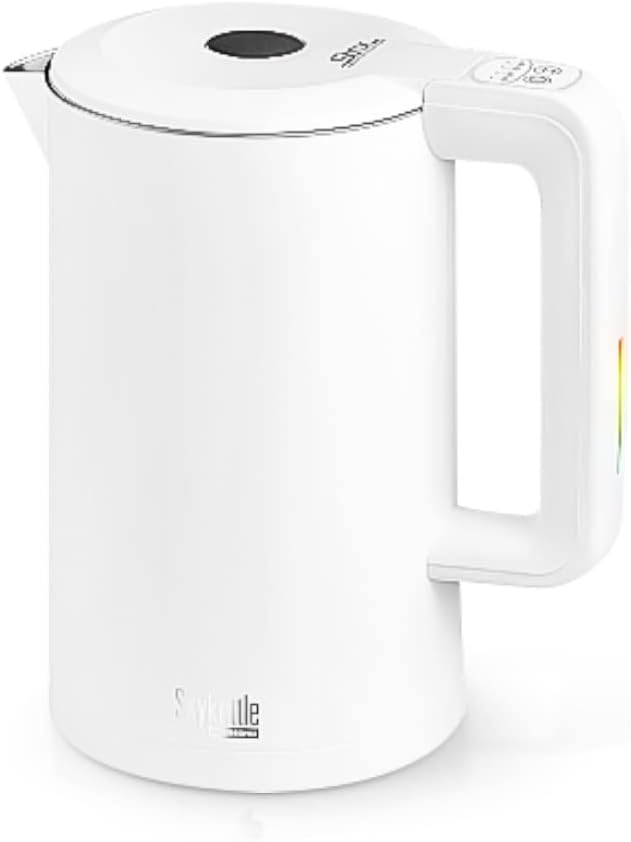
Image 1: The REDMOND SkyKettle M216S, a white electric kettle with a sleek design and control buttons on the handle.
- Kettle Body: Stainless steel and plastic construction, 1.7L capacity.
- Lid: Removable or hinged lid for filling.
- Handle: Ergonomically designed with integrated control buttons.
- Spout: For pouring water.
- Water Level Indicator: To monitor water volume.
- Power Base: 360° rotational base with power cord.
Setup
- Unpacking: Carefully remove all packaging materials from the kettle and its base.
- Initial Cleaning: Before first use, fill the kettle with clean water to the MAX level, boil it, and then discard the water. Repeat this process 2-3 times to remove any manufacturing residues.
- Placement: Place the power base on a flat, stable, heat-resistant surface, away from edges and heat sources.
- Power Connection: Plug the power cord into a suitable wall outlet (220 Volts).
Operating Instructions
Basic Operation
- Fill the Kettle: Open the lid and fill the kettle with the desired amount of water. Do not exceed the MAX fill line (1.7L) and ensure it is above the MIN fill line. Close the lid securely.
- Place on Base: Place the kettle firmly onto its power base.
- Start Boiling: Press the power button on the handle or the base to start the boiling process. The indicator light will illuminate.
- Automatic Shut-off: The kettle will automatically shut off once the water has boiled. The indicator light will turn off.
- Pouring: Carefully lift the kettle from the base and pour the hot water.
Smart Control via Application
The REDMOND SkyKettle M216S can be controlled remotely via a mobile application, offering advanced features like smart boiling, temperature hold, and custom settings.

Image 2: The REDMOND SkyKettle M216S shown alongside a smartphone displaying the kettle's control application, indicating remote control capabilities.
- Download App: Download the official REDMOND smart home application from your device's app store.
- Pairing: Follow the in-app instructions to pair your SkyKettle M216S with your smartphone. This typically involves activating Bluetooth or Wi-Fi on your phone and selecting the kettle from the device list.
- App Features:
- Smart Boiling: Set precise target temperatures for heating water without reaching a full boil.
- Keep-Warm Function: Maintain water at a desired temperature for an extended period.
- Scheduled Operation: Program the kettle to boil water at specific times.
- Remote Control: Start or stop boiling from anywhere within range.
- Safety Features: The kettle includes overheat protection and automatic shut-off when water is low, ensuring safe operation even with remote control.
Maintenance and Cleaning
Regular cleaning ensures optimal performance and extends the lifespan of your kettle.
- Before Cleaning: Always unplug the kettle from the power outlet and allow it to cool completely before cleaning.
- Exterior Cleaning: Wipe the exterior of the kettle with a soft, damp cloth. Do not use abrasive cleaners or harsh chemicals.
- Interior Cleaning (Descaling): Over time, mineral deposits (limescale) may build up inside the kettle, especially in hard water areas.
- Fill the kettle with a mixture of equal parts water and white vinegar (or a commercial descaling solution) to the MAX level.
- Bring the mixture to a boil and then let it stand for at least 30 minutes, or longer for heavy deposits.
- Pour out the mixture and rinse the interior thoroughly with fresh water several times.
- If necessary, repeat the process.
- Filter Cleaning: If your kettle has a removable filter, gently remove it and rinse under running water. Reinstall once clean.
- Storage: When not in use, store the kettle in a dry place, away from direct sunlight and moisture.
Troubleshooting
If you encounter any issues with your REDMOND SkyKettle M216S, please refer to the following common problems and solutions:
| Problem | Possible Cause | Solution |
|---|---|---|
| Kettle does not turn on. | No power supply; Kettle not properly seated on base; Low water level. | Check if the power cord is securely plugged in. Ensure the kettle is correctly placed on the power base. Fill the kettle with water above the MIN level. |
| Water is not boiling. | Lid not closed properly; Faulty power connection. | Ensure the lid is securely closed. Check power connection and try a different outlet. |
| Kettle switches off too soon. | Limescale buildup; Overheat protection activated. | Descale the kettle as per maintenance instructions. Allow the kettle to cool down if overheat protection was triggered. |
| App control not working. | Kettle not paired; Bluetooth/Wi-Fi issues; App malfunction. | Ensure the kettle is powered on and within range. Re-pair the kettle with the app. Check your phone's Bluetooth/Wi-Fi settings. Restart the app or your phone. |
If the problem persists after trying these solutions, please contact REDMOND customer support.
Specifications
| Model Name | M216S |
| Brand | REDMOND |
| Capacity | 1.7 Liters |
| Power | 1850 - 2200 Watts |
| Voltage | 220 Volts |
| Body Material | Stainless Steel, Plastic |
| Color | White |
| Product Dimensions (L x W x H) | 21.5 x 15.5 x 22.3 cm |
| Control Type | Remote control (App) |
| Key Functions | Overheat protection, Smart boiling, Automatic shut-off (low water), Heating without boiling, Automatic keep-warm, 360° rotation |
Warranty and Support
Specific warranty information and customer support contact details are typically provided with the product packaging or on the manufacturer's official website. Please refer to these resources for detailed warranty terms and conditions, as well as for technical assistance.
For further assistance, please visit the official REDMOND website or contact their customer service department.
Related documentsM216S


Ask a question about this manual
Ask about setup, troubleshooting, compatibility, parts, safety, or missing instructions. Manuals+ will review the question and use this page’s manual context to help answer it.