
1. Introduction
The Star Sat SR-6020HD is a Full HD1080 satellite receiver designed for high-quality digital television reception. This device supports DVB-S/S2 standards, MPEG-4, and H.264/AVC, ensuring compatibility with a wide range of satellite broadcasts. It features two USB ports, an HDMI output, and supports up to 6000 channels. Key functionalities include PVR (Personal Video Recorder) via external USB, multimedia file playback, a 7-day Electronic Program Guide (EPG), and support for various DiSEqC protocols (1.0/1.1/unicable/1.2/1.3 USALS). The SR-6020HD is also WiFi supported (WiFi device not included), offering enhanced connectivity options.
2. What's in the Box
Please verify that all the following items are included in your package:
- Star Sat SR-6020HD Satellite Receiver
- Remote Control
- HDMI Cable
- User Manual
- Warranty Card
- IR/External Display
- 12V Power Adaptor
- Mount Bracket for receiver
- 2x Double Tapes (for external display and mount bracket)
- AVI Cable
- 2x AAA Batteries (for remote control)
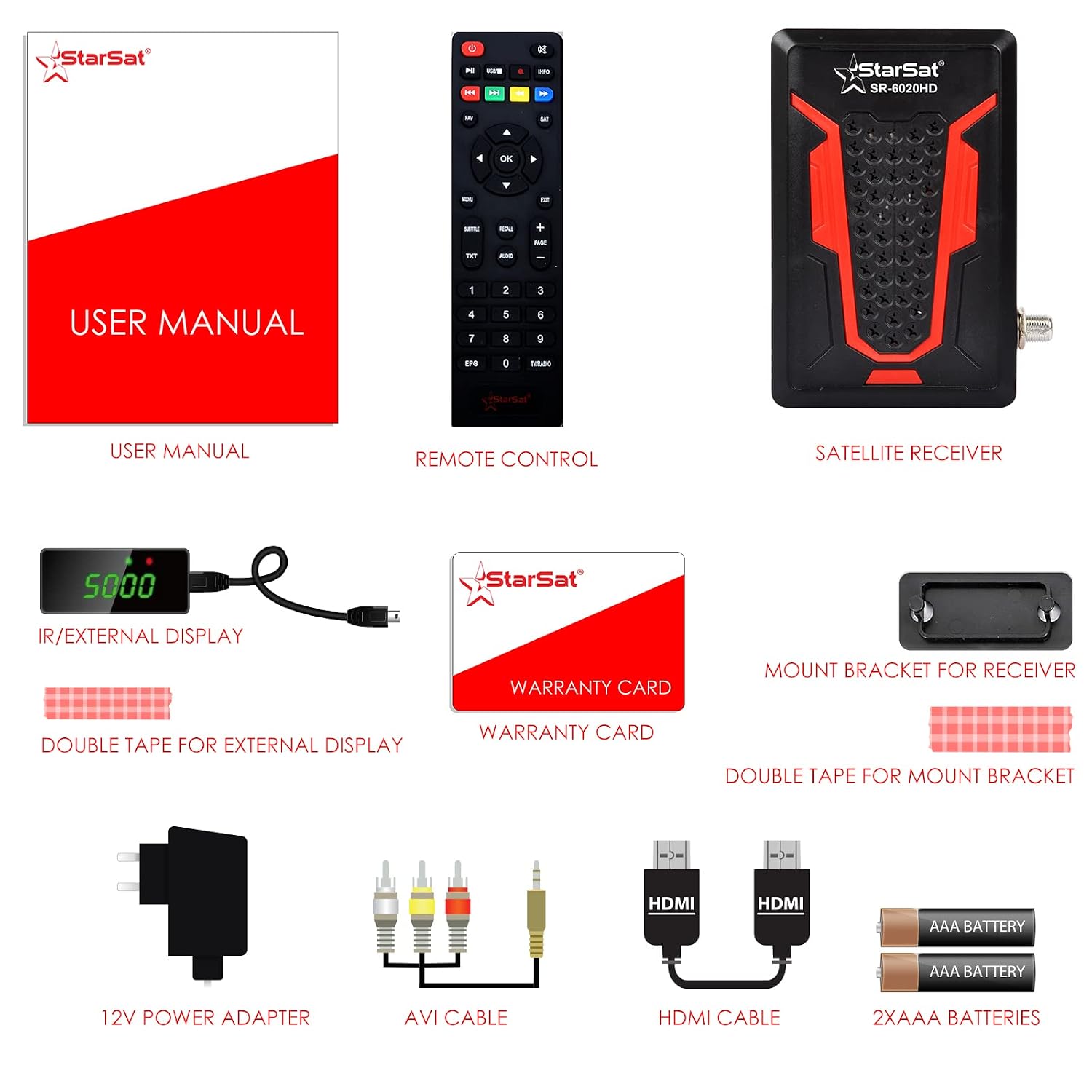
Figure 2.1: All components included in the Star Sat SR-6020HD package, showing the receiver, remote, cables, power adapter, and accessories.
3. Product Overview
Familiarize yourself with the ports and indicators on your SR-6020HD receiver.

Figure 3.1: Top-down view of the Star Sat SR-6020HD receiver, showcasing its compact design and the Star Sat logo.

Figure 3.2: Side views of the receiver, detailing the various input/output ports.
Port Descriptions:
- LNB IN: Connects to your satellite dish's LNB cable.
- HDMI: High-Definition Multimedia Interface for connecting to your TV or display.
- RS-232: Serial port for service or firmware updates.
- IR: Infrared port for connecting the external IR receiver.
- AV: Analog video/audio output for older televisions using the provided AVI cable.
- DC 12V: Power input for the 12V adaptor.
- USB (x2): For connecting USB storage devices for PVR, multimedia playback, or WiFi dongle.
4. Setup Instructions
Follow these steps to set up your Star Sat SR-6020HD receiver.

Figure 4.1: A diagram illustrating the typical connection setup for the SR-6020HD receiver, showing connections to a satellite dish, TV, external display, and USB devices.
- Connect to Satellite Dish: Connect the LNB cable from your satellite dish to the LNB IN port on the receiver.
- Connect to TV: Use the provided HDMI cable to connect the HDMI port on the receiver to an HDMI input on your television. Alternatively, use the AVI cable for older TVs.
- Connect IR/External Display: If desired, connect the IR/External Display cable to the IR port. This allows for remote control operation when the receiver is out of sight.
- Connect Power: Plug the 12V power adaptor into the DC 12V port on the receiver, then plug the adaptor into a power outlet.
- Insert Batteries into Remote: Open the battery compartment on the remote control and insert the two AAA batteries, ensuring correct polarity.
- Power On: Turn on your television and select the correct HDMI or AV input source. The receiver should power on automatically or can be turned on using the remote control.
- Initial Setup Wizard: Upon first power-on, the receiver may guide you through an initial setup wizard for language selection, time zone, and channel scanning. Follow the on-screen instructions.
- Channel Scan: Navigate to the 'Installation' or 'Channel Search' menu. Select 'Automatic Scan' or 'Blind Scan' to find available satellite channels. This process may take several minutes.
5. Operating Instructions
Basic Navigation:
- Use the POWER button on the remote to turn the receiver on/off.
- Use the CH+/CH- buttons to change channels.
- Use the VOL+/VOL- buttons to adjust volume.
- Press the MENU button to access the main menu.
- Use the ARROW keys to navigate through menus and OK to confirm selections.
- Press EXIT to return to the previous screen or live TV.
Electronic Program Guide (EPG):
Press the EPG button on the remote control to view the 7-day program guide. You can browse upcoming programs, set reminders, or schedule recordings directly from the EPG.
PVR (Personal Video Recorder) Functionality:
To use PVR features, connect a USB storage device (e.g., USB flash drive or external hard drive) to one of the receiver's USB ports. The receiver supports recording live TV programs. You can initiate instant recording by pressing the REC button on the remote or schedule recordings via the EPG.
Multimedia Playback:
The SR-6020HD supports playback of various multimedia files (video, audio, photos) from a connected USB storage device. Access the 'Multimedia' or 'USB' menu from the main menu to browse and play your files.
System Settings:
The 'System Setup' or 'Settings' menu allows you to configure various options, including:
- Language: Set OSD (On-Screen Display) language.
- Display Mode: Adjust video output resolution (e.g., 1080p, 1080i, 720p).
- Aspect Ratio: Select between 4:3 and 16:9.
- Parental Control: Set passwords and lock channels.
- Network Settings: Configure WiFi connection if a compatible USB WiFi dongle is connected.
Software Upgrade:
Firmware updates can be performed via the USB 2.0 port. Download the latest software from the official Star Sat website, save it to a USB drive, and follow the instructions in the 'Upgrade' menu.
6. Maintenance
- Cleaning: Use a soft, dry cloth to clean the exterior of the receiver. Do not use liquid cleaners or abrasive materials.
- Ventilation: Ensure the receiver is placed in a well-ventilated area to prevent overheating. Do not block the ventilation openings.
- Power Disconnection: Disconnect the power adaptor from the wall outlet during thunderstorms or if the receiver will not be used for an extended period.
- USB Ports: Avoid inserting foreign objects into the USB ports.
7. Troubleshooting
| Problem | Possible Cause / Solution |
|---|---|
| No Signal / No Picture |
|
| No Picture on TV |
|
| Remote Control Not Working |
|
| PVR Recording Issues |
|
| Receiver Freezes / Unresponsive |
|
8. Specifications
| Feature | Description |
|---|---|
| Tuner Technology | Satellite (DVB-S/S2) |
| Video Decoding | MPEG-4, H.264/AVC Main Profile Level 4.1, MPEG-2, MPEG-1 |
| Resolution | 1080p/1080i/720p/570p/576i |
| Aspect Ratio | 4:3 / 16:9 Auto |
| HDMI Version | 1.3 Supported |
| USB Ports | 2x USB 2.0 |
| DiSEqC Support | 1.0 / 1.1 / Unicable / 1.2 / 1.3 (USALS) |
| Channel Capacity | Up to 6000 TV & Radio Channels |
| EPG | 7 Days Supported |
| PVR Function | Supported via External USB |
| Multimedia Playback | Supported via USB |
| Audio Formats | Dolby Digital, DTS, AAC, MP3, PCM |
| Special Features | Screen Mirroring, WiFi Supported (dongle not included) |
| Power Source | Corded Electric (12V Adaptor) |
| Item Weight | 400 g |
| Dimensions | 20.8 x 13 x 6.8 cm (Package Dimensions) |
9. Warranty and Support
The Star Sat SR-6020HD receiver comes with a 1 Year Service warranty. Please refer to the included Warranty Card for detailed terms and conditions.
For technical support, troubleshooting assistance beyond this manual, or warranty claims, please contact your retailer or the authorized Star Sat service center. Keep your purchase receipt and warranty card handy for any service requests.


