
1. Introduction
The Bezior X1500 is a high-performance electric mountain bike designed for versatile terrain, offering a powerful 1500W motor, long-lasting 48V 12.8Ah battery, and robust dual shock absorption. This manual provides essential information for the safe and efficient operation, maintenance, and care of your e-bike.
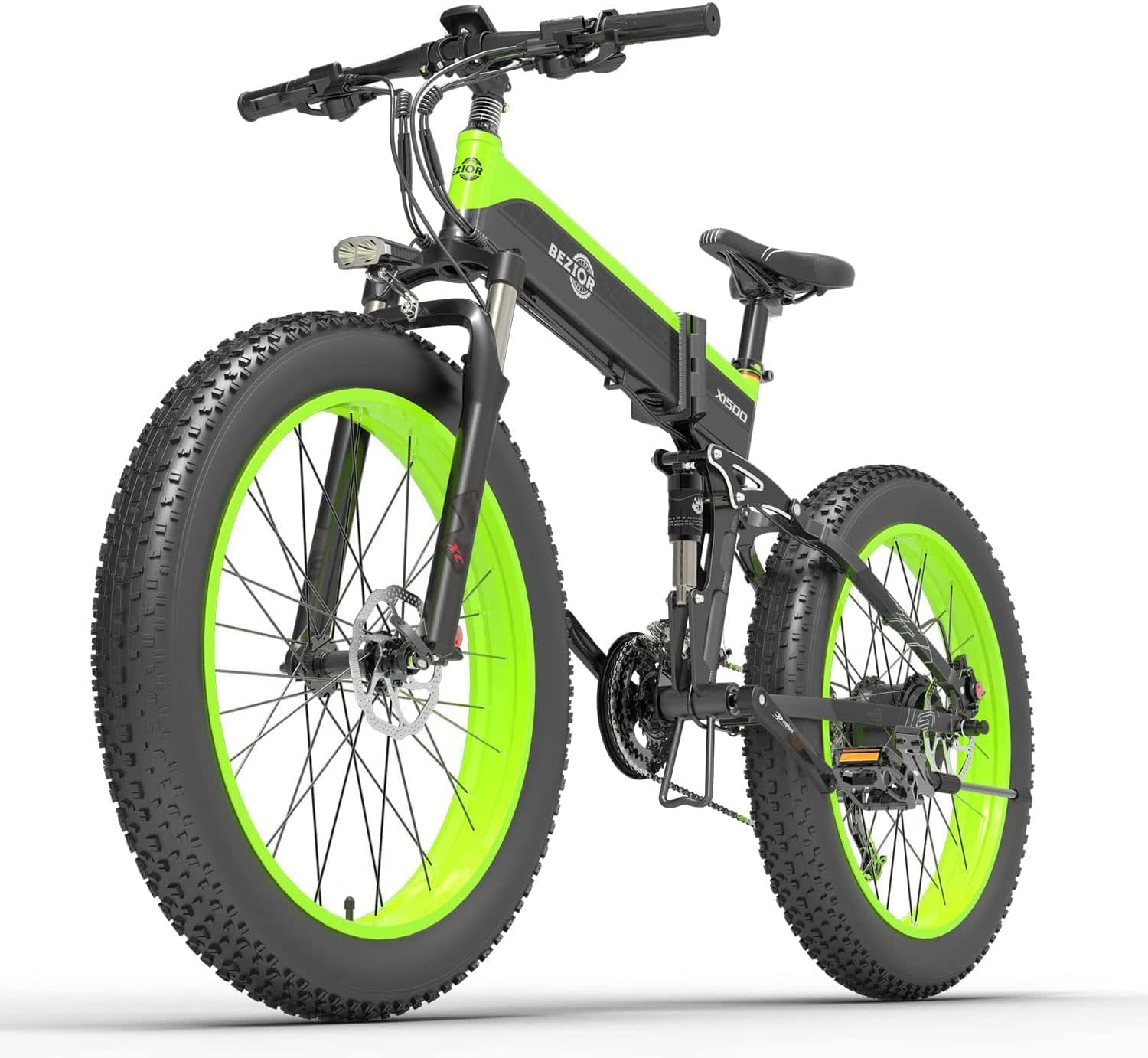
Image 1.1: The Bezior X1500 Electric Mountain Bike, showcasing its robust design and fat tires.
2. Setup
2.1 Unpacking and Initial Assembly
Carefully remove all components from the packaging. The Bezior X1500 comes partially assembled. You will need to attach the front wheel, handlebars, seat, and pedals. A tool kit is included for convenience. Ensure all connections are secure before proceeding.
2.2 Battery Installation and Charging
The 48V 12.8Ah removable lithium battery is integrated into the frame. To charge, you can either charge it directly on the bike or remove it for charging. The battery is IP54 waterproof. A full charge typically takes 4-5 hours. Ensure the charger is properly connected to the battery and a power outlet.

Image 2.1: Illustration of the 18650 lithium battery and the removable battery pack with charging port.
2.3 Pre-Ride Checks
Before each ride, perform the following checks:
- Tires: Ensure tires are inflated to the recommended pressure (check sidewall for details).
- Brakes: Test both front and rear brakes for proper function and responsiveness.
- Quick Releases: Verify all quick-release levers (e.g., seat post, wheels) are securely tightened.
- Handlebars and Seat: Confirm handlebars and seat are firmly in place and adjusted to your comfort.
3. Operating the Bike
3.1 Power On/Off and Display
To power on the bike, press and hold the power button on the 5-inch smart LCD meter. The display provides real-time information including current speed, distance traveled, battery life, and selected PAS (Pedal Assist System) mode. To power off, press and hold the power button again.

Image 3.1: The 5-inch smart LCD meter displaying driving data and the three riding modes.
3.2 Riding Modes
The Bezior X1500 offers three distinct riding modes:
- Electric Mode (100% Boost): Turn the electric throttle for full electric power.
- Power Assist Mode (50% City): Provides 1-5 gears of pedal assistance, offering 10%-80% output power.
- Riding Mode (0% None): Standard bicycle riding without electric assistance.
3.3 Gear System
The bike is equipped with a 9-speed Shimano transmission system. Use the gear shifter on the handlebars to select appropriate gears for different terrains and riding conditions. This system enhances riding pleasure and efficiency.

Image 3.2: Close-up of the 27-speed Shimano transmission system and ZOOM H875 hydraulic disc brake.
3.4 Folding Mechanism
The X1500 features a foldable design for easy transport and storage. Locate the folding latch on the frame and follow the instructions to safely fold and unfold the bike. Ensure the latch is securely engaged before riding.

Image 3.3: The bike in its unfolded and folded states, highlighting the ergonomic seat.
4. Maintenance
4.1 Battery Care
To maximize battery life, charge it regularly, even if not used frequently. Avoid completely draining the battery. Store the battery in a cool, dry place when not in use. The 12.8Ah high-capacity battery is designed for durability and provides sufficient power for extended rides.
4.2 Tire Maintenance
The 26" x 4.0 fat tires offer excellent grip and vibration absorption. Regularly check tire pressure and inspect for any signs of wear or damage. Proper tire inflation is crucial for safety and ride comfort.
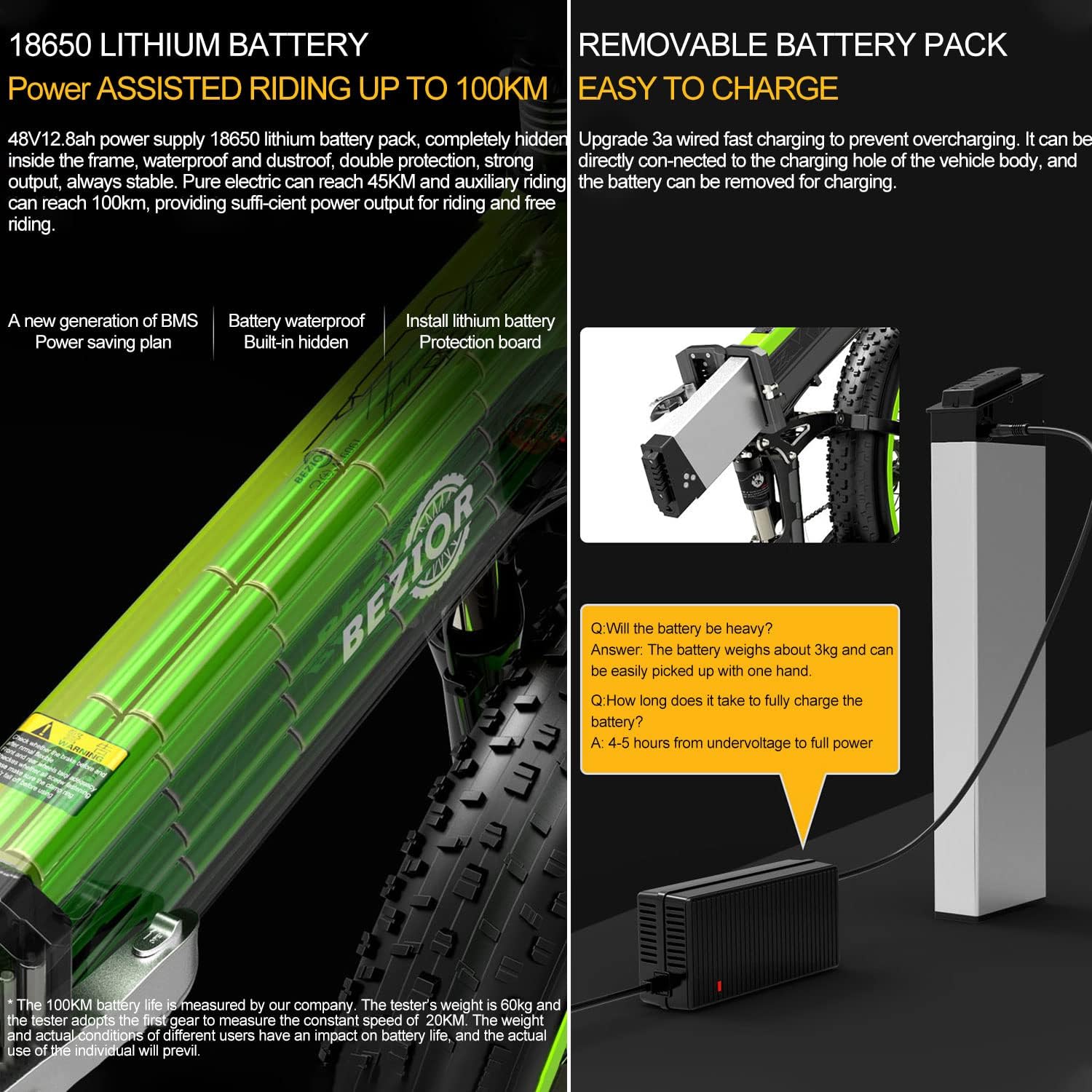
Image 4.1: Detailed view of the oil spring suspension fork and the large 26" x 4.0 fat tires.
4.3 Brake System
The bike features ZOOM H875 power-off hydraulic disc brakes for powerful and sensitive braking. Regularly inspect brake pads for wear and ensure brake levers operate smoothly. If you notice any issues with braking performance, consult a qualified technician.
4.4 Suspension System
The dual oil spring suspension and lockable front fork, along with the soft tail rear oil spring suspension (650 pounds), provide a comfortable riding experience by absorbing shocks from uneven terrain. Periodically check the suspension components for any signs of damage or leaks.
4.5 General Cleaning
Keep your e-bike clean by wiping it down with a damp cloth after rides, especially after riding in wet or muddy conditions. Avoid using high-pressure washers directly on electrical components.
5. Troubleshooting
5.1 Controller/Screen Malfunction
If the display shows '00' and the throttle provides no power, even when the PAS (Pedal Assist System) sensor appears to be working, this indicates a potential issue with the controller or its communication with the display. The PAS sensor, located near the pedals, should activate the motor when pedaling. If the PAS sensor is functioning correctly (as demonstrated by the video showing the wheel spinning when pedaled in PAS mode), but the throttle does not engage the motor when the display reads '00' (indicating no PAS level selected or an error state), it suggests the controller is not receiving or processing the throttle input correctly, or there's a display communication issue.
Troubleshooting Steps:
- Check all cable connections: Ensure all cables, especially those connecting the display, controller, motor, and throttle, are securely plugged in and free from damage.
- Restart the system: Turn off the bike completely, remove the battery if possible, wait a few minutes, then reinsert the battery and power on.
- Verify PAS settings: Access the display settings (if possible) to ensure PAS levels are correctly configured and not set to '0' or a disabled state.
- Inspect the throttle: Check the throttle for any physical damage or sticking.
- Consult support: If the issue persists, it may indicate a faulty controller, display, or motor. Contact Bezior customer support for further assistance.
Video 5.1: Demonstration of a controller/screen issue on the Bezior X1500, showing no power when the display reads '00' but the PAS sensor is functional.
6. Specifications
| Feature | Specification |
|---|---|
| Bike Type | Folding Bike, Electric Bike, Fat Tire Bike, Mountain Bike |
| Age Range (Description) | Adult |
| Brand | Bezior |
| Number of Speeds | 9 |
| Color | Green1 |
| Wheel Size | 26 Inches |
| Frame Material | Aluminum |
| Suspension Type | Front |
| Special Feature | Digital Display |
| Included Components | Tool Kit |
| Size | 26inch x 4ft |
| Brake Style | ZOOM H875 Power-off hydraulic disc brake |
| Model Name | X-1500 |
| Year | 2022 |
| UPC | 782517975544 |
| Manufacturer | Shenzhen Bezior Technology Co., Ltd |
| Item Package Dimensions L x W x H | 38.5 x 30 x 17.7 inches |
| Package Weight | 83 Pounds |
| Date First Available | June 20, 2022 |
7. Warranty and Support
7.1 After-Sales Service
Bezior provides lifelong support for key components including the battery, charger, motor, and controller. Please note that only parts replacements are accepted within 7 days after the item arrives. For any issues or inquiries, please contact Bezior customer service.
7.2 Contacting Support
For online help, you can reach the Bezior Online Help Center. We aim to respond within 24 hours. To contact the seller, click on the store name "BEZIOR Official" on the product page and scroll down to find the "contact this Seller" option.
7.3 Important Tips for Returns
If goods are returned for no reason or due to malfunction, you must inform us within 7 days of receiving the product. Please retain the original packaging for a period in case a return is necessary.