
tectake 801200
Instruction Manual
tectake 800599 File Cabinet with Safety Lock
Model: 801200
Product Overview
The tectake 800599 File Cabinet is a robust and versatile storage solution designed for office environments. It features multiple compartments and drawers, each equipped with a safety lock to secure important documents. The cabinet is constructed from powder-coated steel, ensuring durability and ease of maintenance.

Figure 1: Front view of the tectake 800599 File Cabinet.
Key features include three height-adjustable shelves, reinforced doors with rubber stops for noise dampening, and a wide door opening angle for convenient access. Its design prioritizes both functionality and security for your office storage needs.
Setup and Assembly
The tectake 800599 File Cabinet requires assembly. Please ensure all components are present before beginning. It is recommended to assemble the cabinet on a soft, clean surface to prevent scratches.
Included Components:
- File cabinet panels (sides, top, bottom, back, doors, drawers)
- 3 x Shelves
- 8 x Keys (for all locks)
- Mounting material (screws, bolts, shelf clips, etc.)
- Assembly Manual (this document)
Assembly Steps:
- Unpack and Verify: Carefully unpack all parts and compare them with the component list to ensure nothing is missing or damaged.
- Assemble Frame: Begin by connecting the side panels to the base and top panels using the provided mounting hardware. Ensure all connections are secure.
- Install Back Panel: Attach the back panel to the assembled frame.
- Insert Shelf Supports: Place the shelf support clips into the desired slots on the interior side panels. The cabinet offers multiple height levels for shelf adjustment.
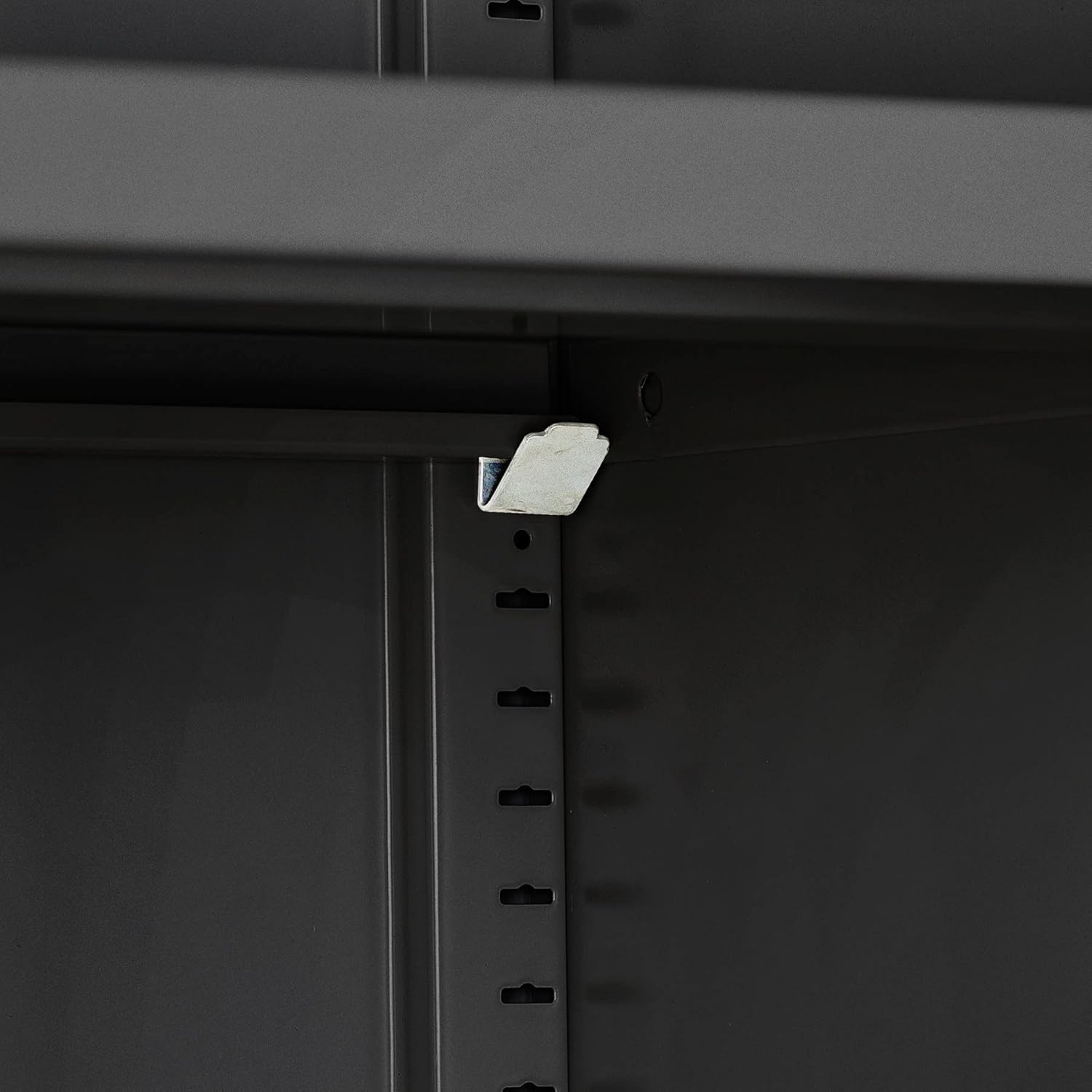
Figure 2: Shelf support clip installation.
- Place Shelves: Carefully place the shelves onto the installed shelf supports.

Figure 3: Shelves placed inside the cabinet.
- Assemble Drawers: Assemble the two drawers according to the instructions in the separate assembly manual for drawers, then install them into their designated slots.
- Attach Doors: Mount the upper and lower doors to the cabinet frame using the hinges and screws provided. Ensure the doors swing freely and align correctly.
- Install Locks: The locks are pre-installed on the doors and drawers. Ensure the locking mechanisms function correctly with the provided keys.

Figure 4: Cabinet with visible locks and stable base.
- Final Check: Verify that all screws are tightened, doors and drawers operate smoothly, and the cabinet is stable.
Operating Instructions
This section details the proper operation of your tectake file cabinet.
Using the Doors:
- To open a door, insert the corresponding key into the lock and turn it to the unlock position. Pull the handle to open the door.
- The doors feature a wide opening angle of approximately 130° for easy access to the interior. Rubber stops are integrated to dampen noise when closing.
- To close and lock a door, push it firmly until it clicks shut, then turn the key to the lock position and remove it.

Figure 5: Cabinet with doors open, showcasing interior and door features.
Using the Drawers:
- To open a drawer, insert the key into its lock, turn to unlock, and pull the drawer handle.
- The drawers are designed for smooth operation, providing convenient storage for smaller items.
- To close and lock a drawer, push it completely shut, turn the key to the lock position, and remove it.

Figure 6: Drawers in use, demonstrating storage capacity.
Adjusting Shelves:
- The cabinet includes three height-adjustable shelves. To adjust a shelf, first remove all items from it.
- Carefully lift the shelf and remove the four shelf support clips from their current positions.
- Reinsert the clips into the desired slots at the new height level, ensuring they are securely seated.
- Place the shelf back onto the clips, ensuring it is level and stable before placing items back on it.

Figure 7: Interior storage with adjustable shelves.
Maintenance
Regular maintenance will ensure the longevity and optimal performance of your file cabinet.
Cleaning:
- The powder-coated steel surface is designed for easy cleaning. Use a soft, damp cloth with mild soap and water to wipe down the exterior and interior surfaces.
- Avoid abrasive cleaners, harsh chemicals, or scouring pads, as these can damage the finish.
- Dry the surfaces thoroughly after cleaning to prevent water spots.
Lock Care:
- If a lock becomes stiff, apply a small amount of graphite lubricant or a silicone-based spray lubricant to the keyhole. Do not use oil-based lubricants as they can attract dust.
- Insert and turn the key several times to distribute the lubricant.
General Care:
- Periodically check all screws and fasteners to ensure they remain tight. Tighten any loose connections to maintain stability.
- Avoid overloading shelves or drawers beyond their specified weight capacity to prevent damage or instability.
Troubleshooting
This section provides solutions to common issues you might encounter with your file cabinet.
| Problem | Possible Cause | Solution |
|---|---|---|
| Doors/Drawers do not close properly. | Misalignment of hinges or drawer slides; obstruction. | Check for obstructions. Adjust hinges or drawer slides if necessary. Ensure the cabinet is on a level surface. |
| Key is difficult to turn in lock. | Lack of lubrication; debris in lock mechanism. | Apply graphite lubricant or silicone spray to the keyhole. Insert and turn the key several times. Do not force the key. |
| Cabinet feels unstable or wobbly. | Uneven floor; loose assembly screws. | Ensure the cabinet is placed on a level surface. Tighten all assembly screws. |
| Shelves sag or are not level. | Overloaded shelf; shelf clips not properly seated. | Reduce weight on the shelf. Re-seat shelf clips securely into the slots. Ensure clips are at the same height on both sides. |
If you encounter an issue not listed here, or if the suggested solutions do not resolve the problem, please refer to the support information provided in your purchase documentation.
Specifications
Detailed technical specifications for the tectake 800500 File Cabinet.
| Feature | Detail |
|---|---|
| Overall Dimensions (W x D x H) | Approx. 80 x 40 x 180 cm (31.5"D x 15.75"W x 70.87"H) |
| Shelf Dimensions (W x D) | Approx. 79 x 36 cm (79.5 x 36 cm in feature bullets) |
| Drawer Interior Dimensions (W x D x H) | Approx. 33.3 x 29.5 x 8 cm (33.8 x 29.5 x 8 cm in feature bullets) |
| Load Capacity per Shelf | 40 kg (88 lbs) |
| Door Opening Angle | Approx. 130° |
| Weight | Approx. 41 kg (90.2 lbs) |
| Material | Powder-coated steel |
| Number of Shelves | 3 (height adjustable) |
| Number of Drawers | 2 |
| Locking Mechanism | Individual key locks for each compartment and drawer |

Figure 8: Dimensional overview of the file cabinet.
Warranty and Support
For information regarding product warranty, please refer to the original purchase documentation or contact the retailer from whom you purchased the tectake 800599 File Cabinet.
For technical support or inquiries about replacement parts, please contact tectake customer service. Contact details can typically be found on the tectake official website or within your purchase receipt.
No official product videos were available for inclusion in this manual.
Related documents801200

Ask a question about this manual
Ask about setup, troubleshooting, compatibility, parts, safety, or missing instructions. Manuals+ will review the question and use this page’s manual context to help answer it.