
Introduction
This manual provides detailed instructions for the setup, operation, and maintenance of your Dilwe Digital FM Radio Receiver Module. Please read this manual thoroughly before using the product to ensure proper function and longevity.
Safety Information
- Ensure the operating voltage is within the specified range (3.0-5.0V) to prevent damage.
- Avoid exposing the module to moisture or extreme temperatures.
- Do not attempt to disassemble or modify the module beyond the instructions provided.
- Keep out of reach of children.
Package Contents
- 1 x FM Receiver Module
- 2 x Washers
- 2 x Nuts
Product Overview
The Dilwe Digital FM Radio Receiver Module is a compact unit designed for integrating FM radio reception and audio amplification into various projects. It features an LCD screen for frequency display, two rotary encoders for control, and integrated 3W x 2 channel sound amplification.

Figure 1: Top view of the Dilwe FM Receiver Module, showing the LCD display, two rotary encoder knobs (VOL and FREQ), speaker output terminals, and antenna connection point.

Figure 2: Detailed view highlighting the LCD screen, the 'VOL' (Volume) knob on the right, and the 'FREQ' (Frequency) knob on the left. Speaker connection points are also visible.
Setup
1. Connecting the FM Antenna
Locate the FM_ANT port on the module. For optimal FM signal reception, it is recommended to connect an external 75cm length trolley antenna to this port.

Figure 3: The module showing the 'ANT' (Antenna) connection point on the top left, where an external FM antenna should be connected.
2. Connecting Speakers
The module includes a 3W x 2 channel sound amplifier. If you require external speakers, connect them to the designated speaker ports (labeled 'SPEAKER' and 'LS1'/'LS2'). Ensure correct polarity.

Figure 4: A close-up view of the speaker output terminals, labeled 'SPEAKER' with 'LS1' and 'LS2' indicating left and right channels.
3. Powering the Module
Connect a power source (3.0-5.0V) to the power input terminals. The module uses an Android interface for power input. Observe correct polarity (+ and -).

Figure 5: A detailed image showing the power input area, marked '3-5.5V' and indicating positive (+) and negative (-) terminals, along with a micro-USB style port.
Operating Instructions
1. Power On/Off
To turn the FM radio module on or off, press and hold the VOL knob. The LCD display will show "ON" to indicate automatic noise reduction is active, or "OFF" to indicate it is deactivated.
2. Automatic Station Search
To automatically search for local radio stations, short press the FREQ encoder. The LCD screen will display the current frequency as it searches. The search will stop automatically when a valid station is found.
3. Manual Frequency Adjustment
Rotate the FREQ knob to manually adjust the receiving frequency. The current frequency will be displayed on the LCD screen.
4. Volume Adjustment
Rotate the VOL knob to adjust the audio output volume.
5. Headphone Function
If headphones are plugged into the headphone jack, the module will automatically switch the audio output to the headphone channel. The speaker output will be automatically muted.
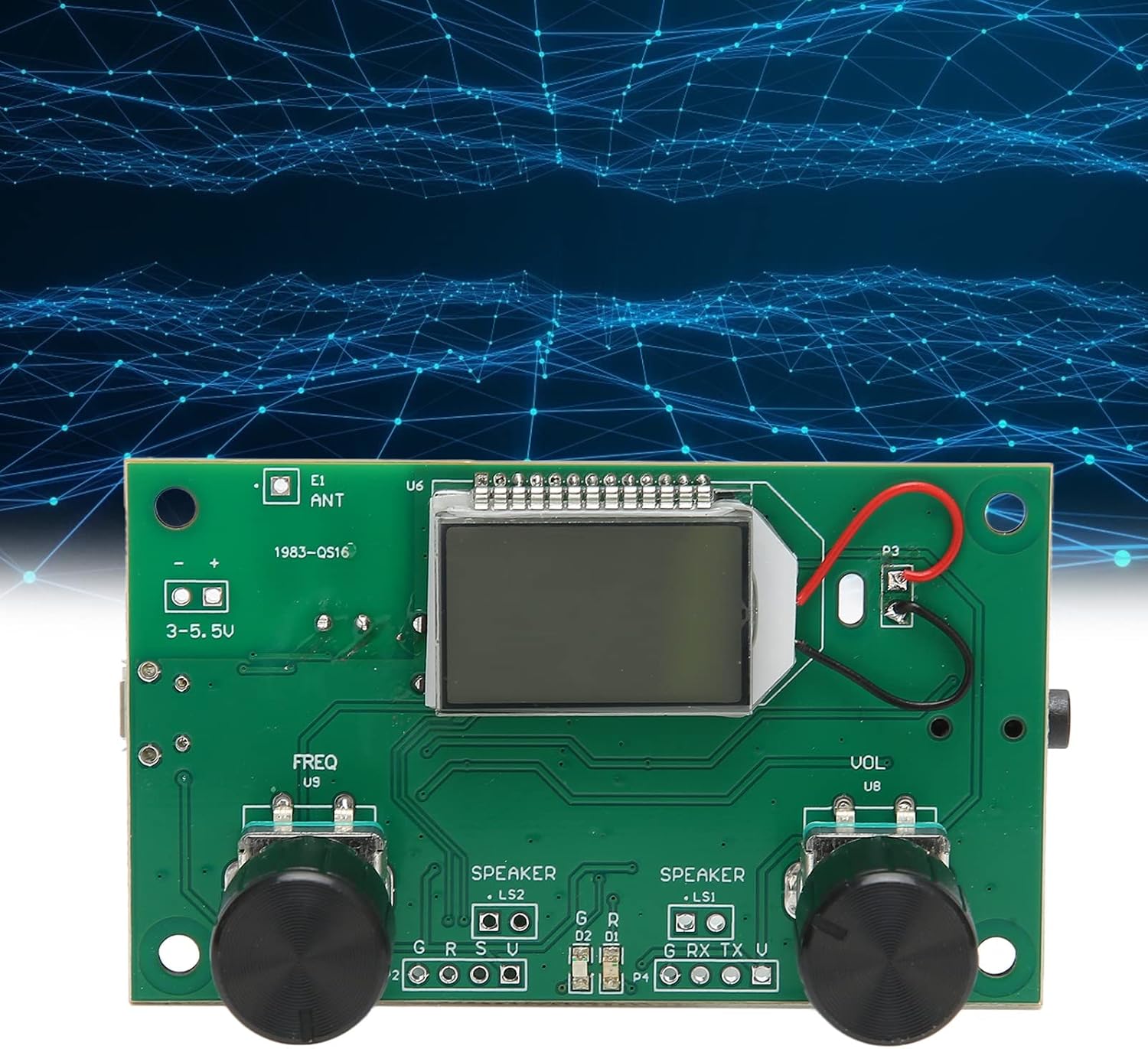
Figure 6: The headphone jack located on the module, which automatically mutes speakers when headphones are connected.
Specifications
| Feature | Specification |
|---|---|
| Item Type | FM Receiver Module |
| Material | PCB |
| Interface | For Android Interface (Power) |
| Operating Voltage | 3.0-5.0V |
| Audio Output Mode | Stereo |
| Surround Sound Channel Configuration | 2 Channel |
| Output Wattage | 3 Watts per channel (Total 6W) |
| Item Weight | 1.31 ounces |
| Package Dimensions | 4.33 x 2.36 x 1.57 inches |
Troubleshooting
- No Power: Ensure the power supply is connected correctly and provides 3.0-5.0V. Check polarity.
- Poor FM Reception: Verify the antenna is properly connected. Try extending or repositioning the antenna. Ensure it is approximately 75cm in length.
- No Sound from Speakers: Check speaker connections for correct polarity. Ensure headphones are not plugged in, as this will mute the speakers.
- No Sound from Headphones: Ensure headphones are fully plugged in. Check headphone functionality with another device.
- Unable to Find Stations: Perform an automatic search. If still unsuccessful, manually adjust the frequency. Ensure you are in an area with FM broadcast signals.
Maintenance
- Keep the module clean and free from dust. Use a soft, dry cloth for cleaning.
- Store the module in a dry environment away from direct sunlight and extreme temperatures.
- Avoid physical impact or dropping the module.
Warranty and Support
Specific warranty information for this product is not provided in the available documentation. For warranty claims, technical support, or further assistance, please contact your retailer or the manufacturer, Dilwe, directly. Refer to your purchase documentation for contact details.