
1. Introduction
This manual provides essential information for the safe and efficient installation, operation, and maintenance of the Dieffematic Came 001U2923 BX-74 Sliding Gate Automation Kit. This kit is designed to automate sliding gates weighing up to 400 kg and with a maximum length of 14 meters, operating on a 230V AC power supply. Please read this manual thoroughly before proceeding with any installation or operation to ensure proper functionality and safety.
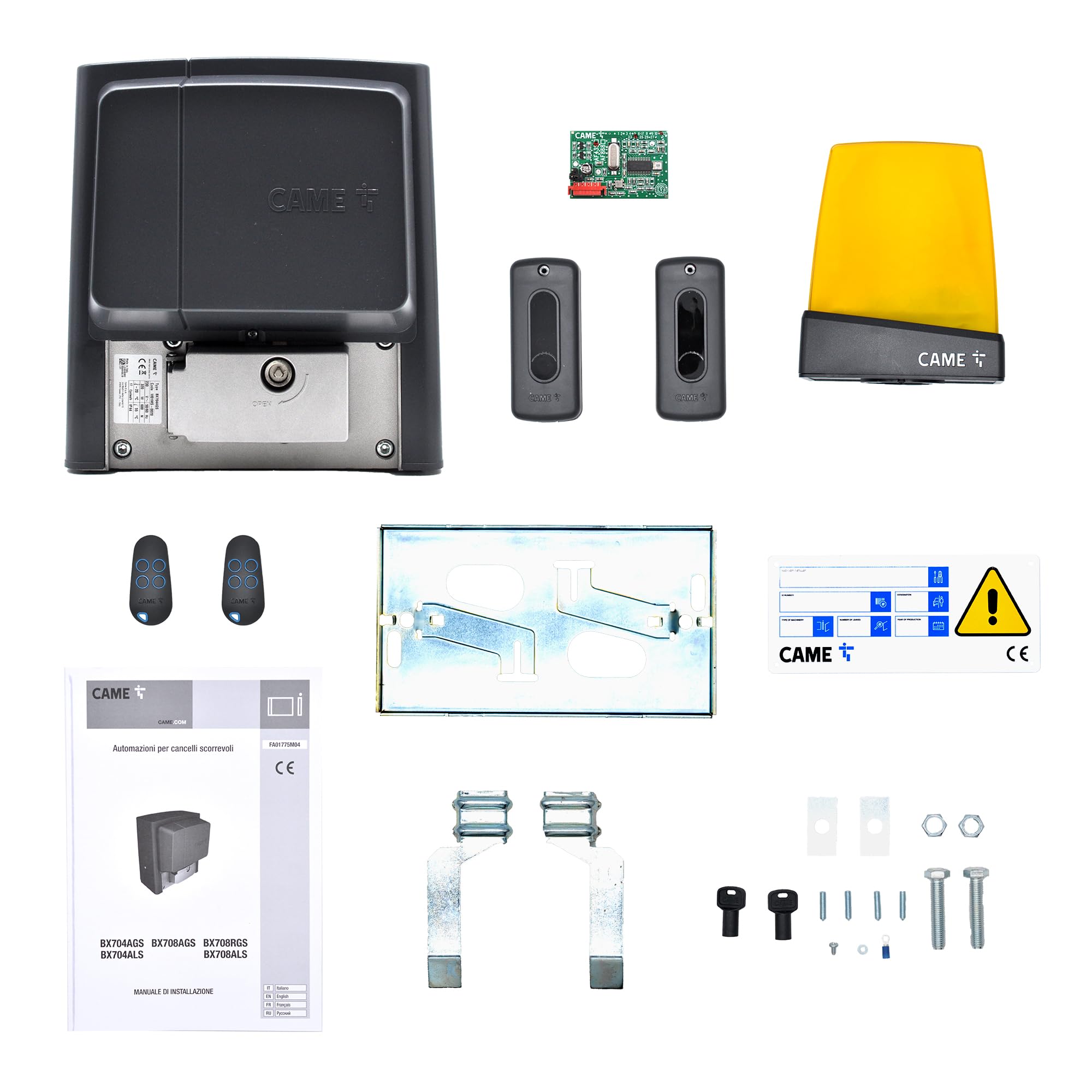
Image 1: Overview of the Dieffematic Came 001U2923 BX-74 Sliding Gate Automation Kit components.
2. Safety Information
WARNING: Failure to follow these safety instructions may result in serious injury or property damage. Keep this manual for future reference.
- Installation and electrical connections must be performed by qualified personnel in accordance with local regulations and standards.
- Ensure the main power supply is disconnected before performing any installation, maintenance, or repair work.
- Do not allow children or pets to play near the gate or the automation system.
- Keep hands and clothing clear of moving parts of the gate and motor during operation.
- Regularly inspect the system for signs of wear, damage, or malfunction. Do not operate a damaged system.
- Ensure all safety devices, such as photocells and flashing lights, are correctly installed and functioning.
3. Product Components
The Dieffematic Came 001U2923 BX-74 kit includes the following main components. Please verify that all items are present and undamaged upon unpacking.
- 801MS-0020 BX704AGS Automation Unit: This is the core motor and control board for sliding gates up to 400 kg and 14m length. It features a programming display, integrated radio decoder, movement control, obstacle detection, and mechanical limit switches.
- TOP432ee Two-channel Transmitter: A black, self-learning remote control for operating the gate.
- 001AF43S Plug-in Radio Frequency Card: For receiving signals from the transmitter.
- 001TOP-A433N Tuned Antenna: Enhances the range and reliability of the radio signal.
- 001DIR10 Pair of Outdoor Photocells: Safety sensors with a 10-meter range, operating at 12-24V AC-DC, designed to detect obstacles in the gate's path.
- 001KLED LED Signal Flashing Light: Provides visual indication of gate movement.
4. Setup and Installation
Installation of the Dieffematic Came 001U2923 BX-74 kit requires technical expertise. It is strongly recommended that installation be carried out by a qualified professional.
- Site Preparation: Ensure the gate track is clean and free of obstructions. Verify the gate moves smoothly manually. Prepare a stable mounting base for the motor unit.
- Mounting the Automation Unit: Securely fasten the 801MS-0020 BX704AGS motor unit to the prepared base, ensuring it is level and correctly aligned with the gate rack (not included).
- Electrical Connections: Connect the 230V AC power supply to the control board within the automation unit. Connect all safety devices (photocells, flashing light) and accessories (antenna) according to the wiring diagrams provided in the detailed product manual (not this overview). Ensure all connections are secure and insulated.
- Installing Safety Devices: Mount the 001DIR10 photocells at appropriate heights on either side of the gate opening, ensuring they are perfectly aligned. Install the 001KLED flashing light in a visible location. Install the 001TOP-A433N antenna for optimal signal reception.
- Initial Programming: Power on the unit. Use the programming display on the 801MS-0020 BX704AGS control board to perform initial setup, including learning the gate's travel limits and adjusting operating parameters.
- Transmitter Programming: Program the TOP432ee two-channel transmitters to the integrated radio decoder of the control unit using the self-learning function.
- Functionality Test: Thoroughly test the gate's operation with the transmitters and verify that all safety features, including obstacle detection and photocells, function correctly.
5. Operating Instructions
- Opening/Closing the Gate: Press the designated button on your TOP432ee transmitter. The gate will begin to open or close. Pressing the button again during movement will typically stop the gate.
- Safety Stop: If the photocells detect an obstruction during closing, the gate will stop and reverse. During opening, it will stop.
- Manual Override: In case of a power outage or system malfunction, locate the manual release mechanism on the 801MS-0020 BX704AGS motor unit. Follow the instructions on the unit to disengage the motor and operate the gate manually. Remember to re-engage the motor for automatic operation.
- Flashing Light: The 001KLED flashing light will activate whenever the gate is in motion, indicating its operation.
6. Maintenance
Regular maintenance ensures the longevity and safe operation of your gate automation system. Perform these checks periodically:
- General Cleaning: Keep the motor unit, photocells, and gate track clean and free from dirt, leaves, and debris.
- Photocell Check: Ensure the lenses of the 001DIR10 photocells are clean and unobstructed. Test their functionality by passing an object through the beam while the gate is closing.
- Gate Movement: Periodically check that the gate moves smoothly and quietly along its track. Address any stiffness or unusual noises.
- Electrical Connections: Visually inspect all electrical wiring and connections for signs of wear or damage. Ensure they are secure. (Only perform if qualified and power is disconnected.)
- Lubrication: If recommended by the detailed product manual, apply appropriate lubricant to moving mechanical parts of the gate and motor.
7. Troubleshooting
Refer to the following table for common issues and their potential solutions. For complex problems, contact a qualified technician.
| Problem | Possible Cause | Solution |
|---|---|---|
| Gate does not respond to transmitter. | No power; Transmitter battery low; Transmitter not programmed; Radio interference. | Check main power supply; Replace transmitter battery; Reprogram transmitter (refer to setup); Check for sources of interference. |
| Gate stops or reverses unexpectedly. | Photocells obstructed or misaligned; Obstacle in gate path; Limit switch issue. | Clean and align photocells (001DIR10); Remove any obstructions; Contact technician for limit switch adjustment. |
| Flashing light (001KLED) does not work. | Bulb/LED faulty; Wiring issue; Control unit fault. | Check connections; Replace light unit if faulty; Contact technician. |
| Gate moves slowly or with difficulty. | Mechanical obstruction; Motor wear; Low voltage. | Check gate track and wheels; Contact technician for motor inspection or power supply check. |
8. Specifications
| Feature | Detail |
|---|---|
| Model | 001U2923 BX-74 |
| Brand | Dieffematic |
| Power Supply | 230 V AC |
| Max Gate Weight | 400 kg |
| Max Gate Length | 14 m |
| Control Unit | 801MS-0020 BX704AGS (with programming display, radio decoder, obstacle detection, mechanical limit switches) |
| Transmitter | TOP432ee (two-channel, self-learning) |
| Photocells | 001DIR10 (outdoor, 12-24V AC-DC, 10m range) |
| Signal Light | 001KLED (LED flashing light) |