
Introduction
This manual provides essential instructions for the safe and effective use, installation, and maintenance of your Dekain ELP-LP88 projector lamp. This replacement lamp is designed for use with Epson H716B and H716C projector models and features an original Philips bulb.
Safety Information
Always follow these safety precautions to prevent injury or damage to the projector and lamp:
- Ensure the projector is completely powered off and unplugged from the power outlet before attempting any installation or maintenance.
- Allow the projector and old lamp to cool down for at least 30 minutes before handling. Projector lamps operate at high temperatures.
- Avoid touching the glass surface of the new lamp directly with bare hands. Oils from your skin can reduce lamp life. Use gloves or a clean cloth.
- Do not drop or subject the lamp to impact.
- Dispose of old lamps according to local regulations, as they may contain mercury.
- Only use the specified replacement lamp model (ELP-LP88) for compatible Epson projectors (H716B, H716C).
Setup and Installation
Follow these steps to properly install your new Dekain ELP-LP88 projector lamp:
- Preparation: Ensure the projector is turned off and unplugged. Allow it to cool down completely.
- Locate Lamp Cover: Identify the lamp cover on your projector. Refer to your projector's specific user manual for its exact location and how to open it.
- Remove Old Lamp: Carefully unscrew any retaining screws holding the lamp cover and the old lamp module in place. Gently pull out the old lamp module.
- Insert New Lamp: Align the new Dekain ELP-LP88 lamp module with the slot in the projector. Push it firmly until it is securely seated. Ensure the electrical connector is properly engaged.
- Secure Lamp: Fasten the retaining screws to secure the new lamp module. Replace the lamp cover and secure it with its screws.
- Power On and Reset Lamp Timer: Plug the projector back in and power it on. Navigate to the projector's menu settings to reset the lamp timer. This is crucial for accurate lamp life tracking. Consult your projector's manual for specific instructions on resetting the lamp timer.
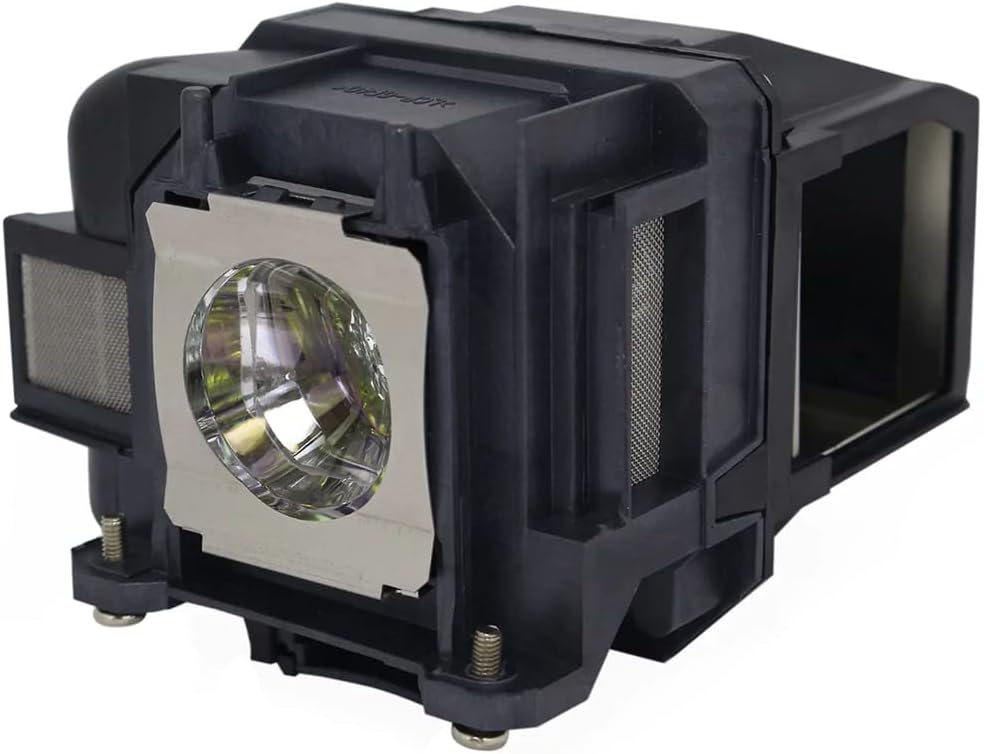
Image: The Dekain ELP-LP88 projector lamp module, showing the bulb and housing. This image illustrates the complete lamp unit ready for installation.
Operating Instructions
Once the lamp is installed, operate your projector as usual. The Dekain ELP-LP88 lamp is designed to provide optimal brightness and color performance for your compatible Epson projector.
- Warm-up Time: Allow the projector lamp a few minutes to reach full brightness after turning it on.
- Cool-down Cycle: Always allow the projector to complete its cool-down cycle after turning it off. Do not unplug the projector until the cooling fans have stopped. This helps extend lamp life.
- Power Modes: Utilize eco or power-saving modes if available on your projector to potentially extend the lamp's lifespan.
Maintenance
Proper maintenance can help maximize the life and performance of your projector lamp:
- Clean Air Filter: Regularly clean or replace the projector's air filter to ensure proper airflow and prevent overheating, which can shorten lamp life. Refer to your projector's manual for filter maintenance.
- Dust Prevention: Operate the projector in a clean, relatively dust-free environment. Dust accumulation can hinder cooling and affect performance.
- Avoid Frequent On/Off Cycles: Frequent power cycles can stress the lamp. Try to minimize turning the projector on and off repeatedly in short intervals.

Image: A visual comparison demonstrating the superior brightness and color accuracy of a Dekain OEM lamp compared to a generic copy lamp, highlighting the importance of quality components.
Troubleshooting
If you encounter issues after installing your new lamp, consider the following:
- Lamp Not Lighting Up:
- Ensure the lamp module is fully seated and the electrical connector is firm.
- Check that the lamp cover is securely closed and all screws are tightened. Some projectors have safety switches that prevent operation if the cover is open.
- Verify the projector is receiving power.
- Dim Image or Poor Color:
- Confirm the lamp timer was reset after installation. If not, the projector may still be operating under the assumption of an old, dim lamp.
- Check projector settings for brightness, contrast, and color modes.
- Ensure the projector lens is clean.
- Lamp Warning Message:
- If a lamp warning persists after installation, ensure the lamp timer was reset.
- If the issue continues, re-check the lamp installation for proper seating and connections.
If troubleshooting steps do not resolve the issue, contact Dekain customer support or a qualified service technician.
Specifications
| Feature | Detail |
|---|---|
| Brand | Dekain |
| Model Number | ELP-LP88 |
| Compatible Projectors | Epson H716B, H716C |
| Light Type | Metal Halide (Original Philips Bulb Inside) |
| Wattage | 200 watts |
| Bulb Shape Size | MR20 |
| Bulb Base | Prong |
| Expected Lamp Life | 3,000-5,000 hours (in power saving mode) |
| Item Weight | 14.4 ounces |
| Package Dimensions | 6 x 6 x 5 inches |
Warranty and Support
Dekain projector lamps are built with original bulbs from OEM manufacturers and are tested before dispatch to meet original standards of quality, function, and performance. OEM lamps typically come with a warranty, providing added protection and peace of mind. For specific warranty details or technical support, please refer to the documentation included with your purchase or contact Dekain customer service.
Video: This video explains the benefits of using genuine OEM original replacement projector lamps, covering aspects like quality, performance, compatibility, warranty, and reliability. It highlights why choosing an OEM lamp like Dekain's is beneficial for your projector.