
DURATECH DT105106AE
DURATECH 20V Cordless Oscillating Multi-Tool User Manual
Model: DT105106AE
1. Introduction
Thank you for choosing the DURATECH 20V Cordless Oscillating Multi-Tool Kit. This manual provides essential information for the safe and effective operation, maintenance, and troubleshooting of your new tool. Please read this manual thoroughly before first use and retain it for future reference.
This versatile tool is designed for a variety of tasks including cutting, scraping, and sanding, making it suitable for numerous DIY projects. Its cordless design offers portability and freedom of movement.
2. Important Safety Instructions
WARNING: Read all safety warnings, instructions, illustrations and specifications provided with this power tool. Failure to follow all instructions listed below may result in electric shock, fire and/or serious injury.
General Power Tool Safety Warnings:
- Work Area Safety: Keep work area clean and well lit. Cluttered or dark areas invite accidents. Do not operate power tools in explosive atmospheres, such as in the presence of flammable liquids, gases or dust. Power tools create sparks which may ignite the dust or fumes. Keep children and bystanders away while operating a power tool. Distractions can cause you to lose control.
- Electrical Safety: Power tool plugs must match the outlet. Never modify the plug in any way. Do not use any adapter plugs with earthed (grounded) power tools. Unmodified plugs and matching outlets will reduce risk of electric shock. Avoid body contact with earthed or grounded surfaces, such as pipes, radiators, ranges and refrigerators. There is an increased risk of electric shock if your body is earthed or grounded. Do not expose power tools to rain or wet conditions. Water entering a power tool will increase the risk of electric shock. Do not abuse the cord. Never use the cord for carrying, pulling or unplugging the power tool. Keep cord away from heat, oil, sharp edges or moving parts. Damaged or entangled cords increase the risk of electric shock. When operating a power tool outdoors, use an extension cord suitable for outdoor use. Use of a cord suitable for outdoor use reduces the risk of electric shock. If operating a power tool in a damp location is unavoidable, use a residual current device (RCD) protected supply. Use of an RCD reduces the risk of electric shock.
- Personal Safety: Stay alert, watch what you are doing and use common sense when operating a power tool. Do not use a power tool while you are tired or under the influence of drugs, alcohol or medication. A moment of inattention while operating power tools may result in serious personal injury. Use personal protective equipment. Always wear eye protection. Protective equipment such as dust mask, non-skid safety shoes, hard hat, or hearing protection used for appropriate conditions will reduce personal injuries. Prevent unintentional starting. Ensure the switch is in the off-position before connecting to power source and/or battery pack, picking up or carrying the tool. Carrying power tools with your finger on the switch or energizing power tools that have the switch on invites accidents. Remove any adjusting key or wrench before turning the power tool on. A wrench or a key left attached to a rotating part of the power tool may result in personal injury. Do not overreach. Keep proper footing and balance at all times. This enables better control of the power tool in unexpected situations. Dress properly. Do not wear loose clothing or jewelry. Keep your hair and clothing away from moving parts. Loose clothes, jewelry or long hair can be caught in moving parts. If devices are provided for the connection of dust extraction and collection facilities, ensure these are connected and properly used. Use of dust collection can reduce dust-related hazards. Do not let familiarity gained from frequent use of tools allow you to become complacent and ignore tool safety principles. A careless action can cause severe injury within a fraction of a second.
- Power Tool Use and Care: Do not force the power tool. Use the correct power tool for your application. The correct power tool will do the job better and safer at the rate for which it was designed. Do not use the power tool if the switch does not turn it on and off. Any power tool that cannot be controlled with the switch is dangerous and must be repaired. Disconnect the plug from the power source and/or remove the battery pack, if detachable, from the power tool before making any adjustments, changing accessories, or storing power tools. Such preventative safety measures reduce the risk of starting the power tool accidentally. Store idle power tools out of the reach of children and do not allow persons unfamiliar with the power tool or these instructions to operate the power tool. Power tools are dangerous in the hands of untrained users. Maintain power tools and accessories. Check for misalignment or binding of moving parts, breakage of parts and any other condition that may affect the power tool’s operation. If damaged, have the power tool repaired before use. Many accidents are caused by poorly maintained power tools. Keep cutting tools sharp and clean. Properly maintained cutting tools with sharp cutting edges are less likely to bind and are easier to control. Use the power tool, accessories and tool bits etc. in accordance with these instructions, taking into account the working conditions and the work to be performed. Use of the power tool for operations different from those intended could result in a hazardous situation. Keep handles and grasping surfaces dry, clean and free from oil and grease. Slippery handles and grasping surfaces do not allow for safe handling and control of the tool in unexpected situations.
- Battery Tool Use and Care: Recharge only with the charger specified by the manufacturer. A charger that is suitable for one type of battery pack may create a risk of fire when used with another battery pack. Use power tools only with specifically designated battery packs. Use of any other battery packs may create a risk of injury and fire. When battery pack is not in use, keep it away from other metal objects, like paper clips, coins, keys, nails, screws or other small metal objects, that can make a connection from one terminal to another. Shorting the battery terminals together may cause burns or a fire. Under abusive conditions, liquid may be ejected from the battery; avoid contact. If contact accidentally occurs, flush with water. If liquid contacts eyes, additionally seek medical help. Liquid ejected from the battery may cause irritation or burns. Do not use a battery pack or tool that is damaged or modified. Damaged or modified batteries may exhibit unpredictable behavior resulting in fire, explosion or risk of injury. Do not expose a battery pack or tool to fire or excessive temperature. Exposure to fire or temperature above 265°F (130°C) may cause explosion. Follow all charging instructions and do not charge the battery pack or tool outside of the temperature range specified in the instructions. Improperly charging or at temperatures outside of the specified range may damage the battery and increase the risk of fire.
- Service: Have your power tool serviced by a qualified repair person using only identical replacement parts. This will ensure that the safety of the power tool is maintained. Never perform maintenance on damaged battery packs. Service of battery packs should only be performed by the manufacturer or authorized service providers.
3. Components and Accessories
Your DURATECH 20V Cordless Oscillating Multi-Tool Kit includes the following items:
- Oscillating Multi-Tool (Main Unit)
- 20V 2.0Ah Li-ion Battery Pack
- 1 Hour Quick Charger
- Auxiliary Side Handle
- Carrying Case
- 3/4" (20mm) Saw Blade (for wood/plastic)
- 1-3/8" (35mm) Bi-metal Saw Blade (for wood/metal)
- Scraper
- Triangular Sanding Pad (3-5/32" x 3-5/32" x 3-5/32")
- Sanding Sheets (15 pieces: 60, 80, 120 grit)
- User Manual

Image: Complete kit contents including the multi-tool, battery, charger, carrying case, and various accessories.

Image: Detailed display of all included accessories: various saw blades, scraper, triangular sanding pad, sanding sheets, 2.0Ah Lithium-Ion Battery Pack, Fast Charger, and Side Handle.
4. Setup and Assembly
4.1 Charging the Battery
Before first use, fully charge the 20V 2.0Ah Li-ion Battery Pack. The quick charger is designed to charge the battery in approximately 1 hour.
- Connect the charger to a standard power outlet.
- Slide the battery pack onto the charger until it clicks into place.
- The charger's indicator light will show the charging status. Refer to the charger's specific instructions for light indications.
- Once fully charged, remove the battery from the charger.
4.2 Installing/Changing Accessories (Tool-Free Quick Blade Installation)
The DURATECH oscillating multi-tool features a tool-free quick-change system for easy accessory installation.
- Lift the Control Lever: Locate the blade lock control lever on the tool head. Lift the lever up to a 180° position to unlock the tool chuck.
- Insert the Accessory: Align the accessory (saw blade, scraper, or sanding pad) with the universal 12-hole interface on the tool chuck. Push the accessory firmly into place.
- Lock the Control Lever: Push the control lever back down into its original locked position. Ensure the accessory is securely fastened before operation. The anti-pinch design protects fingers during this process.

Image: Step-by-step guide for tool-free quick blade installation, showing lifting the control lever, inserting the accessory, and locking the lever.

Image: Close-up view of the quick-change system, highlighting the lever and the mechanism for accessory insertion.
4.3 Attaching the Auxiliary Side Handle
The auxiliary side handle can be installed on either the left or right side of the tool to provide increased cutting force, stability, and control, especially during demanding tasks.
- Locate the threaded inserts on both sides of the tool's head.
- Screw the auxiliary side handle into the desired insert until it is firmly secured.

Image: The DURATECH multi-tool with the auxiliary side handle attached, demonstrating its two-position installation capability for enhanced control.
5. Operating Instructions
5.1 Powering On/Off
To turn the tool ON, slide the ON/OFF switch to the "I" position. To turn the tool OFF, slide the switch to the "O" position.
5.2 Adjusting Variable Speed
The tool features 6 adjustable variable speed settings, ranging from 5,000 OPM (Oscillations Per Minute) to 19,000 OPM. The speed controller dial is located on the tool body.
- Rotate the speed controller dial to select the desired OPM.
- Lower vibration speeds (1-3 gears) are recommended for detailed polishing and delicate work.
- Higher vibration speeds (4-6 gears) are generally used for more aggressive tasks such as wood and metal cutting.

Image: Diagram illustrating the key components of the multi-tool, including the ON/OFF switch, speed controller, LED light, and quick-release lock.

Image: Close-up view of the 6-speed adjustment dial, allowing users to select the appropriate oscillation speed for different applications.
5.3 Using the LED Light
The integrated LED light illuminates the work area, providing improved visibility in dark or poorly lit environments.
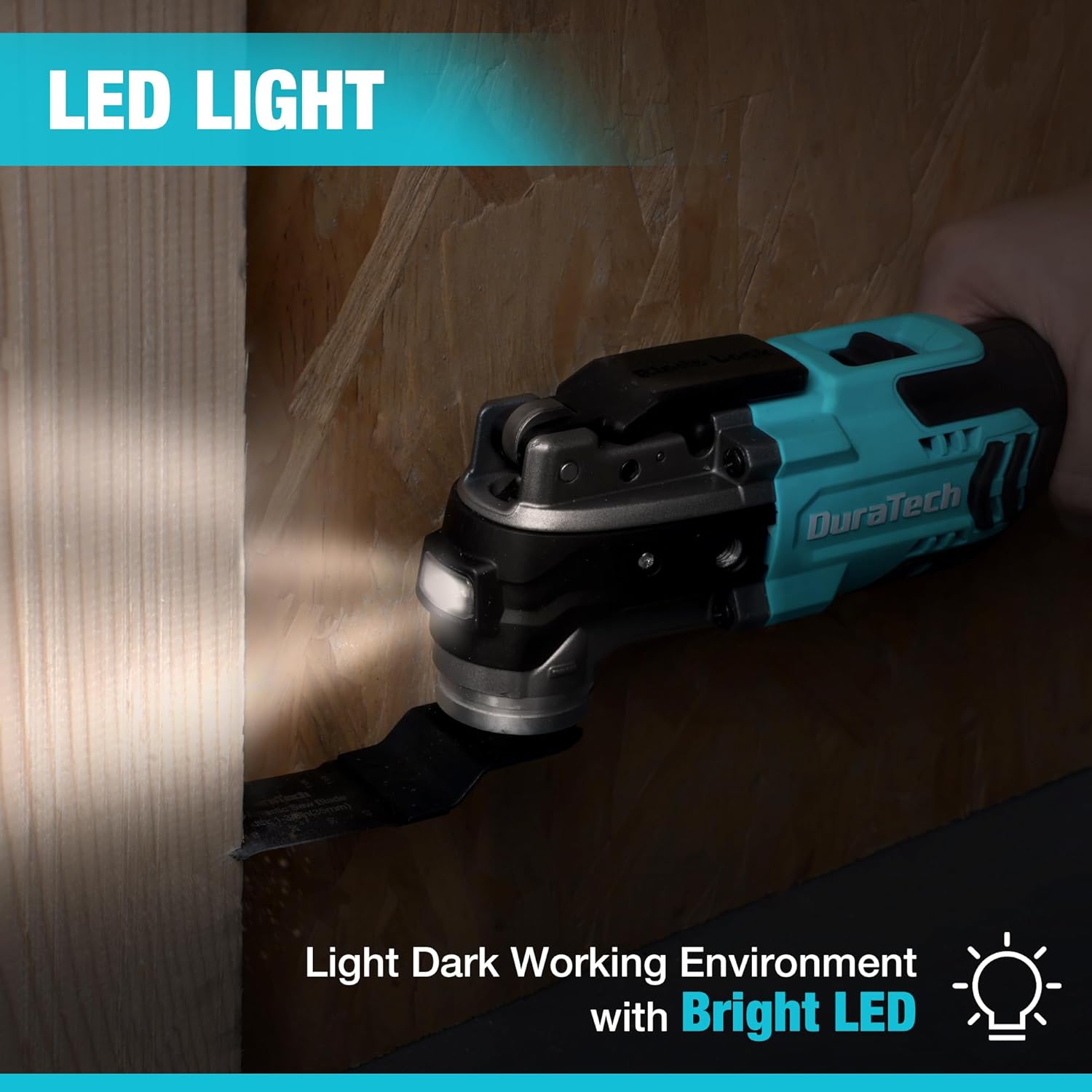
Image: The multi-tool in operation, demonstrating how its integrated LED light illuminates the dark working environment for better visibility.
5.4 Applications and Usage Tips
The DURATECH oscillating multi-tool is suitable for a wide range of applications:
- Cutting: Use appropriate saw blades for cutting wood, plastic pipes, drywall, and soft metals. The 3° oscillation angle provides efficient cutting with higher precision and less noise compared to tools with larger angles.
- Scraping: Attach the scraper accessory for removing wallpaper, old paint, or adhesive residues.
- Sanding: Use the triangular sanding pad with various grit sanding sheets (60, 80, 120 grit included) for sanding wood, preparing surfaces, or detail polishing.

Image: Examples of wide applications for the multi-tool, including cutting square holes in wood, sawing plastic pipes, sanding wood surfaces, and scraping wallpaper.

Image: A multi-functional tool kit display, showing different accessories like 1-3/8" bi-metal saw blade, 3/4" saw blade, scraper, triangular sanding pad, and sanding sheets, along with their respective applications.
6. Maintenance
6.1 Cleaning
Regular cleaning helps maintain the tool's performance and extends its lifespan.
- Always disconnect the battery pack before cleaning.
- Wipe the tool's exterior with a clean, damp cloth. Do not use harsh chemicals or abrasive cleaners.
- Clear any dust or debris from the air vents to ensure proper motor cooling.
- Clean accessories after each use to prevent buildup and maintain cutting/sanding efficiency.
6.2 Storage
When not in use, store the tool and its accessories in the provided carrying case in a dry, secure location, out of reach of children.
- Ensure the battery is removed from the tool before storage.
- Store the battery pack in a cool, dry place, away from direct sunlight and extreme temperatures.

Image: The durable carrying case provided with the DURATECH multi-tool kit, designed for convenient storage and transport of the tool and its accessories.
7. Troubleshooting
This section addresses common issues you might encounter with your multi-tool.
| Problem | Possible Cause | Solution |
|---|---|---|
| Tool does not start. | Battery not charged or not properly inserted. | Ensure battery is fully charged and securely inserted into the tool. |
| Accessory (blade/pad) is loose or falls off. | Control lever not fully locked. Accessory not properly aligned. | Lift the control lever to 180°, re-insert the accessory, and firmly push the lever back down to lock. Ensure proper alignment with the 12-hole interface. |
| Reduced cutting/sanding performance. | Dull or worn accessory. Incorrect speed setting. Overheating. | Replace dull accessories. Adjust speed to a higher setting for cutting/sanding. Allow tool to cool down if it feels hot. |
| Tool vibrates excessively or makes unusual noise. | Accessory not properly installed. Damaged accessory. | Check accessory installation. Replace damaged accessories. If problem persists, contact customer support. |
| Battery life is short. | Battery not fully charged. Old battery. Heavy load. | Ensure battery is fully charged before use. Consider replacing old batteries. Reduce continuous heavy load. |
8. Technical Specifications
| Feature | Specification |
|---|---|
| Model Number | DT105106AE |
| Brand | DURATECH |
| Power Source | Battery Powered |
| Voltage | 20 Volts |
| Battery Capacity | 2.0Ah (2000mAh) Li-ion |
| Charger Input | 120V~, 50-60Hz 70W |
| Charger Output | 20V, 2.4A |
| Charging Time | Approx. 1 hour |
| No Load Speed | 5,000 - 19,000 OPM (Oscillations Per Minute) |
| Oscillation Angle | 3° |
| Item Weight | 3.64 kg (8 pounds) |
| Dimensions (Tool Only) | Approx. 13-31/32" (Length) x 3-35/64" (Height) |
| Blade Material | High Speed Steel |
| Handle Material | Plastic |
| Color | Blue and Black |
| UPC | 820909778974 |

Image: Technical data diagram of the multi-tool, illustrating its dimensions and listing key specifications such as charger input/output, battery capacity, charging time, no-load speed, oscillation angle, and weight.
9. Warranty and Support
9.1 Limited Warranty
This DURATECH product comes with a limited warranty. Please refer to the warranty card included in your product packaging for specific terms and conditions, including coverage duration and limitations.
9.2 Customer Support
For any questions, technical assistance, or warranty claims, please contact DURATECH customer support. Contact information can typically be found on the product packaging, the official DURATECH website, or through your point of purchase.
When contacting support, please have your product model number (DT105106AE) and UPC (820909778974) ready.
Related documentsDT105106AE

Ask a question about this manual
Ask about setup, troubleshooting, compatibility, parts, safety, or missing instructions. Manuals+ will review the question and use this page’s manual context to help answer it.