
DURATECH B0B4N4S3PT
DURATECH 12-in-1 Flex-Head Ratcheting Wrench Set & 24-in-1 Screwdriver Set Instruction Manual
Introduction
This manual provides detailed instructions for the safe and effective use of your DURATECH 12-in-1 Flex-Head Ratcheting Wrench Set and 24-in-1 Screwdriver Set. This versatile tool kit combines the functionality of a ratcheting wrench and a screwdriver, designed for various repair tasks including automotive, bicycle, mechanical, and plumbing applications. Please read this manual thoroughly before operation and retain it for future reference.

Image: The complete DURATECH 36-in-1 Flex-Head Ratcheting Wrench and Screwdriver Set, showcasing the storage case, the main flex-head wrench, various interchangeable sockets, and a selection of screwdriver bits.
Product Components
Your DURATECH tool set includes the following components:
- 1 x Flex-Head Ratcheting Wrench (14mm and 19mm ends)
- 10 x Replacement Wrench Heads (8mm, 9mm, 10mm, 11mm, 12mm, 13mm, 14mm, 15mm, 16mm, 17mm, 18mm, 19mm)
- 1 x 1/4" Drive Magnetic Bit Holder
- 24 x Screwdriver Bits:
- Slotted: 3mm, 5mm, 7mm
- Torx: T15, T20, T30, T40
- Phillips: PH1, PH2, PH3
- Hex: H2, H3, H4, H5, H6
- Square: S1, S2, S3
- Triangle: 2.0, 3.0
- Pozi: PZ1, PZ2, PZ3
- 1 x Storage Case
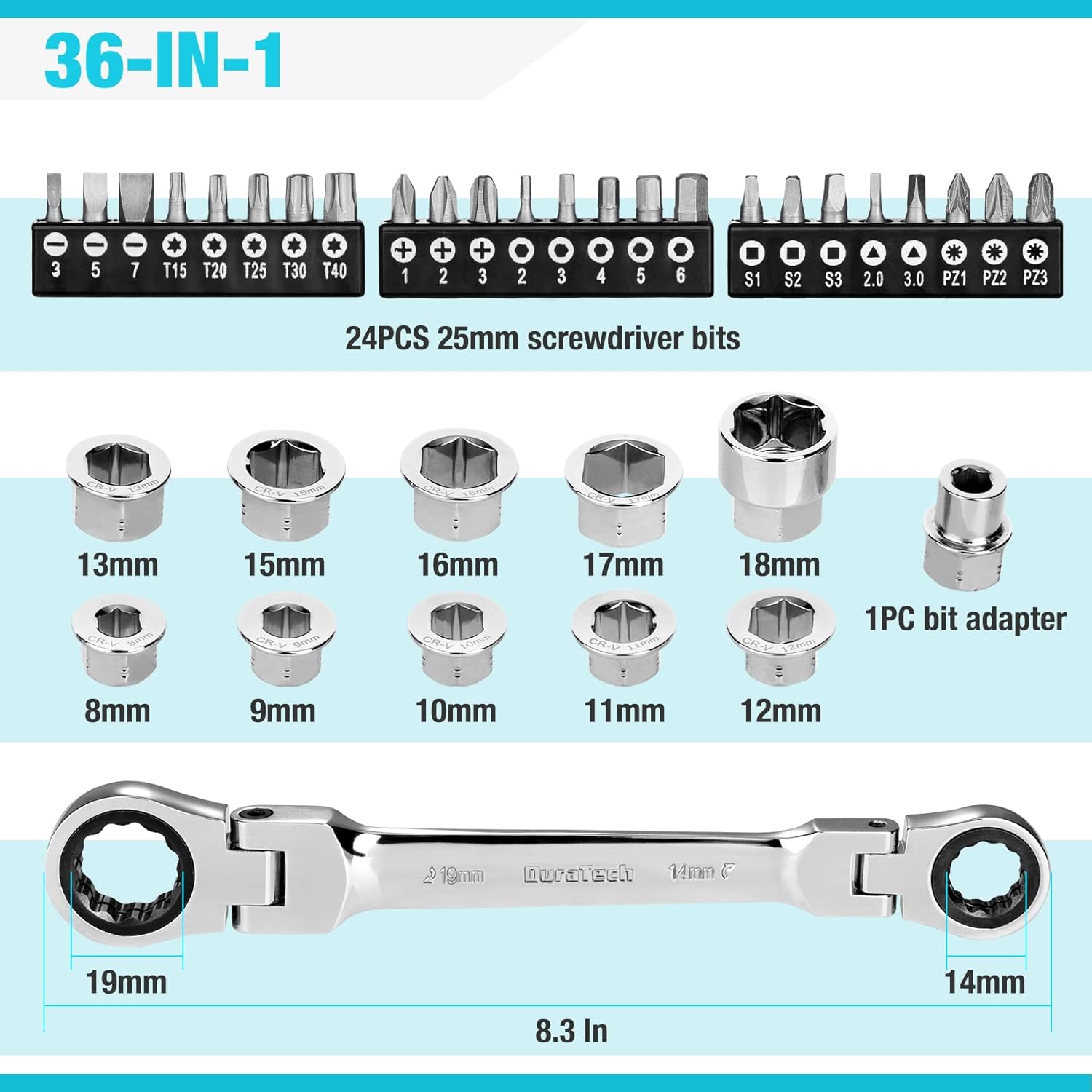
Image: A detailed layout of all 36 components of the DURATECH tool set, clearly showing the flex-head wrench, the 10 interchangeable box end heads (8mm to 19mm), the 1/4" bit adapter, and the 24 screwdriver bits organized by type.
Setup and Assembly
Attaching Wrench Heads
- Select the appropriate size wrench head for your application.
- Align the hexagonal opening of the wrench head with the drive square on either end of the flex-head ratcheting wrench.
- Push the wrench head firmly onto the drive square until it clicks securely into place. Ensure it is fully seated to prevent slippage during use.

Image: A close-up view demonstrating the process of installing a hexagonal socket onto the ratcheting end of the flex-head wrench by pushing it firmly into place.
Attaching Screwdriver Bits
- Insert the 1/4" drive magnetic bit holder into the drive square on either end of the flex-head ratcheting wrench, similar to attaching a wrench head.
- Select the desired screwdriver bit.
- Insert the screwdriver bit into the magnetic bit holder. The magnetic feature will hold the bit securely.

Image: A visual guide showing the magnetic bit adapter being inserted into the wrench, followed by a screwdriver bit being placed into the adapter, highlighting the magnetic retention.
Operating Instructions
Using the Flex-Head Ratcheting Wrench
- Flex-Head Functionality: The wrench features a 180° rotating head design, allowing you to adjust the angle for optimal leverage and access in confined spaces. Simply pivot the head to the desired position.
- Ratcheting Mechanism: The 72-tooth ratchet gear requires only a 5-degree working swing arc, enabling efficient fastening or loosening in tight areas without needing to remove and reposition the wrench.
- Direction Control: Observe the arrow indicator on the ratchet head to determine the direction of rotation (tighten or loosen). Ensure the correct direction is selected before applying force.
- Application: Use the appropriate size wrench head for the fastener. Apply steady, even pressure. Avoid excessive force that could damage the fastener or the tool.

Image: The DURATECH flex-head wrench illustrating its 180-degree range of motion, highlighting its adaptability for reaching fasteners in various orientations and tight spaces.
Using the Screwdriver Function
- Once the bit holder and desired screwdriver bit are installed, the wrench functions as a ratcheting screwdriver.
- Select the appropriate screwdriver bit type and size for the screw head.
- Engage the bit with the screw head, ensuring a secure fit to prevent cam-out.
- Use the ratcheting mechanism to turn the screw, adjusting the direction as needed.

Image: A collage showcasing the DURATECH tool set in various practical applications, such as tightening bolts in an engine bay, adjusting bicycle components, and securing hardware on a cabinet, demonstrating its versatility.
Maintenance
- Cleaning: After each use, wipe down all components with a clean, dry cloth to remove dirt, grease, and debris. For stubborn grime, a mild solvent or degreaser can be used, followed by thorough drying.
- Rust Prevention: The tools are made from chrome vanadium steel with a mirror finish for corrosion resistance. However, to ensure long-lasting durability, store the tools in a dry environment. Applying a light coat of rust-preventative oil periodically can further protect them, especially in humid conditions.
- Storage: Always store the wrench, heads, and bits in the provided storage case. This protects them from damage, keeps them organized, and prevents loss.
- Inspection: Regularly inspect the tools for any signs of wear, damage, or deformation. Do not use damaged tools; replace them as necessary.

Image: The DURATECH tool set components, including the wrench, sockets, and screwdriver bits, are shown securely placed within their designated slots in the organized storage case, ready for transport or storage.
Troubleshooting
- Wrench Head Slipping: Ensure the wrench head is fully pushed onto the drive square until it clicks. If slipping persists, inspect the drive square and the wrench head for wear or damage. Replace worn components.
- Screwdriver Bit Slipping/Cam-out: Verify that the correct bit type and size are used for the screw. Apply firm, consistent downward pressure while turning. Ensure the bit is fully seated in the magnetic bit holder.
- Ratcheting Mechanism Not Engaging: Check the direction switch on the ratchet head. Ensure it is fully engaged in either the tightening or loosening position. If the mechanism feels stiff or jammed, clean it thoroughly and apply a small amount of light lubricant.
- Difficulty in Tight Spaces: Utilize the 180° flex-head feature to adjust the wrench angle for better access and leverage. The 72-tooth ratchet requires minimal swing arc, which is beneficial in confined areas.
Specifications
| Brand | DURATECH |
| Model | B0B4N4S3PT |
| Material | Chrome Vanadium Steel |
| Finish Type | Polished, Mirror Finish |
| Wrench Length | 8.3 Inches |
| Ratcheting | Yes (72-tooth gear) |
| Head Style | Box End, Flex-Head |
| Included Components | 1 Wrench, 10 Replacement Heads, 1 Driver Bit Holder, 24 Pcs Driver Bits |
Warranty and Support
For warranty information, product support, or to inquire about replacement parts, please contact DURATECH customer service directly. Refer to the packaging or the official DURATECH website for current contact details.
Ask a question about this manual
Ask about setup, troubleshooting, compatibility, parts, safety, or missing instructions. Manuals+ will review the question and use this page’s manual context to help answer it.