
CELLSTAR CS-52FRW
CELLSTAR CS-52FRW Drive Recorder User Manual
Model: CS-52FRW
1. Introduction
Thank you for purchasing the CELLSTAR CS-52FRW Drive Recorder. This device is designed to record driving footage in Full HD resolution with both front and rear cameras, providing enhanced safety and security for your vehicle. It incorporates advanced features such as Night Clear Ver.2 for improved low-light recording, High Dynamic Range (HDR) for clear images in varying light conditions, and STARVIS technology for superior night vision. The CS-52FRW also includes parking surveillance, safety driving support functions, and intercommunication capabilities with compatible radar detectors. This product is manufactured in Japan and comes with a 3-year warranty.

Image: Front view of the CELLSTAR CS-52FRW drive recorder main unit.
2. Product Features
- Full HD Recording: Captures clear video at 200 megapixels for both front and rear cameras.
- STARVIS Technology: Equipped with STARVIS sensors on both front and rear cameras for high-sensitivity recording in low-light conditions.
- HDR (High Dynamic Range): Ensures optimal image quality by correcting brightness differences in challenging lighting, such as tunnels or backlighting.
- Night Clear Ver.2: Advanced night vision processing for clearer footage in dark environments.
- 32GB microSD Card: A 32GB microSD card is included for immediate use.
- Parking Surveillance Function: Monitors your vehicle while parked (requires connection to a compatible radar detector).
- Safety Driving Support Function: Provides alerts and assistance for safer driving (requires connection to a compatible radar detector).
- Radar Detector Intercommunication: Seamlessly connects and communicates with compatible CELLSTAR radar detectors for integrated functionality.
- Made in Japan: High-quality manufacturing with a 3-year warranty.

Image: Overview of CELLSTAR CS-52FRW features, highlighting front and rear cameras, Full HD, HDR, STARVIS, and radar intercommunication.
3. Package Contents
Verify that all the following items are included in your package:
- Main Drive Recorder Unit (Front Camera)
- Separate Camera (Rear Camera)
- User Manual
- Intercommunication Connection Cord (3.6m)
- Camera Connection Cord (Straight, 9.0m)
- Main Unit Mount Base (with double-sided tape for glass)
- Main Unit Double-Sided Tape (for dashboard)
- Main Unit Ball Joint (straight)
- Separate Camera Mount Base
- Separate Camera Ball Joint (straight)
- Separate Camera Double-Sided Tape (for glass)
- Separate Camera Double-Sided Tape (for rear tray)
- Degreasing Cleaner Set
- Cord Clips (5 pieces)
- 32GB microSD Card (with case and adapter)

Image: Diagram illustrating all components included in the CS-52FRW package.
4. Setup and Installation
4.1. Main Unit Installation (Front Camera)
- Clean the installation area on your windshield using the provided degreasing cleaner.
- Attach the main unit mount base to the windshield, ideally behind the rearview mirror to avoid obstructing your view. Ensure the camera lens has a clear view of the road.
- Secure the main drive recorder unit to the mount base.
4.2. Separate Camera Installation (Rear Camera)
- Clean the installation area on your rear window or rear tray.
- Attach the separate camera mount base using the appropriate double-sided tape (for glass or rear tray).
- Secure the separate camera to its mount base.
- Connect the separate camera to the main unit using the camera connection cord (9.0m). Route the cable carefully to avoid interference with vehicle operations.
4.3. Power Connection
- Connect the power cable to the main unit and to your vehicle's 12V power outlet.
- Ensure the power cable is routed safely and securely.
4.4. Radar Detector Intercommunication (Optional)
If you have a compatible CELLSTAR radar detector, connect it to the drive recorder using the intercommunication connection cord (3.6m). This enables integrated functions such as parking surveillance and safety driving support.

Image: Diagram showing the installation of the drive recorder main unit behind the mirror and the connection to a separate radar detector for integrated display and control.
5. Operating Instructions
5.1. Power On/Off
The drive recorder will automatically power on and begin recording when the vehicle's ignition is turned on. It will power off automatically when the ignition is turned off.
5.2. Recording Modes
- Continuous Recording: The device continuously records footage while driving. Older files are overwritten when the microSD card is full.
- Event Recording: In the event of an impact or sudden braking, the device automatically saves the current footage to a protected folder, preventing it from being overwritten.
- Manual Recording: Press the REC button to manually save a segment of footage to the protected folder.
5.3. Parking Surveillance
When connected to a compatible radar detector, the parking surveillance function activates automatically when the vehicle is parked. It records events such as impacts or motion detected around the vehicle.
5.4. Safety Driving Support
When connected to a compatible radar detector, the device can provide alerts for various safety driving scenarios, such as lane departure warnings or forward collision warnings. Refer to your radar detector's manual for specific settings and functions.
5.5. Settings Adjustment
Settings such as recording quality, HDR, and other preferences can be adjusted through the device's menu. If connected to a compatible radar detector, settings can also be managed via the radar detector's display.
6. Maintenance
6.1. MicroSD Card Formatting
To ensure optimal performance and prevent recording errors, it is recommended to regularly format the microSD card. This device features "maintenance-free" regular formatting, meaning it automatically manages the card's health. However, manual formatting can be performed via the device settings if needed.
6.2. Cleaning the Lenses
Periodically clean the lenses of both the front and rear cameras with a soft, dry cloth to ensure clear recording quality. Avoid using abrasive cleaners.
7. Troubleshooting
If you encounter any issues with your CELLSTAR CS-52FRW Drive Recorder, please refer to the detailed troubleshooting section in the full user manual provided with the product. Common issues and their solutions are typically covered there. For persistent problems, contact CELLSTAR customer support.
8. Specifications
| Feature | Description |
|---|---|
| Brand | CELLSTAR |
| Model Number | CS-52FRW |
| Video Capture Resolution | Full HD (1080p) |
| Camera Pixels | Front: 2 Million Pixels / Rear: 2 Million Pixels |
| Frame Rate | 30fps |
| Features | HDR (High Dynamic Range), STARVIS, Night Clear Ver.2 |
| Included Components | User Manual, Main Camera, Separate Camera, Intercommunication Connection Cord (3.6m), 32GB microSD Card |
| Mounting Type | Adhesive Mount |
| Color | Gray |
| Product Dimensions (D x W x H) | 10 x 10 x 10 cm (Approximate) |
| Screen Size | 2 inches (LCD) |
| Placement | Front and Rear |
| Compatible Vehicle Type | Car |
| Battery Included | No |
| Warranty | 3-year Manufacturer's Warranty |

Image: Dimensions of the CELLSTAR CS-52FRW main unit and separate camera.
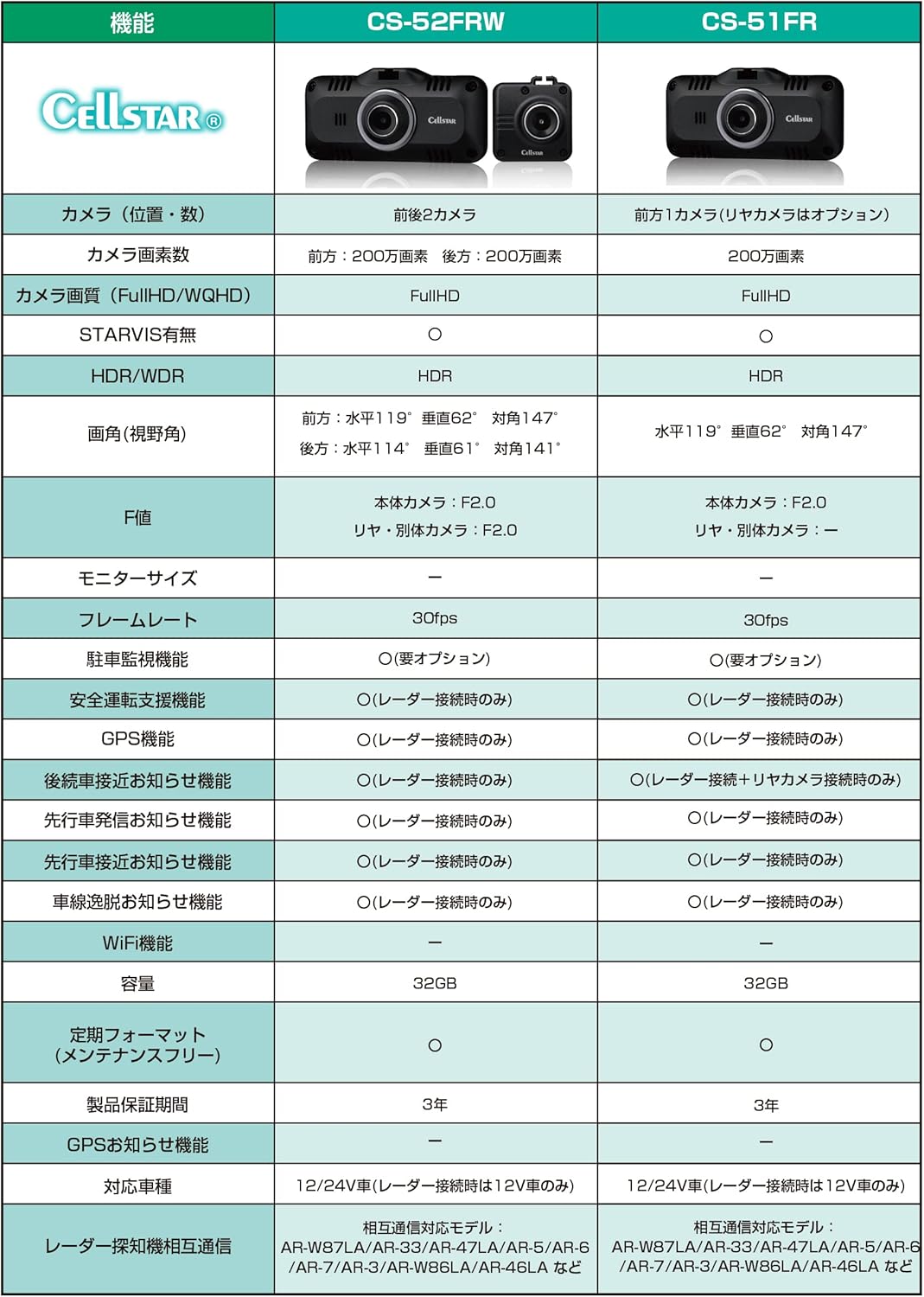
Image: Comparison table detailing specifications between CS-52FRW and CS-51FR models.
9. Warranty and Support
The CELLSTAR CS-52FRW Drive Recorder comes with a 3-year manufacturer's warranty from the date of purchase. Please retain your proof of purchase for warranty claims. For technical support, service, or warranty inquiries, please contact CELLSTAR customer service. Refer to the official CELLSTAR website or the contact information provided in your product packaging for details.
CELLSTAR products are manufactured in Japan, ensuring high quality and reliability.

Image: CELLSTAR's commitment to "JAPAN QUALITY" and domestic production.
Ask a question about this manual
Ask about setup, troubleshooting, compatibility, parts, safety, or missing instructions. Manuals+ will review the question and use this page’s manual context to help answer it.