
1. Introduction
The LAUNCH X431 CRP919E is a professional automotive diagnostic scan tool designed for comprehensive vehicle system analysis, maintenance, and advanced functions. This manual provides detailed instructions for its setup, operation, and troubleshooting, ensuring you can effectively utilize all features of your device.

The LAUNCH X431 CRP919E OBD2 Scanner, showing its 7-inch touchscreen display and robust casing, along with its protective carrying case.
2. What's in the Box
Please verify that all items are present in your package:
- 1 * LAUNCH X431 CRP919E OBD2 Scanner
- 1 * OBD II Diagnostic Cable
- 1 * DC 5V Charging Cable
- 1 * US/UK/EU Plug Adapter
- 1 * Multilingual Quick Start Guide
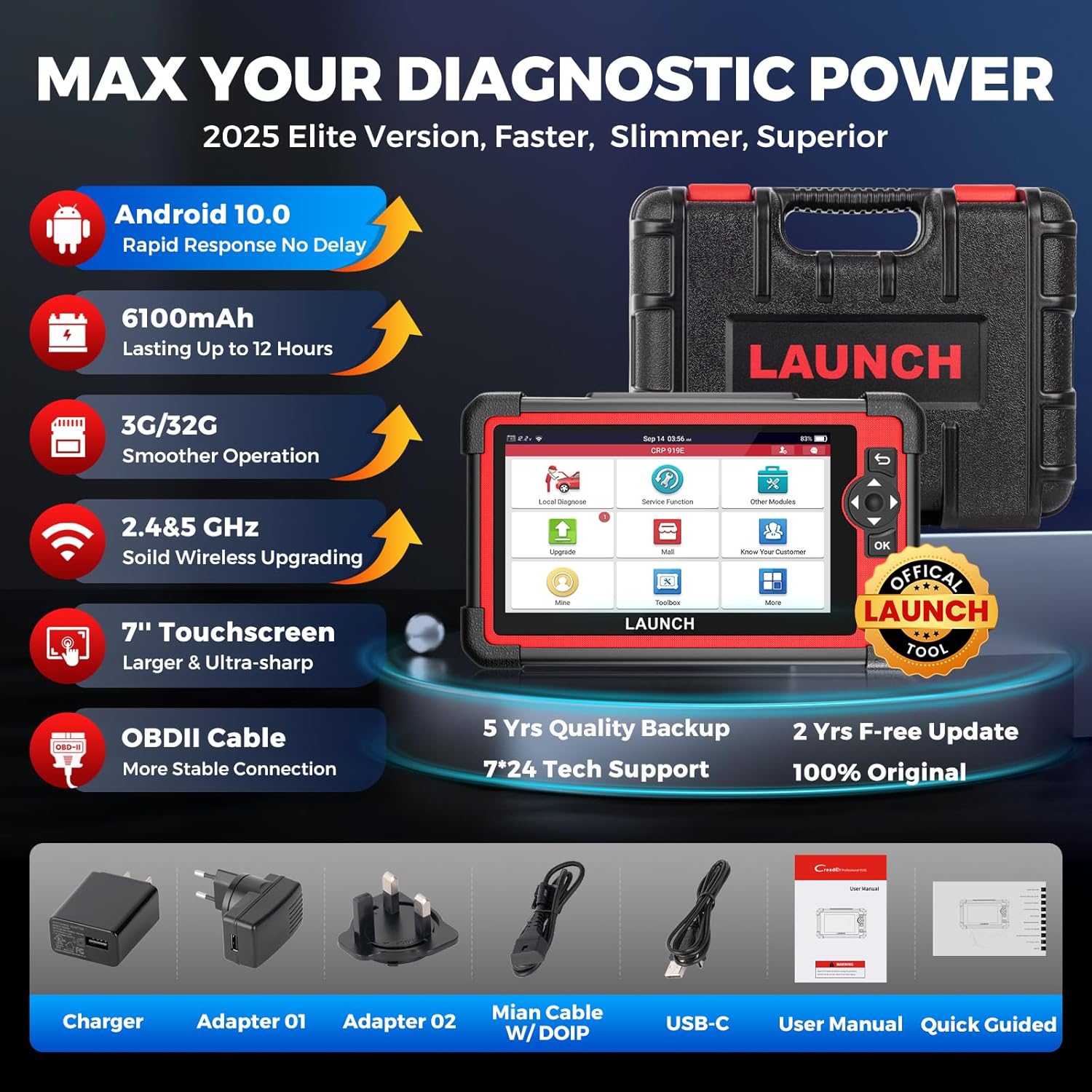
Image showing the LAUNCH X431 CRP919E device and its included accessories: charger, adapters, main cable with DoIP, USB-C cable, user manual, and quick guide.
3. Setup Guide
- Unpacking: Carefully remove all components from the packaging.
- Charging: Connect the DC 5V Charging Cable to the device and a suitable power adapter. Ensure the device is fully charged before first use. The battery indicator will show charging status.
- Power On: Press and hold the power button (usually located on the side or top) to turn on the device.
- Initial Configuration: Follow the on-screen prompts to select your preferred language, set the time zone, and connect to a stable Wi-Fi network. Wi-Fi connectivity is essential for software updates and online functions.
- Software Update: After connecting to Wi-Fi, navigate to the 'Upgrade' section on the main menu and perform a one-click update to ensure your device has the latest software and vehicle coverage.
4. Operating Instructions & Key Features
The LAUNCH X431 CRP919E offers a wide array of diagnostic and maintenance functionalities. Below are the primary features and how to access them.
4.1. OE-Level Full Systems Diagnostic
The CRP919E performs comprehensive diagnostics on all available vehicle systems, including Engine, Transmission, ABS, SRS, TPMS, BMS, and more. This allows for in-depth analysis of vehicle health.
- Read ECU Information: Retrieves detailed information about the control units.
- Read/Clear DTCs: Identifies diagnostic trouble codes and allows for their clearing after repairs.
- View Live Data: Displays real-time data streams from various sensors in text or graph format.
- Freeze Frame: Captures a snapshot of sensor values at the moment a fault occurred.
- Perform Active Tests: See section 4.3 for details.
- Perform Special Functions: See section 4.4 for details.
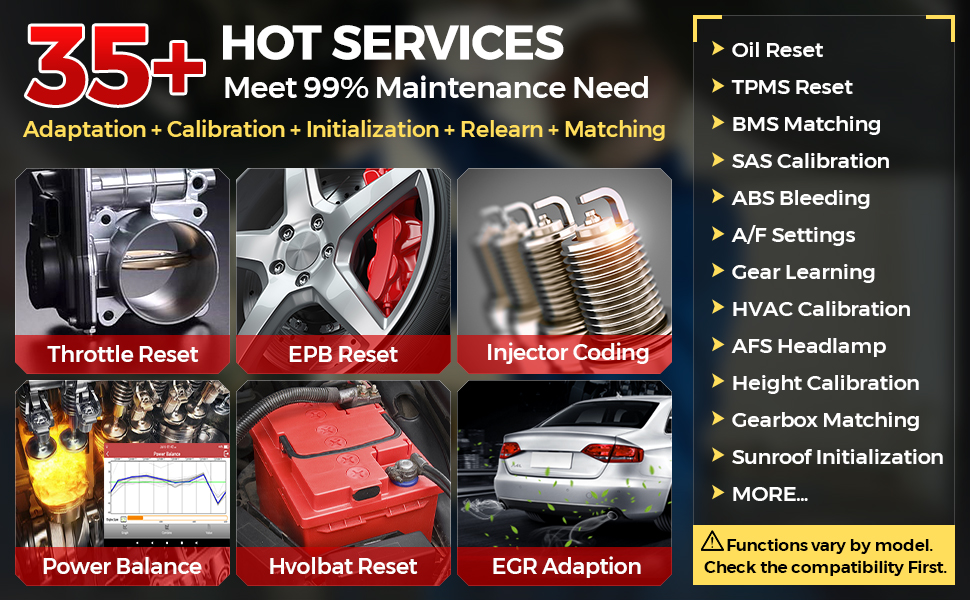
Diagram illustrating the comprehensive OE-level full system diagnostic capabilities of the LAUNCH X431 CRP919E, showing how it reads and clears codes, views live data, and performs active tests across various vehicle modules like ABS, SRS, Engine, and Transmission.
4.2. Advanced ECU Coding
The device supports advanced ECU coding functions, allowing for customization and adaptation of vehicle modules.
- Online Coding: Compatible with VW/Audi/Skoda/Ford/Lincoln/Mazda. Accesses online vehicle repair data for high-level repairs.
- PMI Function: For Ford/Lincoln/Mazda, allows copying data from original modules to new units for replacement.
- Offline Coding: Compatible with Benz/BMW/Ford/Mazda/Jaguar/Vauxhall/Opel. Reads and writes codes between modules.
- Refresh Hidden Features (Personalization): Enables or disables specific vehicle functions (e.g., auto start-stop, daytime running lights).
- Component Matching: Performs matching, relearning, calibration, or initialization for components after replacement (e.g., gearbox, suspension, seats).
- Customize OE-Settings (Retrofitting/Modification): Activates high-end features or adapts to different components (e.g., xenon fog lamps, different battery/tire sizes).
An illustration detailing the advanced ECU coding functions, including online coding, PMI function, component matching, refreshing hidden features, and customizing OE-settings for various vehicle systems.
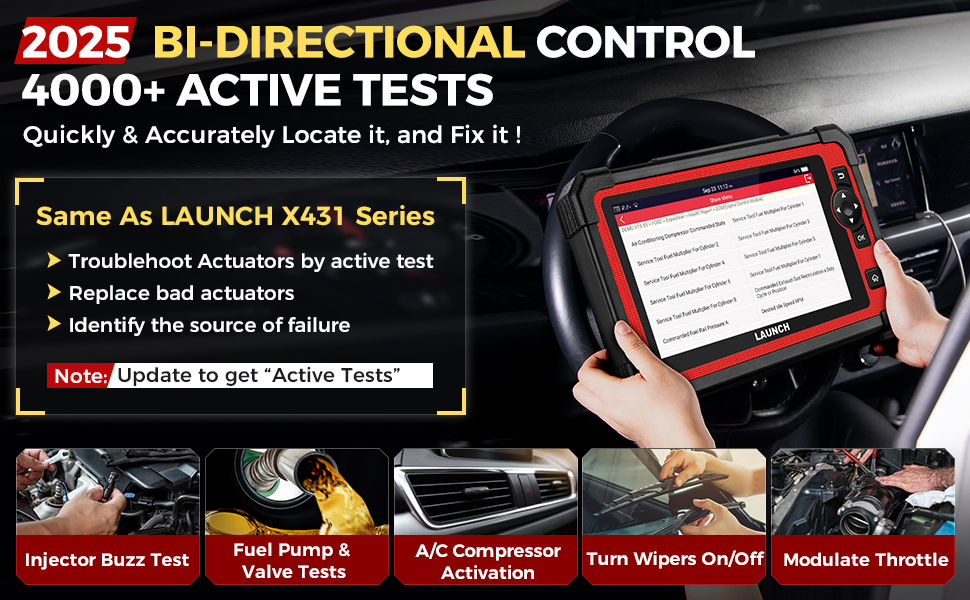
4.3. Bi-Directional Control (Active Tests)
The CRP919E features bi-directional control, also known as Active Tests, allowing the tool to send commands to vehicle ECUs to perform specific tests on actuators. This helps in quickly pinpointing faulty components without extensive disassembly.
- Fuel System Tests: Fuel Pressure Control Valve Test, Fuel Injector Tests, Fuel Pump & Valve Tests, Injector Buzz Test.
- Cooling System: Cooling Fan Test, Activate Radiator Shutter.
- Body Control: Window/Wipers/Sunroof/Door Lock/Headlamp Test, Interior Lighting Test, Horn activation.
- EVAP Tests: EVAP Purge Solenoid Valve, EVAP Vent Solenoid Valve, EVAP Purge/Seal.
- Other: HVAC Calibration, Vehicle Level Position Calibration, Modulate Throttle, Cycling A/C Clutch Relay, Cycling ABS Motor Pump.

Visual representation of the bi-directional control (active test) functionality, demonstrating the ability to command specific vehicle components like radiator fans, sunroofs, injectors, and fuel pumps to test their operational status.
4.4. 35+ Hot Reset Services
The tool provides over 35 commonly used maintenance and reset functions to address various vehicle service needs.
- Oil Maintenance Reset
- Injector Coding
- EPB (Electronic Park Brake) Reset
- ABS Bleeding
- Throttle Adaptation (Idle Relearn)
- Power Balance
- BMS Reset
- SAS Calibration (Steering Angle Sensor)
- Airbag Repair
- Fuel Trim Learn
- Speed Limited
- Air/Fuel Reset
- AdBlue Reset
- AFS (Adaptive Front-Lighting System) Reset
- NOX Sensor Reset
- Tire Reset
- Stop/Start Reset
- Delete Transport Mode
- Air Level Calibration
- Windows Calibration
- CCS (Cruise Control System) Calibration
- Seat Occupancy Calibration
- Sunroof Initialization
- AC Initialization
- Crankshaft Position Sensor Adaptive Relearn
- Gearbox Matching
- TPMS Reset
- Coolant Bleeding
- EGR Adaption
- GPF (Gas Particular Filter) Regeneration
- High Voltage Battery Detection
- Language Change
- FRM Reset
- Fuel Alcohol Content Reset
- Fuel Economy Test
- EVAP Test
- HVAC Calibration
- Seat Standardisation
- A/T Code reset
- Suspension Calibration
- VGT Relearn
- Electronic Pump Activation
- VIN Registration (Write)
- Camshaft/Crankshaft Sensor Relearn
- Gear Learning
- Clutch Adaptation
- Cylinder Compression Test
- Cylinder Leakage Test
- TEC Learn
Note: The availability of specific functions may vary by vehicle model and year. More than 100 repair functions can be found under "1.Diagnose" > "2.Car Model" > "3.System" > "4.Special Function".

A collage of icons representing over 35 hot reset services available on the LAUNCH X431 CRP919E, such as Oil Reset, Brake Reset, SAS Calibration, Gearbox Relearn, Battery Reset, Injector Coding, Power Balance, and Crankshaft Relearn.
4.5. Vehicle Coverage & Protocols
The CRP919E supports over 150 vehicle brands and 100,000+ models from 1996-2025, covering America, Asia, and Europe. It also includes support for modern communication protocols.
- CAN FD Protocol: Compatible with GM models (2019 and later), offering higher data transfer rates. No additional adapter required.
- DoIP Protocol: Compatible with BMW (F&G chassis), Volvo models (2018 later), and Land Rover & Jaguar models (2017 later). Enables diagnostics over TCP/IP and Ethernet for faster data rates.
- FCA AutoAuth: Provides secure access to FCA vehicles (Chrysler, Dodge, Fiat, etc.) after 2017 for diagnostic functions. (Note: AutoAuth account needs to be purchased separately by the user.)

A graphic displaying the extensive vehicle coverage of the LAUNCH X431 CRP919E, supporting over 150 brands from Europe, America, Asia, Australia, and Brazil, along with support for CAN FD, DoIP, and FCA AutoAuth protocols.
4.6. User-Friendly Features
The device incorporates several features to enhance user experience and diagnostic efficiency.
- Auto VIN & Auto Scan: Quickly identifies vehicle information and performs a full system scan.
- One-Click WiFi Update: Simplifies software updates to keep the device current.
- 8-IN-1 Graphing Merge Display: Allows simultaneous viewing of up to 8 live data streams for detailed analysis.
- Diagnostic Report Sharing and Printing: Generates and shares PDF diagnostic reports.
- Online Feedback: Provides a channel for reporting issues or suggestions.
- Battery Voltage Monitor: Monitors the vehicle's battery voltage in real-time.
- DTC LookUp: Provides definitions for diagnostic trouble codes.
- Multi-Lingual Support: Supports 11 languages: English, Spanish, French, German, Russian, Italian, Portuguese, Japanese, Korean, Polish, and Traditional Chinese.
- Expandable Modules: Supports optional modules like the BST360 Battery Tester and X431 i-TPMS tool (sold separately).
- Remote Assistance: Allows technicians to provide remote support via TeamViewer.

An overview of user-friendly features including Auto VIN & Auto Scan, one-click WiFi update, 8-in-1 live data stream, diagnostic report printing and sharing, diagnostic feedback, and support for 11 languages.
5. Maintenance
- Software Updates: Regularly connect your CRP919E to Wi-Fi and perform one-click updates to ensure optimal performance, access to new features, and expanded vehicle coverage. The device includes 2 years of free updates.
- Cleaning: Clean the screen and device exterior with a soft, dry, lint-free cloth. Avoid using abrasive cleaners or solvents.
- Storage: When not in use, store the device in its protective carrying case in a cool, dry environment, away from direct sunlight and extreme temperatures.
- Battery Care: To prolong battery life, avoid fully discharging the device frequently. Charge it regularly, especially if storing for extended periods.
6. Troubleshooting
Here are some common issues and their solutions:
- Device not powering on: Ensure the device is fully charged. Connect it to the charger and wait for a few minutes before attempting to power it on again.
- Connectivity issues (Wi-Fi/OBD-II): Verify your Wi-Fi connection settings. For OBD-II connection, ensure the diagnostic cable is securely connected to both the device and the vehicle's OBD-II port. Check the vehicle's ignition status.
- "Received product is broken or used": If you receive a damaged or previously used item, please contact the seller directly for assistance and replacement.
- "Topology map not working after two years free upgrade": The topology map and other core functions will continue to work after the free update period expires. Updates primarily fix bugs, optimize performance, add new functions, and expand vehicle model coverage.
- General technical issues: For specific technical problems, utilize the 'Diagnostic Feedback' feature on the device or contact the seller's technical support.
7. Specifications
| Feature | Detail |
|---|---|
| Model | LAUNCH ELITE CRP919E |
| Operating System | Android 10.0 |
| Battery | 6100mAh Lithium Metal (included) |
| Memory (RAM/ROM) | 3G/32G |
| Screen Size | 7-inch Touchscreen (1024*600) |
| Connectivity | 2.4G & 5GHz Dual WiFi, OBDII Cable |
| Product Dimensions | 16.85 x 4.88 x 14.25 inches |
| Item Weight | 6.47 pounds |
| Manufacturer Part Number | YZB08 |
| UPC | 884508008689 |
8. Warranty and Support
The LAUNCH X431 CRP919E comes with a commitment to quality and ongoing support:
- Free Updates: Enjoy 2 years of free software updates from the date of purchase. After this period, core diagnostic functions will remain operational, but new features and expanded vehicle coverage will require a subscription.
- Quality Backup: The product is backed by 5 years of quality assurance.
- Technical Support: For any technical assistance, operational queries, or warranty claims, please contact the seller directly. Refer to your purchase documentation for specific contact information. Avoid contacting LAUNCH Tech USA as they may not provide support for Amazon purchases.