
1. Introduction
Thank you for choosing the AMACOOL D37 Baby Stroller Fan. This portable fan is designed to provide a strong yet quiet airflow, ensuring comfort for your baby in various settings. With its flexible tripod and long-lasting rechargeable battery, it's an ideal companion for travel, outdoor activities, and everyday use.
Please read this manual thoroughly before using the product to ensure proper operation and safety.
2. Product Features
- Strong Wind & Whisper-Quiet: Equipped with a 5-inch head and upgraded aerodynamic blades, this fan delivers robust airflow while maintaining a noise level below 30dB.
- Outstanding Battery Life: Features a built-in 5000mAh rechargeable battery, offering up to 20 hours of runtime on low speed. Fully charges in 2-3 hours via USB-C.
- 360° Rotation: The fan head can be adjusted vertically and horizontally, allowing for precise airflow direction. The bendable tripod also aids in adjusting height and angle.
- Easy and Safe to Use: A single control button manages power and 3-speed settings. The fine mesh cover protects small fingers from the blades.
- Upgraded Flexible & Stable Tripod: Crafted from durable, high-grip materials, the flexible tripod securely wraps around various objects like strollers, cribs, car seats, bikes, and treadmills.

Image: The AMACOOL D37 Stroller Fan with its 5-inch head, demonstrating its strong airflow and three speed settings.

Image: The AMACOOL D37 Stroller Fan showcasing its 20-hour long battery life and USB-C charging capability from various sources like power chargers, car chargers, laptops, and power banks.
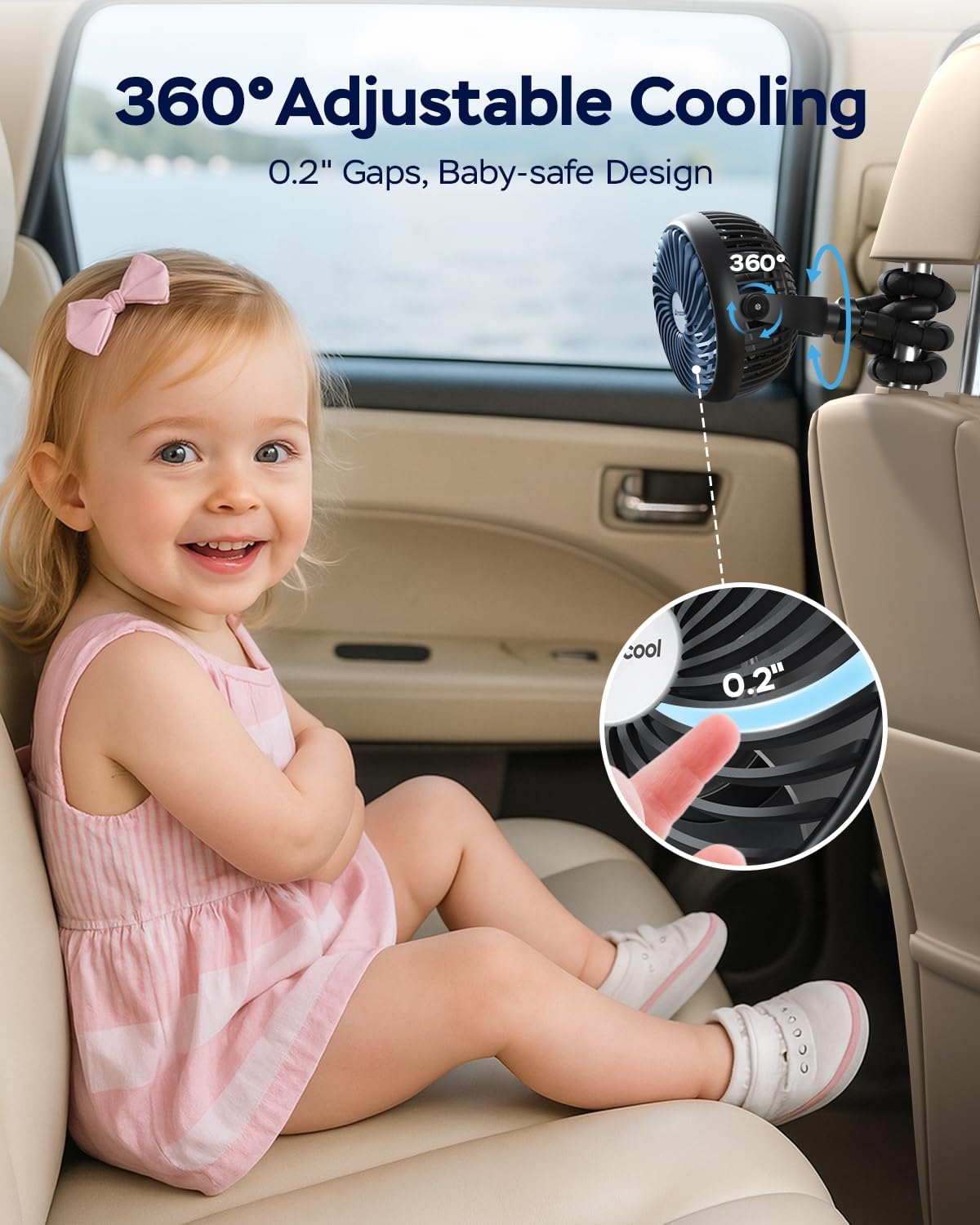
Image: The AMACOOL D37 Stroller Fan attached to a car seat headrest, illustrating its 360° adjustable cooling and baby-safe design with small gaps.
3. Package Contents
- 1 x AMACOOL D37 Baby Stroller Fan
- 1 x USB-C Charging Cable
- 1 x User Manual
4. Setup
The AMACOOL D37 fan features a flexible tripod for easy attachment to various surfaces. To set up your fan:
- Identify Attachment Point: Choose a stable location such as a stroller handle, car seat headrest, crib rail, or desk edge.
- Wrap the Tripod: Bend the flexible legs of the tripod around the chosen object. Ensure the legs are wrapped securely to prevent the fan from falling or shifting.
- Adjust Fan Angle: Once securely attached, adjust the fan head to direct airflow as desired. The fan head rotates 360 degrees.
Video: Demonstration of attaching the AMACOOL D37 Stroller Fan to a stroller handle using its flexible tripod legs and adjusting its position.
Video: A full demonstration of the AMACOOL D37 Stroller Fan, highlighting its flexible tripod for various attachment options and overall functionality.
5. Operating Instructions
The fan is operated using a single control button located on the back of the fan head.
- Power On/Off: Press the control button once to turn the fan on at low speed. Press and hold the button for 2 seconds to turn the fan off.
- Adjust Fan Speed: While the fan is on, press the control button repeatedly to cycle through the 3-speed settings: Low > Medium > High.
- Adjust LED Light: The fan may include an LED light feature. Press the dedicated LED button (if present) to cycle through light brightness settings or turn it on/off.
- Directional Adjustment: Manually rotate the fan head 360 degrees to direct the airflow precisely where needed.
Video: A detailed review of the AMACOOL D37 Stroller Fan, demonstrating its 20-hour battery life, fan speeds, and LED light functionality.
6. Charging
The AMACOOL D37 fan is equipped with a 5000mAh rechargeable battery.
- Charging Port: Locate the USB-C charging port on the back of the fan.
- Connect Cable: Insert the provided USB-C cable into the fan's charging port and connect the other end to a compatible USB power source (e.g., power adapter, laptop, power bank).
- Charging Indicator: A blue LED indicator will illuminate during charging. It typically takes 2-3 hours for a full charge.
- Battery Life: Enjoy up to 20 hours of continuous operation on the lowest speed setting when fully charged.
7. Safety Information
- Keep fingers, hair, and loose clothing away from the fan blades during operation.
- Ensure the fan is securely attached to prevent it from falling, especially when used with children.
- Do not immerse the fan in water or expose it to excessive moisture.
- Do not attempt to disassemble or repair the fan yourself. Contact customer support for assistance.
- Keep out of reach of infants and young children when not in use or when unsupervised.
- Use only the provided charging cable or a certified USB-C cable for charging.
8. Maintenance
- To clean the fan, ensure it is turned off and unplugged.
- Wipe the exterior surfaces with a soft, dry cloth.
- Do not use abrasive cleaners or solvents.
- Periodically check the flexible tripod legs for any signs of wear or damage.
9. Troubleshooting
- Fan not turning on: Ensure the battery is charged. Connect the fan to a power source and try again.
- Weak airflow: Check the fan speed setting and adjust to a higher level if needed. Ensure the fan grille is not obstructed.
- Fan not charging: Verify that the USB-C cable is properly connected to both the fan and the power source. Try a different USB-C cable or power adapter.
10. Specifications
| Feature | Specification |
|---|---|
| Brand | AMACOOL |
| Model Number | D37 |
| Color | Black |
| Power Source | Battery Powered |
| Battery Capacity | 5000mAh |
| Number of Speeds | 3 |
| Noise Level | 30 Decibels |
| Product Dimensions | 3.27"D x 5.51"W x 8.26"H |
| Item Weight | 380 Grams |
| Connector Type | USB Type C |
| Material | Acrylonitrile Butadiene Styrene (ABS) |
11. Warranty and Support
AMACOOL is committed to providing high-quality products and excellent customer service.
- Return Policy: This product is eligible for a 90-day refund/replacement policy.
- Free Replacement: Enjoy 365 days of free replacement for eligible issues.
- Customer Response: Expect a 24-hour response time for customer inquiries.
- Contact Us: For any questions, concerns, or support needs, please refer to your purchase platform or the AMACOOL official website for contact information.